MouseWheelParameters.PageTranslation Property
Gets or sets the device-independent pixel (DIP) conversion factors for both page width and height units (as set in the Wheel settings of the Mouse control panel).
Syntax
public:
property Point PageTranslation {
         Point get ();
         void set (Point value);
}
Property value
Type: Point
The conversion factors for the page width (x) and height (y).
Remarks
The mouse wheel button has discrete, evenly spaced notches or distance thresholds (also called detents). When you rotate or tilt the wheel, a wheel message is sent as each detent is encountered.
The following image shows the default control panel settings for the button wheel. These settings map a single detent to a specific unit of distance in the UI (page width and height). PageTranslation provides the means to redefine these distances and specify the size of a page in terms of device-independent pixels (DIPs).
Figure 1. Mouse Properties dialog with wheel settings displayed
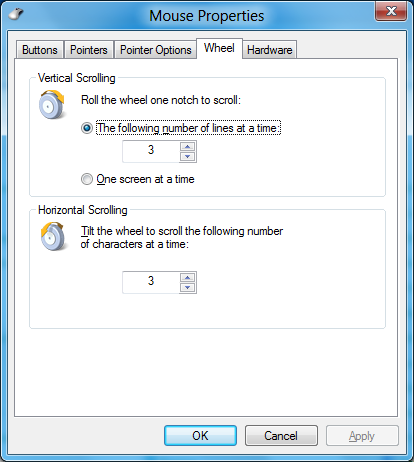
If the wheel button is set to scroll one screen (page) at a time for each detent and the value of PageTranslation is set to (1200,800), vertical scrolling is applied at 1 x 800 device-independent pixels (DIPs) per detent. Horizontal scrolling distance through the mouse tilt wheel is dependent on the value of CharTranslation.
Note
If ManipulationTranslateY/ManipulationTranslateRailsY is disabled and ManipulationTranslateX/ManipulationTranslateRailsX is enabled through GestureSettings then scrolling is applied only along the horizontal axis when the button wheel is rotated or tilted. In the previous example, the result is horizontal scrolling of 1 x 1200 device-independent pixels (DIPs) per detent. Similarly, if ManipulationTranslateY/ManipulationTranslateRailsY is enabled and ManipulationTranslateX/ManipulationTranslateRailsX is disabled through GestureSettings then scrolling is applied only along the vertical axis when the button wheel is rotated or tilted.
This API is not implemented and will throw an exception if called.
Requirements
Namespace: Windows.UI.Input
Metadata: windows.winmd