About your User Profile Page
Each user in your Xbox Developer Portal organization can review information about their user account (as well as any development accounts “owned” by that user account) by going to their own My Profile page. This page can be accessed by clicking on your username, which is located in the upper-right corner of the XDP window.
The My Profile page is divided into a left column and a right column:
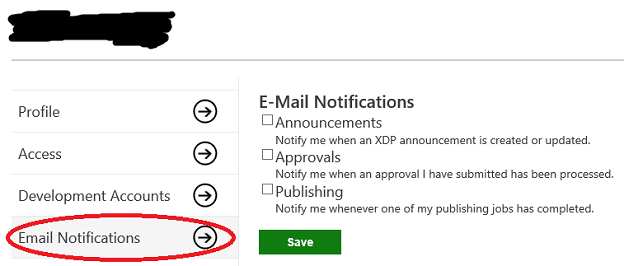
In the left column, the user can click on Profile, Access, Development Accounts, and Email Notifications to view and edit information about these categories.
The Profile page is the default page and displays information regarding the selected user. You can view/edit your First name and Last name, and you can view the Email address, Microsoft Account ID, and Publisher associated with your profile. You can click Save to save any changes you make to the above fields.
The Access page contains three categories-products, groups, and sandboxes-and lists the selected user’s access to each of these areas in XDP.
The Development Accounts page contains information regarding development accounts created under the selected user and the tools to create additional accounts. For information on adding development accounts, see Create Development Accounts for an XDP User Account.
The Email Notifications page allows you to choose when you want XDP to send you email notifications. Select Announcements to be notified about site announcements and downtime; select Approvals to be notified when an approval you have submitted has been processed; and select Publishing to be notified whenever one of your publishing jobs has completed. You can check and uncheck selections to subscribe or unsubscribe from these notifications.
Email notifications will come from xdp@microsoft.com, which should be marked as a safe sender so that the emails don’t go to a junk folder.