Account Linking
The Windows Partner Center is your one-stop shop for all things development on Windows. Here, you can download the tools you need to develop on Windows, check out documentation, and even publish to the Microsoft Store.
Over time, Partner Center will have more and more of the functionality that is present today in XDP, and so in the future, this is where all Xbox developers should be publishing their products. Therefore, it’s a good idea to start preparing for this eventuality now by linking your XDP account to Partner Center.
Benefits of linking your XDP account to Partner Center
By linking your XDP account to a Partner Center account, you’ll be in a better position when you migrate your users, sandboxes, device entitlements, and products to Partner Center. By linking now, you can start getting a feel for Partner Center and what publishing with it will be like. You can even create new products in Partner Center and publish them using its new and expanded capabilities.
While XDP only lets you publish ERA (Exclusive Resource Access) or SRA (Shared Resource Access) products, with Partner Center, in addition to ERA game support coming in the future, you can publish UWP (Universal Windows Platform) apps/games. UWP apps can run on any Windows 10 device, including PC, tablet, and Xbox, using a single codebase. UWP games perform well on Windows 10 PC, and over time they will perform better and better on Xbox.
Partner Center also lets you enable multiple users and permissions, so that an administrator can customize the levels of access each user has, up to and including product-specific permissions. For example, you can assign a user the role of Developer, which means they can upload packages, submit apps and add-ons, and view telemetry details, but they can’t view financial information or account settings. You can also create groups of users that all have the same permissions, to make organization easier. You can even make another user a global administrator so that they too have the ability to manage users. For more information, see Manage account users. Also see Set custom permissions for account users for more information about setting custom account- and product-level permissions.
For these reasons, and the fact that Partner Center is better supported than XDP and XDP will eventually be deprecated, it is a good idea to link your account to Partner Center and start familiarizing yourself with it now.
Link your XDP account to a Partner Center account
Before you link your XDP account, you’ll need to decide whether you want to link it to a new Partner Center account or an existing one. If you’re not sure if your publisher already has a Partner Center account, or if you know that your publisher has a Partner Center account but you’re not sure whether to link your XDP account to it, ask your Microsoft representative.
You can link multiple XDP accounts to a single Partner Center account by following the process below for each account, but you can’t link one XDP account to multiple Partner Center accounts.
We recommend that you have a single Partner Center account per Publisher Licensing Agreement (PLA).
Note
You must have the Publisher Management permission to link an XDP account to a Partner Center account.
Create a Partner Center account
If you have decided to link your XDP account to a new Partner Center account, follow these steps to create one:
- Create a Microsoft account, or use an existing one.
- Review the App Developer Agreement before you register, since it’s easier to read here rather than during the registration process.
- Register for a Partner Center account. Select Sign up and follow the registration process. See Opening a developer account for more information.
- During the registration process, you will need to decide whether to create an individual account or a company account. See Account types, locations, and fees for help with this decision.
Note You don’t need to pay the registration fee-you will receive a promotional code to take care of this. - Log in to your XDP account, and in the Manage dropdown, select Account Linking.
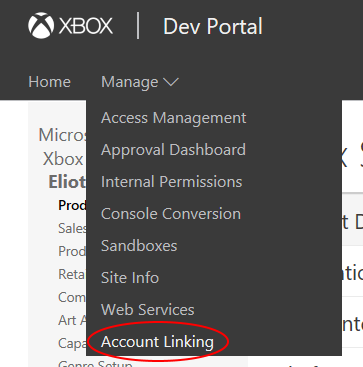
- On the Account Linking page, you will see a code labeled Windows Dev Center Link Secret. Copy this code.
- In Partner Center, on the Registration - Payment page, in the Promo code field, enter the code that you copied from XDP. This will cover the cost of registration.
- Work with your Microsoft representative on the App Developer Agreement addendum required as part of the reseller program (if you want to use reseller pricing).
- Work with your Microsoft representative on setting up the payout account and tax forms.
If someone has already registered your publisher name or a variant of it in Partner Center, email your Microsoft representative and the Windows and Windows Phone Store Report App.
Link your XDP account
Once you have a Partner Center account to which you will link your XDP account, you can start the linking process by following these steps:
- Log in to your XDP account, and in the Manage dropdown, select Account Linking.
- On the Account Linking page, you will see a code labeled Windows Partner Center Link Secret. Keep this page open, and follow the link to the Windows Partner Center in a new tab in your browser.

- Sign in with your Partner Center account.
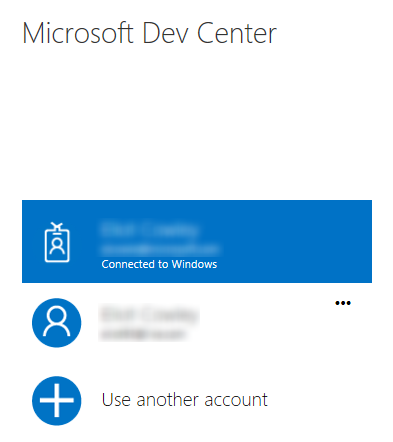
- On the Link your XDP account page, enter the code that you got from XDP and select Link.
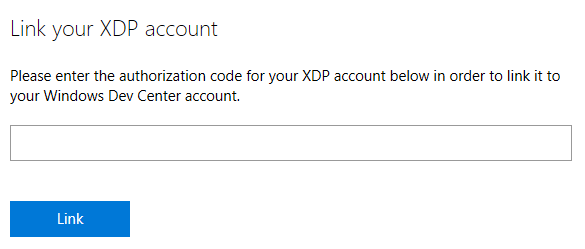
Note Yes, the same code is used to both waive the cost of a Partner Center account and link an XDP account to that Partner Center account. - Make sure the information is correct.
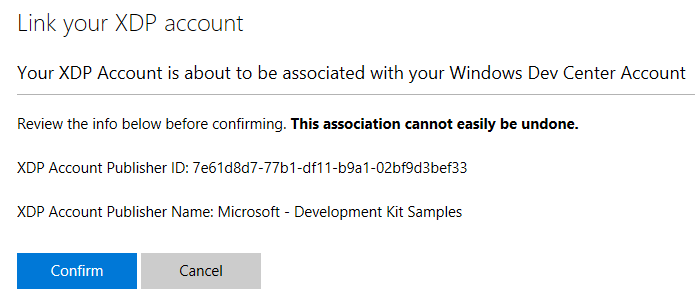
You can check your XDP Account Publisher ID in the URL of the Product Groups page on XDP, after the last forward slash:
You can check your XDP Account Publisher Name on the Profile page in XDP: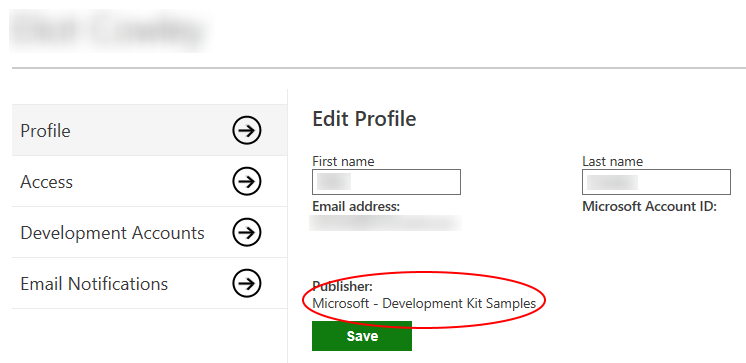
If the information is correct, select Confirm.
Note Once you link your accounts, this cannot be easily undone, so be sure that this is what you want to do before proceeding. - You have now linked your XDP and Partner Center accounts! Select Return to account settings to navigate to the Account settings page.

Additional Partner Center Information
See Features and capabilities for console game publishers (XDP vs. Partner Center) for more information and links to the differences and capabilities.