ATG Graphics Engagement Checklist
Pete Lewis, Xbox Advanced Technology Group
Published June 23rd 2016
In this topic
Sending captures for performance analysis or debugging
Preparing for ATG onsite visits
Introduction
Several scenarios where you may wish to engage directly with the Graphics Engineering Team in the Xbox Advanced Technology Group (ATG) include:
- Performance analysis, including GPU and driver usage on CPU.
- Visual corruption debugging.
- GPU hang/crash investigation.
- Crashes or bugs in the graphics driver or tools.
This document outlines various methods for preparing for such an engagement depending on the support you need.
Pre-engagement checklist
Before engaging ATG, ensure that you have reviewed the following guidelines.
Use the validated driver
Make sure that your title runs clean with the validated DirectX driver; that is, no errors or warnings appear in the output window when you run your title.
- For Direct3D 11 titles, pass D3D11_CREATE_DEVICE_VALIDATED to D3D11XCreateDeviceX.
- For DirectX 12 titles, pass D3D12XBOX_PROCESS_DEBUG_FLAG_VALIDATED to ID3D12Debug::SetProcessDebugFlags.
Use the instrumented driver
If you are engaging ATG for performance analysis, you will need an instrumented build of your game. This build configuration should be as close to optimum as possible (that is, no debug code).
- For Direct3D 11 titles, pass D3D11_CREATE_DEVICE_INSTRUMENTED to D3D11XCreateDeviceX.
- For DirectX 12 titles, pass D3D12XBOX_PROCESS_DEBUG_FLAG_INSTRUMENTED to ID3D12Debug::SetProcessDebugFlags.
Use PIX brackets
By including PIX brackets in your title, ATG will be able to analyze performance issues much more quickly and effectively. We strongly recommend using PIX markers and brackets. These are simple to integrate and have low overhead:
- PIXBeginEvent
- PIXEndEvent
- PIXSetMarker
To have events appear on the GPU timeline in PIX, pass a D3D11DeviceContext or ID3D12GraphicsCommandList object to PIX marker functions.
Set resource names
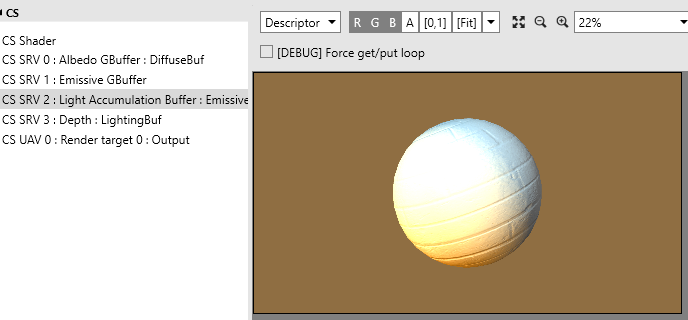
When analyzing PIX captures, it is often helpful to understand the intent of a particular draw call or dispatch. Naming your resources is very helpful in this respect. Most DirectX objects can be given a meaningful name that appears in PIX:
- ID3D11DeviceChild::SetPrivateData (Windows)
- ID3D11DeviceChild::SetName (Xbox)
- ID3D12DeviceChild::SetName (Windows and Xbox)
We recommend that you use these functions to give meaningful names to your resources, such as render targets, textures, and all other kinds of buffers, such as UAVs, vertex, and index buffers.
Figure 1. Naming your resources adds important context to your capture.
Generate shader symbols
ATG can more effectively analyze PIX GPU captures if shader symbols are included.
To generate shader symbols, ensure that you are compiling your HLSL sources with /Zi or D3DCOMPILE_DEBUG. You can strip the debug information into a separate shader symbols file as part of your shader compilation step. For more information, see David Cook’s Xfest 2014 presentation PIX for the Busy Engineer, slides 74+.
Try to reproduce issues in an ATG sample
If you suspect that you are encountering a driver or shader compiler bug, ATG recommends that you try and reproduce it by using one of the samples available on the Xbox One Samples page on XGD. This may not always be possible, but it is the fastest way to escalate such issues to the driver or compiler teams.
Send PIX captures in advance
To ensure best results, make sure to send PIX captures in advance of your onsite or lab engagement with ATG. See the following section for advice on taking and sending PIX captures.
Sending captures for performance analysis or debugging
Sending PIX captures is the easiest and most efficient way to engage ATG for performance analysis. Alternatively, you may have a capture that demonstrates a reproducible bug such as visual corruption or GPU hang, or you require ATG to investigate a PIX, driver, or shader compiler issue.
This section walks you through how to obtain the necessary captures by using PIX or XHIT and securely send them to ATG.
Note: When capturing, use the latest release of the Tools XDK provided on the Xbox One Downloads page on XGD.
What to capture
For all non-GPU hang investigations, ATG will require captures from PIX. Which type of capture depends on your needs. Before capturing, make sure your title is running the instrumented driver and you are using PIX brackets.
For GPU performance analysis, you should collect:
- At least one GPU capture of the worst case performance area(s).
- Corresponding timing captures, captured at approximately the same time as the GPU captures.
- Shader symbols embedded in the capture (see Embed shader symbols in PIX GPU captures later in this paper).
For graphics-related CPU performance analysis, collect:
- At least one timing capture.
- Your executable PDBs (which are often helpful if you are willing to provide them).
For GPU visual corruption debugging, collect:
- At least one GPU capture.
- Shader symbols embedded in the capture (see Embed shader symbols in PIX GPU captures).
For GPU hangs, collect:
- At least one XHIT file.
- Ideally at least one GPU capture taken near the time of the hang (although this is understandably not always feasible).
Embed shader symbols in PIX GPU captures
Shader symbols allow ATG to more effectively analyze your PIX GPU captures. PIX makes it very easy for you to include shader symbols with your PIX GPU captures by embedding the symbols directly into the capture file itself.
The steps for embedding your shader symbols are relatively simple:
- Ensure that you are generating shader symbols (see Generate shader symbols earlier in this paper).
- Ensure that the Symbol Paths setting in PIX includes the path to your shader symbols.
- Take a GPU PIX capture and save it.
To ensure that the symbols were correctly loaded, check PIX’s output window.
Send captures to ATG
PIX timing captures are usually only a few megabytes, so communication via email or the Developer Forums is usually sufficient for CPU performance analysis unless you also choose to provide PDBs.
On the other hand, PIX GPU captures can become quite large, usually ranging from several hundred megabytes to a few gigabytes. While the Developer Forums have file upload limits up to 2 GB, it may not be a convenient option for uploading or downloading such large files due to the lack of bulk-upload or resume capabilities.
Xbox provides a means for you to send and receive large files to and from ATG through a secure and confidential file transfer service called Signiant MediaShuttle. Your developer account manager (DAM) will be able to set up an account for you should you wish to transfer files through this service.
However, some organizations prefer their own means of distributing large files, such as a restricted FTP server or a third-party secure file transfer service. If you choose (or are required by your organization) to use one of these, please provide your DAM with a user name and password that ATG can use.
Preparing for ATG onsite visits
ATG visits are usually fairly brief so it is important to use the time efficiently and have ATG doing meaningful work immediately. As such, proper preparation is key.
If you plan to have the ATG engineer(s) working with you or one of your team directly, make sure to:
-
Have a working copy of your source tree synced, and ensure that the source builds, deploys, and runs.
-
Have shader symbols generated as part of your build process.
-
Set up at least one devkit (two devkits is ideal as it decreases iteration time for PIX analysis), flashed to the latest released recovery.
-
Optionally, have PIX captures of performance “hot spots” already prepared for analysis.
If you wish to have ATG working directly on your title’s source, make sure to also:
-
Set up workstation(s) for the visiting ATG engineer(s), and work with your IT department to grant them the appropriate access and permissions.
-
Specify a dedicated person or persons as a point of contact for the ATG engineer(s) in case they have questions or feedback.
Preparing for ATG Lab visits
If you are visiting the ATG Lab in Redmond, WA, these steps will ensure that you are bringing all the necessary equipment and data with you.
Inform ATG of your hardware and console needs
A few days before the engagement, inform your DAM or ATG contact of the following:
- Whether you will be bringing your own PCs or if you require the use of ATG Lab PCs.
- If you wish to use ATG’s PCs, state what software you require (for example, Visual Studio 2015 updates, Python for build scripts).
- How many PCs you will need.
- How many consoles you will need (usually two consoles per person).
- Any other special hardware requirements.
ATG can provide monitors, peripherals, and devkits, so you will not need to bring those unless you have special hardware.
If you intend to bring your own equipment, we recommend that you bring multiple laptops or workstations if possible. This is useful as a redundancy in case there is a hardware failure, or as a means to parallelize work streams if your build times are long.
Prepare a stand-alone build
Make sure that you bring a stand-alone build of your title. Many studios rely on build servers to generate content or shader build packages, but you will not necessarily have access to these servers while you are offsite.
If you are bringing a pre-built package or executable, make sure to bring matching PDBs with you. If you are bringing full source, make sure you are able to compile offline. Make sure you are also able to compile shaders offline too.
Finally, ensure that you have external access to your company’s network (for example, via VPN) just in case.
Summary
Having complete and comprehensive captures is key to getting the best possible recommendations from ATG. Additionally, if you plan to visit ATG or have them visit your studio, proper preparation helps ATG hit the ground running.