Xbox One Audio Mixing and Monitoring: Best Practices
Updated: October 12, 2017
Recent revisions: The following sections have been recently added or updated:
- Downmixing Windows Sonic Mixes for Speakers
- Headphone Downmixing
- Game DVR / streaming broadcast downmixing
- Console channel output settings
Introduction
As a consumer device, Xbox One aspires to present well-balanced and consistent audio levels so that users don't have to continually readjust the volume of their TV or receiver from experience to experience, or leave the volume too high or low to fully enjoy a title's audio nuances. This white paper describes recommended practices for mixing audio in Xbox One titles and apps so that it is optimized for the audio capabilities inherent in the system itself and to make title and app audio levels consistent with those from other connected devices and media experiences. The paper also includes a high-level discussion of audio mixing in general and methods for balancing audio levels across different levels of activity and intensity within titles.
Typical programming levels and recommendations
When consumers access content on the Xbox One console, the audio levels should be fairly similar to other devices connected to their receiver. Traditionally, audio levels in commercial TV and music content have been fairly inconsistent (not only from piece to piece but also within single pieces of content) and often aggressively loud. However, industry standards have recently begun to align audio levels more closely with user desires, particularly with respect to dynamic range and keeping listening levels more predictable.
The first step in targeting desired loudness levels is the creation of a well-defined, consistently measurable, and global standard. The International Telecommunication Union’s Recommendation ITU-R BS.1770-4 “Algorithms to measure audio programme loudness and true-peak audio level” provides such a standard. It describes how to capture measurements for true peak (dBTP, decibels of actual peak level as presented by devices, many of which oversample their program material) and LKFS (Loudness, K-weighted, relative to Full Scale), which is also labeled LUFS (Loudness Units relative to Full Scale) in some prior standards.
A number of commercial hardware and software metering solutions already offer BS.1770‑4 (or its precursor, BS.1770-3) measurements, as do major game audio-focused middleware solutions. The Game Audio Network Guild Interactive Entertainment Sound Developers (GANG-IESD) has proposed several metering solutions for meeting the ITU standard. They were discussed at a number of recent game and audio broadcast industry events, including the 49^th^ Conference of the Audio Engineering Society and the 2013 Game Developers Conference and have since been adopted by major game developers and publishers.
These guidelines include the following:
- Recommended average loudness for a title should be normalized to –24 LKFS (+/–2 LKFS); titles should capture LKFS measurements for extended representative gameplay (including action sequences, cut-scenes, and menu navigation if applicable), of no less than 30 minutes, and ideally as long as possible.
- A title’s true-peak audio level should not exceed –1 dBTP.
Xbox One audio content should abide by these best practices, which are in line with –24 LKFS broadcast standards in both Japan (ARIB) and the United States (ATSC). Adopting these levels builds in a fair amount of headroom for beefy explosions and crescendoing underscores, and it also provides room for hundreds of voices to be playing in the most intense moments without digital clipping.
LKFS and “Advanced” Output Formats (7.1, 7.1.4, and dynamic spatial surround sound)
While LKFS has well-defined monitoring definitions for 5.1 speakers, the Xbox One masters and outputs for audio formats with more channels—namely its default 7.1 channel surround-sound output, or up to 7.1.4 channels. For bespoke audio engine solutions, BS.1770-4 offers implementation options for 7.1 and 7.1.4. (see Annex 3), or the 5.1 channel algorithm can be used. (An AES paper shows the 5.1 channel algorithm to generally provide nearly equivalent results).
Xbox One audio levels
Xbox One has a number of built-in audio elements whose levels can be used as a reference point for title mixing.
The Xbox One startup sound abides by the BS.1770-4 standard and is normalized to –24 LKFS. Typically, users will use this sound as a way to calibrate their speaker volume to be comfortable, and the startup sound is designed to be fairly loud but comfortable, although individual user tastes and perceptions vary.
To avoid dramatic and abrupt volume shifts between various activities, Xbox One also provides default attenuation on some other user-controlled system audio elements. As discussed later in this paper, game-triggered elements have no such attenuation when the game has focus, unless the game is designed to apply it.
Audio focus and ducking behaviors
A number of different audio experiences can be played at the same time on Xbox One. To allow for both clarity and differing consumer use scenarios, several ducking (volume attenuation) and muting functions exist, starting in the May 2014 console recovery. Some of these behaviors can be customized within the Settings application’s Display & sound menu. Note that these behaviors are system policies, which might change in future console recoveries.
In general, titles should use up to three distinct audio endpoint categories. These are defined by the AUDIO_STREAM_CATEGORY enumeration, which is used by both XAudio2 and WASAPI. The following table shows the AUDIO_STREAM_CATEGORY values.
Table 1. AUDIO_STREAM_CATEGORY values.
| AUDIO_STREAM_CATEGORY value | Sounds to route |
| AudioCategory_GameMedia | Content considered background music (for example, audio to mute/replace if the user selects their own custom music). |
| AudioCategory_GameChat (or AudioCategory_Communications to apply automated ducking to other streams) | Game chat content. |
| AudioCategory_GameEffects | All other game sounds. |
Detailed descriptions of ducking behaviors a title can impose on other audio experiences, in addition to behaviors the title itself can exhibit in response to other titles are listed in the following section of this white paper.
- AudioCategory_Communications and AudioCategory_GameChat
- AudioCategory_Alerts
- AudioCategory_BackgroundCapableMedia
- AudioCategory_ForegroundMedia
- AudioCategory_GameEffects
- Shell-based ducking (snapped/fill and BAT)
- Ducking notifications and title responses
AudioCategory_Communications and AudioCategory_GameChat
Audio sent to an AudioCategory_Communications tagged audio endpoint will duck all other audio sent to that endpoint, except other streams tagged AudioCategory_Communications or AudioCategory_Alerts.
Both Party Chat and Skype use the AudioCategory_Communications category, so during system chat scenarios where chat is being rendered to speakers (that is, no connected voice chat headset), game audio in the speakers will be ducked. If local users are chatting using their mono voice chat headsets, no ducking is applied to the main speakers. The user can select between several options: 0 dB, -6 dB (default), -14 dB, and -∞ dB (muted).
Titles can leverage this same ducking behavior by specifying the AudioCategory_Communications category. If a title wants to manage its mix directly and not apply ducking during game chat, use the AudioCategory_GameChat category instead; the GameChat category applies no ducking to other categories.
Note that a single chat experience—whether Skype, party chat, or game chat—has access to the player’s microphone at any given time; although incoming audio streams can optionally continue to be rendered by an app, even if the user cannot speak during these experiences.
AudioCategory_Alerts
This category is not typically used for games and apps, as they manage their full mix directly. Audio sent to the alerts category will duck all other audio sent to that endpoint, except other streams tagged as AudioCategory_Alerts, AudioCategory_Communications, or AudioCategory_GameChat. The value is configured by the system, and as of May 2014 it is -28 dB. Alerts should typically be used only for brief periods, such as notifications.
AudioCategory_GameEffects
This category should typically be used for rendering nearly all game audio. Only voice chat (AudioCategory_GameChat or AudioCategory_Communications) and possibly game music(AudioCategory_GameMedia) typically reside in alternate endpoint categories.
Ducking notifications and title responses
A title can detect if it is being muted or ducked by registering for volume notification callbacks on a WASAPI client (IAudioClient2) or a spatial audio client (ISpatialAudioClient) instance via IXboxVolumeNotificationClient. For more information, see IAudioClient2::RegisterXboxVolumeNotificationCallback() and IXboxVolumeNotificationClient::OnGameMediaMuted().
This allows the title to change gameplay behavior or to implement Xbox 360-style voice-level muting (rather than system category muting), which allows game music to interact with other game audio sources.
Titles are strongly encouraged to consider doing the following:
- Provide consistent default levels (according to the best practices described previously) and sufficient headroom to allow all experiences to coexist without saturating.
- Expose volume controls if the user is expected to consume multiple audio-generating experiences at once. It is a best practice to provide a volume slider defaulting to 70-80%, so an individual experience can be adjusted louder or quieter in the mix.
Titles should appropriately tag their background music and chat audio as such to allow for well-integrated and consumer-managed audio mix experiences; see the AUDIO_STREAM_CATEGORY section of the documentation for more information on doing this through WASAPI, ISpatialAudioClient, or XAudio2. Titles can additionally choose to specifically expose music and in-game chat volume and muting controls, to allow users to adjust the playback levels of these experiences during gameplay if they so desire. Title control of user music playback is outside the scope of current Xbox One functionality.
In-game audio levels on Xbox One
The title maintains control over the in-game audio experience’s levels; no attenuation is applied to title audio by default when the title has focus (beyond several system- or user-initiated scenarios as described in the preceding section). The lack of applied headroom gives the title full control over the audio experience, though the responsibility to avoid clipping also resides with the title. If one plays two full-scale waves, the output will be clipped. For this reason, titles should use caution when balancing wave playback.
Understanding and addressing clipping concerns on Xbox One depend somewhat on where in the audio flow the clipping occurs. The SHAPE (Scalable Hardware Audio Processing Engine) hardware operates on 24-bit integer data. For example, when playing 16-bit PCM sources, 8 bits of headroom are available. If hard clipping does occur, mix buffers that clip will flag their status, allowing a title to detect this state during development if desired. Software elements of the pipelines (whether XAudio2 or audio middleware) can transport and modify data in the format they desire; XAudio2 uses 32-bit floating point processing. This means that within the software pipeline, content can rise above 0 decibels full scale without clipping. The potential for clipping is present only at the point where audio is delivered by the mastering voice for multichannel encoding and downmixing.
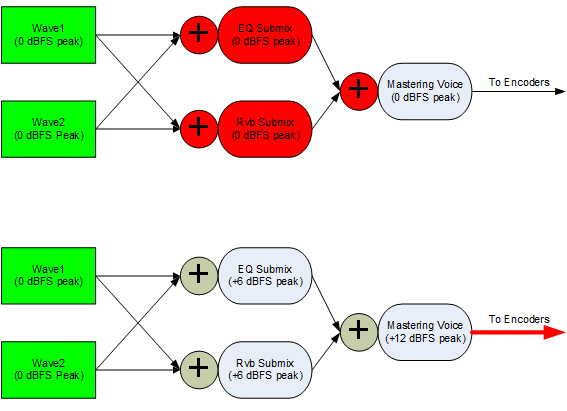
The diagrams in Figure 1 show the potential for clipping within integer mathematics pipelines versus the floating-point mathematics pipelines on Xbox One. In the top diagram, clipping can occur as voices are mixed together (plus signs) or even internally if insert-style or send-style DSP effects add any gain to the signal. In the bottom diagram, gain levels can go arbitrarily high, and clipping will still only occur at encode.
Figure 1. Potential clipping concerns (red) with SHAPE integer mathematics (top diagram) vs. XAudio2/WASAPI/ISAC floating-point representations (bottom diagram).
The temptation might be to simply place a compressor effect in the Xbox One mastering voice. While this is likely a good idea to avoid clipping in the final stage, there are still good reasons to attenuate earlier in the signal chain:
- It provides better control over what is given the most prominence in the mix. If the audio signal gets to the mastering voice and the music is overpowering, compressing the whole mix won’t markedly improve the title.
- Many existing DSP effects are designed to clamp to 0 dBFS.
Downmixing and clipping
A frequently asked question is how content is downmixed such that seven (or for spatial, eleven or more) nearly full-scale speaker signals won’t cause the 5.1 or stereo downmix to be clipped. The downmix that Xbox One performs is designed with 5.1 and stereo in mind, and attenuates the signal of some channels slightly to avoid the most objectionable forms of clipping, given pre-authored multichannel content.
The 5.1 downmix is available by using HDMI or through the optical S/PDIF output. The formula in use for 5.1 downmixing (courtesy of Dolby Laboratories) maintains equal power and virtualizes the back channels as follows.
7.1 to 5.1
| Channel | L | R | C | LFE | LS | RS |
|---|---|---|---|---|---|---|
| FrontLeft (L) | 0 dB | - | - | - | - | |
| FrontRight (R) | - | 0 dB | - | - | - | |
| FrontCenter (C) | - | - | 0 dB | - | - | - |
| LowFrequency (LFE) | - | - | - | 0 dB | - | - |
| LeftSurround (LS) | -8.34 dB | - | - | - | -0.69 dB | - |
| RightSurround (RS) | - | -8.34 dB | - | - | - | -0.69 dB |
| LeftBack (LB) | - | - | - | - | -0.91 dB | -7.25 dB |
| RightBack (RB) | - | - | - | - | -7.25 dB | -0.91 dB |
The formula currently in use (as of the March 2013 XDK) for stereo downmixing is similar to a traditional “LoRo” (left only, right only) mix:
7.1 to 2.0
| Channel | L | R |
|---|---|---|
| FrontLeft (L) | 0 dB | - |
| FrontRight (R) | - | 0 dB |
| FrontCenter (C) | -3 dB | -3 dB |
| LowFrequency (LFE) | - | - |
| LeftSurround (LS) | -3 dB | - |
| RightSurround (RS) | - | -3 dB |
| LeftBack (LB) | -3 dB | - |
| RightBack (RB) | - | -3 dB |
No phase adjustments are applied to the stereo downmix. Note that this system is not designed to aggressively attenuate mono or stereo content placed in all speakers; placing identical full-scale mono channel content in each speaker will indeed cause clipping in the stereo downmix:
- Left= 0 dB + –3 dB + –3 dB + –3 dB\ = 1 + 0.7 + 0.7 + 0.7 (in XAudio2 attenuation multiplier units*)\ = 3.1 (or +9.8 dBFS)
* Conversion from decibels to XAudio2 amplitude-based volume units can be performed by using the XAudio2DecibelsToAmplitudeRatio function.
For this reason, perhaps even more so than the aesthetic issues with non-positioned audio data coming from all speakers, mono and stereo data should not be blindly doubled in all speakers. We recommend the following options:
- Author multichannel content explicitly intended for speakers (in 7.1.4, 7.1, 5.1, 4.0, or 2.0) whenever possible.
- Consider restricting mono/stereo data to mono/stereo speakers rather than doubling. It’s acceptable to use the rear speakers uniquely, keeping in mind how they will fold back down for stereo playback.
- Consider using DSP effects such as delays or reverb to fill out the soundscape rather than doubling.
- Do not double in the center channel; reserve the center for screen-anchored (or 3D-positioned) sounds, not statically omnidirectional sounds.
- Consider reducing the volume of doubling in the rear speakers by 6 dB or more.
- Consider authoring content with headroom in all cases. Limiting peak levels to –10 dBFS would fit nicely into the above formula, where 10 decibels of headroom would be sufficient to typically avoid clipping even when doubling in all speakers.
Note that the LFE channel is not used in stereo linear downmixes (although, as discussed below, it is used for spatial headphone formats); titles should not place a sound’s sole point of origin in the LFE channel, as it will not be heard in linear stereo listening environments. That said, titles should and have taken great advantage of the .1 channel as a transport for providing more audible intensity to gamers with higher fidelity audio systems. In part because many consumer receivers will optionally use bass management to route main speaker content to the subwoofer, it is a best practice to deliver uniquely authored rumble track content rather than doubling of full spectrum content.
We recommend that titles perform most mixing in 7.1 or 7.1.4 and occasionally monitor/validate that the downmixed formats are avoiding saturation. While we encourage the monitoring of actual physical HDMI and optical output from the console, the Xbox One XDK does include an XAudio2 peak/RMS DSP effect (see XAudio2CreateVolumeMeter) that allows for purely digital monitoring of the actual audio frames throughout the audio chain prior to submission for final output. Similarly, audio middleware solutions typically allow the monitoring of the final mixes they are creating and submitting, often even with LKFS meters.
Titles that target a 5.1 mix should specifically note that only a 7.1 virtual endpoint is actually exposed in the XDK; the back channels will only contain silence. Even while the consumer is listening over a 5.1-outputting device, a title-presented 5.1 audio stream will be up-mixed to 7.1 channels (back channels silent) and then down-mixed to the 5.1 output format. Therefore, it is by design that the surround channels will be slightly shifted toward the front speakers in a 5.1 fold-down. This is part of the tradeoff of keeping the back and surround channels distinct in a 5.1 mix-down; otherwise 3D positioned sounds would have discontinuities or static positioning artifacts as they are rotated around the user. In a 7.1 to 5.1 mix-down, equal power is maintained, so sounds should not be louder to the listener than originally authored.
Downmixing Windows Sonic Mixes for Speakers
While non-spatial titles are targeting a 7.1 mix, titles that call EnableSpatialAudio may target spatial sound endpoints, which include support for both dynamic sound objects (3D positioned and rendered by the receiver or headphone encoder) and a channel bed of up to 8.1.4.4 (adding a rear center channel, 4 channels above the user, and 4 channels below). Dynamic sound object levels vary based on the specific speaker configurations of the end consumer, but below we detail the downmix behavior for the channel bed.
Levels are presented as decibel approximations; actual volume multipliers in use are:
1 = unity (0 dB); 1 / √2 ≈ -3.01 dB; ½ ≈ -6.02 dB; - = not present
8.1.4.4 (or 7.1.4) to 7.1
| Channel | L | R | C | LFE | LS | RS | LB | RB |
|---|---|---|---|---|---|---|---|---|
| FrontLeft (L) | 0 dB | - | - | - | - | - | - | - |
| FrontRight (R) | - | 0 dB | - | - | - | - | - | - |
| FrontCenter (C) | - | - | 0 dB | - | - | - | - | - |
| LowFrequency (LFE) | - | - | - | 0 dB | - | - | - | - |
| LeftSurround (LS) | - | - | - | - | 0 dB | - | - | - |
| RightSurround (RS) | - | - | - | - | - | 0 dB | - | - |
| LeftBack (LB) | - | - | - | - | - | - | 0 dB | - |
| RightBack (RB) | - | - | - | - | - | - | - | 0 dB |
| TopFrontLeft | -3 dB | - | - | - | - | - | - | - |
| TopFrontRight | - | -3 dB | - | - | - | - | - | - |
| TopBackLeft | - | - | - | - | - | - | -3 dB | - |
| TopBackRight | - | - | - | - | - | - | - | -3 dB |
| BottomFrontLeft | -3 dB | - | - | - | - | - | - | - |
| BottomFrontRight | - | -3 dB | - | - | - | - | - | - |
| BottomBackLeft | - | - | - | - | - | - | -3 dB | - |
| BottomBackRight | - | - | - | - | - | - | - | -3 dB |
| BackCenter | - | - | - | - | - | - | -3 dB | -3 dB |
8.1.4.4 (or 7.1.4) to 5.1
| Channel | L | R | C | LFE | LS | RS |
|---|---|---|---|---|---|---|
| FrontLeft (L) | 0 dB | - | - | - | - | - |
| FrontRight (R) | - | 0 dB | - | - | - | - |
| FrontCenter (C) | - | - | 0 dB | - | - | - |
| LowFrequency (LFE) | - | - | - | 0 dB | - | - |
| LeftSurround (LS) | - | - | - | - | 0 dB | - |
| RightSurround (RS) | - | - | - | - | - | 0 dB |
| LeftBack (LB) | - | - | - | - | 0 dB | - |
| RightBack (RB) | - | - | - | - | - | 0 dB |
| TopFrontLeft | -3 dB | - | - | - | - | - |
| TopFrontRight | - | -3 dB | - | - | - | - |
| TopBackLeft | - | - | - | - | -3 dB | - |
| TopBackRight | - | - | - | - | - | -3 dB |
| BottomFrontLeft | -3 dB | - | - | - | - | - |
| BottomFrontRight | - | -3 dB | - | - | - | - |
| BottomBackLeft | - | - | - | - | -3 dB | - |
| BottomBackRight | - | - | - | - | - | -3 dB |
| BackCenter | - | - | - | - | -3 dB | -3 dB |
8.1.4.4 (or 7.1.4) to Stereo
| Channel | L | R |
|---|---|---|
| FrontLeft (L) | 1 | - |
| FrontRight (R) | - | 1 |
| FrontCenter (C) | -3 dB | -3 dB |
| LowFrequency (LFE) | - | - |
| LeftSurround (LS) | -3 dB | - |
| RightSurround (RS) | - | -3 dB |
| LeftBack (LB) | -3 dB | - |
| RightBack (RB) | - | -3 dB |
| TopFrontLeft | -3 dB | - |
| TopFrontRight | - | -3 dB |
| TopBackLeft | -6 dB | - |
| TopBackRight | - | -6 dB |
| BottomFrontLeft | -3 dB | - |
| BottomFrontRight | - | -3 dB |
| BottomBackLeft | -6 dB | - |
| BottomBackRight | - | -6 dB |
| BackCenter | -6 dB | -6 dB |
Headphone Downmixing
For non-spatial audio content and a console set to ‘stereo uncompressed’ for Headset format in Settings > Display & sound > Audio output, the headphones reflect the above stereo downmix behaviors.
When the console format is set to Dolby Atmos for Headphones or Windows Sonic for Headphones, both legacy 7.1 audio and spatial audio channel beds will have a virtual surround sound (VSS) downmix applied. Note that when EnableSpatialAudio has been called for a title, ISpatialAudioClient endpoints will be virtualized over headphones, but legacy endpoints (WASAPI or XAudio2) will continue to use linear downmix behavior. This allows for ‘direct to ears’ solutions where the left and right channels are presented to headphones unperturbed. Because psychoacoustic transformations are content specific, it’s not practical to reflect downmix formulas in a speaker-mapping table. But note that, unlike in the stereo uncompressed downmix scenario, the LFE channel is retained at attenuated levels. Dynamic sound objects are virtualized by the spatial audio providers.
8.1.4.4 (or 7.1.4) to Dolby Atmos for Headphones / Windows Sonic for Headphones
| Channel | L | R |
|---|---|---|
| LowFrequency (LFE) | -3 dB | -3 dB |
| All Other Bed Channels (L, R, C, etc.) | [Format-specific Virtual Surround Sound] | [Format-specific Virtual Surround Sound] |
| Dynamic Sound Objects | [Format-specific virtualization] | [Format-specific virtualization] |
Game DVR and streaming broadcast downmixing
For the purposes of capture (via Game DVR, Xbox One Manager, etc.) and broadcasting (Mixer, etc.), non-spatial audio content replicates the 7.1 stereo downmix behavior detailed previously.
Beginning with the October 2017 system update, spatial audio content (8.1.4.4 or 7.1.4) follows the stereo downmix matrix as previously discussed for channel beds. Dynamic Sound Objects are positioned and panned by using X3DAudio speaker calculations, with speaker positions set as returned by ISpatialAudioClient::GetStaticObjectPosition.
Mixing room configuration and listening levels
While 84/85 dB SPL is used for theatrical exhibitions, game mixes should generally calibrate to 79 dB SPL for large-mix stage monitoring, and likely lower levels for typical smaller studio or sound room monitoring. The Advanced Television System Committee (ATSC) A/85 standards document provides good monitoring recommendations for levels based on a room’s spatial volume (see table 10.2 in the ATSC A/85 standards document), and recommends 76 dB SPL for rooms of less than 1500 cubic feet. Engineers should ensure all receiver processing/attenuation is bypassed, and that the surround metering is calibrated to 7.1 program playback.
Speaker positional recommendations for 7.1 are well-defined by industry standards (in particular, ITU BS.2051-1), and the X3DAudio 3D positioning math library abides by these standards; based on the listener’s position, speakers should be positioned at these angles. The following table shows the recommended speaker positions.
Table 2. Speaker positional recommendations.
| Speakers | Recommended speaker placement | X3DAudio angle |
|---|---|---|
| Left (L) / Right (R) |
$\pm$22-30° | $\pm \frac{\pi}{8}$ (22.5°) |
| Center (C) | 0° | 0 (0°) |
| Left Surround (Ls) / </br> Right Surround (Rs) | $\pm$90-110° | $\pm \frac{\pi}{2}$ (90°) |
| Left Back (Lb) / </br> Right Back (Rb) | $\pm$135-150° | $\pm \frac{3\pi}{4}$ (135°) |
| Top Front Left / </br> Top Front Right | $\pm$22-30°, elevation of 30° or greater | |
| Top Back Left / </br> Top Back Right | $\pm$135-150° |
While mixing/mastering levels are well defined relative to the full scale level that a device can present, consumer playback levels may vary by receiver manufacturer and by format. In particular, note that Dolby Atmos playback may diverge from linear PCM formats like 7.1 playback. This is one of the reasons for games that simultaneously mix some streams for Windows Sonic, and others that use linear “direct to ears” playback paths, to consider always presenting spatial content (even if that content is silence). This ensures that receivers continue to present Dolby Atmos-encoded streams instead of switching back to linear PCM 7.1, which can cause an audible playback-volume discontinuity. For more information, see the Dolby Developer Site.
Default speaker ordering for 7.1 and 5.1 channel content
For pre-rendered multichannel content, note that both XAudio2 and the WASAPI low-level audio rendering engine abide by WAVEFORMATEX channel orders (for more information, see the topic KSAUDIO_CHANNEL_CONFIG structure on MSDN). When creating 5.1 or 7.1 wave files (regardless of compression format), note that Xbox One rendering software will, by default, assume the following rendering order:
- 5.1 channel: L, R, C, LFE, LS, RS
- 7.1 channel: L, R, C, LFE, LB, RB, LS, RS
Note that while the order is the same as on Windows, the speaker definitions diverge slightly; 5.1 on Windows uses the back channels rather than the surrounds for 5.1 content. Xbox One as a consumer device abides by the more traditional multichannel surround (what Windows calls “side” channel) definitions for speakers.
A title can certainly programmatically reroute channels as desired from pre-rendered content that does not conform to the above ordering; these are only the default behaviors in the absence of additional speaker routing information.
Console channel output settings
Xbox One consumers—in addition to title developers—can control their console’s current audio output format through the Settings app’s Display & sound page. The Digital Audio section of this page provides dropdown options for both HDMI and Optical (S/PDIF) output ports of the console. Because mixtures of encoded bitstream formats are not supported through the three outputs, a separate Bitstream option supports encoded multichannel formats. The following tables show the dropdown options.
Table 3. HDMI audio settings.
| HDMI audio setting | Comments |
|---|---|
| Off | Cannot be in this state if Optical audio is set to Off. |
| Stereo uncompressed | |
| 5.1 uncompressed | Rejected if receiver doesn’t support this format. |
| 7.1 uncompressed | Rejected if receiver doesn’t support this format. |
| Bitstream out | Uses Bitstream format setting (see table below). |
| [unlisted: auto-detect]* | Query and respond to connected AVR’s Extended Display Identification Data (EDID) to determine channel capability. |
Table 4. Optical audio settings.
| Optical audio setting | Comments |
|---|---|
| Off | Cannot be in this state if HDMI audio is set to Off. |
| Stereo uncompressed* | |
| Bitstream out | Uses Bitstream format setting (see table below). (Unavailable if Dolby Atmos format is selected.) |
Table 5. Bitstream format settings.
| Bitstream format setting | Comments |
|---|---|
| DTS Digital Surround | 5.1 compressed DTS core real-time encoder. |
| Dolby Digital | 5.1 compressed Dolby Digital Live real-time encoder. |
| Dolby Atmos for Home Theater | 7.1.4 compressed Dolby MAT encoder. Only available if the AVR’s Extended Display Identification Data (EDID) reports this capability. When no ISpatialAudioClient is presented by the running title, a connected AVR may indicate only 7.1 output, because only a 7.1 channel bed is transmitted. “Dolby Atmos” will be indicated on AVR while a ISpatialAudioClient is rendering spatial audio. |
*Factory default console setting.
Table 6. Headset audio format settings.
| Headset format setting | Comments |
|---|---|
| Stereo uncompressed | Linear stereo audio, per downmix documentation above (spatial audio disabled). |
| Windows Sonic for Headphones | |
| Dolby Atmos for Headphones |
A title can query the state of these settings through IMMXboxDeviceEnumerator::GetHdAudioChannelCounts, and can register for a state change callback through IMMXboxDeviceEnumerator::RegisterChannelCountNotificationCallback. Some titles can choose to alter their behavior (for instance, create a stereo-optimized mix) based on these reported values, though note that there is no direct way to determine whether the user is listening through the optical or HDMI outputs (or even potentially both), or via headphones. In general, titles should either target a consistent 7.1.4 or 7.1 mix (allowing the system to downmix as appropriate, as described in a previous section of this white paper), or the highest reported channel count of the two audio outputs.
During development, a title can set the state of many of these settings, either through the Settings app on their development console (the same way as consumers) or through the XDK command-line xbconfig application.
Summary
We hope this discussion of general mixing best practices and how Xbox One handles amplitudes equips you to create the most immersive, high dynamic-range audio mix for your title. The key recommendations of this white paper are as follows:
- Normalize average loudness to –24 LKFS (+/–2 LKFS), measured over representative gameplay of no less than 30 minutes.
- Do not exceed –1 dBTP for true-peak audio levels.
- Maintain sufficient headroom to avoid clipping in downmixes.
- Avoid doubling main speaker content in the LFE channel.
For more information about the topics discussed here, consult the Xbox One XDK documentation and other white papers on XGD Secure.
References
- Algorithms to measure audio programme loudness and true-peak audio level (PDF), International Telecommunication Union website, ITU-R BS.1770-4, October, 2015.
- Advanced sound system for programme production (PDF), Telecommunication Union website, RecommendationITU-R BS.2501-1, July, 2016.
- ATSC Recommended Practice: Techniques for Establishing and Maintaining Audio Loudness for Digital Television (PDF), Advanced Television Systems Committee, Inc. (ATSC) website, A/85 standards document, March 12, 2013.
- KSAUDIO_CHANNEL_CONFIG structure (webpage), Microsoft Developer Network (MSDN).