Checkerboard Rendering on Xbox One
James Stanard, Silicon, Graphics & Media DEV R&D
Updated January 30th, 2018
In this topic
Appendix 1 – Alpha Tested Depth
Introduction
Checkerboard rendering (CBR) is a novel graphics technique that reduces shader work without significant loss in image quality. The idea blends EQAA with a temporal resolve step. As with EQAA, some sample colors may be unknown, but other information can be used to infer the unknown color. The technique receives its name from the distribution of samples that resemble a checkerboard. Black pixels are rendered on even frames, and white pixels are rendered on odd frames. A full-resolution image is recovered by combining two consecutive frames using an intelligent algorithm. The main advantage of CBR is that pixel shading work is reduced by half. Color buffers may also be reduced by half, saving memory and bandwidth. The depth buffer remains full resolution to assist with image recovery.
Setup Overview
CBR can be implemented using features of the GCN graphics architecture already present in the Xbox One family of GPUs. Using 2xMSAA with programmable sample positions allows for a pixel grid to be constructed where adjacent pixels—one “odd” and one “even”—are grouped together as one pixel that will be shaded only once. Additionally, this gives us depth and coverage information for both samples. Sample order is inverted on consecutive rows. (Sample positions can be programmed independently for each corner of a 2x2 pixel quad.) As a convention, the pixels at (0, 0) and (1, 1) are shaded on even frames, and the pixels (1, 0) and (0, 1) are shaded on odd frames. (All pixel coordinates are specified in native screen-space.)
Figure 1: Even and odd quad sample patterns. Filled circles represent shaded samples.
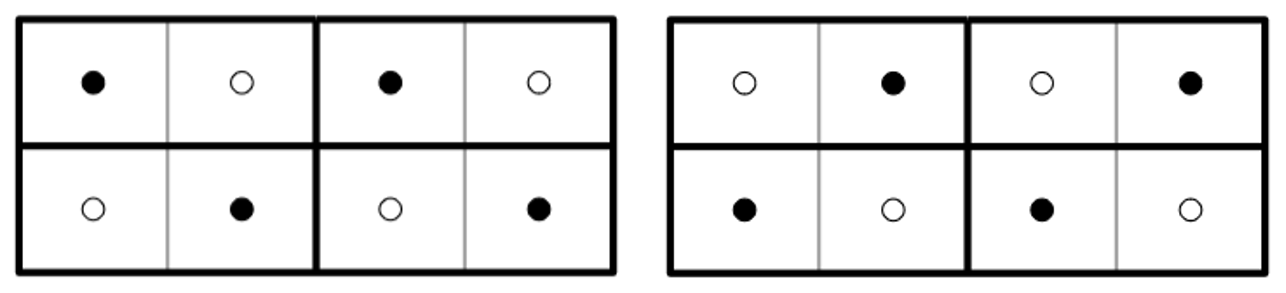
When we shade one of the two samples, we want to shade it at the sample’s correct physical location, not the center of the rectangular pixel. The goal is to shade the same sample as when rendering at native resolution. To do this, we enable per-sample shading with the HLSL ‘sample’ attribute modifier but limit the number of samples shaded using the Xbox-specific MSAA parameter: ‘NumSamplesForPSIterationLog2 = 0’. (‘sample’ has no effect with 1xMSAA native rendering, so it is safe to add to native resolution shaders.) Only the first sample will be shaded. To shade the other sample on the next frame, we exchange the positions of sample 0 and sample 1. (See Appendix 3).
An important part of setup is to utilize EQAA to reduce the size of all color buffers rendered with CBR. EQAA allows for some MSAA color samples to not be stored. In other words, a sample’s color can sometimes be “unknown”. In the case of checkerboarding, we will attempt to infer the missing colors from the geometric and temporal pixel neighbors. Color samples backed by storage are referred to as “fragments” to distinguish them from coverage samples. The setup we have described is 1 fragment with 2 samples, i.e. “1f2s EQAA”. Both coverage samples are backed by depth, but only the shaded sample is backed by color. Another benefit of using 1-fragment EQAA is that FMASK does not need to be decoded and shader resource views can be Texture2D rather than Texture2DMS.
Shader Modifications
Because of the staggered and skewed arrangement of pixel samples, texture gradients computed by the hardware are incorrect. This is a limitation of the GCN sampler units. Recall that the purpose of pixel quads is to compute texture gradients used when determining texture LOD. Ordinarily, the center of each pixel is used to compute horizontal and vertical deltas which form ddx(UV) and ddy(UV). However, with per-sample shading enabled, the gradients are computed from the four samples sharing the same sample index. Observe the shape of the gradients in the following diagram.
Figure 2: Skewed gradients derived from sample 0
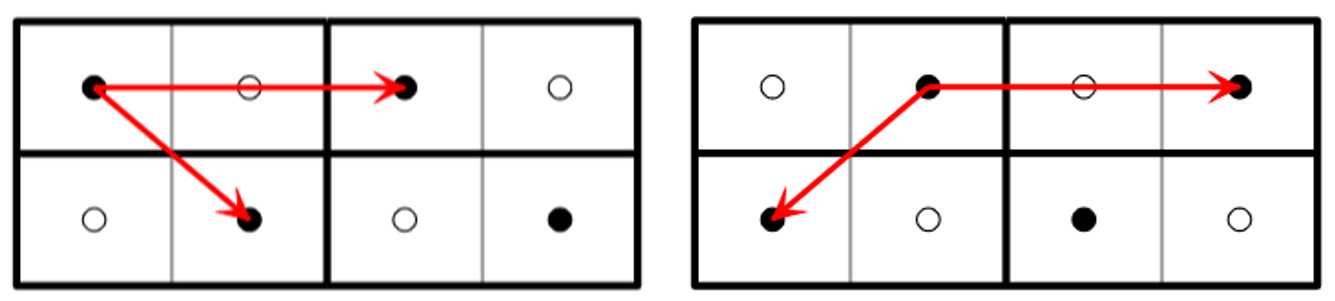
Figure 3: Corrected gradients
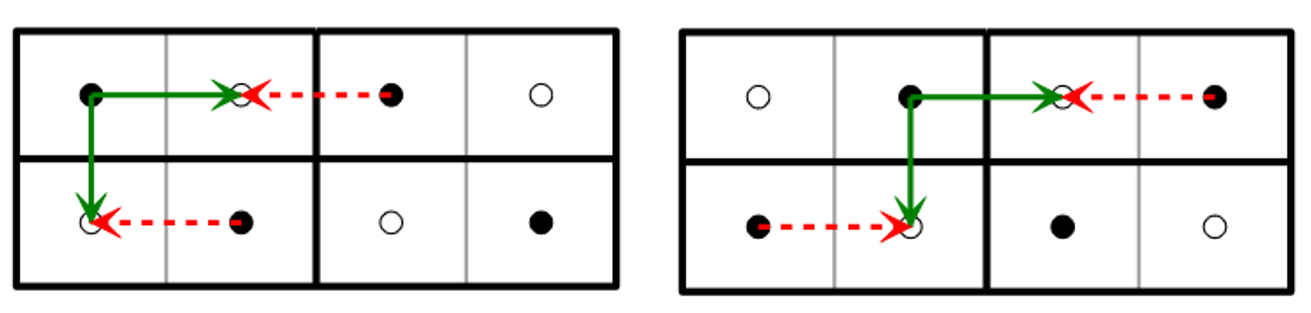
In this case, ddx covers two pixels instead of one, and ddy is diagonal. Notice that ddy is offset by ddx or -ddx depending on whether the frame is odd or even. This code corrects the gradients
float2 DDX = ddx(UV) * 0.5;
  float2 DDY = ddy(UV) + (FrameIsOdd ? +DDX : -DDX);
To use the corrected sample gradients, you must use SampleGrad() rather than Sample() or SampleBias(). This change does add some cost to your shaders. It has the obvious cost of reducing the texture fetch rate, but it also has the hidden cost of increasing VGPR usage and ALU. While shader cost may increase by some percentage, you are essentially cutting your shading work in half. It is not necessary to use ddx_fine()/ddy_fine(). Precise gradients are divergent in the quad and reduce texture fetch rate further.
Perhaps the biggest drawback to these shader modifications affects those who intend to support both checkerboard and native rendering at the same time. This necessitates a fork of your material shaders, doubling the time to compile shaders and doubling the space needed to store them on disk and in memory. We have provided a shader compiler feature to automatically modify shaders to correct gradients. It also supports disabling this feature without recompiling your shaders. This dynamic toggle may be useful during development to validate your CBR effect and compare performance. See our related white paper, Automatic Shader Modification for Checkerboard Rendering, for more information.
Another shader change may be required when sampling from full-screen buffers at native resolution. It is common to use SV_Position to determine your current screen position. Because SV_Position.xy ranges over the viewport dimensions which are now half as wide as native rendering, the X-coordinate must be doubled.
Alpha Testing
While we shade only half of the pixels, we still need consistent and correct depth information for all pixels. Alpha tested geometry must determine coverage for all pixels, not just the shaded pixels. This forces any shader that performs alpha testing to shade both samples. Alternatively, a depth pre-pass may be utilized for greater efficiency. It is generally a good idea to perform a pre-pass for alpha tests to avoid expensive shading when pixels will be discarded. A depth pre-pass for alpha tests also enables early Z rejection for the shading step. When using CBR, the pre-pass shader can be made more efficient by computing coverage for both samples at the same time and writing to SV_Coverage. (See Appendix 1.).
Triangle ID (Optional)
Checkerboard rendering is inherently a temporal process. Unshaded pixels are best filled by looking at what color they were on the previous frame. To consider the previous frame’s pixels, we must first translate each hole’s location to where it would have been rendered on the previous frame using “temporal reprojection”. By combining two frames, many holes in the checkerboard pattern can be resolved as if rendering at native resolution.
When considering whether a pixel from the previous frame is a good candidate for your missing pixel, it is informative to compare depth, velocity, and color. A more conclusive piece of information may be the triangle’s ID. If IDs are temporally stable and match between a pixel’s current location and its indicated previous position, there is near certainty that this is the correct pixel. But be aware that shading and lighting may have changed between frames, and a color bounding box rejection test should be employed as well as comparing IDs.
A triangle ID is very informative when accepting or rejecting temporal samples, but it increases memory and bandwidth costs. In many cases, depth and color may be all you need, especially if you already employ similar techniques for temporal antialiasing.
One possible method of generating IDs is to hash each triangle’s vertex indices and some other per-object or per-material value. First configure a 2xMSAA UINT render target. (We may not use EQAA because we need IDs for both samples.) On GCN hardware, it is permissible to simultaneously bind render targets with different fragment counts if they have the same sample count. IDs are invariant across a triangle face, so they are unaffected by shading rate.
Once you have a UINT render target bound, have your vertex shader export the value of SV_VertexID. The pixel shader can then form a hash from the three vertex indices. This is made possible by the Xbox intrinsic __XB_GetRawInterpoland() which returns an attribute exported from the vertex shader before interpolation. (On PC, the same is possible with Shader Model 6.1 and GetAttributeAtVertex().) One pitfall is that the interpolants can be reordered due to triangle clipping. We recommend sorting indices for consistency using the min3, med3, and max3 instructions. (See Appendix 2).
We chose not to use SV_PrimitiveID in the pixel shader for two reasons. The first is that it is not temporally stable in the presence of triangle culling. The other is that using SV_PrimitiveID has a negative impact on performance, which is beyond the scope of this document.
Image Reconstruction
The process of native image recovery, or “hole filling”, must be done before presenting the final image. Generally, the later this is performed, the more performance is improved. After recovering the missing pixels, you have a native resolution image, which doubles further work. It is sometimes necessary to resolve earlier to avoid certain artifacts, and it may be less intrusive to your codebase, but you will receive the most benefit if nearly everything is rendered at checkerboard resolution.
There are various approaches to hole recovery and no perfect solution. The algorithm you select must be appropriate for your renderer and work with the algorithms you already employ. One factor may be your method of antialiasing. If you use an image-based algorithm such as FXAA, you will probably want recovered pixels to appear unfiltered. When holes are filled with filtered pixels, edge detection algorithms can have trouble finding continuous edges. And in motion, filtered pixels can create the appearance of stippled transparency that reveals the checkerboard pattern. One solution to this is to identify the best color from a set of possibilities and use only that color—essentially nearest sampling rather than blending. We propose a weighted average where each weight is inversely proportional to distance squared. This tends to gravitate to the closest candidate but still allows for blends in the absence of a nearby candidate.
In this situation, we recommend using a temporally stable triangle ID. This lets the hole filling algorithm consider only the pixels that come from the same triangle. In the absence of pixels from the same triangle, the search can be extended to any pixels from the same mesh, and if that also fails, fallback to the average of the four shaded neighbors. This search naturally extends to the previous frame with the hope that this pixel was rendered previously. The four known neighbors from this frame are exactly one pixel distant. After reprojecting your sample location into the previous frame, there will be two shaded pixels with a distance < 1 (except in the unlikely case of landing exactly on another hole).
Figure 4: Gathering influences to infer the missing color. Candidates are weighted by similarity and proximity to the sample.
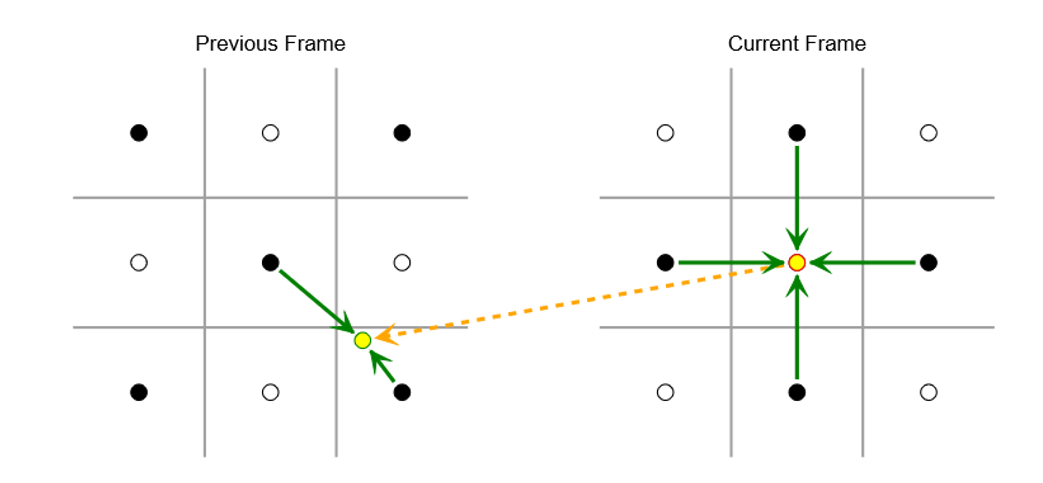
In this scenario, our approach is to weight all samples by 1/δ2 (where δ is distance between the intended sample position and the candidate sample position.) The samples should also be weighted to favor pixels from the same triangle as the hole. Ultimately, you have six candidate pixels (four from the current frame and two from the prior frame) to consider, and based on their triangle IDs and distance from the sample location, it should be possible to infer a good pixel color. If not, the fallback color may be used which averages the four neighbors to blur away the one-pixel triangle. In the best case (stationary camera with stationary geometry), the image is indistinguishable from native rendering, and in the worst case, the image will appear slightly blurry due to having half the sample density. Your results will be somewhere in-between and will vary across different parts of the image.
Temporal Antialiasing
As checkerboard rendering benefits from accurate velocity information, it tends to combine well with temporal antialiasing (TAA) algorithms. Not only can CBR and TAA be resolved at the same time in one shader, it also makes hole recovery less important. Temporal CBR recovery has some of the same challenges as TAA such as dynamic lighting, specular highlights, occlusion and disocclusion, etc. You may try to recover a pristine native image from two frames of CBR and then combine with the temporal accumulation buffer. Or you may merge the two processes and not keep a previous frame CBR buffer. In the latter case, an ID buffer may be less useful when sampling from the continuously-filtered accumulation buffer. As noted, much of the same problems must be solved when resolving CBR and TAA, and we recommend combining the two steps for maximum performance.
Due to the alternating checkerboard sample pattern, we also advise using an odd number of jittered frame positions such that both odd and even checkerboard samples are eventually rendered for all jittered positions.
Performance Expectations
In an ideal world, you would expect a 50% savings on all checkerboard rendering. This only includes the passes that shade half of the pixels. But there is some overhead that includes reduced quad efficiency, the SampleGrad() replacements, decreased occupancy (from extra VGPR pressure), and another non-obvious fact: texture bandwidth is nearly identical to non-CBR scenarios. This is because textures are still sampled at the same magnification, and the same cache lines must be fetched. When rendering triangle IDs, there will also be an increased pixel shader export cost from the additional render target. We have seen a rough 40% savings during Forward+ rendering. A deferred shading pass might come closer to 50% because most of the overhead applies to the base pass. A depth pre-pass may be as much as 20% faster thanks to the use of MSAA which improves depth compression.
Ultimately, the checkerboard image must be resolved to native, which invokes a fixed cost. For resolving with ID and without temporal antialiasing, our approach (described earlier) can be run in less than one millisecond at 4K on Xbox One X. The performance on Xbox One S at 1080p is comparable. With the introduction of TAA and by omitting the ID buffer, performance can range from 1.3 ms to 2.0 ms depending on whether you apply a sharpening filter and whether your accumulation buffer uses 32-bit or 64-bit color.
In real-world titles, the overall frame time savings vary. You receive the most benefit if CBR is employed for most of the frame, possibly deferring the native resolve to include copying to the swap chain. Some post effects may already work at sub-resolutions and be unaffected by CBR resolution. And texture bandwidth may be a large bottleneck to your rendering. Real games have seen a modest 10% - 20% frame time reduction, though the sample set is small, and continued experience with this technique may increase savings in other titles.
Integration Checklist
- Modify depth-stencil surface to half-width and 2xMSAA
- Modify color surfaces to half-width with 1f2s EQAA
- If using triangle ID, create a UINT surface with 2xMSAA (not EQAA)
- If not using TAA, double buffer CBR surfaces for odd & even frames
- Change Viewport and Scissor dimensions to match
- Use the low bit of your frame counter to drive odd & even frames (with a shader constant)
- After setting CBR render targets, call RSSetMSAAParametersX() (Appendix 3)
- Modify pixel shaders:
- Add keyword ‘sample’ to all interpolants
- Correct texture gradients (or use the “Auto CBR” compiler feature)
- Scale SV_Position.x by 2.0 when sampling native resolution buffers
- Optionally move alpha testing to a depth pre-pass (Appendix 1)
- Or shade both samples to get proper coverage by setting NumSamplesForPSIterationLog2=1. Take care that texture gradients for sample 1 use the opposite fixup as sample 0.
- If using triangle IDs, export SV_VertexID from the vertex shader, form a hash in the pixel shader (Appendix 2), and write IDs via MRT export. Or invent your own hash.
- Add a compute dispatch to resolve CBR to native
- (See MiniEngine for an example resolve shader)
Appendix 1 – Alpha Tested Depth
uint mainPS(VSOutput vsOutput) : SV_Coverage
{
    // Per-sample shading is *not* enabled, so interpolated UV is at pixel center,
    // between odd and even samples.  Gradients are not skewed, but ddx is twice too
    // big. The samples are reversed for odd scanlines on even frames and vice versa.
    float2 DDX = ddx(vsOutput.uv) * 0.5;
    float2 DDY = ddy(vsOutput.uv);

    // Shift UVs relative to center by 0.25 of a (native) pixel
    float Invert = (uint(vsOutput.pos.y) & 1) == FrameIsOdd ? 0.5 : -0.5;
    float2 UV0 = vsOutput.uv - DDX * Invert;
    float2 UV1 = vsOutput.uv + DDX * Invert;

    // Determine coverage values from texture alpha
    float C0 = step(g_AlphaRef, g_Tex.SampleGrad(g_Sampler, UV0, DDX, DDY).a);
    float C1 = step(g_AlphaRef, g_Tex.SampleGrad(g_Sampler, UV1, DDX, DDY).a);

    // Return 2-bit combined coverage mask
    return uint(C1 * 2.0 + C0);
}
Appendix 2 – Triangle ID Hash
Our hash function takes the lower 8 bits of each index and merges them into the low 24 bits. We leave the upper 8 bits for containing something to identify the individual draw call, mesh, or material. This could be the lower 8-bits of a material’s index, or a pointer to the mesh, or whatever you choose. This same value is passed in the upper 8 bits of each vertex ID. Here is example code to generate a pseudo-unique triangle ID.
uint Idx0 = asuint(__XB_GetRawInterpoland(vsOutput.vertexID, 0));
uint Idx1 = asuint(__XB_GetRawInterpoland(vsOutput.vertexID, 1));
uint Idx2 = asuint(__XB_GetRawInterpoland(vsOutput.vertexID, 2));
oTriangleID = __XB_Min3_U32(Idx0, Idx1, Idx2) & 0xFF0000FF;
oTriangleID |= (__XB_Med3_U32(Idx0, Idx1, Idx2) & 0xFF) << 8;
oTriangleID |= (__XB_Max3_U32(Idx0, Idx1, Idx2) & 0xFF) << 16;
Appendix 3 – MSAA Parameters
D3D12XBOX_MSAA_PARAMETERS params = {};
params.NumSamplesMsaaLog2 = 1; // 2xMSAA
params.MaxSampleDistanceInSubpixels = 4;
params.NumSamplesMsaaExposedToPSLog2 = 1;
params.DetailToExposedMode = 1;
params.ApplyMaskAfterCentroid = 0;
params.MaxAnchorSamplesLog2 = 1;
params.NumSamplesForPSIterationLog2 = 0; // Limit shading to 1 sample
params.NumSamplesForMaskExportLog2 = 1;
params.NumSamplesForAlphaToMaskLog2 = 1;
params.HighQualityIntersections = 1;
params.InterpolateCompZ = 1;
params.InterpolateSrcZ = 0;
params.StaticAnchorAssociations = 1;
params.OverrasterizationAmount = 0;
params.EnablePostZOverrasterization = 0;
D3D12XBOX_MSAA_SAMPLE_LOCATIONS samples = {};
uint32_t S0 = FrameIsOdd ? 1 : 0;
uint32_t S1 = S0 ^ 1;
samples.TopLeft[S0][0] = samples.TopRight[S0][0] = -4;
samples.TopLeft[S1][0] = samples.TopRight[S1][0] = +4;
samples.BottomLeft[S0][0] = samples.BottomRight[S0][0] = +4;
samples.BottomLeft[S1][0] = samples.BottomRight[S1][0] = -4;
D3D12XBOX_MSAA_CENTROID_PRIORITIES prios = { 0, 1 };
pCommandList->RSSetMSAAParametersX(&samples, &prios, ¶ms);