Download the Events Manifest file from Windows Dev Center
Note: This topic describes the features available only with proper permissions. For details, talk to your account manager or another contact at Microsoft.
This topic describes the procedure for downloading the Events Manifest file from Windows Dev Center. The Events Manifest file is an XML document that contains information about your configuration for the selected sandbox. You can use the manifest, along with the Xbox Common Events Tool, to create header files that contain function definitions that your title can use to send events.
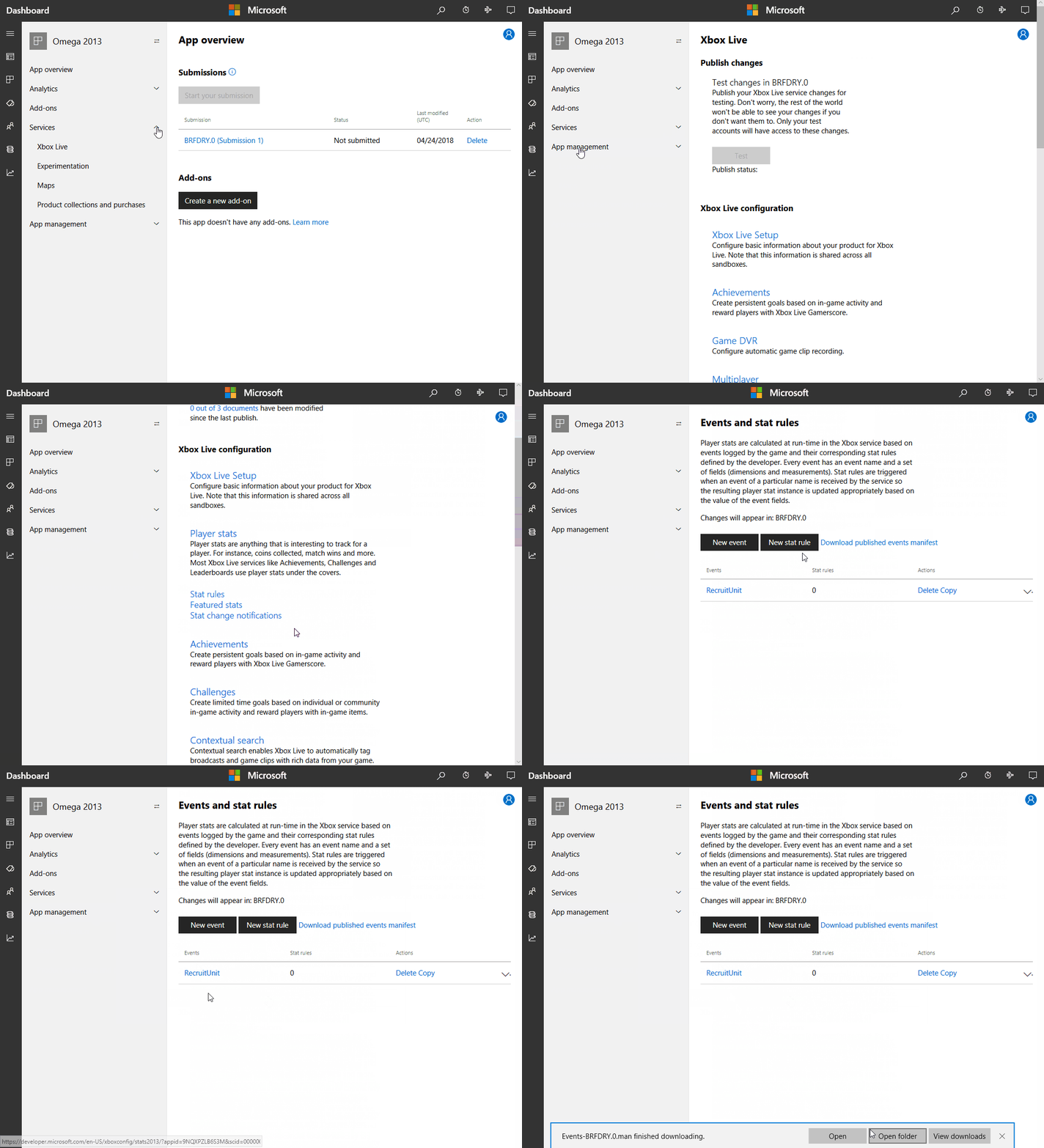
After defining or modifying your title’s events, you must publish them to your Xbox Live sandbox or retail and use the following steps to download the Events Manifest file from Windows Dev Center:
-
Sign in with your account in Windows Dev Center.
-
Select your title, and go to Services > Xbox Live.
-
Click the link to Stat rules.
-
On the Events & Stat Rules page, click Download published events manifest.
The downloaded manifest contains only the configurations published to the sandbox most recently. Any unpublished changes you made are not included.
-
On the Confirm dialog, click Download event manifest to confirm your download; otherwise, click Cancel.
See also
For details on events, see Game events.
For an intro to the Xbox Live service configuration, see Xbox Live service configuration.
For an intro to data platform 2013, see How the Xbox Live data platform 2013 works.