Hero/Featured Stats
Hero Stats (or Featured Stats in the Developer Center) are publisher-defined metrics that highlight the user’s most relevant progress, compare this progress with other players, and drive the user’s investment in the game experience. These custom stats allow publishers to surface dynamic content from a title at a glance — even when it’s not running — in a consistent fashion across Xbox system UX, including the Xbox One console, SmartGlass companion screens, and other platform experiences.
The goals of implementing Hero Stats include:
- Providing users with a consistent and accessible experience to track their own activity and progress in a game or app, as well as comparing with the people they care about.
- Affording publishers a new opportunity to showcase compelling and engaging aspects of their title to bring users back into the game or app.
- Evolving the current gamer profile experience in the shell, which allows the platform to track, celebrate, and reward everything each user does across all entertainment experiences in Xbox Live.
Important
Each title may select up to twenty of their most representative User Stats to be showcased as Hero Stats. All Hero Stats must be marked as Open Access so that other titles can read them.
Example Scenarios
- Display Hero Stats within the context of a “Game Details” scene to provide players real-time progress visualizations.
- Compare Hero Stats for one or many titles between the player and the friends they frequently interact with.
- Calculate aggregations of relevant Hero Stats across friends or the entire Xbox Live user base.
- Use Hero Stats as a proxy to enumerate relevant social leaderboards. Automatically make Hero Stats available for subscription via RTA for companion experiences.
- Glance at Hero Stats when looking at any user’s profile within the context of a title, such as the Party app in multiplayer games.
- Hero Stats are also “discoverable” by any app. This means that third party apps can build custom experiences like add-ins, websites, apps, or toolkits using the information provided by Hero Stats.
-
Fundamentals
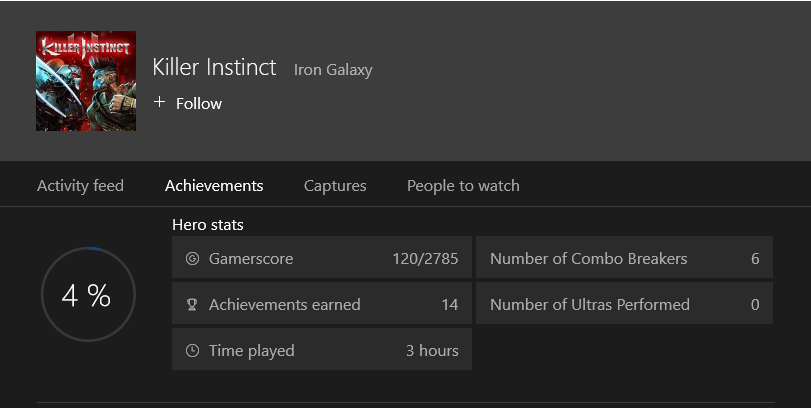
Think of Hero Stats as an opportunity for each Xbox One title to prominently display interesting data about the user’s activity directly into the system UX. Titles implementing Hero Stats may designate up to 20 (maximum) key user stats as Hero Stats. Pick a few of the most compelling stats that the title is already producing to drive users to re-engage and give them a reason to re-launch the title right there.
Figure 1. Example of displaying hero stats.
Configuration
When configuring the list of hero stats, the title publisher needs to specify the following details for each one:
| Detail | Description |
|---|---|
| Stat instance name | A specific user stat instance defined by the title. |
| Display name | The user-friendly name that will be used as the label in the UX. This string must be localized via service configuration. |
| Ordinal | The priority rank among other Hero Stats in this list so the platform UX can display them appropriately if space is limited. |
| Sort order | This property specifies whether a higher or lower value is “better” when comparing the stat between users (one vs. one, or in a social leaderboards context). |
Optionally, the title publisher can also specify the following to change how the Hero Stat is displayed:
| Detail | Description |
|---|---|
| Display Format | Provide formatting hints for clients to display numeric (INT or DOUBLE data type) Hero Stats in a user-friendly way. Publishers can indicate one of the following display formats for each Hero Stat: Integer, Decimal, Percentage, Short Timespan, or Long Timespan. |
| Display Unit | If SHORT or LONG TIME SPAN are selected as Display Format, a Display Unit can be selected to specify the unit of time being tracked by this stat. Publishers can indicate one of the following display units for each Hero Stat: Milliseconds, Seconds, Minutes, Hours, or Days. |
| Display Semantic | In order to assist non-game clients (including the shell, SmartGlass, and Companion apps) to determine what kind of aggregations and calculations should be applied to the value of a Hero Stat. Publishers can indicate one of the following display semantics for each Hero Stat: Cumulative, Tier, or Best. |
Important
Not all User Stats can take advantage of these optional display properties.
Best Practices
Ultimately, each Xbox One game/app designer will have the opportunity to make the most out of the premium screen real estate reserved by the platform for Hero Stats. Consider the following notes to help you determine which hero stats to configure:
- Be strategic about which hero stat is marked as ordinal “1”. Some platform experiences, like the games detail page from the Xbox Game Store, will only display the highest ranked hero stat in the form of a social leaderboard that includes the user’s friends and their relative scores and rankings.
- Try to select metrics that are most likely to cause the user to get launch your title. Examples include player rank, in-game currency balance, name of next goal or campaign milestone, and cumulative numeric scores or XP. Pick one or more metrics that highlight social or interactive aspects of the game, such as stats specific to multiplayer mode, sharing/rating user-generated content, or other cooperative/competitive activities.
- Select stats that define your title’s game play and serve as conversation starters among your user community. For example, number of chickens kicked, number of collectibles found, user level or XP, preferred character or weapon, etc. The value of the stat is not automatically localized to other languages, or mapped to a set of labels.
- Note that the value of a hero stat can be any valid integer, float, or string data type. If a particular formatting is desired, one potential workaround is for the client to define and log events which include the actual value of the stat in one field, and the formatted string equivalent in another event field; then use the string event field as an UPDATE.