Create Gesture Project
To create a new gesture for your collection, set focus to the solution node in the Explorer and then select File > Create New Project or right-click on the solution and select Create New Project from the context menu.
VGB contains a simple dialog to help with gesture creation. Specify the tag name, body side, machine learning technology, and common training settings for each gesture that you create.
Figure 1. Create Gesture Project dialog
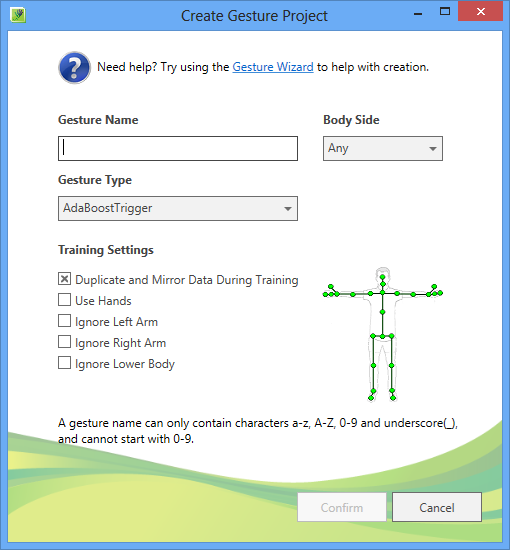
| Gesture Item | Description |
|---|---|
| Gesture Name | The name of the gesture tag. This name should be descriptive enough to capture the intent of the action. If your gesture corresponds to a particular side (Left vs Right) do not include “Left” or “Right” in the tag name, as that will be appended later when you select a Body Side. Examples: Jump, Punch, Kick, Sit, FireWeapon, etc. |
| Body Side | Indicates which side of the body the gesture correspond to. If Left is selected, "_Left" will be appended to the gesture name. If Right is selected "_Right" will be appended to the gesture name. Options:
|
| Gesture Type | Indicates which machine learning technology to use for gesture training and detection. Options:
|
| Training Setting | Description |
|---|---|
| Duplicate and Mirror Data During Training | If set to True (default value), all data for the gesture will be duplicated and mirrored during training. If data exists for the opposite body side (Left vs. Right), that data will also be mirrored and used during training. Set to False when your gesture requires motion from both sides of the body (Body Side = Any) and the gesture is asymmetrical. For example, when the gesture requires that the right arm be up while the left arm is down. |
| Use Hands | If True, supported hand states (open/closed/lasso) will be used during training and detection. Warning: Do not use this option if your game supports more than two simultaneous players. |
| Ignore Left Arm | If True, all joints in the left arm will be ignored during training and detection. Set to True when your gesture does not depend on motion/position of the left arm (Punch_Right, Push_Right, Kick, etc.). |
| Ignore Right Arm | If True, all joints in the right arm will be ignored during training and detection. Set to True when your gesture does not depend on motion/position of the right arm (Punch_Left, Push_Left, Kick, etc.). |
| Ignore Lower Body | If True, all joints below the hip region will be ignored during training and detection. Set to True when your gesture does not depend on motion/position of the lower body. Such a gesture can usually be performed while seated or standing. |
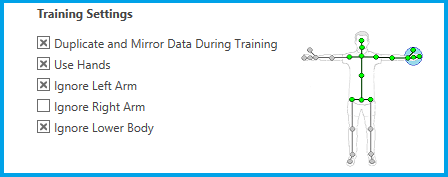
The joint mask is displayed on the right of the Training Settings. Toggling the Use/Ignore settings will update the joint mask. Green joints will be used during training and detection, grey joints will be ignored. A blue circle around the hand indicates if hand state will be used.
Figure 2. A right arm gesture
When you are ready to create your gesture, select the Confirm button and save to the desired location. The new gesture projects (both training and analysis), will then appear in the Explorer.
If you are confused about any of the options on the Create Gesture Project dialog, try using the Gesture Wizard link which is available at the top of the dialog. This will launch the Gesture Wizard tool, which will guide you step-by-step through the gesture creation process.