How to: Deploy Game Resource Files Using Visual Studio
When you use Visual Studio to deploy or launch a Xbox One XDK project, the contents of the Durango\Layout\Image\Loose project subdirectory are deployed to the console. When you build a Xbox One XDK project, compiled application files are automatically copied to this directory and deployed. To deploy additional game resources, such as textures and shaders, their files need to be copied to the Loose subdirectory of the Xbox One XDK project as well.
The Loose directory is relative to the project directory. For example, if the project is stored in the following directory:
c:\MyProjects\D3D11Game1\D3D11Game1
The Loose directory will be a subdirectory of the project here:
c:\MyProjects\D3D11Game1\D3D11Game1\Durango\Layout\Image\Loose
Any files placed in the Loose directory, either manually or as part of the build process, will be deployed with your app.
Files in the Loose directory are deployed with the same relative path they have in the Loose directory. For example, files in Loose\Models will be deployed in a Models subdirectory on the console.
Files in the Loose directory will not be deleted when building or cleaning the project unless they exist as content in the project (see Adding Files to the Project below).
There are three primary ways to add files to Durango\Layout\Image\Loose.
Manually Copying Files
Manually copying files into the Loose directory will cause them to be deployed with the project as long as they remain in the directory.
To add files manually
- Use xcopy to copy files from the project directory to the \Layout\Image\Loose directory.
This method is quick and easy, but might cause problems if you work with a build lab or with developers who do not copy all required files.
Files that are manually copied to the Loose directory will continue to be deployed as long as they are in the directory. Files manually copied to the Loose directory will not be deleted when the project is built or when the project is cleaned. To stop the files from being deployed they must be deleted from the Loose directory.
Copying with a Post-Build Event
Creating a post-build event in Visual Studio to copy files will cause files to be copied to the Loose directory every time that you build your project. In addition, a post-build event can make use of $(ProjectDir) and $(LayoutDir), Visual Studio properties that identify the project directory and the layout directory, respectively.
For example, the following command line causes a file, MyPicture.bmp, to be copied from the project directory to \Image\Loose in the Layout directory, where deployment will copy it to the console.
xcopy $(ProjectDir)MyPicture.bmp $(LayoutDir)Image\Loose
To add files by using a post-build event
- Open your project’s Property Pages dialog box, and then select the Post-Build Event page under Build Events.
Figure 1. Specify a command line for the post-build event.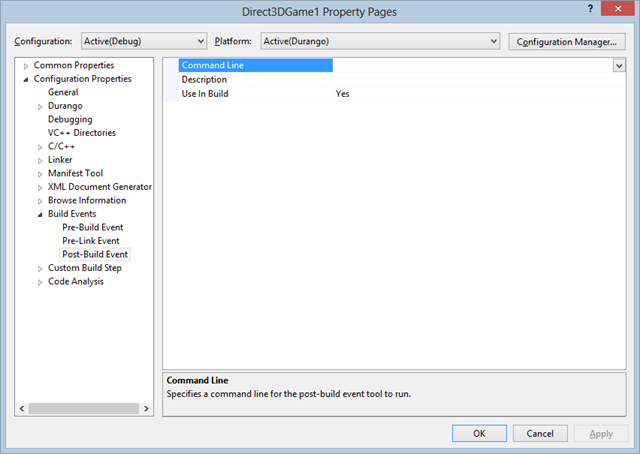
- In Command Line, enter a command line that uses xcopy to copy files from the project directory to the Layout\Image\Loose directory.
For example, xcopy$(ProjectDir)file-name$(LayoutDir)Image\Loose, where file-name matches the name of the file or files that you want to have copied.
Note Files that are copied to the Loose directory with a post-build event will continue to be deployed as long as they are in the directory even if the post-build event is removed from the project. Files copied to the Loose directory with a post-build event will not be deleted when the project is built or when the project is cleaned. To stop the files from being deployed they must be deleted from the
Loosedirectory as well.
Adding Files to the Project
Files can also be added to the project as resources. Project resources are automatically copied to the Loose directory and deployed with the project.
To add files as a project resouce
- Right click on the project and select Add, Existing Item….
- Select the item to add to the project.
- Open the properties window for the resource and ensure the Content property is set to Yes.
This method treats the files exactly like other project files, such as the executable. Files are deleted when building or cleaning the project and are automatically copied to the Loose directy and deployed with the project. Removing the file from the project also removes it from the Loose directory.