Leaderboards
Leaderboards are a fun way to engage users and drive competition amongst your players. Xbox Live provides functionality that is suited for your hardcode gamers (Global ranking against the whole XBL population) and for your casual gamers (Social ranking against a user’s friends).
There are two types of Leaderboards available to you:
- Global Leaderboards (ranks the whole XBL user base and have to be configured)
- Social Leaderboards (are generated dynamically and ranks user’s friends)
These are both very similar concepts, but they have fundamental differences in terms of configuration and intent. Global leaderboards are predefined views configured by developers in the service at ingestion time (either before or at any time after the title is released). Social leaderboards only include people in the user’s social graph and don’t need to be pre-defined at ingestion time because the service generates them dynamically at run time based off existing user stats.
Understanding Leaderboards
In a nutshell, Leaderboards have two main components:
- A value to be ranked against (in XBL, this is always a Player Stat)
- Sort order (Higher or lower values are better)
Stats as ranking values
Leaderboards are derived from Player Stats so having the right Stat Rules defined for what you need is crucial. As your are designing your game, keep in mind what Leaderboards you’d like users to be ranked against.
Global Leaderboards
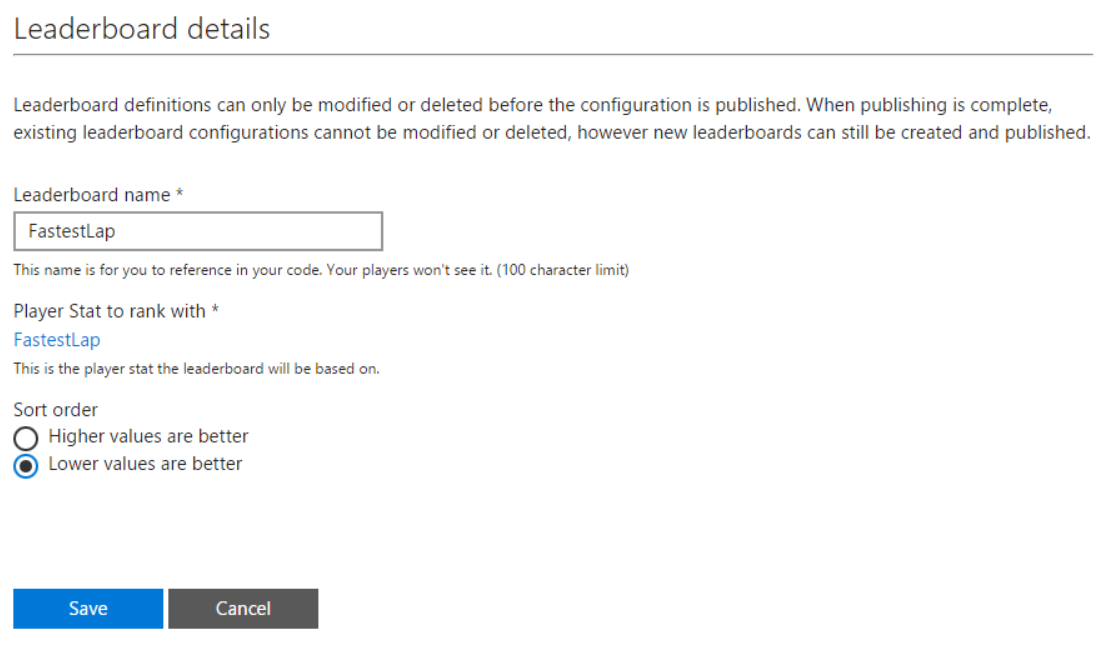
Global leaderboards keep track of the best scores recorded by players across the Xbox LIVE community. The main differentiation for Global leaderboards is that they are predefined at ingestion time by specifying a leaderboard identification name, ranked stat, and sort order (ascending or descending). Titles can define an unlimited number of global leaderboards and add more leaderboards at any time via service configuration. The maximum number of records per global leaderboard is currently limited to 10,000 entries. This means that players whose “best” score is not ranked in the top 10,000 will not appear in the leaderboard.
It is possible to read a “page” of up to 100 leaderboard entries (player XUID, gamertag, global rank, and score) at a time and specify the starting rank of the page, or retrieve leaderboard entries centered around a specified gamertag. The results are always scoped to all-time; day, week, and month views are not supported yet.
Global leaderboards can be accessed via XSAPI or our REST API using GET (/scids/{scid}/leaderboards/{leaderboardname}).
Below is a screenshot of how a sample Leaderboard could be configured for a racing game:
Social Leaderboards
Social leaderboards are great incentives for casual gamers to compare and rank themselves against their friends so even if they are not in the highest ranks of the community, they can still be motivated to beat people they know. They are dynamically created based on any existing user stat, and therefore don’t need to be pre-defined at ingestion time and only people in one specific player’s social graph.
The main advantage to Social Leaderboards is that these are not predefined so you could create a Social Leaderboard for any stat for your game. The caller can specify two things when requesting a social leaderboard: 1) the stat instance and 2) sort order (default is descending by rating). The results are always scoped to all-time; day, week, month views are not supported.
As with global leaderboards, a caller can read a “page” of up to 100 leaderboard entries (player XUID, Gamertag, global rank, and score) at a time and specify the starting rank of the page.
Social leaderboards are accessed via XSAPI or our REST API using GET (/users/xuid({xuid})/scids/{scid}/stats/{statname)/people/{all|favorite}).
Global Leaderboards with a Social View
Since social leaderboards are created dynamically, it takes longer to retrieve a social leaderboard than it does for a global leaderboard. For scenarios where your title frequently retrieves a social leaderboard based on a common set of criteria, you can create a global leaderboard, and retrieve only the entries in the leaderboard that pertain to the user’s social graph.
This results in a faster retrieval time than social leaderboards, since the leaderboard already exists on the Xbox Live servers, and results in a smaller payload, since the results are scoped to the user’s social graph. This type of leaderboard is a global leaderboard, and therefore must be defined in the title’s service configuration.
Global leaderboards with a social view are accessed using the normal global leaderboard request, GET (/scids/{scid}/leaderboards/{leaderboardname}), and appending the following query to the URL: &viewTarget=people&view=people.
To support multi-column leaderboard views stats metadata can be used. A title can define metadata fields for a leaderboard stat which can be returned when querying leaderboard ranks. A title should not use the batch User Stats URI to achieve the same behavior as privacy settings may prevent stats access.
Multi-column Leaderboards
There will be cases where you need more columns in a Leaderboard to decorate the stat with more information, for example, for a Leaderboard for most enemies defeated, you might want to add the weapon the player used, the map where it happened, the most type of enemies defeated, and the K/D ratio.
XBL Leaderboards have multi-column support built in so you can very easily get these type of rankings. The only pre-requisite is that the stat utilized for the Leaderboard has Stat Context defined, which is what’ll be used as additional metadata. For example, for a FastestLap stat we might want to configure these additional properties as Stat Context:
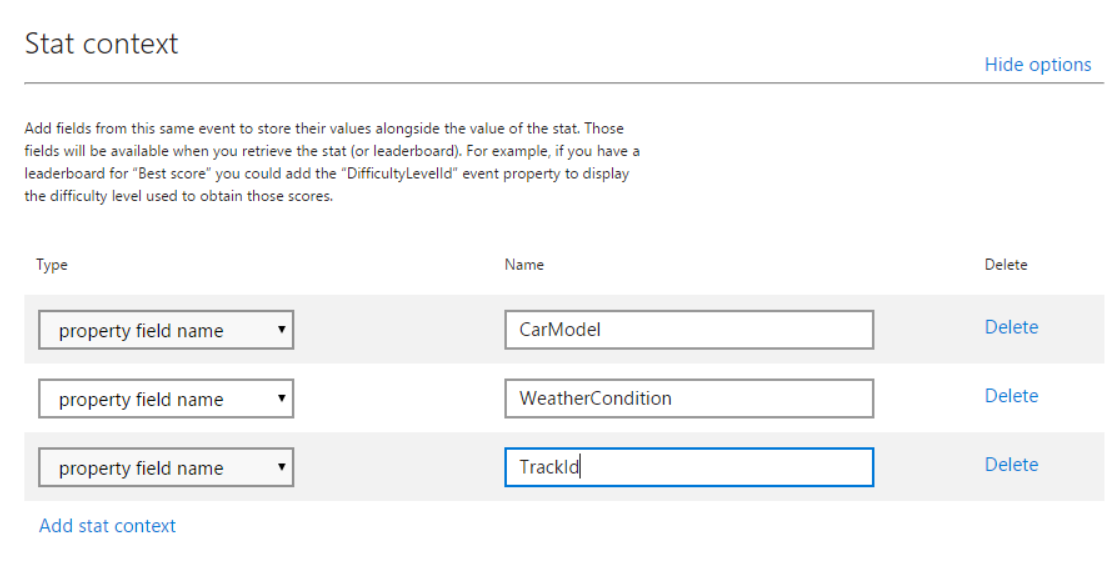
Now that the stat will be getting persisted with context, if we retrieve the multi-column leaderboard, it would look something like this:
| XUID | Value (FastestLap) | CarModel | WeatherCondition | TrackId |
|---|---|---|---|---|
| SUM | Constant or field | Model A | Rainy | 9 |
| MIN | Field | Model A | Sunny | 9 |
| MAX | Field | Model B | Sunny | 2 |
| REPLACE | Constant or field | Model C | Cloudy | 1 |
Multi-column leaderboards are currently supported in Global Leaderboards and Global Leaderboards with a Social View. However if you’d like to create a Multi-column Social Leaderboard, you can use the batch User Stats call to get all the stats with their context and manually create the LB.
Multi-column leaderboards are only accessed via our REST API using the normal global leaderboard request, GET (/scids/{scid}/leaderboards/{leaderboardname}), and appending the following query to the URL: &include=valuemetadata.