Maximizing File Performance
Andrew Farrier, Xbox Advanced Technology Group
Updated June 13th, 2017
In this topic
Introduction
There are several different methods to load data from the Xbox One hard drive. In this paper, we show real world data on what type of performance you can get by using each of the methods. We realize that making some of the recommended changes can have a significant schedule impact. Using this data, you can make an informed decision about what changes to make to your title to achieve the maximum performance from the Xbox One file system in relation to your schedule.
Attachments
Included with this paper are three files:
- FileLoadData.xlsx
- The raw data collected and used in this paper.
- File.cpp and File.h
- The file system used to capture all the data used in this paper.
- This code supports both blocking and asynchronous file I/O. You can use this code in your engine if desired.
Loading data
There are two ways to load data from the Xbox One hard drive. The first way is the most common, a blocking load. The second way is to use asynchronous I/O where there are multiple requests in flight at a time.
All the data gathered for this paper was performed by using an encrypted packaged build that uses the makepkg utility with the test encryption key. You should do this for all your loading tests because it will most closely match the end-user experience. The included raw data file has data for packaged and loose builds, and shows the differences between the two.
The Xbox One X dev kit also includes a solid-state drive (SSD) for development work as well as the traditional rotational drive. Do all profiling using the rotational drive, because this will model the performance characteristics seen in the retail environment. The xbapp and xbdeploy tools now have a /Drive option to determine the where to deploy your application.
Blocking loads
Blocking loads are defined as any call to the operating system to load a file where the caller is blocked until the load finishes.
A prime example of a blocking load is using the C++ Standard Library functions fopen, fread, and fclose. In this case, the caller must wait for fread to finish loading the data before they can continue. This pattern is generally used in titles that are cross-platform because these functions exist everywhere. The problem is that using these functions will produce the slowest load times.
The second case where blocking loads happen is when using CreateFile and ReadFile without using the FILE_FLAG_OVERLAPPED flag on CreateFile along with a correct OVERLAPPED structure with ReadFile.
Asynchronous loads
Asynchronous loads are defined as using overlapped I/O. Xbox One can handle multiple overlapped I/O requests in flight at a time. The term for how many requests are in flight is queue depth. In general, it’s preferable to get this number as high as possible to give the operating system as much information as you can for it to optimize the load order.
On Xbox One, the way to create asynchronous loads is to use the FILE_FLAG_OVERLAPPED flag when opening the file with CreateFile, and then use a unique OVERLAPPED structure for each call to ReadFile that is still in flight.
Caching
Xbox One has a 12 MB cache that is used by default for a file. You can disable the use of the cache for your files by using the FILE_FLAG_NOBUFFERED flag on the call to CreateFile call.
Using the cache has the benefit of fast call if the same data is requested again; the operating system can return the data directly from the cache. This can give a pretty good performance boost when running on a desktop machine that has plenty of memory to use as a file cache. However, on Xbox One, the file cache is a fixed size and overall not that large.
Using the cache on Xbox One creates several problems. Because all reads end up going through the cache, there is always an extra memory copy from the cache to your data buffer. The second is much worse; if there is not enough free space in the cache for a read call, some data will be evicted. One critical piece of data that may be evicted is the file allocation table that stores where files are located on the disk. If this data is evicted, the operating system is required to reload it, resulting in converting one read call into two.
Xbox One does not perform read-ahead like a PC does. This is to avoid polluting the limited cache space with unneeded data. You will need to manage this yourself if your title would benefit from read-ahead.
Two new functions are available in the June 2017 XDK that allow the title to affect the size of the file cache. The functions are SetSystemFileCacheSize and, for querying, GetSystemFileCacheSize. SetSystemFileCacheSize allows you to increase the size of the file cache, but it will decrease the amount of memory available to your title. Don’t use these functions to reduce the amount of memory below the default 12 MB or you’ll see serious degradation in file performance. The system must constantly re-read the file allocation tables and that will double the overhead of many of your file requests.
Xbox One X
Xbox One X includes improvements to the hardware and the underlying file system to increase performance. You’ll see these increases in the bandwidth numbers shown in this paper. However, it’s important to follow the same best practices as before to achieve maximum performance in reading your title. If it loads fast on Xbox One, it’ll load faster on Xbox One X.
The Xbox One X Dev Kit also includes an SSD to greatly reduce daily iteration times. These numbers are also included in the tests. But as you’d expect, the bandwidth for the SSD is drastically higher than for the rotational drive. When finalizing your loading code, it’s important to test on the rotational disk. This is done by installing your title package on the retail disk by using the /Drive:retail flag with the xbapp install command.
Root cause: access time
The root cause of all file loading problems is the time needed for the hard drive head to move from one location on the platter to another location. This time will dwarf any time needed to read in the data after the head is in the correct location. Average access times are measured in milliseconds for a typical physical hard drive such as the drive on the Xbox One console. This means that that each blocking read call will take, on average, several milliseconds at a minimum.
For comparison on Xbox One, converting from a 4-KB read size to a 128-KB read size will decrease loading times by 30x for random locations on the disk. The larger read size results in fewer reads and thus fewer seeks for the same total data read.
If it’s possible to both convert to 128-KB read sizes and place the data sequentially in your package, the decrease in loading times could be up to 200x. Placing the data sequentially has the added benefit of reducing the average distance the head must move and thus reducing the average seek times.
Resolution
Several ways to resolve the issue with seek times depend on your engine architecture and the time you are willing to commit to updating it.
Caveat
In all the presented data, there appear to be some anomalies in the graphed results; for example, a spike on the time to read data. Those cases are due to the random nature of the data read locations used in the test. This was done to try to simulate each title having different patterns in how it reads data. The numbers provided are all a guideline to show general trends; you should always try several different numbers for read size and queue depth with your title to find the optimal parameters.
Reduce read calls
Reading in larger amounts of data per read call will directly lower the number of read calls. This will directly reduce the number of seeks because there will be only one seek per read call.
Figure 1. Performance increase from larger read size and random locations on disk.
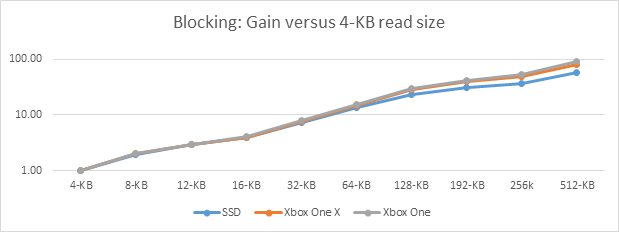
As you see in the graph, the performance drastically improves as the size of the reads increases. For example, the 512-KB reads are almost 90 times faster than 4-KB reads. This is directly related to the reduction in the number of read calls.
The gains are not as pronounced on the SSD or the Xbox One X hard drive. This is because of the overall increase in throughput for these devices. The gain comes more from the reduced overhead in the operating system, due to the reduced number of requests.
Sequential access
If the data needed for each read call is located sequentially from the previous read call, the head on the hard drive needs to move only the minimum amount. This results in a dramatically lower average seek time and thus decreases overall load times.
A common performance trick is to sort a title’s file access based on location in the package. This creates a semi-sequential read order; there’s still a random offset between each call. This produces a reasonable performance increase on Xbox One only for lower read sizes.
Figure 2. Performance increase from sorting read locations.
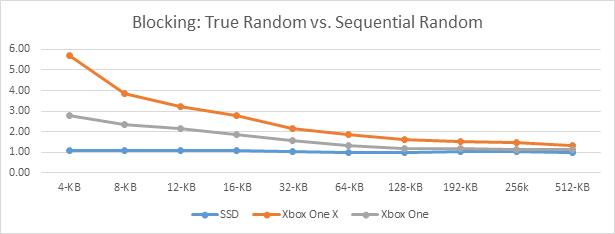
The gain starts to level off around 64-KB reads. This is still due to the reduction in the number of reads, which is already lowering the number of seeks. With the lower number of seeks, the difference starts to become noise in the system. The total variance gained by this method is lower because there are fewer reads.
Xbox One X will see more gain from this pattern due to tighter packing of the tracks on the rotational disk. This causes an overall decrease in the amount of head movement from one location to another, and thus lower seek times.
If the layout on the disk can match the true read order of data with no gaps between locations, you can also receive a significant performance increase. In the retail environment, however, it can be very hard to have true sequential read locations. The problem is that, over time, the drive becomes fragmented from operations like title updates, installing new games, and removing old games. The Xbox One console doesn’t attempt to defragment in the background the same way a Windows PC does.
Figure 3. Performance increase from using true sequential read locations.
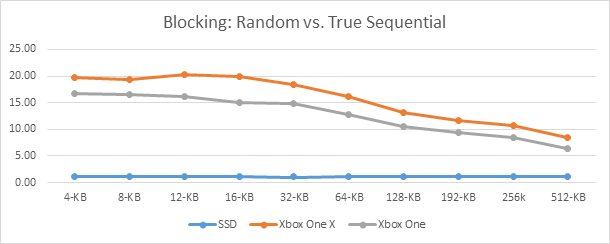
As you can see in the graph, the difference between reading random locations and truly sequential locations can be significant for smaller read sizes. The larger read sizes do not have as much of a gain because the data is already sequential for each read call. The real gain in these cases comes from the much smaller seek times in relation to random locations throughout the disk.
Asynchronous
The ultimate solution to decreasing loading times is to switch to asynchronous read calls. This is done by using the FILE_FLAG_OVERLAPPED flag with CreateFile along with a unique OVERLAPPED structure in each ReadFile call.
Performing asynchronous read calls does have several requirements though. The first is that they cannot go through the file cache; this means the FILE_FLAG_NO_BUFFERED flag must also be set. The second is that read locations and sizes must be aligned. The location on disk must be aligned to a 4-KB boundary, and the read size must be a multiple of 4 KB. The location in memory must also be aligned on an 8-byte boundary. If any of these requirements are not followed, the call to ReadFile will fail.
The main benefit from using asynchronous I/O is that you can have more than one request in flight at a time (the queue depth). The Xbox One drive will reorder all requests in flight to automatically minimize seek times based on the location of the head in relation to the location of the data on the disk.
The first step is usually to convert to using asynchronous I/O but only keeping one request in flight at a time. This requires making sure that all read requests are following the rules for alignment. In this case, the ReadFile call is immediately followed by a WaitForSingleObject call on the event used in the OVERLAPPED structure. This makes the entire process act like a blocking load for the rest of your engine.
Figure 4. Switch from Blocking to Asynchronous with a queue depth of 1.
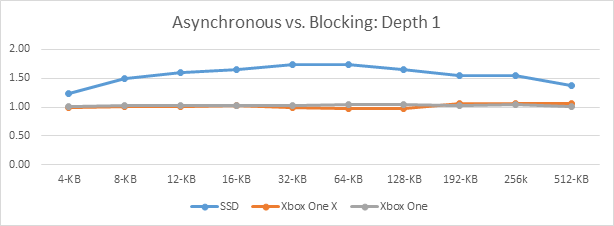
The gains from doing this conversion are almost nonexistent. This is because the number of seeks is the same and because Xbox One cannot reorder the requests. The Xbox One operating system knows about only one read request at a time.
The gains on the SSD come from the reduced overhead in the operating system for asynchronous I/O. Blocking I/O requires extra copies to get the final data into the correct position. This overhead isn’t seen from rotational disks due to the drastically increased cost to read from them.
Asynchronous operations start to show significant improvement in loading times when the number of requests in flight is increased. In this case, the Xbox One hard drive has more information to use to reorder the requests to reduce seek times.
Figure 5. Doubling the queue depth from 1 to 2 on asynchronous reads.
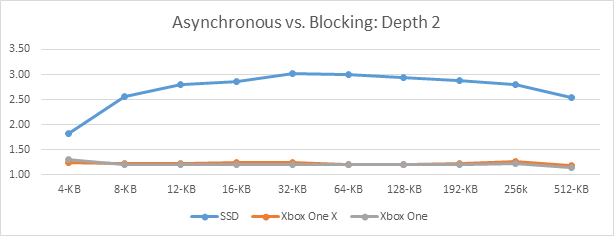
As you can see from this graph, the gain for 4-KB reads goes from nonexistent to1.3 times faster. In the attached raw data, though, you can see this is only a change from ~190 KB/s to ~220 KB/s for the 4-KB read size.
A good number of requests to have in flight is in the 16 to 20 range. The Xbox One hard drive has space for 32 requests in its command queue. The 16-to-20 range allows room for any potential system requests to sit in the queue at the same time. Overall, this provides the maximum amount of usable information, so the hard drive can reorder requests to minimize the amount of seeking. In general, the gains will start to level off with a larger queue depth.
The drop in performance increase as the read size increases is due to the overall reduction in number of reads. The larger read sizes are already getting the benefit of the data being more sequential on the disk.
Figure 6. Recommended queue depth of 16 requests in flight.
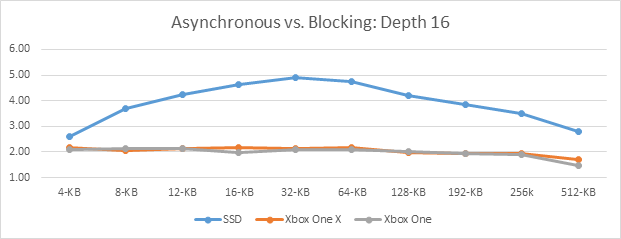
This graph shows the performance gain when there is a maximum of 16 requests in flight at one time. The gain has started to level off at slightly over a twofold improvement over using blocking I/O. As the previous test shows, there is a drop in the performance increase as the read size increases. This is primarily due to the lower number of requests overall for the same total amount of data in both tests. The gain at the lower read sizes is from the larger data set that Xbox One must optimize for the file load order.
One final test is to give Xbox One as much data as possible by increasing the number of requests in flight to the maximum amount. In this case, all reads needed to load a level are known ahead of time, and the title requests all the data at once.
Figure 7. Maximum queue depth on asynchronous reads.
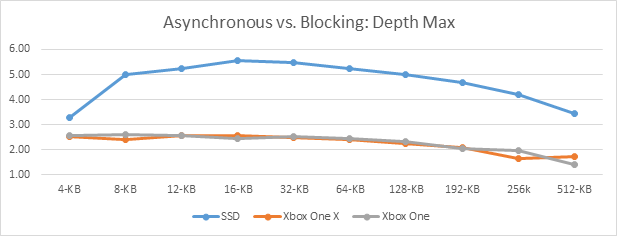
The numbers are better than the numbers when the maximum queue depth was only 16 requests. The bandwidth could increase slightly as the depth increased in size, but the resource pressure on the system increased as well. There is also a gating factor: a limit of 32 entries in the command queue on the hard drive. This means it can support a maximum of 32 requests at a time for reordering. These 32 are also shared with any other requests coming from the operating system—for example, reading from the file allocation table. These tests have zero contention from other sources, which accounts for the higher perceived gain. In retail, however, there will be increased contention from other systems such as connected storage. Therefore, we recommend maintaining around 16 requests in flight at a time. We’ve found it to be a good trade-off with operating system work and title resource limits.
As a side note in these tests, the queue depth could reach almost 19,000 in flight at once. The title code was required to back off slightly due to resource limits on Xbox One for various internal objects.
Throughput
The previous sections covered the gain between the different methods to load files, but what is the actual megabytes per second that can be achieved? With all the data presented, though, keep in mind that we guarantee only an average throughput of 40 MB/s over any two-second window. This means that if your title gets only 20 MB/s for one second, the next second it will get 60 MB/s. All captures were performed when there was no contention on the hard drive from other applications such as the system OS. This represents the optimal performance, where you could see times greater than the promised 40MB/s.
Due to improvements in the hardware and software, Xbox One X consoles have a higher minimum bandwidth guarantee: 60 MB/s over any two-second window.
Caveat
In all the presented data, there appear to be some anomalies in the graphed results; for example, a spike in throughput. Those cases are due to the random nature of the data read locations. This was done to try to simulate each title having different patterns in how it reads data. The numbers provided are all a guideline to show general trends; you should always try several different numbers for read size and queue depth with your title to find the optimal parameters.
Blocking
The worst performance comes from using blocking I/O from random locations in your data files.
Figure 8. Throughput using blocking reads and random locations.
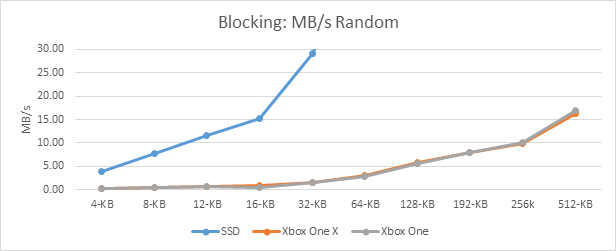
The throughput from using 4-KB reads is only 190 KB/s on Xbox One and 200 KB/s on Xbox One X. This means it would take a little over an hour to load 1 gigabyte of data for a level. The throughput starts to increase drastically as the read sizes get larger. The gains are all coming from the lower number of seeks due to the lower number of read requests.
As expected, the numbers for the SSD go off the chart very quickly. They top out at 392 MB/s.
The final numbers for blocking reads are seen if the title can perform true sequential reads with a zero offset between each read location.
Figure 9. Throughput using blocking reads and true sequential locations.
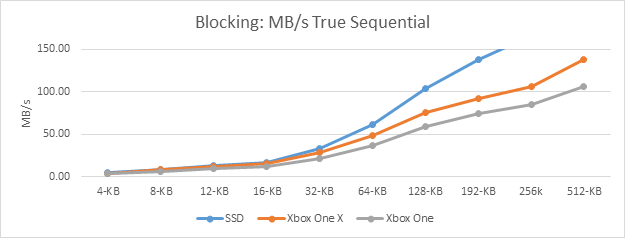
In this case, the 4-KB read size has gone from 190 KB/s for truly random to 3.14 MB/s. on Xbox One. Xbox One X is faster at 3.97 MB/s. We’ve finally broken the one-hour mark for loading times, in this case down to slightly over 5 minutes.
In the retail environment, however, it can be very hard to have true sequential read locations. The problem is that, over time, the drive becomes fragmented from operations like title updates, installing new games, and removing old games. The Xbox One console doesn’t attempt to defragment in the background the same way a Windows PC does.
Asynchronous
The absolute best performance comes from using asynchronous read operations. A recommended number of requests in flight at a time is in the 16 to 20 range. Below that range the performance will not be as optimal, and the gain starts to level off above those numbers. However, the larger read sizes don’t need as many requests in flight to hit their peak. Again, you must measure against your title access pattern for the best number; however, sticking in the 16-20 range is a safe bet.
Figure 10. Throughput using asynchronous reads and random locations with 16 requests in flight at once.
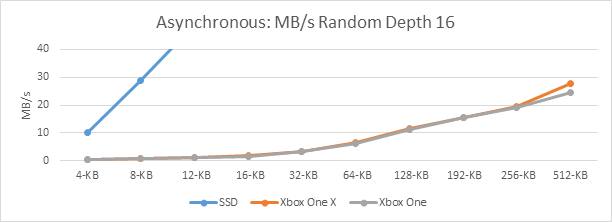
As you can see, the performance difference between asynchronous and blocking reads is very measurable. The throughput when using blocking reads at random locations for 256-KB read sizes was 10 MB/s on Xbox One. The throughput for the same asynchronous reads, with 16 in flight, jumps to 19 MB/s. This is almost a twofold improvement in read performance. Xbox One X shows the same relative performance gains.
The next step was to create the random read requests in sorted order based on location. This minimizes the seek distance between reads. The operating system will reorder the inflight requests, but it only has a certain size window to see all the requests based on how many requests you give it.
Figure 11. Throughput using asynchronous reads and sorted random locations with 16 requests in flight at one time.
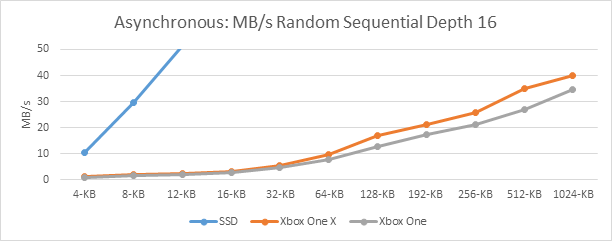
In this case, the change to blocking sorted random reads at 256-KB read size jumps from 10 MB/s to 21 MB/s on Xbox One. This is due to the window of requests that Xbox One has showing data that is physically located nearby. This is the same relative performance gain as seen when using truly random locations.
Figure 12. Throughput using asynchronous reads and sequential locations with 16 requests in flight at once.
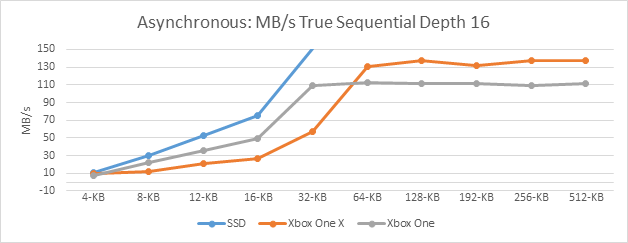
The piece de resistance comes from using truly sequential read locations with asynchronous read operations. In this case, the maximum throughput starts to happen at the 64-KB read size mark, achieving about 110 MB/s for Xbox One. The throughput for blocking reads at this size was only 36 MB/s for true sequential locations. This also happens to be a cross-over point for the Xbox One X hard drive, where it jumps to greater than 132 MB/s.
It’s important to remember that these are optimal numbers based on no other activity happening on the hard drive. We guarantee only 40 MB/s average over any two-second window. If you get 20 MB/s for one second, you’ll get 60 MB/s the next second. Due to improvements in the hardware, Xbox One X consoles have a higher minimum bandwidth guarantee: 60 MB/s over any two-second window. Following these suggestions will lower the overhead caused by the different access patterns.
Xbox One X Dev Kit
The Xbox One X Dev Kit includes an SSD to decrease times for daily iteration work. It’s important not to use the SSD for performance tuning of the loading system.
Figure 13: Throughput using SSD versus using Retail drive.
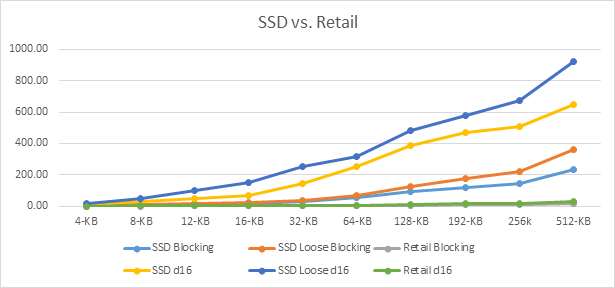
As can be seen the SSD will very quickly surpass the retail disk, the smaller read sizes are already beating the optimal patterns on the rotational disk. The 12-KB read from the SSD can hit 100 MB/s, however the rotational disk in the same scenario can only hit 1.2 MB/s. Using the optimal patterns, you can easily surpass 1 GB/s bandwidth.
Recommendations
You should do everything possible to reduce the number and size of seeks for loading data. The primary way to do this is to attempt to reduce the total number of read calls. The second way is to create multiple requests in flight at a time. The underlying file system will reorder the requests for you to minimize the time taken by the seeks. Make sure to try out different numbers as parameters for your file system to find the best performance for your title.
Summary
There are a variety of ways to load data from the Xbox One hard drive that can result in drastic performance differences. We showed that it’s preferable to use asynchronous I/O and to order your read requests by the location on the hard drive. By keeping this data in mind, you can make the most of the performance characteristics of the Xbox One file system