Media Foundation Transform Decoding
This topic explains how to use the Source Reader to decode media data.
Decoding media data using the Source Reader involves the following steps:
- Create the Source Reader
- Use Hardware Acceleration
- Enumerate Output Formats
- Set the Output Formats
- Process Media Data
- Drain the Data Pipeline
- Set Playback Rate
1. Create the Source Reader
To create an instance of the Source Reader, call the MFCreateSourceReaderFromByteStream function, which takes a pointer to a byte stream. This function also uses the Source Resolver to create the media source.
Note Before calling the MFCreateSourceReaderFromByteStream function, you must call the CoInitializeEx and MFStartup functions.
The pByteStream parameter of the MFCreateSourceReaderFromByteStream function takes a pointer to an IMFAttributes interface that is used to set various options on the Source Reader (as described in the reference topics for the IMFAttributes::Set* methods). Setting this parameter to NULL uses the default behavior, which is not recommended. At a minimum, the source reader should always specify the MF_SOURCE_READER_D3D_MANAGER attribute to enable hardware-accelerated decoding. The MFCreateSourceReaderFromByteStream function outputs a pointer to an IMFSourceReader interface.
C++
int __cdecl wmain(int argc, __in_ecount(argc) PCWSTR* argv)
{
  if (argc < 2)
  {
    return 1;
  }

  const WCHAR *pszFilePath = argv[1];

  // Initialize the COM runtime.
  HRESULT hr = CoInitializeEx(0, COINIT_MULTITHREADED);
  if (SUCCEEDED(hr))
  {
    // Initialize the Media Foundation platform.
    hr = MFStartup(MF_VERSION);
    if (SUCCEEDED(hr))
    {
      // Create the source reader.
      IMFByteStream* pInputByteStream;
      IMFSourceReader *pReader;
      hr = MFCreateFile(
        MF_ACCESSMODE_READ,
        MF_OPENMODE_FAIL_IF_NOT_EXIST,
        MF_FILEFLAGS_NOBUFFERING,
        pszFilePath,
        &pInputByteStream);
      if (SUCCEEDED(hr))
      {
        hr = MFCreateSourceReaderFromByteStream (pInputByteStream, NULL, &pReader);
        if (SUCCEEDED(hr))
        {
          ReadMediaFile(pReader);
          pReader->Release();
        }
    }
  // Shut down Media Foundation.
  MFShutdown();
  }
  CoUninitialize();
}
}
2. Use Hardware Acceleration
The Source Reader is compatible with Microsoft DirectX Video Acceleration (DXVA) 2.0 for hardware-accelerated video decoding. To use DXVA with the Source Reader, perform the following steps:
- Call the MFCreateDXGIDeviceManager function to create the Direct3D device manager. This function takes a pointer to the IMFDXGIDeviceManager interface.
- Call the IMFDXGIDeviceManager::ResetDevice method with a pointer to the Direct3D device.
- Create an attribute store by calling the MFCreateAttributes function.
- Call SetUnknown to set the MF_SOURCE_READER_D3D_MANAGER attribute to the IMFDXGIDeviceManager interface.
- Create the Source Reader. Pass the attribute store in the pAttributes parameter of the creation function.
When you provide a Direct3D device, the Source Reader allocates video samples that are compatible with the DXVA video processor API. You can use DXVA video processing to perform hardware deinterlacing or video mixing. For more information, see DXVA Video Processing. Also, if the decoder supports DXVA 2.0, it will use the Direct3D device to perform hardware-accelerated decoding. For more information, see the Direct3D 11 Video APIs.
3. Enumerate Output Formats
Every media source has at least one stream. For example, a video file might contain a video stream and an audio stream. The format of each stream is described using a media type, represented by the IMFMediaType interface. For more information about media types, see Media Types. You must examine the media type to understand the format of the data that you get from the Source Reader.
Initially, every stream has a default format, which you can find by calling the IMFSourceReader::GetCurrentMediaType method.
For each stream, the media source offers a list of possible media types for that stream. The number of types depends on the source. If the source represents a media file, there is typically only one type per stream. A webcam, on the other hand, might be able to stream video in several different formats. In that case, the app can select which format to use from the list of media types.
To get one of the media types for a stream, call the IMFSourceReader::GetNativeMediaType method. This method takes two index parameters: the index of the stream, and an index into the list of media types for the stream. To enumerate all the types for a stream, increment the list index while keeping the stream index constant. When the list index goes out of bounds, GetNativeMediaType returns MF_E_NO_MORE_TYPES.
C++
HRESULT EnumerateTypesForStream(IMFSourceReader *pReader, DWORD dwStreamIndex)
{
  HRESULT hr = S_OK;
  DWORD dwMediaTypeIndex = 0;

  while (SUCCEEDED(hr))
  {
    IMFMediaType *pType = NULL;
    hr = pReader->GetNativeMediaType(dwStreamIndex, dwMediaTypeIndex, &pType);
    if (hr == MF_E_NO_MORE_TYPES)
    {
      hr = S_OK;
      break;
    }
    else if (SUCCEEDED(hr))
    {
      // Examine the media type here.

      pType->Release();
    }
    ++dwMediaTypeIndex;
  }
  return hr;
}
To enumerate the media types for every stream, increment the stream index. When the stream index goes out of bounds, IMFSourceReader::GetNativeMediaType returns MF_E_INVALIDSTREAMNUMBER.
4. Set the Output Formats
To decode the stream, create a new media type that describes the desired uncompressed format. In the case of the decoder, create the media type as follows:
- Call MFCreateMediaType to create a new media type.
- Set the MF_MT_MAJOR_TYPE attribute to specify audio or video.
- Set the MF_MT_SUBTYPE attribute to specify the subtype of the decoding format (for available subtypes, see Audio Subtype GUIDs and Video Subtype GUIDs).
- Call SetCurrentMediaType.
The Source Reader will automatically load the decoder. To get the complete details of the decoded format, call IMFMediaTypeHandler::GetCurrentMediaType after the call to SetCurrentMediaType. The following code configures the video stream for RGB-32 and the audio stream for PCM audio.
C++
HRESULT ConfigureDecoder(IMFSourceReader *pReader, DWORD dwStreamIndex)
{
  IMFMediaType *pNativeType = NULL;
  IMFMediaType *pType = NULL;

  // Find the native format of the stream.
  HRESULT hr = pReader->GetNativeMediaType(dwStreamIndex, 0, &pNativeType);
  if (FAILED(hr))
  {
    return hr;
  }

  GUID majorType, subtype;

  // Find the major type.
  hr = pNativeType->GetGUID(MF_MT_MAJOR_TYPE, &majorType);
  if (FAILED(hr))
  {
    goto done;
  }

  // Define the output type.
  hr = MFCreateMediaType(&pType);
  if (FAILED(hr))
  {
    goto done;
  }

  hr = pType->SetGUID(MF_MT_MAJOR_TYPE, majorType);
  if (FAILED(hr))
  {
    goto done;
  }

  // Select a subtype.
  if (majorType == MFMediaType_Video)
  {
    // NV12 is the only supported output type from HW decode.

    subtype= MFVideoFormat_NV12;
  }
  else if (majorType == MFMediaType_Audio)
  {
    subtype = MFAudioFormat_PCM;
  }
  else
  {
  // Unrecognized type; skip.
    goto done;
  }

  hr = pType->SetGUID(MF_MT_SUBTYPE, subtype);
  if (FAILED(hr))
  {
    goto done;
  }

  // Set the uncompressed format.
  hr = pReader->SetCurrentMediaType(dwStreamIndex, NULL, pType);
  if (FAILED(hr))
  {
    goto done;
  }

  done:
  SafeRelease(&pNativeType);
  SafeRelease(&pType);
  return hr;
}
5. Process Media Data
To get media data from the source, call the IMFSourceReader::ReadSample method, as shown in the following code.
C++
DWORD streamIndex, flags;
LONGLONG llTimeStamp;

hr = pReader->ReadSample(
  MF_SOURCE_READER_ANY_STREAM,    // Stream index
  0,                              // Flags
  &streamIndex,                   // Receives the actual stream index
  &flags,                         // Receives status flags
  &llTimeStamp,                   // Receives the time stamp
  &pSample                        // Receives the sample or NULL
  );
The first parameter is the index of the stream for which you want to get data. You can also specify MF_SOURCE_READER_ANY_STREAM to get the next available data from any stream. The second parameter contains optional flags; see MF_SOURCE_READER_CONTROL_FLAG for a list of these. The third parameter receives the index of the stream that actually produces the data. You will need this information if you set the first parameter to MF_SOURCE_READER_ANY_STREAM. The fourth parameter receives status flags, indicating various events that can occur while reading the data, such as format changes in the stream. For a list of status flags, see MF_SOURCE_READER_FLAG.
If the media source is able to produce data for the requested stream, the last parameter of ReadSample receives a pointer to the IMFSample interface of a media sample object. Use the media sample to:
- Get a pointer to the media data.
- Get the presentation time and sample duration.
- Get attributes that describe interlacing, field dominance, and other aspects of the sample.
The contents of the media data depend on the format of the stream. For an uncompressed video stream, each media sample contains a single video frame. For an uncompressed audio stream, each media sample contains a sequence of audio frames.
The ReadSample method can return S_OK and yet not return a media sample in the pSample parameter. For example, when you reach the end of the file, ReadSample sets the MF_SOURCE_READERF_ENDOFSTREAM flag in dwFlags and sets pSample to NULL. In this case, the ReadSample method returns S_OK because no error has occurred, even though the pSample parameter is set to NULL. Therefore, always check the value of pSample before you dereference it.
The following code shows how to call ReadSample in a loop and check the information returned by the method, until the end of the media file is reached.
C++
HRESULT ProcessSamples(IMFSourceReader *pReader)
{
  HRESULT hr = S_OK;
  IMFSample *pSample = NULL;
  size_t  cSamples = 0;

  bool quit = false;
  while (!quit)
  {
    DWORD streamIndex, flags;
    LONGLONG llTimeStamp;

    hr = pReader->ReadSample(
      MF_SOURCE_READER_ANY_STREAM,    // Stream index
      0,                              // Flags
      &streamIndex,                   // Receives the actual stream index
      &flags,                         // Receives status flags
      &llTimeStamp,                   // Receives the time stamp
      &pSample                        // Receives the sample or NULL
      );

    if (FAILED(hr))
    {
      break;
    }

    wprintf(L"Stream %d (%I64d)\n", streamIndex, llTimeStamp);

    if (flags & MF_SOURCE_READERF_ENDOFSTREAM)
    {
      wprintf(L"\tEnd of stream\n");
      quit = true;
    }
    if (flags & MF_SOURCE_READERF_NEWSTREAM)
    {
      wprintf(L"\tNew stream\n");
    }
    if (flags & MF_SOURCE_READERF_NATIVEMEDIATYPECHANGED)
    {
    wprintf(L"\tNative type changed\n");
    }
    if (flags & MF_SOURCE_READERF_CURRENTMEDIATYPECHANGED)
    {
      wprintf(L"\tCurrent type changed\n");
    }
    if (flags & MF_SOURCE_READERF_STREAMTICK)
    {
      wprintf(L"\tStream tick\n");
    }

    if (flags & MF_SOURCE_READERF_NATIVEMEDIATYPECHANGED)
    {
      // The format changed; reconfigure the decoder.
      hr = ConfigureDecoder(pReader, streamIndex);
      if (FAILED(hr))
      {
        break;
      }
    }

    if (pSample)
    {
      ++cSamples;
    }

    SafeRelease(&pSample);
  }

  if (FAILED(hr))
  {
    wprintf(L"ProcessSamples FAILED, hr = 0x%x\n", hr);
  }
  else
  {
    wprintf(L"Processed %d samples\n", cSamples);
  }
  SafeRelease(&pSample);
  return hr;
}
6. Drain the Data Pipeline
During data processing, a decoder or other transform might buffer input samples. In the following diagram, the app calls ReadSample and receives a sample with a presentation time equal to t1. The decoder is holding samples for t2 and t3.
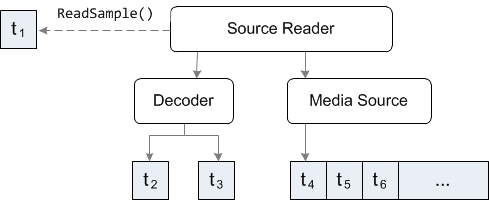
On the next call to ReadSample, the Source Reader might give t4 to the decoder and return t2 to the app.
If you want to decode all of the samples that are currently buffered in the decoder, without passing any new samples to the decoder, set the MF_SOURCE_READER_CONTROLF_DRAIN flag in the dwControlFlags parameter of ReadSample. Continue to do this in a loop until ReadSample returns a NULL sample pointer. Depending on how the decoder buffers samples, this might happen immediately or after several calls to ReadSample.
7. Set Playback Rate
Although you can set the playback rate using the Source Reader, doing so is typically not very useful, for the following reasons:
- The Source Reader does not support reverse playback, even if the media source does.
- The app controls the presentation times, so the app can implement fast or slow play without setting the rate on the source.
- Some media sources support thinning mode, where the source delivers fewer samples—typically just the key frames. However, if you want to drop non-key frames, you can check each sample for the MFSampleExtension_CleanPoint attribute.
To set the playback rate using the Source Reader, call the IMFSourceReader::GetServiceForStream method to get the IMFRateSupport and IMFRateControl interfaces from the media source.