NUI Speech: Reading It Aloud
Overview
One interesting aspect of the NUI Speech technology used by Kinect on Xbox One is the fact that it doesn’t need a dictionary containing every word in a given locale to recognize words in that language. This feature is great for developers, because it means that the speech API doesn’t need to contain an exhaustive dictionary for each locale. The part of the speech system that performs this trickery is known as Letter to Speech (LTS), which automatically converts strings of letters in a word (graphemes) into the most likely set of phones that represent the word.
Although LTS works exceptionally well for most cases, it’s not perfect. In particular, every language contains heteronyms: words that share the same spelling but have different pronunciations. For example:
| Phrase | Pronunciation |
|---|---|
| “bring me my bow” |  |
| “take a bow” |  |
In some instances, LTS will interpret these words incorrectly—or, rather, other than as expected. Proper nouns may also be interpreted in unexpected ways, although grammar file authors tend to be naturally more wary of issues with proper nouns.
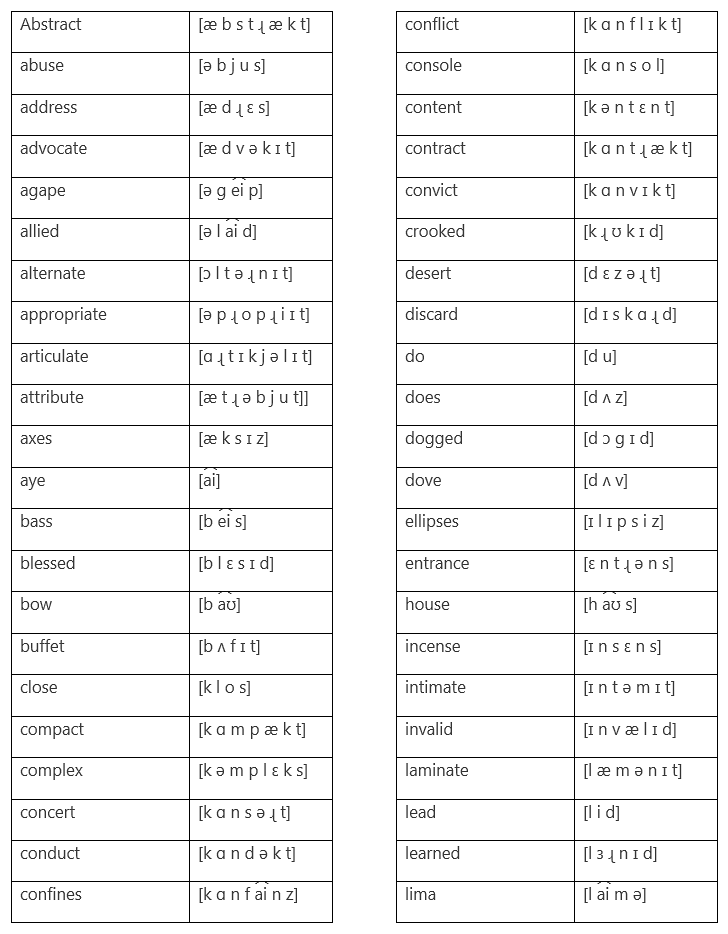
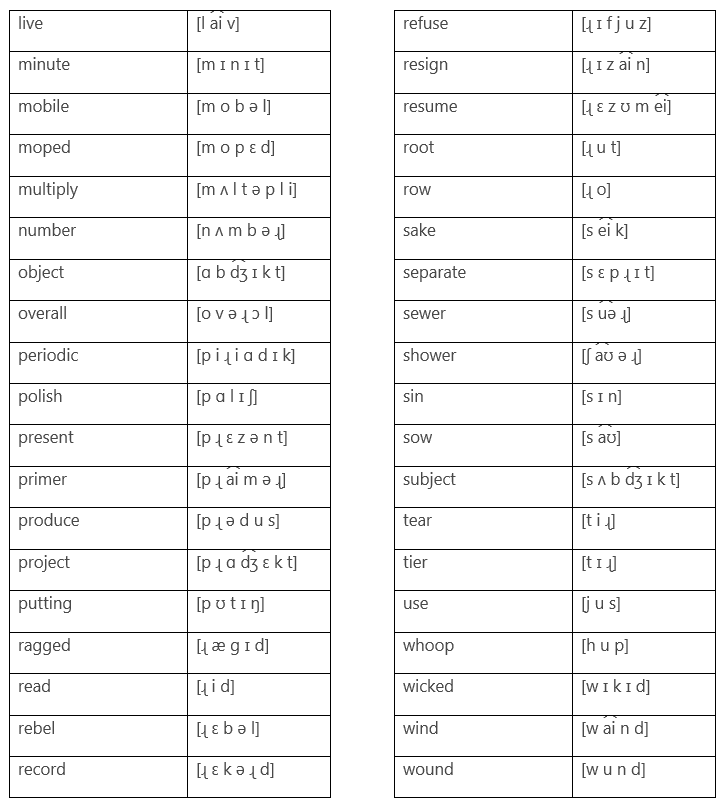
Some other examples of heteronyms in U.S. English are alternate, convict, desert, excuse, minute, and separate. Refer to Appendix A for a longer list of heteronyms.
This is a problem because naively written grammar files may contain phrases that the grammar file creator expects to be pronounced in one way but that LTS expects to be pronounced as the word’s heteronym.
How do you solve this? If you hit these edge cases you will need to resort to using custom phonetic spellings in your grammar file to force the use of the correct pronunciation. The more difficult issue, however, is identifying the inaccurate words in the first place.
Identifying incorrect heteronyms
The NUI Speech API is based in part on the Microsoft Speech API (SAPI) codebase, which is closely tied to the Windows Text to Speech system. Although NUI Speech and Text to Speech are not identical, you can use TTS as a reasonable starting point to help identify corner cases in title grammar files.
To analyze your raw (non-phonetic, simple sentence) grammar files with TTS, it’s simple to create a command-line tool in C# using the .NET TTS API. You will need to add a reference to the System.Speech.dll assembly.
The following code, a short text to phoneme test program, is a barebones example that you can use as a starting point for your own phoneme analysis tools.
  using System;
  using System.Text;
  using System.Speech.Synthesis;
  using System.IO;

  namespace TextToPhoneme
  {
      enum AudioOutputMode
      {
          Silent,
          ReadBack
      };

      class Program
      {
          static TextWriter tw = null;

          static void Main(string[] args)
          {
              TextToPhoneme("bring me my axe and my bow", AudioOutputMode.ReadBack);
          }

          static void TextToPhoneme(string text, AudioOutputMode audioMode)
          {
              // Create a file to output the results to.

              tw = new StreamWriter(@"output.txt", false, Encoding.Unicode);

              SpeechSynthesizer scc = new SpeechSynthesizer();

              // Set the output to either silent (for unattended use) or to read back using the
              // default audio device.

              if (audioMode == AudioOutputMode.ReadBack)
              {
                  scc.SetOutputToDefaultAudioDevice();
              }
              else
              {
                  scc.SetOutputToNull();
              }

              // Optional; could just use the default voice.

              scc.SelectVoiceByHints(VoiceGender.Male);

              // Hook the output and progress monitoring events, so we can grab the phonemes as
              // they are emitted.

              scc.SpeakProgress += new EventHandler<SpeakProgressEventArgs>(scc_SpeakProgress);
              scc.PhonemeReached += new
                   EventHandler<PhonemeReachedEventArgs>(scc_PhonemeReached);

              // Run the text through the speech engine.

              scc.Speak(text);

              // Close the output file.
              tw.WriteLine("");
              tw.Close();
          }

          static void scc_SpeakProgress(object sender, SpeakProgressEventArgs e)
          {
              tw.Write("\r\n" + e.Text + " = ");
          }

          static void scc_PhonemeReached(object sender, PhonemeReachedEventArgs e)
          {

              tw.Write(e.NextPhoneme + " ");

              // If this was emphasised, output a stress marker.

              if ((e.Emphasis & SynthesizerEmphasis.Stressed) != 0)
              {
                  tw.Write(" S1 ");
              }
          }
      }
  }
The code in this example creates an instance of the Text to Speech engine—optionally setting it to either output audible results or run in silent mode—and will read out the results. As the TTS engine emits phonemes, these are captured and emitted to a file alongside the input text that generated the sequence. The phonemes generated by the TTS engine are in International Phonetic Alphabet (IPA) form, which is what you are used to seeing alongside any definition in the dictionary. In contrast, SAPI and NUI Speech both use the Universal Phone Set (UPS), so you will have to convert the IPA phonemes to UPS phonemes. For more information about converting phonemes from IPA to UPS, download the Microsoft white paper entitled SAPI Universal Phone Set as a reference.
Correcting the output
The phrase “bring me my axe and my bow,” generates the following output:
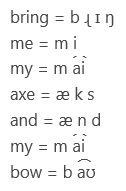
If you listened to the output—or carefully examined the output file’s phonemes—you would notice that LTS is using the wrong form of bow for this sentence. You might have expected this sound:

But LTS used the heteronymic form with this ending:

To fix this, you would want to use a phonetic spelling of the word in your grammar file, instead of letting LTS do the work. Simply find the alternate word form you were expecting in a dictionary and get the IPA markup for the word. Then, using the mappings listed in the SAPI Universal Phone Set white paper, translate the IPA markup to the grammar-file compatible form. Finally, replace your original, incorrectly translated grammar rule of “bring me my axe and my bow” with the expected form of “bring me my axe and my B O+UH.”
Summary
On the road to producing a robust grammar file, you may run across problems that can adversely affect the quality of your title’s speech recognition. Failure of LTS to correctly recognize different heteronyms is one of these problems—and it is probably the most difficult to pick up because it’s not readily apparent when it hits.
Fortunately, adding TTS and phoneme generation to your tools pipeline is a useful check that—combined with a little knowledge of phonetics—will help you to quickly identify and fix these corner cases.
Appendix A: LTS phoneme selections for common U.S. English heteronyms