Overview of the SmartGlass Platform
Xbox SmartGlass allows users to use devices such as smart phones and tablets to control, obtain information from, and interact with titles and apps that run on an Xbox One console. SmartGlass works with devices that the users already own, so that users do not need to obtain proprietary controllers to interact with the console. The SmartGlass platform supports devices that use the following platforms:
- Windows Store 8.0 and Windows Store 8.1
- Windows Phone 8.0 and Windows Phone 8.1
- iOS
- Android
Xbox SmartGlass enables scenarios that involve multiple screens and multiple users, and provides those users with opportunities for increased collaboration, interaction, and access to information.
When you provide SmartGlass experiences for your Xbox One games and apps, you can:
- Deepen the engagment of users with your games or apps by providing access to additional features or content.
- Allow users to share Xbox and SmartGlass experiences through social media.
- Create opportunities for monetization of your titles.
- Expand your audience as SmartGlass users discuss how your SmartGlass experience enhances their enjoyment of your title with other potential customers.
SmartGlass Scenarios
You can use Xbox SmartGlass to enable a number of scenarios that you could not implement otherwise, or that you might find difficult or awkward to implement without SmartGlass. These scenarios include the following:
- Allow a user to use their device as a game controller.
You can mimic the controls such as the buttons and joysticks that are available on the standard Xbox game controller, but you can also use features of the mobile device such as an accelerometer or gyrometer to provide additional ways for the user to control and send input to the game or app. For example, you can allow the user to control the movement of an item by tilting their mobile device in different directions. - Provide secret screens to privately display different information to each user.
For example, when you create a card game, you can display the cards for an individual player only on their SmartGlass-enabled device, so that no player sees the cards of the other players. You can use the Xbox console to display only the information that you want all players to see. - Collect input from some users while another user interacts with the game or app on the Xbox One console.
For example, if users take turns singing or dancing to a song, you can provide a SmartGlass experience that allows users to join the queue to participate and select the song that they want to use while the Xbox console plays a song for another user to sing or dance to. - Allow a user to act as a secondary or assistant player. While one player acts as the principal game player on the Xbox console, other players can use their SmartGlass-enabled devices to help out.
- Provide opportunities for extended immersion in your game, by bringing part of the game to the user’s device to make the game experience feel more connected and personal.
For example, if part of the game involves the player who receives a phone call, the game could call the phone on which the user is running your SmartGlass experience. - Provide an improved way for users to provide text input, through an interface that the user is already familiar with on their device, instead of moving over a keyboard letter by letter with the Xbox One game controller.
- Provide statistics, hints, and timelines without affecting the display of the title on the Xbox One console.
- Provide offline experiences that extend the involvement of the user with your title beyond the time that they spend with your title on the Xbox One console.
- Provide access to Xbox Live services from anywhere.
- Provide Help features for games and apps without affecting the display of the title on the Xbox One console.
SmartGlass Technology and Features
The SmartGlass platform offers the following technologies and features:
- UDP-based discovery of Xbox One consoles that are available to the mobile to connect to.
- Encrypted connections between the SmartGlass-enabled device and the console.
- The capability for the SmartGlass-enabled device to act as a controller and provide input.
- Authentication of users through Xbox Live.
- Continuous updates from the console to the device to provide context about what is running on the console.
- The ability to manage apps from the device, including launching apps, snapping, and controlling volume.
- Messaging between the console based on JavaScript Object Notation (JSON) objects.
- Support for providing many different types of input from the device to the console, including:
- Game pad.
- Text.
- Media.
- Sensors such as accelerometers and gyrometers.
End-to-End SmartGlass Development
Because SmartGlass experiences involve the interaction of one or more mobile devices with an Xbox One console, you must create code that runs on the Xbox One console and code that runs on the mobile devices when you develop a a SmartGlass experience. SmartGlass provides different APIs and development kits that you can use to create the code that runs in each of these locations and that allows the code running on each mobile device to exchange information with the code running on the console.
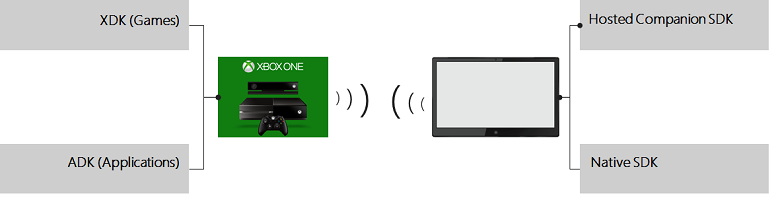
The following diagram illustrates the different development kits that you can using during the development of SmartGlass experiences.
Console-Side Development
Microsoft provides the SmartGlass Console API to Xbox One game and app devleopers so that those developers can create the console side of the SmartGlass experience for their titles. The SmartGlass Console API is available in the following development kits:
- The XDK if you are a game developer.
- The ADK, if you are an app developer.
For information about developing the Xbox One console side of a SmartGlass experience, see Developing the Console Side of a SmartGlass Experience. For reference information about the API elements in the SmartGlass Console API, see SmartGlass Console API Reference.
Options for Device-Side Development
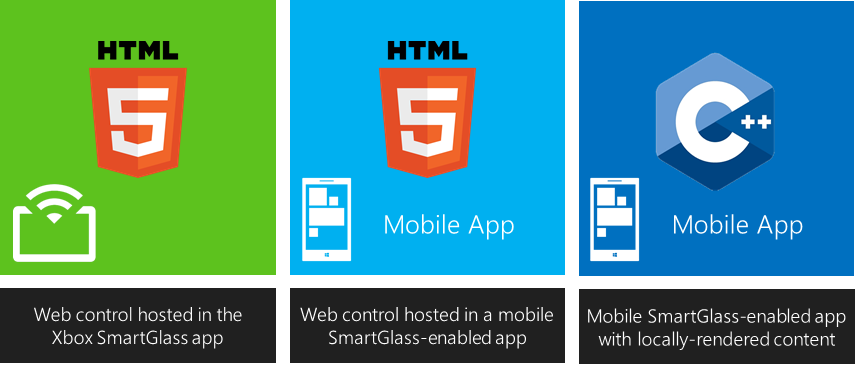
You have the following options for developing the device side of a SmartGlass experience:
- Develop a companion that runs within the context of the Xbox SmartGlass app that Microsoft provides for each platform that SmartGlass supports.
- Develop an all-in-one native app to run on SmartGlass devices.
- Develop a hybrid app for SmartGlass devices in which a native app also hosts a companion.
The following illustration summarizes these development options.
Developing Companions
The hosted companion option for developing the device side of your SmartGlass experience requires two items:
- A companion that consists of web content in the form of HTML, CSS, and JavaScript files that you develop and host on your own web server. This companion content is specific to your title or group of titles, but is independent of the platform of the mobile device on which the user accesses your SmartGlass experience.
- The Xbox SmartGlass app from Microsoft. The user installs the version of this app specific to the platform of their mobile device on which the user accesses your SmartGlass experience. This SmartGlass app is independent of your title or group of titles.
For the hosted companion option, the Xbox SmartGlass app acts as the browser that displays and runs the Web content for your companion. Your Web content can access SmartGlass capabilities in your JavaScript code by calling the SmartGlass Device JavaScript API. The SmartGlass Device JavaScript API is available as part of the SmartGlass Hosted Companion SDK.
The hosted companion option for developing the device side of the SmartGlass experience provides you with the following advantages:
- You can concentrate your development efforts on the unique interface and features for your SmartGlass experience, because the Xbox SmartGlass app handles communication, the process of discovering and connecting to Xbox One consoles, and signing the user into Xbox Live for you.
- You can easily target all platforms supported by SmartGlass, because you can create the same Web content for all of them. The Xbox SmartGlass app from Microsofft that the user installs on their device handles the platform-specific operations.
- You can use a familiar development environment based on HTML, CSS, and JavaScript, with access to many more tools that can help with your development process.
- You have the flexibility to update your companion regularly, because you host the Web content on your own server.
Developing Native Apps
In the native app option for developing the client side of your SmartGlass experience, you create an all-in-one app that handles not only the interface and features specific to your SmartGlass experience, but also the tasks of discovering, connecting to, and communicating with Xbox One consoles. In this case, the user does not use the Xbox SmartGlass app from Microsoft as part of your SmartGlass experience.
When you use the native app option, your app is both title-specific and platform-specific, so you need to create different versions your app for each platform that you want to target. You create the app for each platform by programming in the native languages that developers standardly use to develop apps for the platform. For example, for the version of your app for Android devices, you use Java. For the version of your app for iOS devices, you use Objective-C.
To use SmartGlass capabilities in your native app, you use the same libraries that Microsoft uses to create the Xbox SmartGlass app that users install for running hosted companions. Microsoft provides these libraries as part of the SmartGlass Native SDK, and includes libraries for all of the platforms that Xbox SmartGlass supports.
The native app option for developing the device side of the SmartGlass experience provides you with the following advantages:
- You can more readily integrate SmartGlass functionality into apps that you already created for mobile devices.
- You can more easily use platform-specific capabilities because you use the native language or languages that are standard for developing applications for the mobile app platform.
- You can use great third-party frameworks and middleware platforms that already exist for developing apps for your target platforms.
- You have more monetization opportunities for your app.
Hosting Companions in Native Apps
As a third device-side development option, you can combine the advantages of the other two development options to create a hybrid app in which you display and run a companion in a native app. To create such a hybrid app, you:
- Create a companion with the JavaScript Console API included in the SmartGlass Hosted Companion SDK.
- Create native app with the Native SDK API for the platforms for which you want to provide your SmartGlass experience.
- Include an instance of the Canvas (XsgCanvas in Objective-C) control in your native apps to display and run your companion.