Speech Design Overview for Game Designers
Introduction
Adding speech to gameplay creates a more immersive, realistic gaming experience; it brings a game to life. Paired with gesture, speech brings incredible opportunities for game development as well as design challenges.
Designing for speech requires thoughtful planning and careful implementation. There are constant tradeoffs when using speech, but good design can overcome the challenges. In the end, seeing players effortlessly using speech in the game is the biggest reward.
This topic helps you determine where speech works in a gameplay scenario. It also provides principles, tips, and examples to help you incorporate speech. These are summarized below, under Summary of Design Principles.
For information about designing better menu navigation in games or apps, see SpeechLab Stock Grammars, in this XDK documentation.
In this topic:
- Introduction
- Identify speech opportunities
- Design for success
- Work within constraints
- Optimize the speech experience
- Play to the magical quality of speech
- Other questions to ask
- Resources
- Summary of design principles
- Tips
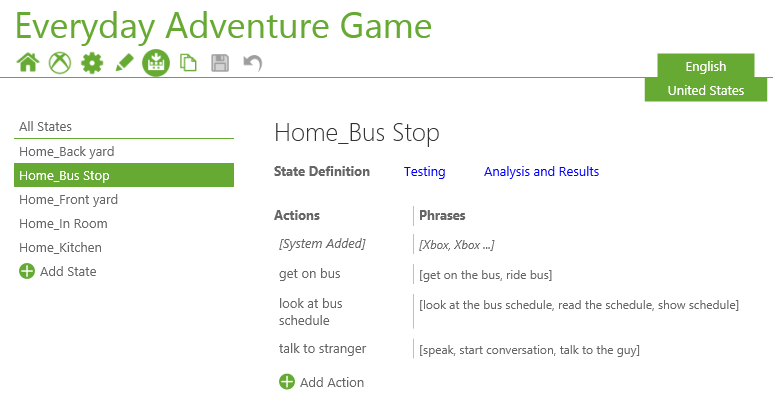
Terminology
If you’re new to this technology, here are some key terms and definitions to help you understand how speech applications work.
Phrase/action
A phrase contains the words the speech recognizer listens for. A phrase is mapped to an action. For example, the phrase “Come here” could be mapped to an action such as “approach player”— one character approaching another.
Synonym
An alternative way to say a command. Multiple synonyms improve players’ game experiences by giving them several ways to say a command.
State
The environment, state, and circumstances of the game that affect what a player can say and do.
Grammar
A list of rules for the actions and phrases that the speech recognizer understands in a given game state. NUI Speech grammars start as GRXML files that implement a subset of version 1.0 of the speech recognition grammar specification of the World Wide Web Consortium (W3C).
In addition to GRXML format, titles can use CFG and programmatic grammars using GrammarBuilder.
Tip Click Index at the left side of the ADK documentation home page, then enter speech overview in the search field below the Index tab.
For the speech recognizer to work, a word or phrase must be in a grammar. Multiple grammars can be active at once and you can activate different grammars based on context.
Speech errors
Speech errors occur when the recognizer does not recognize what a player said. For information about types of speech errors, see Principle 11: Design error handling into the game, in this topic.
Side speech
When the recognizer hears speech not intended for recognition—for example, when a player is talking to another person and not to the Xbox One console.
Background noise
Other sounds in the room, such as a fan whirring, a dog barking, or the sounds produced by the game via output speakers. Kinect for Xbox One compensates for many noises, including background audio from the Xbox One console and continuous ambient noises.
Normal listening
When the system is listening for an engagement command. On the Xbox platform, the engagement command is “Xbox.” During normal listening, the system does not act on any commands until it recognizes the engagement cue.
Active listening
A mode of speech recognition in which the recognizer is listening for commands.
Engagement model
The prescribed method in which a title lets players move in and out of active listening, and how players understand that they can engage with speech at both the system and title level.
System grammar
The grammar that is always active in the system recognizer, which cannot be turned on or off by exclusive or shared apps. The system grammar always has priority and, when detected, always takes control of speech recognition until it is dismissed by the player.
Title grammar
The grammar generated by the title developer. The title designer has absolute control over when the grammar is enabled or disabled and over how the speech and the engagement model are implemented.
Figure 1. Terminology is used by the NUI speech tool, SpeechLab, for generating and testing speech experiences
Technical speech solutions
The following technologies are built into our audio and speech pipelines to ensure that you can create the best speech experiences on Xbox One.
Beam forming
The microphone array can relate positional information back to the title in terms of the relative angle of incoming audio source(s).
Echo noise cancellation
The known output of the Xbox One console is recognized in the microphone’s input and is cancelled or suppressed from the recorded bit stream.
Speaker correlation
Technology that, upon return of speech recognition events, attaches that speech event to a body being tracked by the NUI skeletal system.
System speech recognizer
Runs in reserve system space that recognizes when a player is speaking directly to the Xbox shell rather than the title’s recognizer.
Xbox select
Shared apps that use the Xbox UI Framework may hide behind the system speech recognizer via the “Xbox select” keyword. Saying the phrase “Xbox select” enables See It Say It menu navigation items as well as the global grammar.
Technical considerations
When you’re designing for Kinect for Xbox One, keep the following information in mind.
- Assume that one speaker is active at a time.
- The amount of overall speech investment increases with the size of a grammar. Time and resource requirements for speech testing and tuning increase because the likelihood of false accepts increases with the same number of phrases.
- NUI Speech recognizes one language at a time.
- The speech recognizer works best when a player is speaking at an average volume—neither yelling nor whispering.
- Many states can affect the speech recognizer, including a player’s emotions—excitement, frustration, and disappointment—fatigue, physical health, and age. We recommend that you always supplement speech recognition with a secondary input mechanism.
- Even with Kinect for Xbox One background noise detection, background noise can affect speech recognition. Be sure to test your speech scenario to make sure that speech is being properly detected.
- NUI Speech includes end-pointing. It can determine when a player has stopped speaking. A player doesn’t have to say something like “Stop listening” or “I’m done” after each command.
Identify speech opportunities
As you design speech into a game, stay focused on the speech experience created for the player. Rather than use speech everywhere, think about how speech will work in the game and how players will feel using it. This will help you to find the right places to implement speech recognition.
Principle 1: Use speech for its best purposes
To create a player-focused speech experience, think about which actions are good candidates for speech. Look for places that will play to speech’s strengths and work with its limitations.
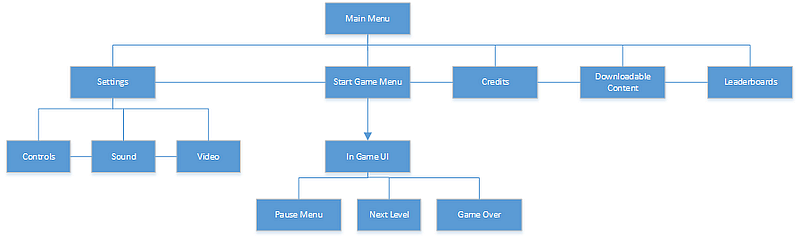
- It works well for commonly used commands, such as “Show map” and for screen navigation, as shown in Figure 2.
- It also works well in situations where it’s easier to say a phrase than to pick a gesture from a phrase list.
- Speech can also be magical when it empowers the player or provides a sense of delight.
Figure 2. Possible menu screen navigation using speech
Plan for the time it takes to say and recognize a command. Using speech for parts of gameplay that need to be fast, such as a character’s lifespan, or for irreversible actions can cause problems, such as speech errors that require additional time to correct.
Using speech to access non-critical information works well. For example, a player could use a phrase such as “show inventory” to see the contents of a backpack. These actions enhance the gameplay even when they are not critical. More exploratory games, or exploratory parts of gameplay where time is less critical, can be great places to incorporate speech.
What might feel natural for the player to say?
When you determine where to use speech, consider the following questions:
- When does it feel natural to speak?
- When is it easier for the player to use speech instead of other inputs?
- Are there contextsùfor example, when there’s background noise such as players cheeringùthat are not good candidates for speech?
- When does a player have time to say a phrase, and possibly have to correct for speech errors?
- What actions are better suited for gestures or button presses?
Another way to determine if speech makes sense is to consider if false accepts fit into the storyline and interaction in the game. Situations where this is true can be good candidates for speech recognition, such as those shown in the following examples.
- Radio communication, which can break up or be interrupted by static
- Talking to an entity that doesn’t always understand, including alien races or animals
- Talking to another person
Principle 2: Consider the engagement model and interactions
When you design speech into a game, think about the engagement model and interactions being used.
- Does the player say what comes to mind or follow a script?
- Does the player have to say a specific phrase for an action to occur, or will several alternate phrases for the same action work just as well?
Also, consider whom the player is talking to. By letting a player talk to another humanoid character in the game, the title must approximate real-life conversation. This can require great investment to implement properly. Other in-game entities that may be natural to speak to might include non-human characters, a command center, or even high-tech computers.
Finally, think about how the player is exposed to speech recognition.
- How will players discover speech-enabled actions?
- How will they toggle active and normal listening?
- How will they know which listening state is engaged?
Interaction and engagement principles can often be bundled into speech engagement models, as shown in Figure 3.
Figure 3. Known engagement models for speech used on Xbox 360 and Xbox One. See It Say It is the engagement model adopted by the Xbox One platform.
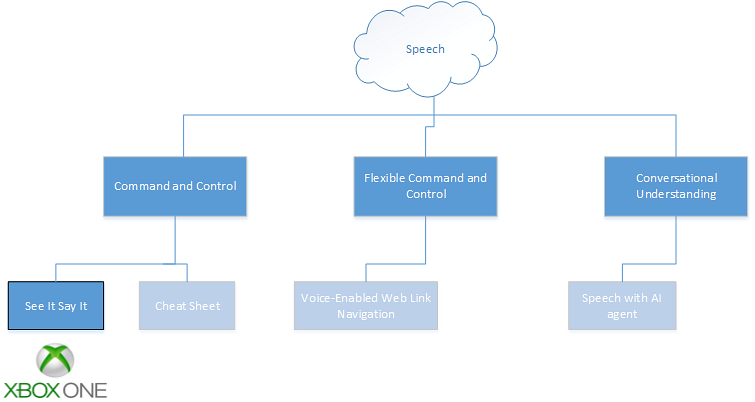
In Command and Control engagement models, the player issues orders in a constrained language—for example, “Unit Alpha, move to station Bravo.” The unit, action, and position are all a limited set of words. Often, the interaction agent in Command and Control systems are the title, animals, and non-realistic human agents. There are four types:
Intuitive
Questions and interactions have a constrained set of responses that fit within a number of supported concurrent commands. For example:
- “Would you like to see my wares?” Responses are “Yes,” “No,” and their synonyms.
- “Do you want to buy or sell?” Responses are “Buy” or “Sell.”
- “I have armor, weapons, and spells. Which do you want?” Responses are the examples given and possibly “None of them.”
Verbalized actions
Saying a command causes something to happen that in reality would be a physical action. These commands can also verbalize a character’s thoughts. Because they aren’t phrases that someone would really say, word the commands carefully—make them interesting to say out loud. For example:
- “Switch weapon” or “sword.” If one weren’t playing a game, one would reach for the weapon instead of speaking the action aloud.
- “Lucky rabbit’s foot.” The desired object is named instead of reaching into a backpack and grabbing it.
Conversational understanding
A player speaks conversationally to an application or speaks as a game entity. Usually, this type of speech engagement contains examples of phrases people speak within the scope of certain intents. Persistent visual prompting is not as common in this form of speech engagement.
- “Sarah, can you lead me to your house?” A conversational request is actually a command directed at another character.
See It Say It
A player speaks to the game using visible speech. This is often used for basic menu navigation. For example:
- “Pause game.”
- “What can I say?”
- “Xbox Help.” Help commands could also be handled conversationally, where the player says, “Sarah, can you help me?”
Design for success
When you design speech into a game, you can predict the success of the experience in part by noting how often the game responds correctly to speech and to other sounds. The best result is that it correctly recognizes a player’s spoken command—High Correct Accept—and responds with the correct action. It should also ignore irrelevant sounds that aren’t speech—Low False Accept.
A command’s phrasing—what you expect and perhaps teach the player to say—can affect speech recognition. If the phrases are not the way a player says the commands, there will be speech errors rather than recognition success. Because the recognizer can match a player’s speech only to items in the active grammar, it’s important for the grammar to contain the right words. This is shown in the following example.
Example: “Open door”
“Open door” may seem like a great speech command. It’s easy to say and someone would say it in real life. Or would they? You might say, “Noah, open the door.” Or you would just grab the handle and open the door. Perhaps this action would be better executed via gesture.
Suppose you enable a gesture to open the door. You could also enable a command to accompany the gesture, like saying “Anybody home?” or “Hello?” as the player opens the door. Or, you could have a few options, such as saying “Knock, knock,” making a knocking gesture, or both saying the command and making the gesture. If the speech recognizer hears a player say “Knock, knock” and recognizes the gesture of knocking on the door, the game may have more confidence that the player is trying to do the action Knock.
For speech, “Open sesame” might be a good command, since it is fun to say and, when you say it, the door magically opens.
Principle 3: Write the way a player speaks
Speech commands work best when they’re written the way players say them, not in the language of game developers. For example, when you’re designing and developing a game, you might have an action called “Leave vehicle.” However, a player probably thinks of this as getting out of a car. So instead of making the command “leave vehicle,” it’s better to use phrases such as “Get out of the car” or “Ditch the car.” Intuitive commands reduce a player’s need to think about what to say and are better than using a controller, whose actions are arbitrarily assigned to buttons. Instead, players can use a more natural phrase to verbalize the action.
Principle 4: Minimize confusion (for the both recognizer and the player)
When you write speech commands, think about the recognition accuracy for the phrases. To create good speech commands:
- Check the stock grammars that come with the SpeechLab tool. Stock grammars are tested and contain high-performance grammars. Stock grammar phrases are already localized to Xbox One speech-supported locales and come with test waves for game scenario-specific accuracy testing.
- Use multi-syllabic phrases; they generally perform better than monosyllabic commands. For example, use “Purchase” rather than “Buy.”
- Make sure speech commands are phonetically distinct; that is, they don’t sound alike and are not easily confused. For example, “Move box” may be confused with “Move blocks.”
Phonetically distinct phrases contain different speech sounds. These differences minimize errors. They can be hard to notice by simply looking at the words because you’re also concerned with sounds that are similar (like the “f” and “v” in the words “fast” and “vast”). Testing a grammar for commands that produce frequent speech errors, especially false accepts, can help you find which phrases to adjust.
Principle 5: Include reasonable synonyms (heard during play testing)
When you think about which phrases to support, consider reasonable synonyms. Reasonable synonyms are not all of the ways a player might say a command, but rather a short list of ways in which most players would say it. User research and play testing are the best ways to determine the most natural way of speaking a command.
Tip: Testing your game with real people can help you find synonyms to add to the grammar.
Prompting players to say a specific command doesn’t guarantee that they will actually say it. Often players change the wording slightly without realizing it. For example, for the command “Purchase supplies,” you may also want to include synonyms like “Purchase some supplies” and “Purchase more supplies.” Each of the variations of “Purchase supplies” can be mapped to the Purchase supplies action.
Tip: You may have more success by adding a few synonyms to the grammar than by trying to change what the player says.
When you choose synonyms, consider whether they can be confused with other phrases in the grammar. However, if multiple phonetically similar phrases all perform the same action, then the phonetic confusion between the synonyms isn’t an issue. For example, if a player wants to sell weapons, the grammar could include the phrases “Sell weapons,” “Sell my weapons,” and “Sell a weapon.” Even though all three phrases contain the words “sell” and “weapon,” they all trigger the Sell weapon action; they will not be confused. However, if the phrase “Jump” and the synonym “Jump up” are in the same grammar as the phrase “Dump cup,” there could be confusion between “Jump up” and “Dump cup.”
You must also strike a balance between supporting appropriate synonyms and overloading the grammar. With too many items in the grammar, there’s an increased likelihood of speech errors. The goal is to cover the majority of players with the fewest number of synonyms.
Tip: Often, in conversational understanding speech interactions, a few of the most frequently used synonyms cover the majority of players. The frequency of synonyms has a long tail.
Principle 6: Help players know what to say
While speech is a natural interaction, players still need to know what they can say. Depending on the gameplay, you can provide speech command discoverability in different ways. Some places to expose speech commands include:
- Most recommended: Use the phrase “What can I say?” as a common speech command. “What can I say” is intended to be used as a globally accessible but contextually relevant speech help aid, indicating what is available for the player to say at the time that the phrase is spoken by the player. Players should feel confident that this phrase can be spoken at any time to help guide them to what can be said.
Note “What can I say?” can be used in conjunction with some of the discoverability tactics listed below (like summoning another entity to help the player).
- Use SmartGlass to display speech commands on a separate device.
- Use another entity to help inform a player about what can be said. This can be as instruction or can be woven into conversation.
- Use a narrator to help the player know what to say.
- Display relevant commands on screen in text.
- Display supported speech commands during game setup.
- Let players use “Xbox Help” to keep speech commands on the screen during gameplay.
Note Xbox Help may be easy to implement but it is not the ideal stand-alone solution; it removes the player from game context and opens another Xbox One application in Snap mode.
When you’re displaying the available commands, a “just in time” approach works well to expose players to the relevant command when they can use it or right after they use an alternative method. For example, if a player has used a gesture to choose a character’s phrase from a phrase list, the game could provide a tip or hint explaining that they can also say that phrase using speech.
Always guide the player to the expected commands—those in the grammar. Otherwise, the player might become frustrated trying to guess the right speech command for an action.
Principle 7: Use gameplay to indicate speech recognition
Giving players feedback about their speech is critical in successful speech experiences. Here are some ways to indicate speech recognition to the player:
- Take action—for example, if a player says “Show map,” display the map on the screen.
- Have another character respond appropriately.
- Use audio output, such as tones or sounds associated with the action.
- Use other confirmation, such as displaying text on the screen.
Taking action is usually the quickest and most effective way to indicate recognition. Often a change on screen, such as switching to a new screen or having a process begin, is enough for a player to know the command was recognized. On the other hand, a lack of change is quickly interpreted by the player as a speech error.
Principle 8: Provide feedback to help the player improve recognition
Just as it’s important to let players know that a command was recognized, players need feedback to help them troubleshoot speech errors. Recognition errors that require feedback include:
- Speech is too loud. Feedback helps players know to lower their voices.
- Background noise is interfering with recognition. Feedback indicates that a player needs to make the room quieter.
- Speech is not detected. Feedback indicates that players need to raise their voices.
Feedback mechanisms include:
- Showing an icon of the speech recognizer’s listening states.
- Showing an equalizer or wave forms that are mapped to the volume of the player’s speech. This could be implemented by looking at the amplitude of the signal coming from the Kinect sensor array. We recommend using equalizers within VUI bars.
- Changing an on-screen character’s expression, like tilting the head or raising the eyebrows.
- Using audio output, such as short tones and other sounds.
Ideally, feedback is subtle and doesn’t distract from gameplay. We recommend that icons and visualizations appear either on the top right of the screen or along the bottom, for platform consistency.
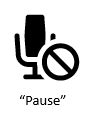
The icons recommended for exclusive apps for player feedback
| No Image Recommended |  |
 |
 |
 |
 |
| Normal Listening | Active Listening | Successfully Detected / Processing | Successful Speech Recognition | Speech Error: Not Supported | Speech Error: No Recognition |
Principle 9: Use confirmation sparingly
In speech, there are generally two ways to confirm recognition: implicit confirmation and explicit confirmation. Both forms should let a player correct the recognition if it’s wrong.
Implicit confirmation
The recognition is implied by what the game does. Implicit confirmation can be worked into the gameplay: The action resulting from the speech command is clear to the player and confirms that the command was understood. A character, or text on screen, paraphrasing the recognized action can also be an implicit confirmation. For example, if a character says, “Sarah, can you lead me to your house?” Sarah could say, “Yes, my place is just around the corner.”
Explicit confirmation
The player is explicitly asked if he or she wants a certain action to be taken. These types of confirmations can feel like an extra step that slows interaction. Use them carefully. Irreversible actions, such as exiting a game, may be good candidates for explicit confirmation. Many games already use explicit confirmations for such actions by asking players to verify that they want to take actions before completing them. Explicit confirmations can also be woven into gameplay.
Confirmations, especially explicit confirmations, can feel like a “road bump” to the player. Rather than moving forward based on a command, the gameplay is stalled while the player’s desired action is confirmed. Because they can negatively affect the perception of forward progress, use confirmations that add more time or create more steps only when necessary.
Work within constraints
Just as there may be good candidates for speech, there are also times when using speech will have low recognition success. These situations may result in a bad player experience. Use speech for what it’s good at, but also recognize there are limitations.
Principle 10: Acknowledge inherent limitations of speech
Speech commands take time to say and time to recognize and process. Actions that need really fast responses should not be activated with speech. In addition, you should plan for errors that take time to correct. As the grammar becomes more complex, the chances for errors increase as well.
Think about consecutive commands and how the player feels when saying them. Prototyping or having other ways to try the commands may help you decide which ones to enable. The following example describes a scenario where there might be limitations of speech in a title.
Example: “Cast iceball”
“Cast iceball” seems like a fun thing to say. It might make a player feel powerful. For example, a player could say it while fighting a fire-breathing dragon and use their voice to defeat it.
In this example gameplay, the player has the following items: an iceball, a fireball, and a spellbook. The player encounters the dragon, says “Cast iceball,” and the dragon’s fire goes out.
But if there is a speech error and the player’s command isn’t recognized, the player may be burned by the fire during the time it takes to say the command again. If the recognizer didn’t hear the player, the player might also be burned.
If there were a false accept, the speech recognizer might think the player said “Cast fireball.” The dragon’s fire would be enhanced and the player might die.
Given the need for quick action, the negative effect of misrecognition, and the catastrophic result of a false accept, using speech for these kinds of actions may not be a good idea.
Principle 11: Design error handling into the game
Plan for recognition errors. There will always be recognition errors, but error frequency may go up as the grammars become larger and more complex. Here are the main types of speech errors and their typical causes.
The types of speech errors and their causes
| Error type | Causes |
|---|---|
| No match |
|
| No input |
|
| False Accept |
|
It may be possible to mask the error by integrating it into the gameplay. You can do this in a natural way, for example by having another character raise their eyebrows or by having a character tilt their head if the command is not understood. The game also could simply ignore errors. This is especially desirable if a lot of side speech is expected. Doing nothing after an error may be the best strategy.
Alternately, a more explicit response to a no-match error could be a character saying, “What’s that?” and waiting for the player to repeat a response.
Reserve the mechanism used to show errors for just speech errors. Using that same mechanism to display other non-speech information may result in players not knowing if the error is due to not being understood or something else happening within the game.
Principle 12: Allow for error correction
When speech errors occur, it’s important that players can correct them quickly. Often players respond to a speech error by repeating themselves. To handle many of the errors, the game should be prepared for the player to try again.
In the case of a no-input error, a player might have spoken too softly (false no input). The player thinks there was an error because they weren’t heard, but the recognizer doesn’t know that the player said something and doesn’t return any speech information. Here the player will likely just repeat the command. Feedback to let the player know that nothing was heard can help them to know to speak louder.
In the case of a false-accept error, when the game performs the wrong action, the game should let the player correct that action. The complication is that the recognizer, and therefore the game, won’t know that the action was incorrect. In some situations, the correction may be that the player says “Go back” or “Cancel.” In other situations, the player may need to speak a different command to get back to the previous state. To support this type of speech correction, the speech recognizer should continue to listen for speech commands for a short while after the recognition has processed.
Optimize the speech experience
Always keep the speech constraints and performance in mind. A speech design that doesn’t actually recognize the player is not a successful design.
Speech recognition works best if phrases are phonetically distinct—if they don’t sound too much alike. As the number of phrases increases, so does the possibility of phonetic confusion between phrases, and speech recognition performance may drop off quickly. How fast it drops off depends on the design. In all cases, observing performance as people play the game and speak while playing is critical to properly tuning grammars.
Principle 13: Context, context, context
When you incorporate speech into a game, think about the contexts in which speech is used. Then think about what commands are relevant to that context.
By thinking about grammars in terms of different contexts or states, you can identify the key phrases that need to be active at that time. For example, in a role-playing game, there may be many different states. One might be that the character is in a store. Another could be that the player is walking on a path with a companion. While in the store, a person might want to speak of types of items to buy, like “Armor,” “Spells,” and “Weapons.” When walking on a path with a companion, the player might want to say the companion’s name or ask for directions. The player might also want to say “Show spellbook,” which would perform an action different from what happens if the player says “Spell” within the store. With states, there is no need to worry about conflicts between the commands “Spell” and “Show spellbook” because they aren’t active at the same time. “Spell” is in grammar while the player is in the store; “Show spellbook” is in grammar only when the character is walking around.
Use states to add items to, or take them away from, the active grammar. For example, if the player has a handgun, but drops it, remove “handgun” from the grammar. Since the player no longer has the gun, the player probably won’t ask for it. If the player goes to a store and buys a new handgun, add “handgun” back into the grammar after the purchase.
Principle 14: Conduct research to improve the speech experience
Research can take many forms, including:
- Lightweight user research: ask other designers and developers about wording choices. For example, to get a new weapon, ask people how they would name that action. If most people say “switch gun” instead of “switch weapon,” you may want “switch gun” to be the command you expose to players, but support “switch weapon” as a synonym.
- Formal play testing: bring people to a lab to see what they try to say when playing the game. Determine where speech is working and where it needs to be improved. Consider testing methods for exposing the speech options to see if players know what to say as they play the game. Also consider play testing as a means to gather data for tuning the grammars. For more information, see the white paper The User Says What? Testing and Tuning Guidelines for Xbox One available for download from XGD.
To uncover any localization issues, conduct the research in each language that the game supports.
Play to the magical quality of speech
Principle 15: Design experiences that delight the player
Create ways to make the speech experience whimsical and fun. The specifics are game-dependent, but sometimes it can be fun just to say certain words or phrases. Delight can also come from an unexpected command or phrase being recognized. Sprinkling these phrases into the gameplay can help create a magical experience.
Other questions to ask
- What are the game’s goals? How does speech fit into those goals?
- How will you introduce the player to voice functionality?
- When can the player speak?
- Are the speech commands available throughout the game or just in certain contexts?
-
Is the game always listening for speech or just at certain moments? Does the player need to make a gesture to begin speech recognition? Does the player need to say a keyword, like a character’s name, before speaking a command?
- What can the player say?
- What feedback will you provide?
How do voice commands interplay with gesture? Do some gestures naturally have a speech pairing? Can a combination of speech and gesture be used together to understand better what the player is trying to do?
Resources
For more information about speech design and implementation guidance on Xbox One, see the following white papers and sections in the Xbox One Software Development Kit documentation.
White papers
Silver Tongue Cheat Sheet, on XGD.
The User Says What? Speech Testing and Tuning Guidelines for Xbox One, on XGD.
XDK Documentation
SpeechLab
SpeechLab Stock Grammars
Summary of design principles
Identify speech opportunities
- Use speech where it works well.
- Consider the interaction model.
Design for success
- Write the way a player speaks.
- Minimize confusion for the recognizer and the player.
Include reasonable synonyms heard during play testing.
- Help players know what to say.
- Use gameplay to indicate speech recognition.
- Provide feedback to help the player improve recognition.
- Use confirmation sparingly.
Work with constraints
- Acknowledge inherent limitations of speech.
- Design error handling into the game.
- Allow for correction of errors.
Optimize the speech experience
- Remember: Context, context, context.
- Conduct research to improve the speech experience.
Play to the magical quality of speech
- Design experiences that delight the player
Tips
- When you write a speech command, try saying the phrase out loud. Say it to other people. If it feels strange or silly to say the command aloud, think of rephrasing it or possibly not using it at all.
- Test your game with real people to discover synonyms to add to the grammar.
- Add synonyms to the grammar, rather than try to change what the player says.
- Often a few of the most frequently used synonyms cover the majority of players. The frequency of synonyms has a long tail.
- Delight comes from the unexpected.