Triangle Tessellation
Demonstrates how to render a tessellated triangle on the Xbox One.
The following sections describe tessellation and how to render a tessellated triangle on the Xbox One dev kit.
- What is Tessellation
- Patches, Control Points, and Tessellation Factors.
- Changing your Vertex Shader
- Tessellation Shaders
- The Tessellation Stage
- Domain Shader
- Tessellation Samples at XGD
What is Tessellation
Tessellation is a stage in the graphics pipeline that subdivides polygons into smaller polygons for improved graphical detail. Tessellators are frequently used to soften harsh rounded edges and improve shading on curved surfaces.
Tessellation is most commonly performed on the GPU, allowing high detail rendering while minimizing cost to memory bandwidth. Tessellation can also be rendered on the CPU. For more information on CPU versus GPU rendering, see Tessellation.
Reasons to use tessellation:
- Reduced memory cost: Using tessellation to dynamically generate vertices allows you to reduce the vertex count of stored meshes, freeing up memory for other tasks.
- Dynamic Level of Detail on the GPU: Far away objects can be rendered at low detail, the additional detail is unlikely to be visible to the user. Tessellation is a simple and efficient method to dynamically inprove detail based on distance or other factors.
- Physics and Animation efficiency: Reducing the vertex count of your meshes can benefit performance in other systems.
Patches, Control Points, and Tessellation Factors.
Tessellation takes patches of control points as input instead of traditional vertices. Patches can be defined as either triangles or quads, and can consist of up to 32 control points. Control points must contain an XYZ position, and can contain any additional information you specify. Texture coordinates and normal vectors are commonly stored in control points.
Sample declaration of a Control Point struct:
//control point for a patch
struct CONTROL_POINT
{
    float position[ 3 ];

    // Add additional data here: texture coordinates, normal vectors, etc.
};
Each control point functions like a vertex, so a quad made out of 16 control points does not have to align those points to a single plane. The control points can be used to render complex geometry like a curved surface, and the tessellator will smooth out the control points by adding additional polygons.
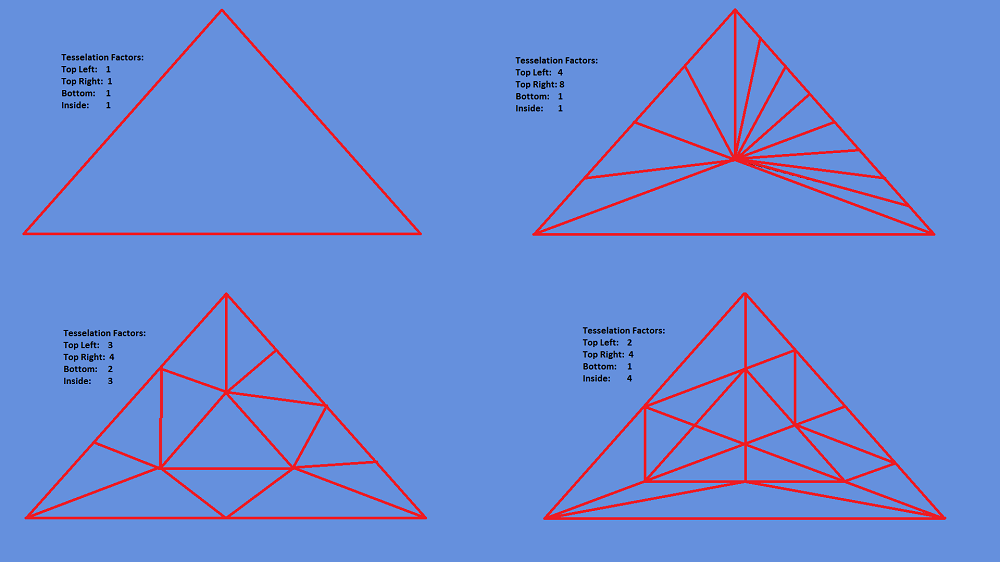
Tessellation Factors indicate how many times a patch will be tessellated. Higher Tessellation Factors result in more polygons being generated for the current patch. There are two kinds of Tessellation Factors: Edge factors and Interior factors. Edge factors indicate how many polygons an individual patch edge should be subdivided into. Interior factors affect how many new polygons are created inside the patch. Triangle patches have three Edge Tessellation Factors, and one Interior Tessellation Factor. Quad patches have four Edge Tessellation Factors and two Interior Tessellation Factors.
If all Tessellation Factors for a patch are set to 1, then no tessellation is performed, and the patch is drawn as if every control point is a traditional vertex. If the Tessellation Factors are set to 0, then the patch is rejected and no more calculations are performed on that patch. This is useful for backface removal and culling.
Figure 1. Triangle tessellation examples:
Changing your Vertex Shader
You may need to make some small changes to your existing Vertex Shader, because it needs to handle control points instead of traditional vertices. The actual performance of the Vertex Shader is largely unchanged; the Vertex Shader will still modify points in 3D space and determine the onscreen positions of those points. The only difference is the changing of data types, which may or may not be trivial, depending on your implementation.
An example of a simple pass-through Vertex Shader:
struct VS_CONTROL_POINT_INPUT
{
    float3 Pos : POSITION;
};

struct VS_CONTROL_POINT_OUTPUT
{
    float3 vPosition : WORLDPOS;
};

// Vertex Shader function - takes control points as input, modifies them as necessary, and passes the results to the Hull Shader
VS_CONTROL_POINT_OUTPUT main( VS_CONTROL_POINT_INPUT input )
{
    VS_CONTROL_POINT_OUTPUT output = (VS_CONTROL_POINT_OUTPUT)0;
    output.vPosition = input.Pos;
    return output;
}
Tessellation Shaders
Tessellation utilizes two shaders; the Hull Shader, and the Domain Shader. Output from the Vertex Shader is modified by the Hull Shader, which then passes output to the Domain Shader.
The Hull Shader stage consists of two shaders: a Constant Hull Shader and a Control Point Hull Shader.
| Shader in the Hull Shader stage | Description |
|---|---|
| Constant Hull Shader | Evaluated per patch. Outputs the Tessellation Factors for that patch. |
| Control Point Hull Shader | Takes a number of control points as input. Outputs another number of control points. |
These shaders in the Hull Shader stage are described in more detail below.
Constant Hull Shader
The Constant Hull Shader is evaluated per patch, and outputs the Tessellation Factors for that patch. The Constant Hull Shader takes two data types as input:
- The first data type is called an InputPatch, and it tells the shader which data type to catch from the Vertex Shader (control points), and how many of them to catch (the number of control points in the current patch).
- The second data type is a patch ID value, used to differentiate the patches. You can use or ignore the patch ID.
After all the control point values have been recorded, the Constant Hull Shader determines what tessellation factor values should be passed on to the Control Point Hull Shader. How you determine the tessellation factor values is up to you: they can be arbitrarily chosen, passed as input from the Vertex Shader, or dynamically calculated. Here are some common metrics for dynamically calculating how much tessellation is needed:
- Distance from the camera: Put less detail into far-away objects, because the user is less likely to pay attention to them, and in extreme cases too much detail on a small object can cause visual artifacts such as twinkling of pixels.
- Screen area coverage: If an object is occupying a large portion of your screenspace, it makes sense to render that object in as much detail as possible.
- Orientation: Polygons along the edge of a silhouette will visually benefit more from tessellation than other triangles. This is also a useful method of backface removal.
An example of a Constant Hull Shader:
// Output from the Vertex Shader is taken as input by the Hull Shaders.
struct VS_CONTROL_POINT_OUTPUT
{
    float3 vPosition : WORLDPOS;

    // Add additional data here
};

// Output patch constant data.
struct HS_CONSTANT_DATA_OUTPUT
{
    float EdgeTessFactor[3]            : SV_TessFactor;       // e.g. would be [4] for a quad domain
    float InsideTessFactor            : SV_InsideTessFactor; // e.g. would be Inside[2] for a quad domain

    // Add additional data here
};

// Patch Constant Function - Takes a number of control points as input, and determines Tesselation Factors for that patch
HS_CONSTANT_DATA_OUTPUT CalcHSPatchConstants(
    InputPatch<VS_CONTROL_POINT_OUTPUT, NUM_CONTROL_POINTS> ip,
    uint PatchID : SV_PrimitiveID)
{
    HS_CONSTANT_DATA_OUTPUT Output;

    // This snippet uses predefined values stored in a constant buffer. Alternatively, you could pass Teselation Factors
    //    as output from the Vertex Shader, or dynamically caluculate the factors here.
    Output.EdgeTessFactor[0] = TF_Bottom;
    Output.EdgeTessFactor[1] = TF_TopRight;
    Output.EdgeTessFactor[2] = TF_TopLeft;
    Output.InsideTessFactor = TF_Inside;

    return Output;
}
Performance advice:
- Render all of your tessellated objects one batch. Turning tessellation on and off is expensive.
- For GPU performance reasons, try to avoid tessellating to the extent that triangles cover less than 8 pixels.
- Try to avoid tessellating patches that have a tessellation factor of 1. Calling the tessellator on objects that aren’t going to be tessellated is a waste of GPU overhead.
Control Point Hull Shader
The Control Point Hull Shader takes a number of control points as input, and outputs another number of control points.
The simplest form of Control Point Hull Shader is known as a pass-through shader. This simply takes the control point input, and passes it along to the Domain Shader without modification.
More complicated Control Point Hull Shaders will add additional control points or modify the values of the existing control points. The number of control points taken as input does not have to equal the number of control points that are output. For example, a Control Point Hull Shader could take a triangle patch with three control points as input, and output a triangle patch with 12 control points.
An example of a pass-through Control Point Hull Shader:
// Output control point
struct HS_CONTROL_POINT_OUTPUT
{
    float3 vPosition : WORLDPOS;

    // Add additional data here
};

[domain("tri")]
[partitioning("integer")]
[outputtopology("triangle_cw")]
[outputcontrolpoints(3)]
[patchconstantfunc("CalcHSPatchConstants")]
HS_CONTROL_POINT_OUTPUT main(
    InputPatch<VS_CONTROL_POINT_OUTPUT, NUM_CONTROL_POINTS> ip,
    uint i : SV_OutputControlPointID,
    uint PatchID : SV_PrimitiveID )
{
    HS_CONTROL_POINT_OUTPUT Output;

    // Insert code to compute Output here
    Output.vPosition = ip[i].vPosition;

    return Output;
}
Before defining the Control Point Hull Shader, you must set several attributes. These attributes are placed immediately before the definition, within square brackets.
| Attribute | Description | Examples |
|---|---|---|
domain | Defines the patch type.
Valid arguments:
"tri"
"quad"
"isoline" |
[domain("tri")]
[domain("quad")]
[domain("isoline")]
|
partitioning | Defines how new vertices are added or removed. The "integer" approach has a noticeable popping effect as new vertices are added. The "fractional_" approach tessellates more smoothly.
Valid arguments:
"integer" (tessfactor range: 1-64)
"fractional_even" (tessfactor range: 2-64)
"fractional_odd" (tessfactor range: 1-63) |
[partitioning("integer")]
[partitioning("fractional_even")]
[partitioning("fractional_odd")]
|
outputtopology | The winding order of the triangles created by subdivision. Can be clockwise or counterclockwise, or set to render lines.
Valid arguments:
"triangle_cw"
"triangle_ccw"
"line" |
[outputtopology("triangle_cw")]
[outputtopology("triangle_ccw")]
[outputtopology("line")]
|
outputcontrolpoints | The number of times the Hull Shader executes, outputting one control point per time. | [outputcontrolpoints(3)] |
patchconstantfunc | A string specifying the name of the Constant Hull Shader function that pairs with this Control Point Hull Shader. |
[patchconstantfunc("CalcHSPatchConstants")]
[patchconstantfunc(MyPatchConstantFunc)] |
maxtessfactor | The maximum amount of tessellation allowed. Useful when performance is an issue. | [maxtessfactor(3)] |
The Tessellation Stage
The tessellation stage occurs after the Hull Shader, and before the Domain Shader. This stage is performed entirely by the hardware, and cannot be modified by programmers. In this stage, the patch is subdivided into smaller triangles based on the output from the Hull Shader.
Domain Shader
The Domain Shader is invoked for each vertex created by the tessellation stage. The Hull Shader functions similarly to the Vertex Shader, the main difference being that the Vertex Shader works on individual control points, while the Hull Shader works on entire patches. The Domain Shader functions differently depending on whether it is modifying quads or triangles.
For quad patches, the Domain Shader takes the following inputs:
- The tessellation factors and other output from Constant Hull Shader.
- The parametric (u, v) coordinates of the tessellated vertex positions.
- All of the patch control point output from the Control Point Hull Shader.
From this input data, the hull shader derives the actual 3D positions of the vertices output by the tessellation stage.
Triangle patches function similarly to quad patches. The main difference is that tessellated vertex positions for triangles are in barycentric (u, v, w) coordinates instead of parametric (u, v) coordinates.
struct DS_OUTPUT
{
    float4 vPosition  : SV_POSITION;
};

[domain("tri")]
DS_OUTPUT main(
    HS_CONSTANT_DATA_OUTPUT input,
    float3 domain : SV_DomainLocation,
    const OutputPatch<HS_CONTROL_POINT_OUTPUT, NUM_CONTROL_POINTS> patch)
{
    DS_OUTPUT Output;

    Output.vPosition = float4(
        patch[0].vPosition*domain.x+patch[1].vPosition*domain.y+patch[2].vPosition*domain.z,1);

    return Output;
}
Tessellation Samples at XGD
For working tessellation samples, at Samples for the XDK at the Xbox Game Developer (XGD) site, look for ‘tessel’. For example:
- The SimpleBezier sample demonstrates how to create hull and domain shaders to draw a tessellated Bezier surface representing a Mobius strip.
- The SimpleBezierTable sample does the same, but using resource tables.
For instructions about downloading and running XDK samples, see Running the XDK Samples.