Visual Gesture Builder Timeline
Describes the Timeline and Output panes.
Timeline Pane
Use the timeline to perform time tagging of clips.
Note The title of the Timeline pane changes based on the currently selected tag.
Tagging Clips
In order to train on clips, they must be tagged in some manner. Different machine language algorithms accept different types of tagging but, for a specific frame, some metadata representing the intended gesture is encoded. The following are the allowed tagging types.
- In AdaBoostTrigger Machine Learning projects, mark a specific part of the clip as a gesture.
- In RFRProgress Machine Learning projects, identify different parts of the gesture sequence with a value.
Figure 1. Tagging Clips
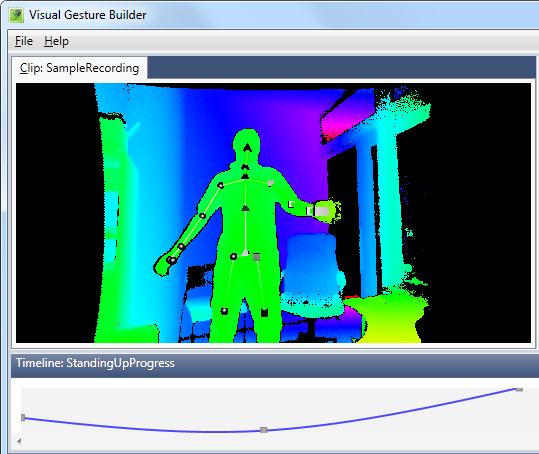
The following is an example of steps you can perform to generate training data.
- Click on one of the files. You are presented with the file view.
- Scroll to some frame.
- Add new metadata.
- Repeat the previous steps as many times as needed.
Output Pane
This pane displays status and error messages. You can use the results of application operations that are displayed here for debugging purposes.
Keyboard Shortcuts
The following keyboard shortcuts are available to expedite tagging gestures in VGB.
| Keyboard Shortcut | Description |
|---|---|
| LEFT Arrow | Move position marker to the previous frame |
| RIGHT Arrow | Move position marker to the next frame |
| CTRL + LEFT | Move position marker to the previous key frame |
| CTRL + RIGHT | Move position marker to the next key frame |
| PAGEUP | Load tags for the previous gesture listed in the Tags pane |
| PAGEDOWN | Load tags for the next gesture listed in the Tags pane |
| Shift + HOME | Select all frames left of the position marker to the start of the file |
| Shift + END | Select all frames right of the position marker to the end of the file |
| Shift + LEFT | Select frames left of the position marker |
| Shift + RIGHT | Select frames right of the position marker |
| CTRL + Shift + LEFT | Select all frames left of the position marker to the previous key frame |
| CTRL + Shift + RIGHT | Select all frames right of the position marker to the next key frame |
| UP | Increase the value of the selected tag |
| DOWN | Decrease the value of the selected tag |
| Delete | Delete the value of the selected tag |
| CTRL + Delete | Delete the selected key frame |
| Enter | Set tag to default maximum value (TRUE for discrete gesture types, 1 for continuous gesture types) |
| Space | Set tag to default minimum value (FALSE for discrete gesture types, 0 for continuous gesture types) |
| CTRL + Z | Undo last tag change |
| CTRL + Y | Redo a previously undone tag |