Visual Gesture Builder Training Project
Describes the Training Project in Visual Gesture Builder.
Training Project Menu
To access the context menu for a training project, open an existing solution in VGB (File > Open Solution) and right-click on a gesture project in the Explorer.
The Training Project menu displays options for adding clips and building the gesture detector.
Figure 1. Training Project menu
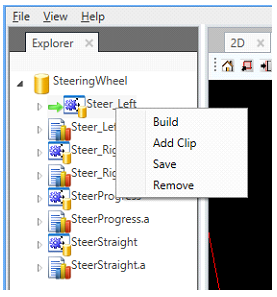
The following options are available for the training project.
| Menu Option | Description |
|---|---|
| Add Clip | Adds one or more clip files (.xef) to the project. This will create an associated .vgbclip file for tagging metadata, if no such file exists. |
| Build | Builds the gesture database file (.gba). This trains the gesture detector and outputs a single project database (.gba) which can only be used for analysis or Live Preview testing. This option is disabled when another build or analysis is in progress. |
| Save | Saves all changes to the project (.vgbproj), including clip references. |
| Remove | Removes the project from the solution. |
Training Project Settings
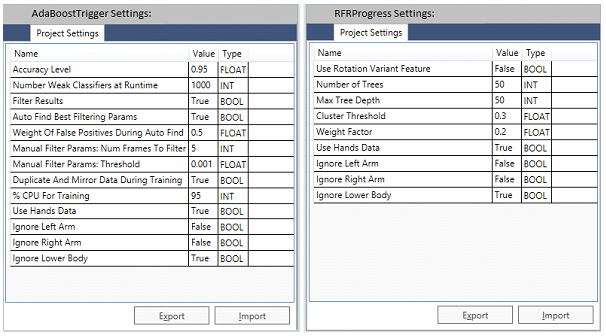
The training project settings enable you to modify project property values. These values affect gesture training results and performance. Available settings depend on the Machine Learning technology used by the selected gesture project. For more information, see Machine Learning Technologies.
Figure 2. Training Project Settings
| Parameter | Description |
|---|---|
| Name | Settings property name. The names listed depend on the machine learning technology used by the project.
|
| Value | Assigns the value to the settings property. |
| Type | Displays the type associated with the settings property. |
| Export | Export the project property values to a file. Use this control as follows:
|
| Import | Import the project property values from a settings file (.fid) that you select. Use this control as follows:
|
Training Project Results
While building, training progress will be displayed in the Output pane for a gesture project. When complete, the resulting database (.gba) can then be loaded in VgbView on the console for live testing (File > Live Preview), or it can be used to analyze the gesture detector against a collection of test clips (for more information, see Analysis Project).