Understanding Security Tokens for Xbox One
Updated: July 24, 2019
Introduction
Xbox uses security tokens to establish identity about the device, the title, the user—or a combination of all three—during communication between the console and Xbox Live or partner services, or between a partner service and Xbox Live. These tokens are created by the Xbox Secure Token Service (XSTS) and they will have varying contents depending on their intended audience.
Note: Check out the XSTS Server Sample.
XSTS Tokens
The token used for Xbox One is a JSON Web Token (JWT) that uses one of two JWE encryption types:
- Asymmetric public / private key pair – token is encrypted using a certificate’s public key and is then decrypted on your service with the private key. The token is also digitally signed by Xbox Live to validate its origin. This is the recommended token type as it is more secure.
- Symmetric shared key – a single secret key is shared between Xbox Live and your service that is used to encrypt and decrypt the token.
As of 2018, tokens are compliant with RFC 7519 and all new titles and services should use this standardized token version. The legacy JWT token format is only for titles migrated from the Xbox Developer Portal (XDP) and require it for ongoing compatibility.
Tokens are meant for a specific relying party, which represents a set of service endpoints that share the same token configuration, encryption certificate, and signature policy. These are described in more detail below:
- Token configuration: the claims that are in the token; token lifetime.
- Encryption certificate: the key used to encrypt the token.
- Signature policy: specifies which parts of the request (headers and body data) must be signed for integrity validation.
Most Xbox Live services share the same relying party. Publishers that have their own services their titles call must configure their relying party via the Partner Center Xbox Live configuration.
Token structure
The token is broken into sections including a Header and the Payload. There are other sections in the token depending on the encryption method for your token. For a sample token, see Appendix A in this document. Each part of the token is separated by a ‘.’ in the encoded token string.
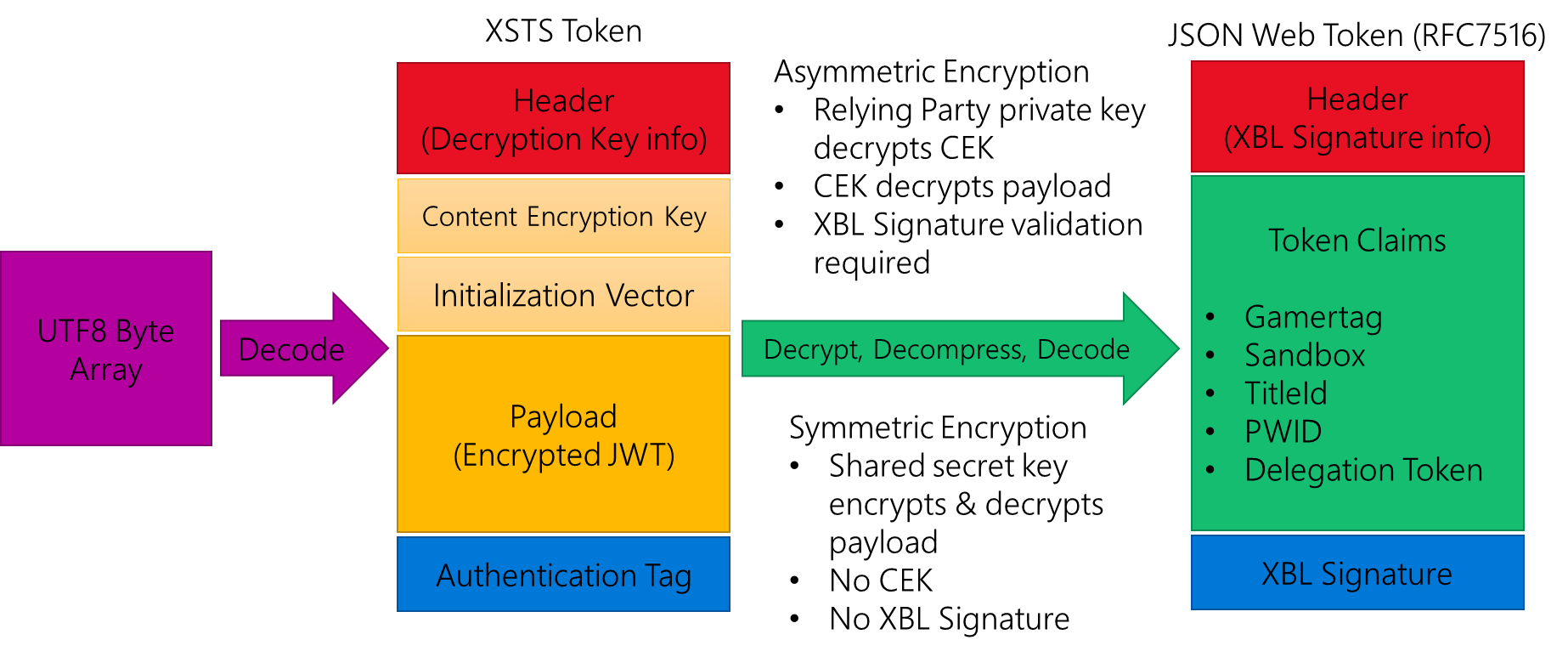
Header
The header has two sections. The first describes the details about how the JWT is encrypted and includes the encryption, algorithm, and content type. If the token uses Asymmetric encryption the header will also include the thumbprint of the x509 certificate used for encryption. This thumbprint should match the certificate provided by you during configuration of your relying party and the private key must be installed on the server to enable the token to be decrypted.
Content Encryption Key
Not present with Symmetric encryption. With Asymmetric encryption the private key decrypts this content which then provides you the decryption key needed for the payload.
Initialization Vector
Not present with Symmetric encryption. Used with the AES decryptor for the payload.
Payload
The payload is the encrypted JSON Web Token that contains the claims and information your server needs for authentication of the user.
Authentication Tag
Integrity value for the token.
Inner JSON Web Token
Once the Payload is decrypted you will have a UTF8 array that represents the RFC7516 JSON Web Token. This inner token also has a header that includes information related to generating and validating the signature on the token. The token will be signed with the private key of the Xbox Live signing certificate to validate that the token is from Xbox Live. The header of the inner token contains the thumbprint and a URL to download the public key of the cert so that your service can do a validation of the signature. This means that your server should keep a cache of this public cert that it downloaded at runtime to re-use. Since the Xbox Live signing cert can expire and needs to be renewed every 18 months, we recommend that your server does not hard code the cert nor install it on your servers. You should always check your local cache: if you do not have the cert, download it (validating it is coming from https://xsts.xboxlive.com), and then cache it. If the cert is updated, the tokens will have a new thumbprint and URL in their headers to reflect that. If you follow the logic outlined in the XSTS Server sample around the signature cert management your service will never have to be updated to handle a new Xbox Live signing cert.
The payload of this token contains the claims you will use to make decisions and act on the request. It contains a set of top-level claims, as well as a set of “identities” for the device, the title, and one or more users. The presence or absence of claims is determined by the token configuration for your relying party. For example, if your relying party isn’t configured to include age group, then that user claim won’t be included.
Claim values can be traditional types (string, integer, GUID, and so on.). They can also be a JSON object representing a more complex structure.
Claim values with no data can be represented through null values or can be missing from the token entirely. Title services should consider this when parsing claim values.
Identities
A set of related claims that describe aspects of a principal are known as an identity. From a structural perspective, they are claims where the value is a JSON object. That object will either be a set of claims or an array of sets of claims.
The identities that can be contained in Xbox One tokens are listed and described below (with their specific short names shown in parenthesis):
Device identity (xdi)
The claims in the device identity provide details about the device that requested the token. There can be only one device identity in the token. This means that the device identity will be a simple list of claims and values.
See Device identity claims for a list of possible claims.
Title identity (xti)
The claims in the title identity provide details about the title running on Xbox One that requested the token. The token can contain only one title identity. If present in the token, the title identity will be a simple list of claims and values.
See Title identity claims for a list of possible claims.
Service identity (xsi)
The claims in the service identity provide details about a service if the request came from that service instead of from Xbox One. There can be only one service identity in the token. If present, the service identity will be a simple list of claims and values.
See Service identity claims for a list of possible claims.
User identity/identities (xui)
The claims in the user identity provide details about a user. If more than one user is logged in to the console, there will be more than one user identity in the token. If present, the user identity will be an array of claims sets (even if it is an array with one object).
See User identity claims for a list of possible claims.
The authorization header of the request contains the necessary information to determine which user in the token the request applies to. For additional information about processing tokens with multiple users, see Multi-user tokens.
Aggregate identity (xai)
The claims in the aggregate identity provide a merged set of values representing all of the users in the token, such as age group (the value matches that of the youngest user) and privileges. Combining these as a separate identity enables the service to make decisions without having to perform the analysis directly, and it ensures that privileges blocked by banning are enforced, something that the service cracking the token wouldn’t be able to determine easily.
See Aggregate identity claims for a list of possible claims.
Multi-user tokens
For Xbox One, tokens will contain user identities for any user that is currently signed into the console. This means that the xui claim in the token will be an array containing one or more user objects. In the incoming request, the authorization header will contain the following:
XBL3.0 x=<user hash>;<token>
The user hash value will be one of three values:
- A number that matches the user hash claim of one of the user identities in the token, indicating that the request is for that specific user.
- An asterisk (*), indicating that the request is for all users contained within the token.
- A hyphen (-), indicating that the request is not in the context of any of the users in
If the user hash value in the header matches the user/hash claim of one of the user identities in the token, the request is meant for only that user. User hash values are unique to that instance but are not guaranteed to always be the same for a given user in future XSTS tokens. They should not be used as a permanent identifier or cached.
Appendix A: Example XSTS token
Below is an example of an authorization header using an XSTS token that is using Asymmetric encryption with a relying party certificate. This token comes directly from the Web Services sample when attempting to talk to the server https://asym.xsts2018Sample.azurewebsites.net/ which is running a version of the XSTS Server sample handling RFC 7516 Asymmetric XSTS tokens.
Authorization: XBL3.0 x=4133656994526485445;eyJlbmMiOiJBMTI4Q0JDLUhTMjU2IiwiYWxnIjoiUlNBLU9BRVAiLCJjdHkiOiJKV1QiLCJ6aXAiOiJERUYiLCJ4NXQiOiJBQVNqb1N3ZFhsa3dlakNOYlFMb09YamlxYTQifQ.ZZxHdEK3FfofcUZyKTBn4ZyYO8mU0U_rng_DqU0ij-bVZjUq8jnDfvBUu0Vy-zAZheSIeF85rtF4mzPZGyoJ9E60HPqmLv-fdRUtNelYcyPQPDZCe_n-dkWiVSAiyzhkMoVK2tR9y6RvFICEcG2qesVIhokGoZLkxAx-v25QBTaFuIlPeNjTsZWp7r7n1dDAR0IBDuwaVwcCsiOz5wfHmKNsl07WUY5qm3dYBWi8NsLMQ_n2EQAnG5-pusTFDi0_KzKVW2h5feswJO7mgCfyhLZpEiZH-k6pHApbiK58-r3oWRZ57bEAdszq0HZQIjqBEkQdqI-j59GB6vt9x9VnTw.HEYX5Z99ZVviYcQzYHhe7Q.nkwIO0W8k5exZyQHBmV-xM0djzX-QcjFq5Zr60mJ07iRBk9iSF28vDxwT_WVKxOS3OO0iKWPfzKwv5XOai0i_A5w-qMmm-PTvAA2rRNquPBiio5UaeIStYXoME_6dhnjkPPl9DbCuzFYxELy9s1KYsnuFDusExaTMGkKf_5q1vYt_QimUUjbXsq9OL7374zPEENfjrQQoclGmFSWDSadyGkGLsBa-evsaGB4Xl2MEAzctU7qSZ5i2i9p5H72Fd8WpKNRfXEcTIHycS7cXXUKFKs4BH5DG8PfMOzsaoKIv-x7yH2HYaJQIjzQY_DfqZ6iOzSF_cI7Rs_H2XoUCg596kaMmMRIwSfKsiVksycPqQoCcU5p4_uR7vjrCHuURBlTFUtFceAXh2pYurcjGfsq81EHL8chwhn157WuBeD9jA4_pT9aoDiAXyP03lC9kR1_myvNBfFfQ360I2ErMKFczC87NaLQEdPIOIctmJQq_YoQtlBoDHPdbscfO57l5-jfMi3Zctm6khnd4Wb_dYFtOhv4KMvLlE5eYcRknDTMs1aebEb45XaOQG3MH8YT6FB0sYGuPCKlZgd6UjVnFdF9hcRpi7idX-uRhHYW9bsh5PCVzhrhMkLLvRUtPvPXtAKSz3poaPl2d_5j3EdWlq96egjdlx_vgkeWD8VcLgQvfAeye_hmFKGAWNX2PoP5hTCXLmj_D18_qZkZPCCoawCrF3du8ZyaZHRvevMqnXvZIVCn3ssx3h7xQNgOvmerAgEZLP2dUfCaHNZjAh461TXN3DqmV8POBXeu-Af6GK38wV4DFlWgP5lpf7BO_uRcr022erhisk-lxT4XjjMp-v_PZDvcuWqsYkN4BYk5KwPNLR2Od6v4g7CNVUIUIX0DYd3b0Ojf5avtxldPNLeSN3URgjXDTLzZFVV1NHTAJ49Lw9b99Mqige1P68YJzSuHfnlOhoJghT1_tTi8IKHXwtqHy01reADalA5imwmqsLo5pYJcSgJdekpPexaef6WuCKmQZiWfwF4IWt-EaXpI4n7alUoA31SGeGz6dyCwn1xYSUzy__D7uBctur9w2ufsLqaxkSy4EL6_lylVe_BSxGxLv4KOguZ6GBYyTPUPBXp-exelIvfDMJe8TNm4D53MSGoC8miOvVS7cGsZHRBRmGzsJ9UBWwsarBbcjycvj6uN9H9xKvhzEyzs7jUu68M5_s04pDS_0aYxYMINDzBJ9N3h0PuBkWe2cR8GrmASuWp07KiLgFLVVRjXVh2SXoCH-0kS7bX2hC-X4plEM0AXAUZUe4y9lpyUxE9PfRKtmr8mGXxkFpzRZFYX8tQn2chaYI4p2nr4DZCcLsAPzTGg1Q4YHu27d213GGNbrdi0hhZOXnUDTyvbvdD6A31K1UM_49bK5ch1HYsJ4lpaMoSUDffKHOOMWSkG9AqOGGjVDT_ta1MrRd0m_sLRLMF_BoTB4I1fZAjt2AddoAq5EcHEwSWrNIm3M8a2xv9zCLZLk-GFiws3HtUUHDo2s3KiPb0gbrp4zOWBsTjksRGrO-zDLHpnsVbfX1HlFsxHLG942o6F00kYaIgrUPAne9dLx8CmK42HzvVIoveQbQ1DXirychtFKTE1qjBVvnkggz8AhyYGQSdzAQrdKD1vuA-yaw5iWGJhtGiuFznlaC9T_rNhEKzwyTkyCcZjgswXMeDnMKTK2h9T4q8-xvICHthvwDlGlSsQ_DfjuBbjFBhYf4DUiyjoR01Iv-Ao1BtlH42hbsMlZdfYrxmLRFLOAIp-1ah_A4upxxTft-NV9G7EDnkSd8a1bV-sRLvCpH_RoUpc5FzmHULu3PtgoS0lRao9pMWg-YM1bi6XUOMquFjwuYISC2mAoNlvRzLCJsDglimqBBFyc4aL31eIsYrJjEjZIZzu4cVG.K8y8KKxtaxLSzeHehla_7g
The various sections of the token can be broken up as follows:
Authorization: XBL3.0 x=4133656994526485445;[HEADER].[CONTENT ENCRYPTION KEY].[INITIALIZATION VECTOR].[PAYLOAD].[AUTHENTICATION TAG]
So, for example, the header component is eyJlbmMiOiJBMTI4Q0JDLUhTMjU2IiwiYWxnIjoiUlNBLU9BRVAiLCJjdHkiOiJKV1QiLCJ6aXAiOiJERUYiLCJ4NXQiOiJBQVNqb1N3ZFhsa3dlakNOYlFMb09YamlxYTQifQ.
You can put the token portion (everything minus the “Authorization: XBL3.0 x=4133656994526485445;”) into the JWT tool at https://jwt.io to see the following contents of the header:
{
  "enc": "A128CBC-HS256",
  "alg": "RSA-OAEP",
  "cty": "JWT",
  "zip": "DEF",
  "x5t": "AASjoSwdXlkwejCNbQLoOXjiqa4"
}
This tells us that this is a JWT and that the certificate used to encrypt the Content Encryption Key has a thumbnail of 0004A3A12C1D5E59307A308D6D02E83978E2A9AE, which you can get by using Base64URL to decode the x5t value:
AASjoSwdXlkwejCNbQLoOXjiqa4 -> Base64Url Decode to byte array
-> [00-04-A3-A1-2C-1D-5E-59-30-7A-30-8D-6D-02-E8-39-78-E2-A9-AE]
-> Convert into a string and remove the ‘-‘ characters
Using the private key of the Relying Party cert that matches the thumbprint we can then decrypt the Content Encryption Key.
Content Encryption Key (CEK):
ZZxHdEK3FfofcUZyKTBn4ZyYO8mU0U_rng_DqU0ij-bVZjUq8jnDfvBUu0Vy-zAZheSIeF85rtF4mzPZGyoJ9E60HPqmLv-fdRUtNelYcyPQPDZCe_n-dkWiVSAiyzhkMoVK2tR9y6RvFICEcG2qesVIhokGoZLkxAx-v25QBTaFuIlPeNjTsZWp7r7n1dDAR0IBDuwaVwcCsiOz5wfHmKNsl07WUY5qm3dYBWi8NsLMQ_n2EQAnG5-pusTFDi0_KzKVW2h5feswJO7mgCfyhLZpEiZH-k6pHApbiK58-r3oWRZ57bEAdszq0HZQIjqBEkQdqI-j59GB6vt9x9VnTw
Using base64Url decode returns:
[65-9C-47-74-42-B7-15-FA-1F-71-46-72-29-30-67-E1-9C-98-3B-C9-94-D1-4F-EB-9E-0F-C3-A9-4D-22-8F-E6-D5-66-35-2A-F2-39-C3-7E-F0-54-BB-45-72-FB-30-19-85-E4-88-78-5F-39-AE-D1-78-9B-33-D9-1B-2A-09-F4-4E-B4-1C-FA-A6-2E-FF-9F-75-15-2D-35-E9-58-73-23-D0-3C-36-42-7B-F9-FE-76-45-A2-55-20-22-CB-38-64-32-85-4A-DA-D4-7D-CB-A4-6F-14-80-84-70-6D-AA-7A-C5-48-86-89-06-A1-92-E4-C4-0C-7E-BF-6E-50-05-36-85-B8-89-4F-78-D8-D3-B1-95-A9-EE-BE-E7-D5-D0-C0-47-42-01-0E-EC-1A-57-07-02-B2-23-B3-E7-07-C7-98-A3-6C-97-4E-D6-51-8E-6A-9B-77-58-05-68-BC-36-C2-CC-43-F9-F6-11-00-27-1B-9F-A9-BA-C4-C5-0E-2D-3F-2B-32-95-5B-68-79-7D-EB-30-24-EE-E6-80-27-F2-84-B6-69-12-26-47-FA-4E-A9-1C-0A-5B-88-AE-7C-FA-BD-E8-59-16-79-ED-B1-00-76-CC-EA-D0-76-50-22-3A-81-12-44-1D-A8-8F-A3-E7-D1-81-EA-FB-7D-C7-D5-67-4F]
We can then decrypt the Base64URL decoded value by using the RSA private key, which returns the fully decoded CEK:
[84-25-45-F7-B9-0A-4C-84-03-9D-3D-43-77-C9-30-A9-F0-87-0C-1F-3A-21-36-DF-C8-97-45-D2-E5-E8-96-C3]
The CEK can then be broken into the hmacKey and the aesKey to decrypt the payload. We also base64 decode the initialization vector:
hmacKey = [84-25-45-F7-B9-0A-4C-84-03-9D-3D-43-77-C9-30-A9]
aesKey =  [F0-87-0C-1F-3A-21-36-DF-C8-97-45-D2-E5-E8-96-C3]
iv =      [1C-46-17-E5-9F-7D-65-5B-E2-61-C4-33-60-78-5E-ED]
Decrypting the payload with the information above we get the following:
[7D-94-C9-96-A3-3A-12-86-9F-A8-FA-88-C9-D7-5E-1A-23-30-18-89-44-48-80-B4-A9-C3-60-9B-39-5D-65-6C-86-A7-6F-E1-BC-BD-ED-E5-77-14-11-FA-63-BC-2E-1E-B8-A6-C7-3A-A8-BD-4B-AC-84-B5-7F-F2-AA-DC-29-36-8E-D8-EA-2A-B8-76-9F-EE-70-57-CA-93-BB-73-07-52-71-5A-D5-01-7C-AC-98-56-CF-82-71-90-C3-D2-27-E0-BE-E0-64-54-04-7C-80-38-FA-D7-3E-92-F6-7D-05-CA-B3-B9-06-F5-FE-7D-3D-63-50-2C-46-55-A6-E4-DB-1F-AA-3A-D7-AA-67-96-8A-CE-EF-F1-3B-8F-0E-7A-A1-91-D5-57-71-57-0C-E4-21-FA-AE-E1-29-E9-8A-E5-00-78-02-75-DE-54-97-62-65-7A-7E-B6-1D-EC-CC-E7-08-94-2E-6A-E2-BF-65-42-2E-A5-CD-EA-5B-F8-9F-EB-E2-55-65-12-6E-B2-97-C2-FA-7E-FB-C0-5E-AF-89-32-8A-94-2C-59-82-23-D2-22-0D-53-A8-FA-BD-0D-C4-62-BC-44-1A-BE-DD-7A-AA-B3-14-AF-6E-F3-5D-FF-7F-79-32-A5-DE-A8-45-ED-EE-10-65-2A-B6-A0-8A-68-BB-62-E9-2F-D2-6A-92-FE-33-A6-1C-A0-06-1A-98-22-55-96-50-17-4E-5B-07-C3-B3-16-0E-19-B7-F8-24-F6-CC-ED-3F-71-26-C6-C6-89-E3-BD-AF-F0-F0-12-91-77-D8-EC-CB-7F-ED-4B-A7-6B-B7-77-D4-1C-55-BC-4A-CD-0D-9C-F1-8F-CD-CA-87-FB-96-1F-27-70-A4-7E-03-B7-56-35-79-CF-3F-7E-D9-50-FE-75-9B-C7-3F-6E-8F-97-52-EA-74-BB-E3-88-1A-A6-6E-7F-5E-B7-D6-75-E2-1C-C5-31-2E-6C-B8-A6-A0-CA-F2-C4-6B-09-B4-05-EE-BC-57-64-1F-DC-DC-29-87-6B-F7-78-91-46-18-99-2D-60-C0-F0-33-A7-68-29-FB-62-FB-E7-A3-59-24-AE-92-2B-2E-C8-9B-CE-A2-4D-E7-33-56-0E-C8-3E-68-05-54-26-64-D9-B7-32-A9-58-61-75-5A-0A-6C-CC-69-37-14-96-AB-13-27-76-F9-B2-D5-CF-7E-8A-45-EA-68-63-FA-3F-5D-99-F6-53-0B-C2-D0-F6-87-52-A8-6C-CB-6F-CD-92-A2-BE-A5-40-8E-51-A5-64-72-8C-12-6D-AB-E3-0C-3E-75-B1-1F-97-C2-7E-64-AC-89-27-5F-E9-18-ED-70-9F-F5-5C-A7-49-DC-E7-4A-15-5E-93-D1-B8-32-DB-F6-D5-AA-0F-81-78-45-A0-5D-A3-73-0C-0A-46-BE-A8-1A-5F-A2-A6-7A-A2-AE-03-34-35-8D-C8-A9-FE-08-CD-8E-93-3E-9C-4B-F5-60-67-1A-5A-89-E2-A5-49-5F-F2-AC-7B-5C-98-3A-A2-28-39-3C-89-73-08-33-E0-D9-BC-2B-BF-32-56-26-F1-F2-54-22-C0-F4-38-29-E7-DC-D9-2F-C2-A9-D4-BC-15-40-50-77-CA-57-3E-B3-C6-56-13-4B-A8-B8-C5-3C-EC-EC-13-57-CC-B7-50-E7-88-6B-B8-8D-1D-4F-C5-8C-34-2C-35-77-D4-79-5C-48-53-BD-59-EF-3D-29-3D-1A-F4-1C-57-57-4B-E8-17-F5-39-5F-ED-8A-E1-C1-7C-09-DB-D5-32-D9-29-1A-97-16-3E-7F-1B-88-B1-37-89-EF-80-C7-B1-96-3B-55-C6-7A-02-0B-A9-BD-18-30-8D-2D-6F-28-28-D6-32-C5-9C-A8-83-97-AB-ED-7D-65-9A-DD-C7-5A-67-0A-7A-3C-7C-E6-4F-23-C3-A7-8E-B5-09-45-CA-EF-B8-29-26-DC-B4-8A-9C-6B-B0-BD-CB-1E-7E-F6-41-CE-F8-8A-56-AE-C8-37-03-5B-6C-C1-4D-A8-63-1A-02-FC-59-6F-59-CF-9F-5E-CA-B9-8D-97-5C-F6-F6-E3-9B-9A-8F-9F-7E-7A-27-B4-16-33-86-CC-40-6B-AB-87-6B-A1-10-AB-82-72-A6-17-D2-40-2D-80-48-C7-96-6D-61-06-17-44-EF-3A-5A-99-42-7E-E2-0E-C5-36-BB-0D-54-90-63-77-A2-39-4E-7E-12-37-32-D6-88-AD-42-43-0B-30-44-62-37-BE-AC-B3-70-90-21-7A-B9-6F-0E-E9-83-D3-71-95-EF-0B-56-F9-8C-17-A5-15-7D-A8-F8-94-D4-B8-47-63-90-D8-2D-5A-94-0A-39-71-C5-13-06-64-2C-9D-53-78-47-2A-9B-70-0F-E5-DC-DE-47-9C-84-9A-A8-01-E0-2A-D2-7D-79-6E-84-55-8C-28-61-2B-EF-91-16-38-CC-08-1C-AF-75-AD-ED-F4-91-0A-AF-1C-F8-09-A9-45-CF-47-EC-C0-89-47-40-C7-AB-5D-F9-09-EE-84-D5-02-BC-7A-2D-B6-F8-24-A2-A3-CC-AB-AC-D0-0A-95-20-52-64-2E-F7-D5-A7-A1-2E-FF-1D-79-8F-DB-40-FA-71-99-9F-AC-ED-8C-1A-34-A3-35-94-9A-A4-7E-DA-4A-3F-77-94-F1-35-7C-02-F2-A6-1C-65-2E-F7-25-90-3A-45-C3-56-41-CD-1A-51-AE-F3-C4-FD-EC-10-4F-CA-4F-3F-C3-84-28-F9-F9-73-BE-9B-F2-EC-CA-3D-72-67-64-7D-F6-6A-2A-06-FE-E1-C0-62-77-59-6F-D5-B5-A0-8E-97-A3-E4-BB-E4-76-92-6C-A0-48-32-75-37-5E-37-C6-A7-8D-F9-C6-FA-C6-41-74-5C-90-75-BC-4B-3D-B3-6B-B9-13-5A-36-0E-37-56-36-C6-F5-C6-C5-C6-FA-C6-1F-FB-AD-CE-0D-04-92-E5-0D-DB-98-6F-AC-49-5E-D0-49-72-B3-F9-BB-1F-0E-36-5E-A5-BE-06-6D-FE-60-B3-C7-9F-78-A1-21-59-41-32-BE-9C-3F-C9-4C-71-07-A5-94-27-FF-CB-40-B0-3F-06-7F-17-77-8C-55-F6-0F-BA-F7-F9-A3-BF-26-CB-2D-35-B3-E7-63-3F-79-7D-1A-EA-9D-BD-17-BF-82-3F-ED-B1-9E-88-76-76-4D-5E-FB-D4-FB-BD-DB-EF-82-8B-30-DE-F4-6D-E4-55-B2-BA-3D-D9-8D-29-0B-55-1F-7D-C1-96-D4-F0-EB-06-AC-69-F7-76-58-1F-59-24-68-A6-3D-40-68-A7-E0-EF-39-AE-F4-97-1E-B5-93-D9-C4-D9-72-EF-FD-C3-C5-DB-F7-FE-CC-8C-F7-33-72-7A-63-FE-2A-C7-69-0E-6F-88-D2-57-E2-1D-82-75-3C-81-A7-91-F0-A0-A5-BF-77-DF-F0-F9-6D-BA-67-58-7E-C1-57-3B-32-2D-4D-E8-D5-10-DE-DF-1B-42-AB-49-76-66-6E-85-A7-B9-63-38-73-97-B9-7D-FF-FA-A5-DE-6E-D6-EB-8F-73-FB-73-3B-9B-EA-33-B9-C3-C8-F6-7C-75-D7-90-DF-67-B0-E7-2A-83-2F-8A-87-FB-D0-E6-A7-EC-6C-1A-D6-4B-09-6E-F2-7E-2F-DE-EE-4F-57-3A-11-83-45-A6-2B-FD-05-57-D3-D7-C1-23-CD-1C-84-B6-F9-DB-AE-19-BF-BC-1C-FA-5E-87-37-28-A2-5F-85-77-DC-2F-F4-F6-0E-11-DD-EF-29-C4-E2-F8-5F]
Decompressing this byte array (see XSTS Server sample XstsUtilities.cs DecompressAsync()) we get the inner JWT token that contains the claims for the user:
eyJ0eXAiOiJKV1QiLCJhbGciOiJSUzI1NiIsIng1dCI6InRhYThiOEpzNThscUY0bEdLR0gyNWt1ZEp0VSIsIng1dSI6Imh0dHBzOi8veHN0cy5hdXRoLnhib3hsaXZlLmNvbS94c3RzL2NlcnRpZmljYXRlcy90YWE4YjhKczU4bHFGNGxHS0dIMjVrdWRKdFUifQ.eyJhdWQiOiJycDovL0FzeW1tZXRyaWNSRkM3NTE2LmF0Zy5uZXQvIiwiaXNzIjoieHN0cy5hdXRoLnhib3hsaXZlLmNvbSIsIm5iZiI6MTU2NDE2MTkzNiwiZXhwIjoxNTY0MjE5NTM2LCJ4ZGkiOnsiZGRtIjoiRVJBIiwiZHR5IjoiWGJveE9uZSJ9LCJ4dGkiOnsidGlkIjoiMjA2NzM3NjExNSJ9LCJzYngiOiJYREtTLjEiLCJjbmYiOnsiandrIjp7ImNydiI6IlAtMjU2IiwieCI6IlZHSVVNcFEzX0habWJkREFZNlJuSF9IbGdnelpuRjZ5aFZEOUNsbTMydmciLCJ5IjoiZWI1b1I0bjlDTjlLUUdnMF93cE1wMDFfdWhUcDl3X0FNYTlncDI4RGVIYyIsImFsZyI6IkVTMjU2Iiwia3R5IjoiRUMiLCJ1c2UiOiJzaWcifX0sInh1aSI6W3siZGx0IjoiMFpKcFpaUjVwL1lUTlNmamY4TWVmb1hQeWt5eUFFL2hmQ0ZuS0kzSHV0cURPT2VKSjhsMll0TXB5SGhqZ3FVWmQxd29Fa3MzR1JXWmdYalpKU2tMSW9sRG9Qa0JFYldPaUdWVys1S0U4VWdxbG8yZGh2bkZ0ZTIwbzYxUjF2WDZ2NkNYQlFCY1BvZ2xSY3NkVGJ2NURjUXB6TGpKRjhvUmJsTTA5THVheDZ4K2sxeFhUNnBuZFI3akRETVdDNHo5MUUvRVg0YVV3bGhaUmREc29FcnNTVDJncTN3a1BwTGNyeFJPa3FmV3lBZTA9IiwiZ3RnIjoiMiBEZXYgNjcwNjk1MTU0IiwidWhzIjoiNDEzMzY1Njk5NDUyNjQ4NTQ0NSIsInV0cyI6IkV4dGVybmFsIiwidXBpIjoiRUJCMzcxNEU5Mzk4Qzc1RDhEMjAyRjE3OEM4NDFDNUEyMTg4MzU1RSIsInVnciI6IjE1MGFlZjAwLWVjMzctNDc3My05ZWFjLTIwZGM5ZmE5NGRmOCAzNDcyN2YxNy1kZmQ1LTRiNmMtOWFkMy1hMGVhYWU0Mzc4YTEgM2UwNmEwMDgtNWQ3Zi00Y2M4LWE4ZDctMWUzYmM3OGU5OGJkIDRhYTRhNzY0LWRiZmYtNGEwYS04NzFhLWNlZDk0NzJkNDYwZSA4MzdhMzE1OS1lZjgzLTQ4M2UtYmNkOS04YjAwNDUxMjMxMzQgM2YxNTk4MzItZmY3NC00MjA1LTgyODgtZjUzZTBiMTY4YWI2IiwiYWdnIjoiQWR1bHQiLCJjdHIiOiIxMDMiLCJwcnYiOiIxODUgMTg2IDE4NyAxODggMTkwIDE5MSAxOTIgMTkzIDE5NCAxOTYgMTk4IDE5OSAyMDAgMjAxIDIwMyAyMDQgMjA1IDIwNiAyMDcgMjA4IDIwOSAyMTEgMjE0IDIxNSAyMTYgMjE3IDIyMCAyMjQgMjI3IDIyOCAyMzUgMjM4IDI0NSAyNDcgMjQ5IDI1MiAyNTQgMjU1In1dfQ.P5MEmAOryItV2U7MgmbpmeWyfXBasp8wJmXQ4lF8Z-OqkAiwR3HIBYiLTJ_686OKZ5vTv5bhWzImR6tXUQ2LMPEkRiEPf0Dw6vGUmSDROjw80MM61NoxVh4u4SkwBjVaygmL9KJ8mLxU5vsSGm5xPdtwxQfMTTuWJ9OztC0s5WYOkT_6oEsoBIHEdPEuktU3XWTe5ZJrfMMzBR6BbDQCxlUNaIyxkv--2ffDuqGfqfHB2sWgESFJL26jR_H08Y2UEuTNngnkbCaHB5Du1OfpuRyJ6qldGSUEca41mKNhwP9JRjxOQFB_FiUYKuGTvznv0cS-cJA8yTfvQMT88TENZA
Using the JWT decoding tool at https://jwt.io again we can now see the claims in the payload section. We can look for the specific user claims we are supposed to be operating on by finding the specific user hash from the authorization header and comparing it to each ush in the user claims:
{
  "aud": "rp://AsymmetricRFC7516.atg.net/",
  "iss": "xsts.auth.xboxlive.com",
  "nbf": 1564161936,
  "exp": 1564219536,
  "xdi": {
    "ddm": "ERA",
    "dty": "XboxOne"
  },
  "xti": {
    "tid": "2067376115"
  },
  "sbx": "XDKS.1",
  "cnf": {
    "jwk": {
      "crv": "P-256",
      "x": "VGIUMpQ3_HZmbdDAY6RnH_HlggzZnF6yhVD9Clm32vg",
      "y": "eb5oR4n9CN9KQGg0_wpMp01_uhTp9w_AMa9gp28DeHc",
      "alg": "ES256",
      "kty": "EC",
      "use": "sig"
    }
  },
  "xui": [
    {
      "dlt": "0ZJpZZR5p/YTNSfjf8MefoXPykyyAE/hfCFnKI3HutqDOOeJJ8l2YtMpyHhjgqUZd1woEks3GRWZgXjZJSkLIolDoPkBEbWOiGVW+5KE8Ugqlo2dhvnFte20o61R1vX6v6CXBQBcPoglRcsdTbv5DcQpzLjJF8oRblM09Luax6x+k1xXT6pndR7jDDMWC4z91E/EX4aUwlhZRdDsoErsST2gq3wkPpLcrxROkqfWyAe0=",
      "gtg": "2 Dev 670695154",
      "uhs": "4133656994526485445",
      "uts": "External",
      "upi": "EBB3714E9398C75D8D202F178C841C5A2188355E",
      "ugr": "150aef00-ec37-4773-9eac-20dc9fa94df8 34727f17-dfd5-4b6c-9ad3-a0eaae4378a1 3e06a008-5d7f-4cc8-a8d7-1e3bc78e98bd 4aa4a764-dbff-4a0a-871a-ced9472d460e 837a3159-ef83-483e-bcd9-8b0045123134 3f159832-ff74-4205-8288-f53e0b168ab6",
      "agg": "Adult",
      "ctr": "103",
      "prv": "185 186 187 188 190 191 192 193 194 196 198 199 200 201 203 204 205 206 207 208 209 211 214 215 216 217 220 224 227 228 235 238 245 247 249 252 254 255"
    }
  ]
}
Because the initial XSTS token’s CEK was encrypted with a public cert, it is possible someone could get that cert and then make fake tokens. For this reason when using Asymmetric tokens you must validate the signature on the inner JWT to ensure that it is signed by the Xbox Live service. To do this, we look at the inner JWT’s header to find the signing cert’s info:
{
  "typ": "JWT",
  "alg": "RS256",
  "x5t": "taa8b8Js58lqF4lGKGH25kudJtU",
  "x5u": "https://xsts.auth.xboxlive.com/xsts/certificates/taa8b8Js58lqF4lGKGH25kudJtU"
}
The x5u is the URL to download the public key of the signing cert to validate it was generated with the private key of the signing cert. Make sure that the x5u maps to the host https://xsts.auth.xboxlive.com, if it is to another endpoint that could indicate an attack attempt to fool your service.
Once the cert is downloaded it is best to cache it on your server in memory so that it can be accessed again without having to re-download it. We recommend caching this at runtime and not hard coding this cert. That way when the Xbox Live signing certificate is renewed, your service should just see a new URL for downloading the new cert, will get it, cache it, and no downtime or server update is needed. The XSTS Server sample uses this caching method and we encourage developers to model the same on their services.
If using one of the already existing JWT open source solutions (such as Jose.JWT that the XSTS Server sample uses), signature validation will be done automatically for you when you pass in the Xbox Live signing cert’s RSA public key. At this point you can trust that the certificate is authentic and the data within it.
Appendix B: Claims in the token
The following is a list of claims that can be included in the token encrypted for your relying party. The actual claims that are contained within the token are determined when your relying party is first configured.
Claims not part of an identity
The following claims are not part of a device, title, or user identity.
Audience
| Description | The audience the JWT is intended for. For XSTS tokens this will be the name (audience URI) of your relying party when configured on Partner Center. |
|---|---|
| Name (short) | aud |
| Type | String |
Issuer
| Description | The principal that issued the JWT. This should always be xsts.auth.xboxlive.com. |
|---|---|
| Name (short) | iss |
| Type | String |
Token issue date/time
| Description | The time (UTC) at which the token becomes valid and should not be used before then. Value is the number of seconds since epoc (1-1-1970). |
|---|---|
| Name (short) | nbf |
| Type | IntDate |
Token expiration date/time
| Description | The expiration time (UTC) of the token. Value is the number of seconds since epoc (1-1-1970). |
|---|---|
| Name (short) | exp |
| Type | IntDate |
Sandbox ID
| Description | Identifies the sandbox in which the title is being executed. |
|---|---|
| Name (MXA) | AuthClaimTypes.SandboxId |
| Name (short) | sbx |
| Symbol | http://schemas.microsoft.com/xbox/2013/05/claims/sandbox/id |
| Type | String |
Proof key
| Description | A public key generated by the caller and passed in the initial request for a token. Requests will be signed using the associated private key, and the receiving service must verify the signature using the JWK in the token. |
|---|---|
| Name (MXA) | AuthClaimTypes.ProofKey |
| Name (short) | cnf |
| Symbol | http://schemas.microsoft.com/xbox/2013/03/claims/proofkey |
| Type | JSON object |
Device identity claims
The following claims can be part of the device identity (xdi) section of the token.
Device pairwise ID
| Description | An anonymized identifier from Microsoft account (MSA) that represents the device. This value is unique to each partner. |
|---|---|
| Name (MXA) | AuthClaimTypes.DevicePairwiseId |
| Name (short) | dpi |
| Symbol | http://schemas.microsoft.com/xbox/2013/03/claims/device/pwid |
| Type | String |
Device type
| Description | The type of device making the call. |
|---|---|
| Name (MXA) | AuthClaimTypes.DeviceType |
| Name (short) | dty |
| Symbol | http://schemas.microsoft.com/xbox/2011/07/claims/device/type |
| Type | String |
| Possible values | WindowsPhone, WindowsPhone7, Web, Xbox360, PC, MoLive, XboxOne, WindowsOneCore, WindowsOneCoreMobile |
Device version
| Description | The device version. |
|---|---|
| Name (MXA) | AuthClaimTypes.DeviceVersion |
| Name (short) | dvr |
| Symbol | http://schemas.microsoft.com/xbox/2012/11/claims/device/version |
| Type | String |
Device debug
| Description | The device debug mode (Retail, SRA, ERA). |
|---|---|
| Name (MXA) | AuthClaimTypes.DeviceDebug |
| Name (short) | ddm |
| Symbol | http://schemas.microsoft.com/xbox/2012/11/claims/device/debug |
| Type | String |
Partner device ID
| Description | A device identifier available for some partners that had this configured for Xbox 360 titles. |
|---|---|
| Name (MXA) | AuthClaimTypes.PartnerDeviceId |
| Name (short) | pdi |
| Symbol | http://schemas.microsoft.com/xbox/2011/07/claims/device/pdid |
| Type | HexBinary |
Device ID
| Description | A device identifier available for some partners that had this configured for Xbox 360 titles. |
|---|---|
| Name (MXA) | AuthClaimTypes.DeviceId |
| Name (short) | did |
| Symbol | http://schemas.microsoft.com/xbox/2011/07/claims/device/id |
| Type | HexBinary |
Title identity claims
The following claims can be part of the title identity (xti) section of the token.
Title ID
| Description | The title ID. |
|---|---|
| Name (MXA) | AuthClaimTypes.TitleId |
| Name (short) | tid |
| Symbol | http://schemas.microsoft.com/xbox/2011/07/claims/title/id |
| Type | Integer |
Title version
| Description | The title version. |
|---|---|
| Name (MXA) | AuthClaimTypes.TitleVersion |
| Name (short) | tvr |
| Symbol | http://schemas.microsoft.com/xbox/2011/07/claims/title/version |
| Type | String (decimal integer): Xbox 360, GFWL, Windows Phone 7 & 8, Windows 8 </br> String (System.Version): All other platforms (including Xbox One) |
User identity claims
The following claims can be part of the user identity (xui) section of the token.
User hash
| Description | A dynamically generated string that identifies a particular user identity within an XBL3.0 token (Xbox One). When a request applies to a specific user in the token, the client will include the appropriate user hash in the authorization header. |
|---|---|
| Name (MXA) | AuthClaimTypes.UserHash |
| Name (short) | uhs |
| Symbol | http://schemas.microsoft.com/xbox/2013/03/claims/user/hash |
| Type | String |
User pairwise ID
| Description | An anonymized identifier from the Microsoft account (MSA) that represents the user. This value is unique to each partner and should be used when linking against a partner’s internal identifier for single sign-on scenarios. Only available in XBL 3.0 tokens (Xbox One). |
|---|---|
| Name (MXA) | AuthClaimTypes.UserPairwiseId |
| Name (short) | upi |
| Symbol | http://schemas.microsoft.com/xbox/2013/03/claims/user/pwid |
| Type | String |
Guest
| Description | If present, the user is a guest and the claim value is the index associated with this guest. |
|---|---|
| Name (MXA) | AuthClaimTypes.UserGuest |
| Name (short) | ugs |
| Symbol | http://schemas.microsoft.com/xbox/2013/06/claims/user/guest |
| Type | String |
Test
| Description | Indicates whether the user is a test user. |
|---|---|
| Name (MXA) | AuthClaimTypes.UserTest |
| Name (short) | uts |
| Symbol | http://schemas.microsoft.com/xbox/2013/04/claims/user/test |
| Type | String |
Family ID
| Description | Identifies the user’s family. |
|---|---|
| Name (MXA) | AuthClaimTypes.UserFamilyId |
| Name (short) | ufi |
| Symbol | http://schemas.microsoft.com/xbox/2013/07/claims/user/familyid |
| Type | String |
Gamertag
| Description | The gamertag of the user. |
|---|---|
| Name (MXA) | AuthClaimTypes.Gamertag |
| Name (short) | gtg |
| Symbol | http://schemas.microsoft.com/xbox/2011/07/claims/user/gamertag |
| Type | String |
Age group
| Description | The user’s age group. |
|---|---|
| Name (MXA) | AuthClaimTypes.AgeGroup |
| Name (short) | agg |
| Symbol | http://schemas.microsoft.com/xbox/2011/07/claims/user/agegroup |
| Type | String |
| Possible values | Child, Teen, Adult |
Country
| Description | The country ID where the token came from (Physical IP address of the console). This does not represent the user’s MSA country. It should be used to determine which country the console is coming from. Because users can set their consoles to any country / language in the system settings, you can’t trust what the console itself says to determine any regional law compliance. |
|---|---|
| Name (MXA) | AuthClaimTypes.Country |
| Name (short) | ctr |
| Symbol | http://schemas.microsoft.com/xbox/2011/07/claims/user/country |
| Type | Integer |
| Possible values | See Appendix C |
Delegationtoken
| Description | An encrypted string representing the user and title ID. This token allows a third-party service to obtain a Delegated Auth XSTS token in order to call Xbox Live services on behalf of a user. |
|---|---|
| Name (MXA) | AuthClaimTypes.DelegationToken |
| Name (short) | dlt |
| Symbol | http://schemas.microsoft.com/xbox/2011/07/claims/delegationtoken |
| Type | String |
Privileges
| Description | The privileges granted to the user. |
|---|---|
| Name (MXA) | AuthClaimTypes.Privileges |
| Name (short) | prv |
| Symbol | http://schemas.microsoft.com/xbox/2011/07/claims/user/privileges |
| Type | Integer array |
| Possible values | See Appendix D |
Service identity claims
The following claims can be part of the service identity (xsi) section of the token.
Service ID
| Description | The service instance ID. |
|---|---|
| Name (MXA) | AuthClaimTypes.ServiceId |
| Name (short) | sid |
| Symbol | http://schemas.microsoft.com/xbox/2013/05/claims/service/id |
| Type | String |
Service type
| Description | The type of the service. |
|---|---|
| Name (MXA) | AuthClaimTypes.ServiceType |
| Name (short) | sty |
| Symbol | http://schemas.microsoft.com/xbox/2013/03/claims/service/type |
| Type | String |
Service cluster
| Description | The cluster to which the service is deployed. |
|---|---|
| Name (MXA) | AuthClaimTypes.ServiceCluster |
| Name (short) | scl |
| Symbol | http://schemas.microsoft.com/xbox/2013/06/claims/service/cluster |
| Type | String |
Service instance
| Description | The instance name of the service. |
|---|---|
| Name (MXA) | AuthClaimTypes.ServiceInstance |
| Name (short) | sin |
| Symbol | http://schemas.microsoft.com/xbox/2013/05/claims/service/instance |
| Type | String |
Aggregate identity claims
The following claims may be part of the aggregate identity (xai) section of the token.
Age group
| Description | The lowest age group of all of the users in the token. |
|---|---|
| Name (MXA) | AuthClaimTypes.AgeGroup |
| Name (short) | agg |
| Symbol | http://schemas.microsoft.com/xbox/2011/07/claims/user/agegroup |
| Type | String |
| Possible values | Child, Teen, Adult |
Privileges
| Description | The union of privileges from the users in the token. Note: if one of the users has been banned from receiving a particular privilege, the value will not appear in this claim even if other users have it. |
|---|---|
| Name (MXA) | AuthClaimTypes.Privileges |
| Name (short) | prv |
| Symbol | http://schemas.microsoft.com/xbox/2011/07/claims/user/privileges |
| Type | Integer array |
| Possible values | See Appendix D |
Appendix C: Values for country claim
The following table describes the mapping for the country claim value.
| Claim | Country/Region |
|---|---|
| 0 | UNKNOWN |
| 1 | UNITED ARAB EMIRATES |
| 2 | ALBANIA |
| 3 | ARMENIA |
| 4 | ARGENTINA |
| 5 | AUSTRIA |
| 6 | AUSTRALIA |
| 7 | AZERBAIJAN |
| 8 | BELGIUM |
| 9 | BULGARIA |
| 10 | BAHRAIN |
| 11 | BRUNEI DARUSSALAM |
| 12 | BOLIVIA |
| 13 | BRAZIL |
| 14 | BELARUS |
| 15 | BELIZE |
| 16 | CANADA |
| 17 | |
| 18 | SWITZERLAND |
| 19 | CHILE |
| 20 | CHINA |
| 21 | COLOMBIA |
| 22 | COSTA RICA |
| 23 | CZECH REPUBLIC |
| 24 | GERMANY |
| 25 | DENMARK |
| 26 | DOMINICAN REPUBLIC |
| 27 | ALGERIA |
| 28 | ECUADOR |
| 29 | ESTONIA |
| 30 | EGYPT |
| 31 | SPAIN |
| 32 | FINLAND |
| 33 | FAROE ISLANDS |
| 34 | FRANCE |
| 35 | UNITED KINGDOM |
| 36 | GEORGIA |
| 37 | GREECE |
| 38 | GUATEMALA |
| 39 | HONG KONG SAR |
| 40 | HONDURAS |
| 41 | CROATIA |
| 42 | HUNGARY |
| 43 | INDONESIA |
| 44 | IRELAND |
| 45 | ISRAEL |
| 46 | INDIA |
| 47 | IRAQ |
| 48 | IRAN, ISLAMIC REPUBLIC OF |
| 49 | ICELAND |
| 50 | ITALY |
| 51 | JAMAICA |
| 52 | JORDAN |
| 53 | JAPAN |
| 54 | KENYA |
| 55 | KYRGYZSTAN |
| 56 | KOREA, REPUBLIC OF |
| 57 | KUWAIT |
| 58 | KAZAKHSTAN |
| 59 | LEBANON |
| 60 | LIECHTENSTEIN |
| 61 | LITHUANIA |
| 62 | LUXEMBOURG |
| 63 | LATVIA |
| 64 | LIBYA |
| 65 | MOROCCO |
| 66 | MONACO |
| 67 | NORTH MACEDONIA, THE FORMER YUGOSLAV REPUBLIC OF |
| 68 | MONGOLIA |
| 69 | MACAO SAR |
| 70 | MALDIVES |
| 71 | MEXICO |
| 72 | MALAYSIA |
| 73 | NICARAGUA |
| 74 | NETHERLANDS |
| 75 | NORWAY |
| 76 | NEW ZEALAND |
| 77 | OMAN |
| 78 | PANAMA |
| 79 | PERU |
| 80 | PHILIPPINES |
| 81 | PAKISTAN |
| 82 | POLAND |
| 83 | PUERTO RICO |
| 84 | PORTUGAL |
| 85 | PARAGUAY |
| 86 | QATAR |
| 87 | ROMANIA |
| 88 | RUSSIAN FEDERATION |
| 89 | SAUDI ARABIA |
| 90 | SWEDEN |
| 91 | SINGAPORE |
| 92 | SLOVENIA |
| 93 | SLOVAKIA |
| 94 | |
| 95 | EL SALVADOR |
| 96 | SYRIAN ARAB REPUBLIC |
| 97 | THAILAND |
| 98 | TUNISIA |
| 99 | TURKEY |
| 100 | TRINIDAD AND TOBAGO |
| 101 | TAIWAN |
| 102 | UKRAINE |
| 103 | UNITED STATES |
| 104 | URUGUAY |
| 105 | UZBEKISTAN |
| 106 | VENEZUELA |
| 107 | VIETNAM |
| 108 | YEMEN |
| 109 | SOUTH AFRICA |
| 110 | ZIMBABWE |
| 111 | AFGHANISTAN |
| 112 | AMERICAN SAMOA |
| 113 | ANDORRA |
| 114 | ANGOLA |
| 115 | ANGUILLA |
| 116 | ANTARCTICA |
| 117 | ANTIGUA AND BARBUDA |
| 118 | ARUBA |
| 119 | BAHAMAS |
| 120 | BANGLADESH |
| 121 | BARBADOS |
| 122 | BENIN |
| 123 | BERMUDA |
| 124 | BHUTAN |
| 125 | BOSNIA AND HERZEGOVINA |
| 126 | BOTSWANA |
| 127 | BURKINA FASO |
| 128 | BURUNDI |
| 129 | CAMBODIA |
| 130 | CAMEROON |
| 131 | CABO VERDE |
| 132 | CAYMAN ISLANDS |
| 133 | CENTRAL AFRICAN REPUBLIC |
| 134 | CHAD |
| 135 | CHRISTMAS ISLAND |
| 136 | COCOS (KEELING) ISLANDS |
| 137 | COMOROS |
| 138 | CONGO |
| 139 | CONGO, THE DEMOCRATIC REPUBLIC OF THE |
| 140 | COOK ISLANDS |
| 141 | COTE D’IVOIRE |
| 142 | CYPRUS |
| 143 | DJIBOUTI |
| 144 | DOMINICA |
| 146 | EQUATORIAL GUINEA |
| 147 | ERITREA |
| 148 | ETHIOPIA |
| 149 | FALKLAND ISLANDS (MALVINAS) |
| 150 | FIJI |
| 151 | FRENCH GUIANA |
| 152 | FRENCH POLYNESIA |
| 153 | GABON |
| 154 | GAMBIA |
| 155 | GHANA |
| 156 | GIBRALTAR |
| 157 | GREENLAND |
| 158 | GRENADA |
| 159 | GUADELOUPE |
| 160 | GUAM |
| 161 | GUERNSEY |
| 162 | GUINEA |
| 163 | GUINEA-BISSAU |
| 164 | GUYANA |
| 165 | HAITI |
| 166 | JERSEY |
| 167 | KIRIBATI |
| 168 | LAO PEOPLES DEMOCRATIC REPUBLIC |
| 169 | LESOTHO |
| 170 | LIBERIA |
| 171 | MADAGASCAR |
| 172 | MALAWI |
| 173 | MALI |
| 174 | MALTA |
| 175 | MARSHALL ISLANDS |
| 176 | MARTINIQUE |
| 177 | MAURITANIA |
| 178 | MAURITIUS |
| 179 | MAYOTTE |
| 180 | MICRONESIA |
| 181 | MOLDOVA |
| 182 | MONTENEGRO |
| 183 | MONTSERRAT |
| 184 | MOZAMBIQUE |
| 185 | MYANMAR |
| 186 | NAMIBIA |
| 187 | NAURU |
| 188 | NEPAL |
| 189 | NETHERLANDS ANTILLES |
| 190 | NEW CALEDONIA |
| 191 | NIGER |
| 192 | NIGERIA |
| 193 | NIUE |
| 194 | NORFOLK ISLAND |
| 195 | NORTHERN MARIANA ISLANDS |
| 196 | PALAU |
| 197 | PALESTINIAN TERRITORY |
| 198 | PAPUA NEW GUINEA |
| 199 | PITCAIRN |
| 200 | REUNION |
| 201 | RWANDA |
| 202 | SAMOA |
| 203 | SAN MARINO |
| 204 | SÃO TOMÉ AND PRÍNCIPE |
| 205 | SENEGAL |
| 206 | SERBIA |
| 207 | SEYCHELLES |
| 208 | SIERRA LEONE |
| 209 | SOLOMON ISLANDS |
| 210 | SOMALIA |
| 211 | SRI LANKA |
| 212 | SAINT HELENA ASCENSION AND TRISTAN DA CUNHA |
| 213 | SAINT KITTS AND NEVIS |
| 214 | SAINT LUCIA |
| 215 | SAINT PIERRE AND MIQUELON |
| 216 | SAINT VINCENT AND THE GRENADINES |
| 217 | SURINAME |
| 218 | SWAZILAND |
| 219 | TAJIKISTAN |
| 220 | TANZANIA |
| 221 | TIMOR-LESTE |
| 222 | TOGO |
| 223 | TOKELAU |
| 224 | TONGA |
| 225 | TURKMENISTAN |
| 226 | TURKS AND CAICOS ISLANDS |
| 227 | TUVALU |
| 228 | UGANDA |
| 229 | VANUATU |
| 230 | VATICAN CITY |
| 231 | VIRGIN ISLANDS, U.S. |
| 232 | VIRGIN ISLANDS, BRITISH |
| 233 | WALLIS AND FUTUNA |
| 234 | WESTERN SAHARA |
| 235 | ZAMBIA |
Appendix D: Values for privileges claim
The following table describes the possible privileges in the privilege claim.
| Value | Privilege | Description |
|---|---|---|
| 185 | Cross Network Play | User can play across different Networks |
| 186 | Play Tournament | User can participate in Tournaments |
| 187 | Create Tournament | User can participate in Tournaments |
| 188 | Clubs | User may create/join/participate in Clubs |
| 189 | Sessions | User may create/join non-interactive multiplayer sessions |
| 190 | Broadcast | User may broadcast live gameplay |
| 191 | Premium Music Content | User may access premium music applications for Xbox Live gold subscribers |
| 192 | Skype Advertisement | User may access premium features of Skype from Xbox consoles |
| 193 | Download Free Content | The user can use the Xbox Store to download free content. |
| 195 | Fitness Upload | The user can upload fitness data to an online service. |
| 196 | AuthPrivileges.ManageProfilePrivacySetting | User may change their setting to show their real name |
| 197 | View Friends List | The user can view other users’ friends lists. |
| 198 | Game DVR | The user can upload recorded in-game videos to the cloud. Viewing Game DVRs is subject to privacy controls. |
| 199 | Share Kinect Content | Kinect recorded content can be uploaded to the cloud for the user and made accessible to anyone if this privilege is present. Viewing other users’ Kinect content is subject to a privacy setting. |
| 203 | Multiplayer Parties | The user can join a party session. |
| 205 | Communication Voice In-Game | The user can participate in voice chat during parties and multiplayer game sessions. Communicating with other users is subject to additional privacy permission checks. |
| 206 | Communication Voice Skype | The user can use voice communication with Skype on Xbox One. |
| 207 | Cloud Gaming Manage Session | The user can allocate a cloud compute cluster and manage a cloud compute cluster for a hosted game. |
| 208 | Cloud Gaming Join Session | The user can join a cloud compute session. |
| 209 | Cloud Saved Games | The user can save games in cloud title storage. |
| 211 | AuthPrivileges.ShareContent | Users may share content |
| 214 | Premium Content | The user can purchase, download, and launch premium content available with the Xbox Live Gold subscription. |
| 217 | Internet Browser | The user can launch an Internet browser on Xbox One if this privilege is present. |
| 219 | Subscription Content | The user can purchase and download premium subscription content and use premium subscription features. |
| 220 | Social Network Sharing | The user is allowed to share progress information on social networks. |
| 221 | PII Access | User allows the title to access a subset of their personally identifiable information (PII): real name, email address, and so forth. |
| 224 | Premium Video | The user can access premium video services. |
| 235 | Video Communications | The user can use video communication with Skype or other providers when this privilege is present. Communicating with other users is subject to additional privacy permission checks. |
| 245 | Purchase Content | The user is authorized to purchase content when this privilege is present. |
| 247 | User Created Content | The user is authorized to download and view online user-created content. |
| 249 | Profile Viewing | The user is authorized to view other users’ profiles. Viewing other users’ profiles is subject to additional privacy checks. |
| 252 | Communications | The user can use asynchronous text messaging with anyone. Extra privacy permissions checks are required to determine who the user is authorized to communicate with. Communicating with other users is subject to additional privacy permission checks. |
| 254 | Multiplayer Sessions | User can join a multiplayer session for a game. |
| 255 | Add Friend | The user is authorized to follow Xbox Live users. |