Visual Studio 2017 Support Notes
This topic describes XDK support for Visual Studio 2017. The RTM version of Visual Studio 2017 and the latest update (version 15.9) are supported for XDK development.
Note If you install a new edition of Visual Studio 2017 after installing the May 2018 XDK or newer, you need to repair the XDK or manually install the two .vsix files located at
c:\Program Files (x86)\Microsoft Durango XDK\<edition>\XDK\VS2017in order for the XDK to integrate with the newly installed edition of Visual Studio 2017.
Visual Studio 2017 Support Notes
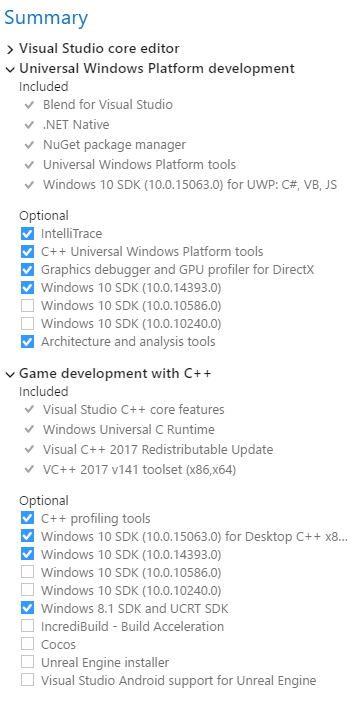
When installing VS 2017, you will need to select a few optional components in setup:
- Select the “Game Development with C++” workload.

- Select the “Windows 8.1 SDK and UCRT SDK” optional component in this workload
- Select the “Universal Windows Platform development” workload

Migrating existing Visual Studio 2015 projects to Visual Studio 2017
In most cases, the upgrade wizard provided with Visual Studio can migrate your project to Visual Studio 2017 without any other changes. When you open a Visual Studio 2015 project in Visual Studio 2017 you’ll see the following dialog prompting you to upgrade:
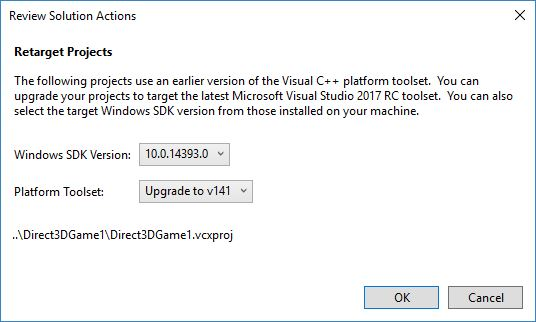
Selecting OK will cause the project to be upgraded.
Manually upgrading projects to Visual Studio 2017
If you want to upgrade your project by directly editing your project files (.vcxproj) you’ll need to make the following changes:
- Change the tools version at the start of the project file from 14.0 to 15.0. For example:
<Project DefaultTargets="Build" ToolsVersion="14.0" xmlns="http://schemas.microsoft.com/developer/msbuild/2003">
<Project DefaultTargets="Build" ToolsVersion="15.0" xmlns="http://schemas.microsoft.com/developer/msbuild/2003">
- Change all instances of PlatformToolset from v140 to v141. For example:
 <PlatformToolset>v140</PlatformToolset>
 <PlatformToolset>v141</PlatformToolset>
- Rebuild the project
Additional Visual Studio 2017 migration resources
- Xfest 2017: Visual Studio 2017 (XGD)
- Visual C++ Porting and Upgrading Guide (VS 2017)
Referencing CRT headers and libraries from Visual Studio 2017 projects
As of QFE1 of the July 2018, the XDK includes CRT headers and libraries that match the compiler and linker toolset shipped in version 15.8 of Visual Studio 2017. The CRT headers and libraries that shipped in XDKs prior to February 2018 are still included for backwards compatibility and for use with some of the previous versions of Visual Studio.
The new and old headers and libraries are installed side-by-side under the %DurangoXDK"edition number”\xdk directory. The new headers are in a folder named VS2017 while the older headers are in the VS2015 folder.
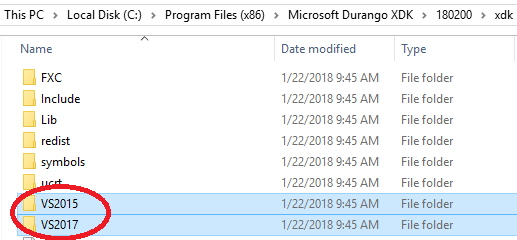
By default, all projects that are built with Visual Studio 2017 will build with the headers and libraries in the VS2017 directory. If you are not using version 15.5 or later of Visual Studio 2017 (or 15.8 or later if using C++17) there may be cases where you’ll need to fall back to using the old headers instead. An msbuild property called EnableLegacyXdkHeaders can be used to fall back to the previous versions of the CRT headers and libraries contained in the VS2015 directory.
The following table provides guidance on which version of the CRT headers and libraries to reference based on the version of compiler you are using:
| Visual Studio version | CRT guidance |
|---|---|
|
VS 2017 (15.0 a.k.a. RTM)
VS 2017 (15.1) VS 2017 (15.2) _MSC_VER "1910" |
The VS 2017 CRT headers in the Xbox One XDK (February 2018 or later) are not compatible with the original VS 2017 compiler present in 15.0, 15.1, and 15.2. It is recommended that you update to a newer version of VS 2017. Alternatively, you can EnableLegacyXdkHeaders to use the VS 2015 C/C++ Runtime headers. via Environment Variable
or VC++ Project element
...
|
|
VS 2017 (15.3)
VS 2017 (15.4) _MSC_VER "1911" |
To support this scenario with the April 2018 XDK or newer, you need to define a processor symbol: With /std:c++17 or /std:c++latest, use You may have to suppress some C4996 warnings with
Alternatively, you can EnableLegacyXdkHeaders to use the VS 2015 C/C++ Runtime headers. Use of /permissive- in this case is not recommended. |
|
VS 2017 (15.5)
_MSC_VER "1912" |
The CRT headers in February 2018 Xbox One XDK match this update. You can EnableLegacyXdkHeaders to use the VS 2015 C/C++ Runtime headers, but will likely need to apply the following workarounds: (A) unresolved external symbol
(B) (C++17 mode only) unresolved external symbol
|
|
VS 2017 (15.6)
_MSC_VER "1913" |
Xbox One XDK (April 2018 or newer) version of the C/C++ Runtime matches this update. You can EnableLegacyXdkHeaders to use the VS 2015 C/C++ Runtime headers, but will likely need to apply the following workarounds: (C) unresolved external symbol
(B) (C++17 mode only) unresolved external symbol
|
|
VS 2017 (15.7)
_MSC_VER “1914” |
The Xbox One XDK (May 2018, June 2018, or July 2018) version of the C/C++ Runtime matches this update. You can EnableLegacyXdkHeaders to use the VS 2015 C/C++ Runtime headers, but will likely need to apply the following workarounds: (A) unresolved external symbol
(B) (C++17 mode only) unresolved external symbol
|
|
VS 2017 (15.8)
_MSC_VER “1915” |
The Xbox One XDK (July 2018 QFE1+) version of the C/C++ Runtime matches this update. With older versions of the CRT, you will need to apply the following workaround to your Debug configuration: (A) unresolved external symbol
You can EnableLegacyXdkHeaders to use the VS 2015 C/C++ Runtime headers, but will likely need to apply the following workarounds: (B) unresolved external symbol
(C) (C++17 mode only) unresolved external symbol
|
|
VS 2017 (15.9)
_MSC_VER “1916” |
A future Xbox One XDK version of the C/C++ Runtime will match this update. This compiler is fully compatible with the 15.8 update C/C++ Runtime in the Xbox One XDK (July 2018 QFE1+). With older versions of the CRT, you will need to apply the following workaround to your Debug configuration: (A) unresolved external symbol
You can EnableLegacyXdkHeaders to use the VS 2015 C/C++ Runtime headers, but will likely need to apply the following workarounds: (B) unresolved external symbol
(C) (C++17 mode only) unresolved external symbol
|
If you’re not using msbuild, you can control which version of the CRT you compile and link with using your include and lib paths:
| Path | Visual Studio 2015 CRT | Visual Studio 2017 CRT |
|---|---|---|
| Include |
%Console_SdkRoot%\VS2015\vc\include
%Console_SdkRoot%\VS2015\vc\platform\amd64 |
%Console_SdkRoot%\VS2017\vc\include
%Console_SdkRoot%\VS2017\vc\platform\amd64 |
|
Library Reference
Library WinRT |
%Console_SdkRoot%\VS2015\vc\lib\amd64
%Console_SdkRoot%\VS2015\vc\platform\amd64 |
%Console_SdkRoot%\VS2017\vc\lib\amd64
%Console_SdkRoot%\VS2017\vc\platform\amd64 |
Exception Specifiers
C++11 introduced a new, streamlined method of annotating exception-throwing behavior of functions first supported by VS 2015. At the same time, older exception specifiers were deprecated and removed as of C++17. See Microsoft documentation for details.
To support this change, there’s been a number of modifications to the C++ compiler over the update cycle for VS 2017 as detailed here.
-
As of VS 2015 (Update 2), the C4577 warning was introduced to flag use of the noexcept keyword when building with exception handling mode disabled as there was some specific behavior differences compared to the formal C++ standard. For VS 2017, this warning was made off-by-default so is only triggered when using /Wall or if explicitly enabled. Per the Xbox One Code Generation Best Practices whitepaper, you should use
/EHscfor all Xbox One code generation, and x64 native generally, as there is no code generation impact or runtime cost unless you are actually throwing an C++ exception at runtime. -
As of VS 2017 (15.5 update), use of C++14 mode with
/permissive-or use of C++17 mode results in new warnings and errors related to the deprecation of throw(), throw(…), throw(list) in favor of noexcept, noexcept(false), as well as when detecting mismatches between declarations of functions with respect to their exception specifiers. These can be disabled using/Zc:noexceptTypes-as a workaround for non-conforming code. -
As of the VS 2017 (15.8 update), the preprocessor define
_NOEXCEPTwhich was used internally by the Visual C++ Runtime has been completed removed. The library instead uses the noexcept keyword directly in all conditions. Any external code or 3rd party code that used the internal_NOEXCEPTmacro needs to be updated. It should use noexcept directly, but failing that you will need to define a local preprocessor define value directly instead of relying on the Visual C++ runtime to define it.
#ifndef _NOEXCEPT
#define _NOEXCEPT noexcept
#endif