When Searches Fail: Optimizing the Discoverability of Titles on Xbox One
Despite the increasing sophistication of search engines, there can still be times when consumers looking for an app or title on Xbox One might not find it because the specific search terms they used hadn’t been indexed by Bing. One way to avoid this problem is by using alternate titles, which broaden the scope of search terms associated with your title and make it more likely that consumers will find what they’re looking for. This topic is a high-level overview of common search-related issues and includes recommendations for dealing with them.
When game and app searches fail
Even when an Xbox One user knows the name of your game or app, it’s still possible that searching for the name will not locate your title. Search failures like this can happen when a user enters or speaks search terms that weren’t included in the catalog metadata for your title and were, therefore, not indexed by Bing.
So how do you make sure that everyone who searches for your title can find it?
To help make games and other media easier to find in the catalog, the Xbox Live Discovery team and Bing have identified some of the most common search-related problems and what causes them. We identified these problem areas by analyzing the performance of popular Xbox queries, paying particular attention to why some searches perform badly. With that information as a guide, we’ve devised recommendations for how you can optimize your title’s discoverability by including additional search terms in your catalog metadata.
Publishing alternate titles
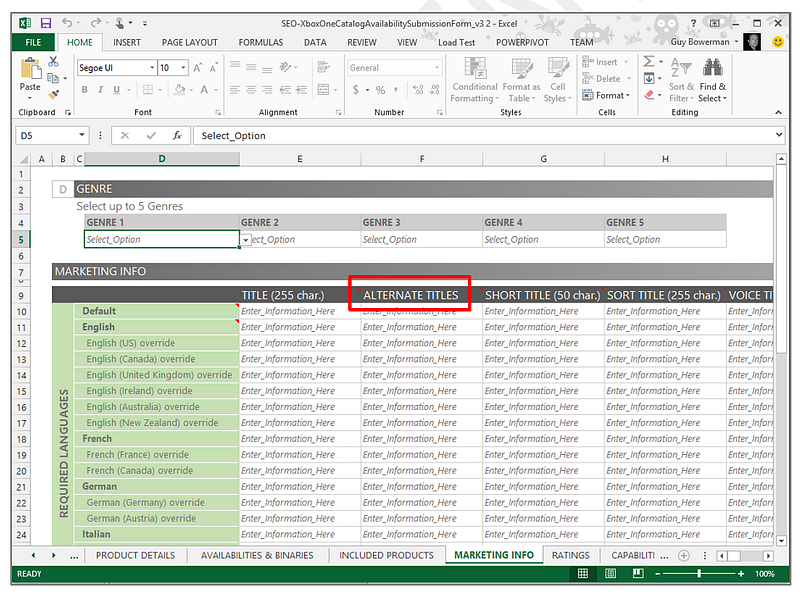
The best way to specify additional search terms in the catalog metadata is to include them as alternate titles when you submit your game or app to Microsoft. The Alternate Titles field of the Catalog Submission Availability Form offers publishers a useful way to include additional catalog metadata to be indexed by Bing. Including alternate titles as search terms will help ensure that consumers can find the title they’re looking for even when they enter search strings that vary from the game or app’s “official” title. You can add as many search terms as you like, to ensure that your content is surfaced when a user searches for them.
Include this information in the Alternate Titles field, which is on the Marketing Info tab of the form, as shown in Figure 1.
Figure 1. Xbox One Catalog Availability Submission Form.
Recommendations for alternate titles
The goal of using the Alternate Titles field is to identify as many as possible of the words and phrases that customers are likely to enter when they search for your content, and then to make sure that those words and phrases are included in the catalog metadata.
The following examples and guidelines will help you to anticipate a wide range of possible search terms for your content, which you can then include as alternate titles when you submit your game or app for publishing. The guidelines also address some of the difficulties caused by spoken search terms.
The examples below use a mixture of game titles from Microsoft Studios and made-up titles chosen to illustrate each guideline.
Anticipate voice recognition.
Consider the various ways in which voice recognition might interpret your title when the title is spoken aloud, including the effects of applicable regional accents. If possible, run practical experiments in which you search for your title by using voice recognition on an Xbox One console.
Examples:
| Title | Alternate Titles |
|---|---|
| A Game Within | with in |
| SabreWulf | Saber, Sabre, Wolf |
Include any applicable acronyms as alternate titles for your content.
The more popular your game, the more likely it is that it will become known—and searched for—by its acronym. The acronym might be simply the initials of the official title, or it might be a nickname that evolves among gamers.
Example:
| Title | Alternate Titles |
|---|---|
| Killer Instinct | KI |
Include alternate titles for acronyms both with and without spaces.
When users search for a title that includes both an acronym and a number, it is common for them to omit blank spaces—particularly if the search is being entered on a controller, where typing is cumbersome.
To put this more simply: For any title of the form <acronym><space><number>, expect that a significant number of users will omit the space.
Example:
| Title | Alternate Titles |
|---|---|
| Forza Motorsport 5 | F5, FM5, F, FM |
If there is punctuation in the title, include alternate titles that omit the punctuation.
If your official title includes punctuation marks, most people won’t include that punctuation when searching. Include at least one non-punctuated alternate version.
Example:
| Title | Alternate Titles |
|---|---|
| G.A.M.E. | Game |
Assume that searchers will use regular (Arabic) numbers and Roman numerals interchangeably.
For franchises that have multiple editions or parts, people searching will use Roman numerals and modern numerals for edition and part numbers interchangeably. If your official title includes Roman numerals, consider including alternate titles that include the corresponding Arabic numerals, and vice versa.
Examples:
| Title | Alternate Titles |
|---|---|
| Forza 5 | Forza V |
| GAME III | GAME 3 |
Include spelling variants for titles with unique spelling or grammar.
When a game or app title contains nonstandard or unusual spelling or grammar, many people will use standard spelling or grammar when they search for it, and voice recognition may not correctly understand what the searcher intends. Consider likely spelling variants of your title to include as alternate titles.
Examples:
| Title | Alternate Titles |
|---|---|
| Forza 5 | V |
| GAME III | 3 |
| Play 4Square | foursquare, four square, 4, IV |
Add keywords for non-standard genre names.
If your game is of a genre not covered by the standard genre categories available at publishing time, include the specialized genre name in the Alternate Titles field.
Example:
| Title | Alternate Titles |
|---|---|
| Top Goal Scorers | soccer, football |
Queries are case-insensitive.
Bing handles case variations in titles automatically. You do not need to be concerned with case sensitivity.
Unicode and special characters are handled automatically.
Bing automatically handles double-width (Unicode) characters and accented characters, such as à or ü. You don’t need to add alternate titles to account for such characters.
Review and update
Finally, be prepared to periodically revisit and update the alternate titles for your content. As people start playing a popular title and player communities develop around it, players might use one or more nicknames for the title. They might also start referring to the title by using a phrase that usefully—if unofficially—distinguishes it from another title. For example, if you release a sequel to your title, players might start referring to the first version with an Arabic number 1 or a Roman numeral I appended to the official title even if the official title had no number.