Xbox Live User Privileges
Privileges control which features of Xbox Live a user can access at a given point in time. The effective privileges of a user are computed and issued by Xbox Live when the user logs in and is authorized to Xbox Live. Privileges stem from the effective entitlements of the user, the device, and the platform. In addition, parental controls and bans issued by the Xbox Live enforcement team restrict privileges of a user.
Privilege-based access control is enforced on access to any online service. Privileges are used to drive client applications to show UI to the user. This UI explains the user’s state and provides actions that the user can take to get the required privileges.
This topic outlines how to configure your applications and single sign on services (relying parties) to integrate with Xbox Live privileges. This topic also describes the privilege resolution and upsell system on Xbox One.
- Prerequisites
- Overview
- Obtaining an XSTS token for users
- Implementing privilege-based access control in partner services
- Client-side handling and the user experience for privileges and upsell
- Testing privilege-based access control in your services and apps
- Xbox Live privilege specification
- Summary
Prerequisites
- In order to handle user privileges in your Xbox One client application, you must have configured your title for authentication with Xbox Live. The detailed configuration is described in Your Xbox One Title, XSTS Tokens, and Web Services, a white paper available on the Xbox Game Developer (XGD) site.
- In order to enforce privilege-based access control in your service, you must have a service configured for single sign on (SSO) with Xbox Live. This enables the Xbox Live Secure Token Service (XSTS) to issue tokens encrypted with a public key provided by you during configuration. This is frequently referred to as configuring your relying party. The detailed configuration is described in the white paper Service Authentication and Authorization to Xbox Live on XGD (not currently available at publish date of this paper). See also Understanding Security Tokens for Xbox One, a white paper available on XGD.
Overview
On Xbox One, every authenticated user’s account has associated privileges. Some of these privileges are for system-controlled features, while others may be associated with specific games or extension subscriptions. These privileges cover a number of common scenarios, from multiplayer to streaming video. Client applications and services use this information to make access control and personalization decisions.
A user will need to be signed in to Xbox Live in order for you to obtain that user’s privilege information (a user’s privileges are carried in the token received at authentication time). The flow of obtaining a privilege set is outlined below:
Figure 1. Obtaining a privilege set.
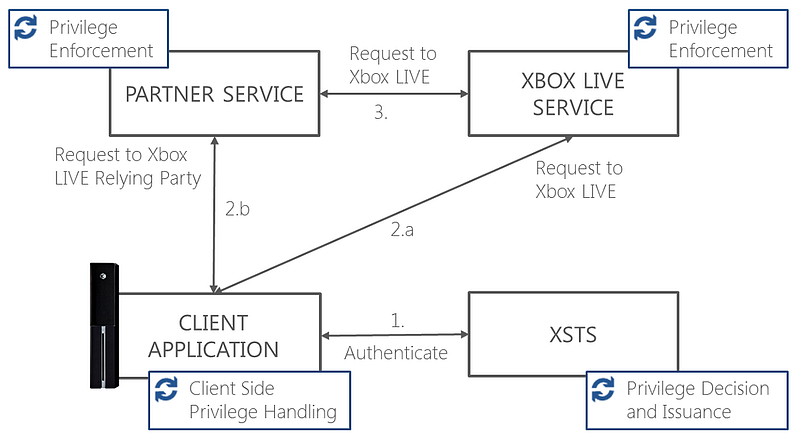
- The Xbox One console (on behalf of a title or app) makes a token request to XSTS. XSTS returns a token for the requested relying party. XSTS computes the privileges for all users on the requests and issues them in a token claim.
- Requests from the client application.
- The application calls the Xbox Live service directly and includes the token in the authorization header of the request. The Xbox Live service grants access to the requested feature (e.g., multiplayer, purchase, add friend, etc.) based on the privileges in the token. The client application may use the Xbox One platform APIs to customize the user experience and drive resolution (e.g., upsell, parental override, etc.) before issuing requests to Xbox Live services.
- Alternatively, the application calls a relying party service configured for SSO. It includes the token on the authorization header of the request. If the partner SSO service provides an implementation of an Xbox Live feature (for example, upload Kinect content, download user created content, etc.), it uses the privileges in the token to grant access to the requested feature. In order to decrypt and de-serialize Xbox Live tokens, the partner service must be configured for single sign on. For more information on this configuration, see Your Xbox One Title, XSTS Tokens, and Web Services. The client can use Xbox One platform APIs to customize the user experience and drive resolution (upsell, parental override) before issuing requests to Xbox Live services.
- Partner services can make requests to the Xbox Live service on behalf of users through a delegated authorization token. If the request is for a feature that requires a specific privilege (for example, Add Friend, Send Message, etc.), the partner service must obtain a delegated auth token for Xbox Live on behalf of the signed-in user and include it in the authorization header of the request. The Xbox Live service grants access to the request feature based on the user privilege.
Data model
Privileges are a claim in the user identity:
prv (JSON Web Tokens)
The privileges claim in the user identity contains the collection of the current effective privileges of the user. If a privilege is in the collection, then the user is currently authorized to access the corresponding feature. If the privilege is not in the collection, then the user is not currently authorized.
The effective privileges of a user are dynamic. They depend on the expiration of purchased subscriptions, applications that are currently running, all users currently logged in on the same client device, status of the console, parental controls, and input from the Xbox Live online safety and enforcement moderators. The fact that a user is authorized to a feature at a given time does not guarantee the user will be authorized to access the feature later. The privileges issued for the user are valid for the lifetime of the token issued when the user is authenticated.
Privileges and privacy settings
Privileges determine if a user is authorized to access a feature of Xbox Live or a third-party service. This is a coarse check; privileges determine whether or not a user is able to use voice chat communication at all, not whether a given two individuals can chat together.
For social features of Xbox Live, the privacy service is used by applications and services to determine with whom an action can be performed, based on the privacy settings of all users involved in the action. For instance, it determines if the user is able to use voice chat with a target user based on the settings of the target user (e.g., messages can be received from friends only, block list, etc.). For more details on integrating with the privacy service, please refer to XGD.
Privileges and content restrictions
Privileges do not provide information about content rating. If your app is subject to Xbox Requirements (XRs) regarding content ratings, please refer to the XR documentation and Xbox One Software Development Kit (XDK) documentation on XGD for content rating guidance.
Obtaining an XSTS token for users
This step is described in the Your Xbox One Title XSTS Tokens and Web Services whitepaper. See also the client side code sample “Web Services”, which you can download from the Samples page on XGD.
Implementing privilege-based access control in partner services
The client app must send the XSTS token for the partner service on the “authorization” header of the HTTP request. Once the token is decrypted by the partner service and the signature of the token and request is verified, the privilege claim must be extracted and verified with the expected privilege for the service. A sample web service that decrypts and retrieves claims from an XSTS token is available on XGD in the “Xbox One Simple Web Server” sample.
Xbox Live tokens can contain multiple user identities. Each user identity within the token will have a privilege claim.
If you are using the Xbox Services and Relying Party SDK (Microsoft.XboxLive.Auth.dll (MXA)), then the following code can be used to retrieve the privilege claim on each of the user identities present in the token.
    ...
    using Microsoft.XboxLive.Auth;
    using Microsoft.XboxLive.Auth.Claims;
    ...

    // Use the Microsoft.XboxLive.Auth library to retrieve the current principal
    ClaimsPrincipal principal = ( ClaimsPrincipal ) Thread.CurrentPrincipal;

    if ( principal != null )
    {
        // Iterate over the user identities in the token and do something in case the // privilege is in the user identity
        foreach ( var uid in principal.GetUserIdentities() )
        {
            // Process the privileges claim
            string privilegesClaim = string.Empty;
            if ( uid.TryGetClaimValue( AuthClaimTypes.Privileges, out privilegesClaim ) )
            {
                //Error response to client
            }
            var privilegeValues = privilegesClaim.Split( ' ' );
            int[] privileges = Array.ConvertAll(
                privilegeValues,
                privilegeString =>
                {
                    // Return zero for any bytes that can't be parsed
                    int privilege;
                    return int.TryParse( privilegeString, out privilege ) ? privilege : 0;
            });
            HashSet< int > privilegesHash = new HashSet<int>(privileges );

            // Verify if the right privilege is included
            if ( !privilegesHash.Contains(AuthPrivileges.Multiplayer ) )
            {
                //Access denied response to the client
            }

            //Perform the authorized operation for the user
        }
    }
For instance, the code example shown above could be used by a partner matchmaking service to determine if each user on a request is authorized to join multiplayer sessions.
If you are using your own token handler instead of MXA and you receive a request with an XBL 3.0 token, you will need to parse the token using the token specification. See below and also “Understanding Security Tokens for Xbox One”, a white paper available on XGD.
Client-side handling and the user experience for privileges and upsell
Overview
Client applications may be subject to XRs requiring a portion of the title to be controlled by a privilege. For these applications, it is important to use the following API on Xbox One:
Windows.Xbox.ApplicationModel.Store.Product.CheckPrivilegeAsync The Product.CheckPrivilegeAsync Method is a single-call API for dealing with a number of use cases around privileges, including showing the user the necessary UI to explain and/or upsell if they do not have the privilege.
The following flow is expected, assuming that an app is subject to the multiplayer privilege XR and relies on a partner SSO service to provide matching:
- The user sees an option to start a multiplayer session. The user clicks on the button and attempts to start a match.
- The app checks the “hint”. Is the privilege present in the UserDisplayInfo.Privileges Property?
- If it’s not there, call the Product.CheckPrivilegeAsync Method before calling services.
- If it is there, assume the user has the privilege and call your service.
- The application makes the call to the SSO partner service to obtain a match.
- This could be your call to start streaming in your media content app.
- The SSO service enforces privilege-based access control as described above. If the user is authorized to perform the action, then the service request processes the call accordingly.
- If the privilege-based access checks fail in the SSO partner service, then the service returns an access denied status code in the web response.
| Note |
|---|
| Xbox Live APIs return a 403 Status Code (HTTP_E_STATUS_FORBIDDEN) when access is denied to a feature because of a missing privilege in the XToken. All endpoints of Xbox Live enforce privilege-based access control as appropriate. |
-
In response to the failure code, the title app then calls the Product.CheckPrivilegeAsync Method with the appropriate privilege ID (see table in the XR) for the privilege you’re trying to resolve. This function will do two logical things. First, it will call Xbox Live to see if the user has the privilege. Then, it will tell the user why the action failed and/or show the user UI to resolve it.
When called with attemptResolution equal to true, this API call will provide the user with a UI flow to help him/her get the privilege. And, if possible, this API call will:
- Show the UI related to the user’s banning status from Xbox Live enforcement, if banned.
- Show the UI related to their parental controls, if those apply.
- Attempt to sell subscriptions, as needed. (For example, an Xbox Live Gold subscription.)
- Return the result to the title (either success or failure with a reason).
| Note |
|---|
| If Xbox Live is unreachable or the Internet is unavailable, the Product.CheckPrivilegeAsync Method will fail. This failure should be treated as if the user did not possess the privilege. |
- On return from the Product.CheckPrivilegeAsync Method:
- If failure is returned, the title should allow the user to keep clicking the button because the user’s bans may lapse, parental controls change, etc.
- If success is returned, then the user has been remediated, and your title may re-attempt the action. The user’s token will contain the needed privileges as part of the remediation performed by the Product.CheckPrivilegeAsync Method.
The Product.CheckPrivilegeAsync Method returns the result to the app (either success or failure with a reason).
| Note |
|---|
| Privileges are macro-level checks that answer the question, “Can I?” They answer questions like, “Can this user play multiplayer at all?” Privileges aren’t the only permission your app has to check. Please consult privacy and content rating XRs to see if they are applicable to your use case. |
The Product.CheckPrivilegeAsync Method takes a Boolean argument attemptResolution. If this argument is set to false, the resolution UI is not launched, and the Product.CheckPrivilegeAsync Method will just return the current user’s state. In general, it’s recommended that the resolution be only triggered once on a particular active user action. For instance, once per time the user clicks on a Start Multiplayer Mode button.
Example code:
    using namespace Windows::Xbox::ApplicationModel;
    using namespace Windows::Xbox::System;
    #include "ppltasks.h"
    using namespace Concurrency;

    #define XPRIVILEGE_MULTIPLAYER_SESSIONS                       254

    //
    //  Check and resolve the privilege. 'true' in the line below is the value passed to //  'attemptResolution'. True will show UI; false just reports the user state.
    //
    if( input.XPreviouslyPressed() )
    {
           auto AsyncOp = Store::Product::CheckPrivilegeAsync(User::Users->GetAt(0),XPRIVILEGE_MULTIPLAYER_SESSIONS, true, L"Unable to launch Multiplayer Session");

           create_task( AsyncOp ).then( [this] ( task<Store::PrivilegeCheckResult> PrivilegeCheckTask )
           {
              try
              {
                 auto priv_check = PrivilegeCheckTask.get();
                 XboxSampleFramework::DebugPrint( L"SAMPLE: %d\n", priv_check );
              }
              catch ( Platform::Exception^ ex )
              {
                 XboxSampleFramework::DebugPrint( L"SAMPLE: %S\n", ex->Message );
              }
           } );
    }
Using display tokens to obtain a high performance non-authoritative privilege hint in client applications
Having smart strings on button text is generally a best practice for the user experience. The privileges object under the User.DisplayInfo Property provides more performance in accessing this information. When the console is connected and users are logged in to Xbox Live, then the privileges are cached in an unencrypted display portion of the token and exposed in the UserDisplayInfo.Privileges Property of the User Class.
Unlike the Product.CheckPrivilegeAsync Method, this call does not require a request to Xbox Live. Keep in mind that this call uses privileges cached on the console and computed at the time the last authentication request was made to Xbox Live for the user, generally this is when the title was launched. This call is not authoritative. Using the UserDisplayInfo.Privileges Property only is not sufficient to meet client app XRs.
Apps running on non-Xbox platforms can directly use the display portion of the token in order to get information on the privileges and personalize the user experience on the client. Tokens can be obtained by a POST request to:
POST https://xsts.auth.xboxLive.com/xsts/authorize
If the access to Xbox Live is authorized, the response from XSTS contains the display claims as follows. For a JSON web token, the list of privileges is a space delimited collection of integers, carried in the “prv” claim. The display claims are not encrypted.
    HTTP/1.1 200 OK
    {
    "Issued"       : "2013-03-18T14:34:23.3107352Z"
    "NotAfter"     : "2013-03-18T18:34:23.3107352Z"
    "Token"        : "mNgl3hVTaVD20sz4PN ... dFOZsVvnRzNi4O3eXqYg=="
    "DisplayClaims":{"xid":"2533274794203084","prv":"211 212 220 226 227 228 229 230 231 234 237 240 243 244 245 246 247 248 249 251 252 255","agg":"Adult","uhs":"14036676388542775734"}
    }
Best practices for app side privilege handling
Frequency for resolving privileges in app
For privilege checks, the requirement is to ensure and resolve that the user has the privilege at least once per launch of the app for the user. Microsoft’s best practice is to check every logical session/discrete action. The definition of “session” will vary widely with your application’s usage.
Examples of best practices:
- For media streaming apps/video players: Resolve once per-click on the play button (stream start), or at playlist start (for multiple streams, i.e., a music playlist).
- For messaging apps: Check privileges once for the first message sent.
- For multiplayer apps using third-party match services: Resolve every session (match) start.
Never assume the subscription tier of a user
In the past, claims from Xbox 360 provided information about the subscription tier of the user (for example, Gold, Silver, etc.). This claim has been deprecated with Xbox One. All decisions should be made using privileges. The tier of the user or how the user acquired a given privilege should be opaque to the app.
Offline mode
If the Product.CheckPrivilegeAsync Method returns that the service is down or unreachable, then treat this as if the privilege check fails. This will give your app a fail-safe behavior and keep the title XR-compliant.
Targeting the correct logged-in user
A safe default is to always use the acting user — the one who clicked the button — if another user is not specified. If your app supports designating a given user, you should use the currently designated user.
The following example describes this activity:
- You have three users logged in, Bill, Bob, and Beth.
- Your app supports switching between “active users”, to designate whose recommendations/history/settings to use.
- Beth was the launching user for your app.
- When your app is running, the user(s) have switched to using Bob’s profile/recommendations/history.
- You should call the Product.CheckPrivilegeAsync Method for Bob, when you discover you’re lacking privileges.
Checking without UI/out of focus
There are cases where your app is in a state such that it is undesirable to pop modal, blocking UX for a privilege, yet it is necessary to check a privilege. For example, a user is engaged with a snapped app, your app is playing music in the background, or incoming calls while the Skype app is running in the background.
In these cases, it is recommended that the title call the Product.CheckPrivilegeAsync Method (as in the sample above) with attemptResolution set to false. This will just return the current permission state of the user (or failure if the call failed), rather than showing UI.
Your app can then block/impact the user as appropriate, and inform them of it when you’re returned to focus (or show them non-modal error information, or other UX as desired). When appropriate to show them blocking UX, you can re-call the Product.CheckPrivilegeAsync Method to show the proper UX (Upsell, Banned, etc.).
Testing privilege-based access control in your services and apps
Privileges are computed based on the multiple inputs:
- Effective subscription entitlements of the current user(s).
- Effective privilege entitlements of the current device.
- Effective privilege entitlements of the client platform.
- Effective privilege entitlements of the current title. It is possible to package a title with a collection of privileges such that all users of the apps automatically get these privileges in context of the running app. Please contact your developer account manager if your title requires this feature.
- Parental controls. Parents can decide to remove privileges for children in their families.
- Online safety and enforcement: Xbox Live moderators may ban privileges for users or consoles that have been identified for abuse of the service.
Testing privileges provided by subscriptions
The Xbox Developer Portal (XDP) allows creation of test users with the Xbox Live Gold subscription. You should use such users to test your privilege logic for privileges that are expected from Xbox Live Gold subscriptions.
Other subscriptions can be directly purchased by a test user on a development Xbox One console. In order for this flow to work, the subscription must be published to a development sandbox where your user or device is authorized, and the user on the development console must be logged in to the same sandbox.
Xbox Live test users created through XDP cannot directly purchase retail Gold subscriptions. Instead, they can purchase a developer-specific version of Xbox Live Gold which only applies to development scenarios.
Testing privileges provided by the running title
You must contact your developer account manager if you want to set up an app to automatically provide a privilege when users are in context of the app. Testing this scenario requires you to configure your app for authentication with Xbox Live and run the app with users signed in.
Testing privileges removed by parental control
In order to test logic with privileges removed by parental control (Add Friend, Communication, etc.), it is possible to set up family accounts either on Xbox.com or on the console. Beginning with the first approved libraries XDK release, parents in a family may use the console to restrict privileges of children.
It is also possible for a user to use the Xbox One console to restrict privileges of their own user. We recommend to use this method to test scenarios that require that privileges of a user are restricted.
| Note |
|---|
| The XDP does not currently provide a way to create families of test accounts. |
Xbox Live privilege specification
Token format for privileges
Privileges are carried in the user/privileges claim for each user identity on a token. The privilege claim contains a space delimited collection of integers. Each integer represents a specific privilege. If a value is in the collection, it means that the user currently has the privilege and is authorized to access the corresponding feature.
The below is an example of a full decrypted JSON web token containing the privilege claim:
{ "enc":"A128CBC+HS256", ... }.
{ "typ":"JWT", ... }.
{
"aud":"http://your_relying_party.com/",
"iss":"xsts.auth.xboxLive.com", ...
"cnf":"
{...}",
"xdi":"
{...}",
"xti":"
{...}",
"xui":"
[
{
"xid":"2533274991020393",
"gtg":"SampleGamertag1",
"agg":"Adult",
...,
"prv":"211 212 220 226 227 228 229 230 231 234 237 240 243 244 245 246 247 248 249 251 252 255"
},
{
"xid":"1234574991020397",
"gtg":"SampleGamertag2",
"agg":"Adult",
...,
"prv":"211 212 220 226 227 228 229 230 231 234 237 240 243 244  246 251 252 255"
}
]"
}
List of Privileges
| Privilege ID | Privilege Name | Description |
|---|---|---|
| 193 | DOWNLOAD_FREE_CONTENT | The user can use the Xbox Live marketplace to purchase free content when this privilege is present. |
| 195 | FITNESS_UPLOAD | The user can upload fitness data to an online service when this privilege is present. |
| 197 | VIEW_FRIENDS_LIST | The user can view other user’s friends list if this privilege is present. |
| 198 | GAME_DVR | The user can upload recorded in-game videos to the cloud if this privilege is present. Viewing Game DVRs is subject to privacy controls. |
| 199 | SHARE_KINECT_CONTENT | Kinect recorded content can be uploaded to the cloud for the user and made accessible to anyone if this privilege is present. Viewing other user’s Kinect content is subject to a privacy setting. |
| 203 | MULTIPLAYER_PARTIES | The user can join a party session if this privilege is present. |
| 205 | COMMUNICATION_VOICE_INGAME | This privilege is not issued for Xbox One. Titles should use privilege 252 for checking voice communication privileges instead. |
| 206 | COMMUNICATION_VOICE_SKYPE | The user can use voice communication with Skype on Xbox One if this privilege is present. |
| 207 | CLOUD_GAMING_MANAGE_SESSION | The user can allocate a cloud compute cluster and manage a cloud compute cluster for a hosted game session if this privilege is present. |
| 208 | CLOUD_GAMING_JOIN_SESSION | The user can join a cloud compute session if this privilege is present. |
| 209 | CLOUD_SAVED_GAMES | The user can save games in cloud title storage if this privilege is present. |
| 214 | PREMIUM_CONTENT | The user can purchase, download and launch premium content available with the Xbox Live Gold subscription if this privilege is present. |
| 217 | INTERNET_BROWSER | The user can launch an Internet browser on Xbox One if this privilege is present. |
| 219 | SUBSCRIPTION_CONTENT | The user can purchase and download premium subscription content and use premium subscription features when this privilege is present. |
| 220 | SOCIAL_NETWORK_SHARING | The user is allowed to share progress information on social networks when this privilege is present. |
| 224 | PREMIUM_VIDEO | The user can access premium video services if this privilege is present. |
| 235 | VIDEO_COMMUNICATIONS | The user can use video communication with Skype or other providers when this privilege is present. Communicating with other users is subject to additional privacy permission checks. |
| 247 | USER_CREATED_CONTENT | The user is authorized to download and view online user created content when this privilege is present. |
| 249 | PROFILE_VIEWING | The user is authorized to view other user’s profiles when this privilege is present. Viewing other user’s profiles is subject to additional privacy checks. |
| 252 | COMMUNICATIONS | The user can use voice chat or asynchronous text messaging with anyone when this privilege is present. Extra privacy permissions checks are required to determine who the user is authorized to communicate with. Communicating with other users is subject to additional privacy permission checks. |
| 254 | MULTIPLAYER_SESSIONS | The user can join multiplayer sessions for a game when this privilege is present. |
Privilege computation logic
Privileges are computed independently for each user simultaneously signed in on a console in a two-step process:
- Privileges are added from the effective entitlements of the user, the device, the title currently running on the console, and the platform on which the app is running.
- Privileges are then removed for each user based on parental controls, banning, and the guest status of each specific user.
Effective entitlements may result from subscriptions purchased by the user, purchased by other users logged in at the same time, or directly associated to a device. Effective entitlements may also result from promotional offers. An example of promotional offers could be “Free multiplayer week end”, etc.
Privilege entitlements resulting from the device type
Certain types of devices (Xbox One, Windows, Windows Phone, etc.) automatically grant a collection of privileges to any user logging in to Xbox Live from these platforms.
Effective privilege entitlements resulting from subscriptions
Subscription products may provide a collection of privileges to users who the subscription effectively applies to. There are several ways a user can be effectively entitled to privileges based on a subscription product:
- The user has purchased the subscription product.
- Another user logged in on the same device has purchased the subscription product.
- The subscription product has been associated to the device that the user is currently using.
At launch of Xbox One, the Xbox Live Gold subscription will follow the logic above. It is possible to associate a Gold subscription to a device, in which case all users currently on the device will be effectively entitled to privileges associated to the Gold subscription tier. In addition, any user (including sponsored guests) simultaneously logged in with a user who purchased a Gold subscription are effectively entitled to the privileges associated to the Gold subscription.
Partner subscriptions may also be used to issue privileges by the means described above. In addition, privileges associated to a partner subscription may be issued only when a specific participating title is currently running.
Promotional entitlements
Promotional entitlements add privileges for a limited period of time to users who meet certain dynamic criteria. For instance, a promotion may offer the multiplayer privilege to certain users for the duration of a weekend. Historical promotions like “Free Gold Weekend” will follow the model of promotional entitlements. Your services and titles do not need to be directly aware of promotions like these — they are dynamically computed when XSTS tokens are issued to users who are logged in.
Privileges removed for sponsored guest accounts
Sponsored guests are guest users signed in with Xbox Live. Sponsored guests only exist in the presence of at least one other signed in user on the console (for instance, split-screen multiplayer with only one user logged in). Sponsored guests are authenticated users and get a token like any other authenticated user. In that respect, guest users who are signed in get privileges, although some privileges are always redacted for guest users irrespective of their effective entitlements or the app that is currently running.
If you call the Product.CheckPrivilegeAsync Method for sponsored guests, please call with attemptResolution set to false. Sponsored guests cannot be “resolved” — they do not have any path to buy, be banned, etc.
The collection of privileges removed for guests includes, but is not limited to, the following:
| Privilege ID | Privilege Name | Description |
|---|---|---|
| 199 | SHARE_KINECT_CONTENT | Kinect recorded content can be uploaded to the cloud for the user and made accessible to anyone if this privilege is present. Viewing other user’s Kinect content is subject to a privacy setting. |
| 220 | SOCIAL_NETWORK_SHARING | The user is allowed to share progress information on social networks when this privilege is present |
| 224 | PREMIUM_VIDEO | The user can access premium video services if this privilege is present |
| 235 | VIDEO_COMMUNICATIONS | The user can use video communication with Skype or other providers when this privilege is present. Communicating with other users is subject to additional privacy permission checks |
| 245 | PURCHASE_CONTENT | The user is authorized to purchase content when this privilege is present |
| 255 | ADD_FRIEND | The user is authorized to follow Xbox Live users. |
If no user is currently signed in, which is the case with a “pure guest”, no token is issued for the user. This means that no effective privileges are computed for any user on the console.
Online safety and Microsoft enforcement
Xbox Live moderators may remove privileges of abusive users or devices.
Parental controls
Parents can remove privileges of children in their family irrespective of the subscription of the children or the current running title. This is controlled through the Xbox One, Xbox 360, or Xbox.com clients.
Which privileges are Gold subscribers entitled to at Xbox One launch?
Policies for privilege entitlements for a particular subscription are dynamic and will change over time. The table below is an indication of the privileges that Gold subscribers are entitled to at launch of the Xbox One console. Keep in mind that even if a subscriber is entitled to a privilege, he or she may not have the privilege at a given point in time because of parental controls or enforcement policies.
| Important |
|---|
| Privileges are not a good reflection of the current subscription of a user. |
| Privilege ID | Privilege Name | Description |
|---|---|---|
| 198 | GAME_DVR | The user can upload recorded in-game videos to the cloud if this privilege is present. Viewing Game DVRs is subject to privacy controls. |
| 206 | COMMUNICATION_VOICE_SKYPE | The user can use voice communication with Skype on Xbox One if this privilege is present. |
| 207 | CLOUD_GAMING_MANAGE_SESSION | The user can allocate a cloud compute cluster and manage a cloud compute cluster for a hosted game session if this privilege is present. |
| 214 | PREMIUM_CONTENT | The user can purchase, download, and launch premium content available with the Xbox Live Gold subscription if this privilege is present. |
| 217 | INTERNET_BROWSER | The user can launch an Internet browser on Xbox One if this privilege is present. |
| 224 | PREMIUM_VIDEO | The user can access premium video services if this privilege is present. |
| 235 | VIDEO_COMMUNICATIONS | The user can use video communication with Skype or other providers when this privilege is present. Communicating with other users is subject to additional privacy permission checks. |
| 254 | MULTIPLAYER_SESSIONS | The user can join multiplayer sessions for a game when this privilege is present. |
Partner subscriptions and privileges
It is possible to configure partner subscriptions to provide a collection of Xbox Live privileges from the list provided above. Partner subscriptions are only used to compute privileges of a user when the user is logged in to apps that have been explicitly associated to the subscription. As an example, Xbox Live Music privileges are only issued in tokens for users who are currently logged in to Xbox Music apps on the Xbox One console.
In order to set up partner subscriptions, contact your developer account manager.
Partner subscriptions can be tested in development sandboxes before they are released. Only users and devices that are authorized to use these development sandboxes will be able to purchase these subscriptions.
Summary
This topic provided an overview of how a service and an app can use Xbox Live privileges to control access to service features and personalize user experiences on the client. Privileges are issued in a token claim, are used by apps and SSO services, and are computed at the time of authentication requests from Xbox Live. Privileges of a user are provided by the effective subscription entitlements of that user, the type of device, the app currently running, parental controls, and input from online safety and enforcement moderators of Xbox Live.
Additional resources
Links to additional resources found in this topic are provided below.
Whitepapers
Understanding Security Tokens for Xbox One
Your Xbox One Title, XSTS Tokens, and Web Services