Hats Off! Getting Started with C++/WinRT
By: Steven Hammond, Advance Technology Group, and Brent Rector, Windows and Devices Group
Updated: November 10, 2016
In this topic
Introduction
This white paper provides an overview of the common changes you can expect to make to your code and your build setup as you port your game project to the new C++/WinRT language projections, available with the October 2016 XDK (for XDK development) and on GitHub (for UWP development). This paper is also a guide to how new code, written with the WinRT projections, differs from code written with the CLI-style C++ syntax used with previous XDKs.
When game development for Xbox One was introduced, C++/CX was the only available language option. As the platform matured, more choices became available for different types of applications, but until now, C++/CX with CLI syntax has been the only option for AAA game development that leverages the full power of the console. The release of the C++/WinRT projections, a preview available on GitHub and with the 2016 XDK, is the first fully supported alternative for game development. It’s a set of headers that you can include in your project as an alternative to—or along with—the C++ compiler extensions included with the /ZW compiler switch.
Note The headers on GitHub and those in the XDK are not interchangeable. For games built with the XDK, use the headers included in the XDK. For Universal Windows Platform (UWP) app and game development, download the headers available on GitHub.
Porting each of your projects to the WinRT projections will be a unique process that requires some novel steps. But you can also expect to encounter many steps and code changes that occur in nearly every project. This white paper provides an overview of those common changes to your code and to your build setup. It’s also a guide to how new code, written with the WinRT projections, will differ from code written with the CLI-style C++ syntax required with previous XDKs.
Porting your code
The first step in getting started with C++/WinRT is to download the WinRT projection headers from GitHub if you’re developing a UWP game; see the project link in References. This package includes a group of headers totaling roughly 40MB. These headers may be placed anywhere in your build tree that’s convenient. They should sit alongside your existing project; they don’t replace or overwrite any existing headers in your build.
Note The code snippets in this section were created from an XDK project and may not be available for UWP development. Even if the exact APIs are not available, the demonstrated concepts still apply to UWP development.
Build change: Command-line and project settings
The following steps explain the changes to make in the command line for your build:
-
Make sure your Visual Studio installation is up to date. Visual Studio 2015 Update 3 is the minimum supported version. You don’t have to use the IDE, but the MSVC compiler is required.
-
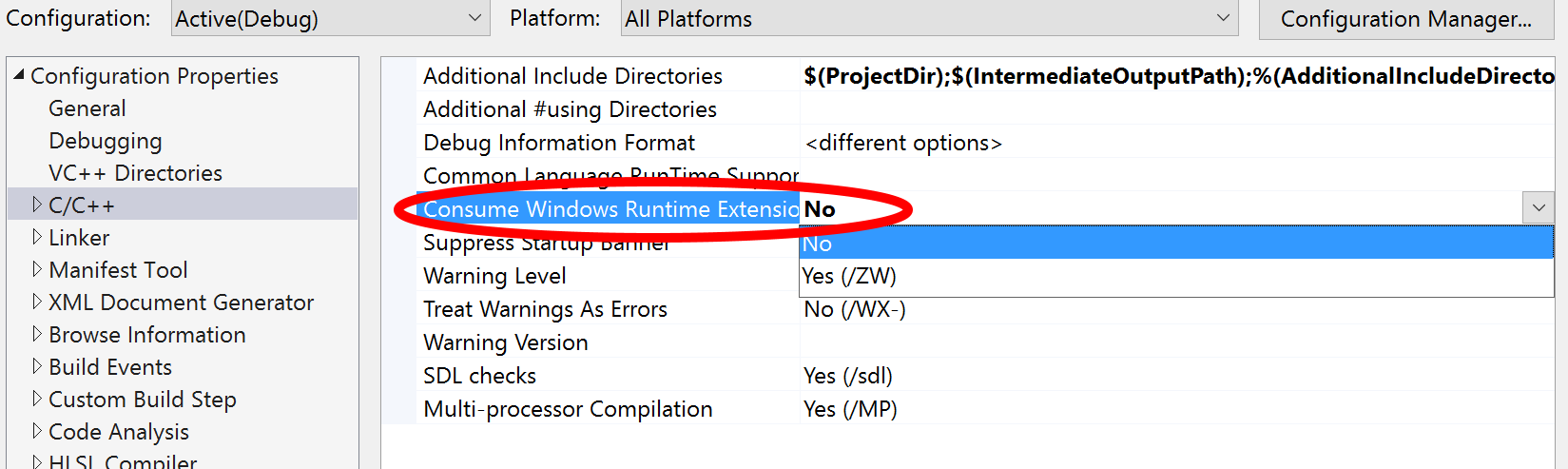
(Optional) Remove the /ZW compiler switch. If you’re using the Visual Studio IDE, this can be disabled by opening the Project Properties dialog, going to C/C++ > General, and setting the Consume Windows Runtime Extensions option to No.
Figure 1. The Consume Windows Runtime Extensions setting in Visual Studio.
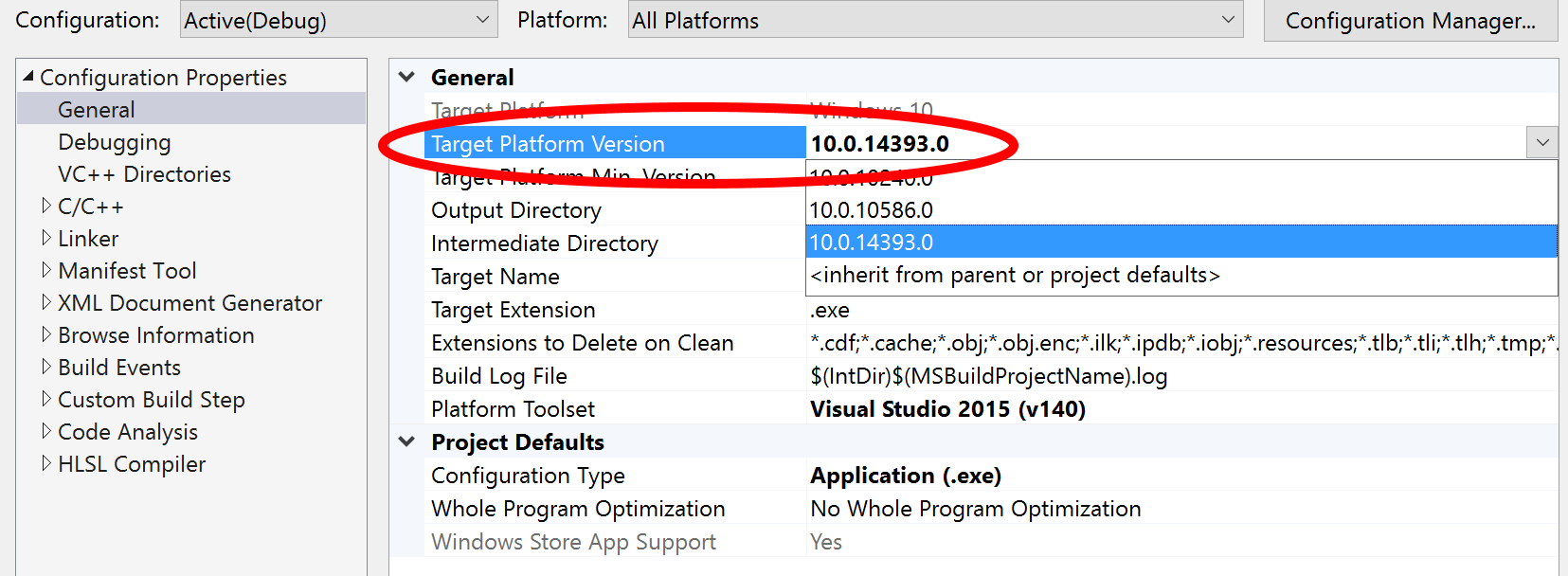
- The porting section of this paper assumes that the Microsoft extensions are not present; the /ZW switch is not enabled.(For Universal Windows Platform (UWP) projects) The WinRT projections require at least version 10.0.14393.0 of the Windows 10 SDK. To set this in Visual Studio, open Project Settings and set the Target Platform Min. Version to at least 10.0.14393.0. If you are not working in Visual Studio, set the MinVersion and MaxTestedVersion to the appropriate values in your app manifest. Also, if you have multiple versions of the Windows SDK installed side by side, make sure your Include Directories option point to at least the 10.0.14393.0 version of the SDK headers. Note that this is the version of the Windows SDK required to develop—and the version of Windows required to run—an app using the WinRT projections. It is not the version of Windows required for the development PC.
Figure 2. The Target Platform Version setting in Visual Studio.
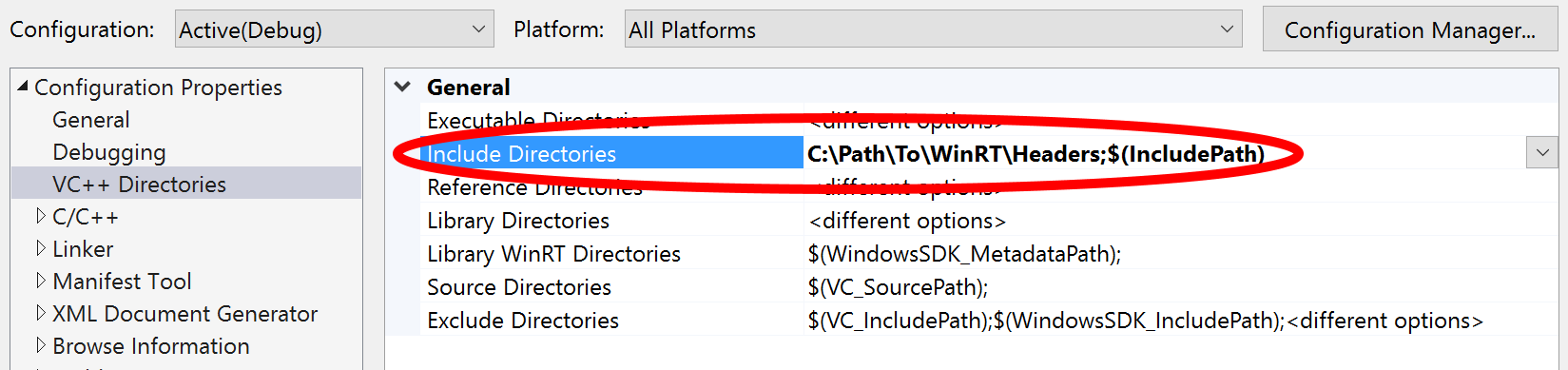
- Add the directory containing the WinRT projection headers to your Include directories. If you’re using the Visual Studio IDE, you can do this by opening the Project Properties dialog, navigating to the VC++ Directories page, and adding the directory to the Include Directories. As an alternative, you can explicitly include any headers used in the solution.
Figure 3. Include Directories setting in Visual Studio.
- (Optional) If you’re using a precompiled header, consider increasing the precompiled header memory allocation with the /Zm compiler option. If you’re using the Visual Studio IDE, you must add this option to the Additional Options in the Command Line page of Project Properties.
After you complete these steps, you can build your code using the WinRT projection headers. But because you’ve removed the Windows Runtime extensions from your configuration, you’ll see numerous errors when you try to compile even the simplest projects. The following sections show you how to adjust many areas of your code to work with C++/WinRT.
Code change: Namespaces
Any source file that includes C++/CX code must be edited to use the WinRT projections. The first step is to include the appropriate headers in your source file. The WinRT headers are organized by the namespaces they cover. For example, if a specific source file uses the Windows::Foundation namespace, the Windows.Foundation.h header must be included to access the WinRT projections of the Windows::Foundation namespace.
C++/CX code:
using namespace Windows::Storage::Streams;
C++/WinRT code:
using namespace winrt::Windows::Storage::Streams;
Note Adding using namespace winrt; at the top of a source file is often enough to port a source file that uses the Windows or Microsoft namespaces. You may also do a simple “find and replace” of “Windows::” with “winrt::Windows::”.
Code change: Handles-to-reference, or “hats”
One of the most visible changes introduced with C++/CX was the handle-to-reference, also known as the “hat” operator (“\^”). Code that uses this operator may be ported in different ways, depending on context. Variables declared with the operator are simply changed to concrete instances of the data type.
C++/CX code:
User ^user = nullptr;
C++/WinRT code:
User user = nullptr;
Note The WinRT type can still be assigned a nullptr value. Even though the WinRT type is an instance of a User object, the projection of each data type has a “null initializer” that allows you to declare a variable with a logical default value to defer initialization to a later time.
Note Searching for the caret (“\^”) character is effective for finding areas of code that need to be fixed. However, we recommend that you do not remove all instances of this operator without reviewing its usage in each place. This is because the caret may also be used as the exclusive OR operator in standard C++.
Handles used in argument lists must also be changed. Examples include function declarations and definitions, try/catch statements, and anonymous events. In these cases, handles to references should be changed to const references.
C++/CX code:
void LogPresenceRecord(PresenceRecord^ record)
C++/WinRT code:
void LogPresenceRecord(PresenceRecord const & record)
Code change: Getting and setting properties
Properties in C++/CX code can be an unexpected source of run-time performance hitches. This is because getting or setting a class property appears identical to getting or setting a simple variable, even though it invokes a function call. Without the Microsoft extensions, properties are no longer available in code. Properties in XDK and UWP data types become explicit function calls with the WinRT projections. Getting the value of a property is a function call with no arguments.
C++/CX code:
auto gamertag = user->DisplayInfo->Gamertag;
C++/WinRT code:
auto gamertag = user.DisplayInfo().Gamertag();
Note Not all data in WinRT data types are properties. There are some instances in which the data is a primitive and does not require this syntax. For example, code that accesses a field of a structure is not a function call.
    Rect g;

    auto b = g.bottom;
Setting a property turns into a function call with a single argument—the new value to be assigned.
C++/CX code:
    auto webSock = ref new Windows::Networking::Sockets::MessageWebSocket();
    webSock->Control->OutboundBufferSizeInBytes = 1024;
C++/WinRT code:
    Windows::Networking::Sockets::MessageWebSocket webSock;
    webSock.Control().OutboundBufferSizeInBytes(1024);
Code change: Data types in the Platform namespace
Several data types in the Platform namespace are used fairly frequently when you use the XDK or UWP libraries that are not available in the WinRT projections. This table shows data types that must be replaced.
Table 1. C++/WinRT replacements for Platform data types.
| C++/CX | C++/WinRT |
|---|---|
| Platform::Exception | winrt::hresult_error |
| Platform::String | winrt::hstring |
| Platform::Object | winrt::Windows::IInspectable |
C++/CX code:
catch (Platform::Exception^ ex)
C++/WinRT code:
catch (winrt::hresult_error const & ex)
Note This code change also requires some changes to the way exception data is handled. Although the same data is present in the hresult_error type, the names of the data members are different and must be updated.
C++/CX code:
    auto m_users = Windows::Xbox::System::User::Users;
    Platform::String^ gamertag = m_users->GetAt(0)->DisplayInfo->Gamertag;
C++/WinRT code:
    auto m_users = winrt::Windows::Xbox::System::User::Users();
    winrt::hstring gamertag = m_users.GetAt(0).DisplayInfo().Gamertag();
Note One common operation with Platform::String references is to convert the data into a const wchar_t* with the Platform::String::Data() method. The analog to this operation is the winrt::hstring::c_str() method.
Note Although it is possible to simply replace all instances of Platform::String with winrt::hstring this is not always the best option. Where possible, it may provide better performance to replace them with standard C++ types.
C++/CX code:
void SignInEventHandler(Platform::Object^ sender, SignInCompletedEventArgs^ args)
C++/WinRT code:
void SignInEventHandler(winrt::Windows::IInspectable const & sender, SignInCompletedEventArgs const & args)
Code change: Events
Events are another area of major divergence between C++/CX and the WinRT projections. The first common operation is to subscribe to an event handler. C++/CX code would do this with the += operator, which is not supported with the WinRT projections. Instead, a WinRT event is a method to which an event handler can be passed and which returns an event token. The token can later be passed to the same method to unsubscribe.
C++/CX code to subscribe:
    User::SignInCompleted += ref new EventHandler<SignInCompletedEventArgs^ >(HandleSignin);
    User::SignOutCompleted += ref new EventHandler<SignOutCompletedEventArgs^ >([=](Platform::Object^, SignOutCompletedEventArgs^ args)
    { HandleSignout(); });
C++/WinRT code to subscribe:
    winrt::event_token signinToken = User::SignInCompleted(HandleSignin);
    winrt::event_token signoutToken = User::SignOutCompleted(
    { this, &MyClass::HandleSignout } );
C++/CX code to unsubscribe:
User::SignInCompleted -= ref new EventHandler<SignInCompletedEventArgs^ >(HandleSignin);
C++/WinRT code to unsubscribe:
User::SignInCompleted(signinToken);
Code change: PPL
You’re probably using the Parallel Pattern Library (PPL) in your Xbox One or Windows 10 game. PPL greatly simplifies asynchronous programming with non-real time APIs, like network programming. If you’ve worked with Xbox Live, this code will look familiar.
C++/CX code:
    auto pAsyncOp = m_user->DisplayInfo->GetGamerPictureAsync( ... );

    create_task( pAsyncOp )
        .then( [this] (task<GetPictureResult^> resultTask)
    {
        GetPictureResult^ result = resultTask.get();
        // ...
    }
C++/WinRT code:
    using namespace winrt::ppl;

    GetPictureResult result = m_user.DisplayInfo().GetGamerPictureAsync( ... ).get();
Most of these changes have been reviewed in previous sections. See the Handle-to-reference and Getting and setting properties sections for details on code changes not discussed here.
Using PPL with the WinRT projections involves the winrt::ppl namespace. This can either be included at the top of your file, as in the example, or used explicitly when declaring data types in the namespace. The primary change to recognize is the replacement of task<GetPictureResult\^> with task<adapter> const &. Removing the handle-to-reference “hat” (“\^”) on the template argument will generate a compiler error stating that there’s no acceptable default constructor for GetPictureResult. The adapter type takes care of this, and its usage is very similar to the original C++/CX PPL task result.
Code change: Program startup
You must also make significant changes to your implementation of the IFrameworkViewSource and program entry point.
C++/CX code:
    ref class ViewProviderFactory sealed : Windows::ApplicationModel::Core::IFrameworkViewSource
    {
    public:
        ViewProviderFactory( UINT_PTR renderer ) : m_renderer( renderer ) {}
        virtual Windows::ApplicationModel::Core::IFrameworkView^ CreateView();
    private:
      UINT_PTR m_renderer;
    };
    [Platform::MTAThread]
    int main( Platform::Array< Platform::String^ >^)
    {
        // Sample is a class that implements the rendering
        std::shared_ptr<Sample> sample( new Sample );
        auto viewProviderFactory = ref new ViewProviderFactory( reinterpret_cast< UINT_PTR >( sample ) );
        Windows::ApplicationModel::Core::CoreApplication::Run( viewProviderFactory );
        return 0;
    }
C++/WinRT code:
    struct ViewProviderFactory sealed : winrt::implements<ViewProviderFactory, winrt::Windows::ApplicationModel::Core::IFrameworkViewSource>
    {
    public:
      ViewProviderFactory(UINT_PTR renderer) : m_renderer(renderer) {}
      virtual winrt::Windows::ApplicationModel::Core::IFrameworkView CreateView();
    private:
      UINT_PTR m_renderer;
    };
    int main()
    {
        winrt::initialize();
        // Sample is a class that implements the rendering
        std::shared_ptr<Sample> sample(new Sample());
        auto viewProviderFactory = winrt::make <ViewProviderFactory>(reinterpret_cast< UINT_PTR >(sample));
        winrt::Windows::ApplicationModel::Core::CoreApplication::Run(viewProviderFactory);
        return 0;
    }
The differences between the two implementations begins with the declaration of the view provider. The WinRT implementation declares the ViewProviderFactory as a struct instead of a ref class. Following the changes previously specified, the declaration of the CreateView method does not return a handle-to-reference type, and the explicit use of the Windows namespace must be prepended with the winrt namespace.
It is common to add the MTA (multi-threaded apartment) attribute to the definition of main, but attributes are not supported without the /ZW compiler switch. The attribute must be removed if you’re not using the Microsoft extensions. However, the same behavior may be achieved with winrt::initialize(). The remainder of the required changes have already been covered in previous sections of this white paper.
Piecemeal porting and interop code
It’s possible for a single project to use both C++/CX components and C++/WinRT components. When working with a small project, it makes sense to port all of the code to C++/WinRT at once. However, with larger, multi-library projects, porting can be done one component at a time. This leads to the question of how C++/CX components can interact with each other.
Projection, WinRT, and ABI types
Before looking at the interop, it’s a good idea to understand the structure of the WinRT types. When working with an activatable class, such as Windows::Foundation::Stringable, you declare it with the same winrt:: namespace prefix as described in earlier sections.
winrt::Windows::Foundation::Stringable stringable;
When an instance of a Stringable is instantiated in code, the default constructor calls RoActivateInstance to instantiate the underlying runtime class. Your code interacts with the stringable object which in turn interacts with the WinRT object it created. This works as expected with interface types, as in this example.
winrt::Windows::Foundation::IStringable iStr = stringable;
In this case, the iStr object acts similarly to a smart pointer to the underlying data. If you need access to the underlying application binary interface (ABI) type, the winrt::get function will grant access in client code.
winrt::ABI::Windows::Foundation::IStringable\* pStr = winrt::get(iStr);
The C++/WinRT headers provide declarations of all referenced raw WinRT/COM interface pointers in the winrt::ABI:: namespace.
Note When the C++/WinRT language projection interface (aka the'smart pointer type') is named winrt::Windows::Foundation::IStringable, the underlying WinRT/COM interface pointer's type will be named winrt::ABI::Windows::Foundation::IStringable.
It’s important to pay attention to reference counting. At this point three objects—iStr, pStr, and stringable—all reference the same underlying object. However, the winrt::get function doesn’t call AddRef. It’s up to client code to handle reference counting to ensure the lifetime of the underlying object appropriately. Using the winrt::com_ptr type is one effective way to ensure proper reference counting.
    winrt::com\_ptr\<winrt::ABI::Windows::Foundation::IStringable\> comStr;
    comStr.copy\_from(pStr);
Now the object comStr has a reference to the object and will also handle cleanup. Once comStr is no longer in scope, it calls Release in its destructor and thus takes care of reference counting for you.
Converting C++/WinRT types to C++/CX
The same winrt::get function is used to create a C++/CX handle-to-reference type from the underlying WinRT object. Because this is a C++/CX type, the code will use the \^ (handle-to-reference) operator and take care of reference counting. Here’s an example.
    Windows::Foundation::IStringable ^ cxStr =
    reinterpret_cast<Windows::Foundation::IStringable ^>(winrt::get(iStr));
Assuming that iStr is the winrt::Windows::Foundation::IStringable type used in the example above, the return value of the call to winrt::get() can be cast and used as its equivalent C++/CX type. Once cxStr falls out of scope, its destructor is called and Release decreases the reference count as expected.
Converting C++/CX types to C++/WinRT
Creating C++/WinRT objects from C++/CX objects makes use of the winrt::copy_from function. The code for the conversion might look like this.
    Windows::Foundation::IStringable^ cxStr = ...;
    winrt::Windows::Foundation::IStringable iStr;
    winrt::copy_from(
      iStr,
      reinterpret_cast<winrt::ABI::Windows::Foundation::IStringable*>(cxStr));
Summary
C++/WinRT moves away from platform-specific extensions to the C++ language that were introduced with Xbox One game development. It enables you to write code that’s less divergent when working with multiple platforms. So you can write multi-platform games with less code fragmentation, and the learning curve for writing your first game on a Microsoft platform is greatly reduced.
References
- C++/WinRT headers (GitHub download)