Xbox One Market Expansion: Application Language Support
This topic provides an overview of the new markets that will be supported by Xbox One in September 2014. It provides detail on the level of voice language support that partners are required to implement to ship an application on Xbox One on a market-by-market basis.
Introduction
Xbox One, which is currently supported in 13 markets, is expanding into 27 new markets in September 2014.
Although applications are not required to localize for any market, publishers are encouraged to do so to drive app adoption in that market. When an application does localize for a particular market, it is required to support voice when the system provides a voice acoustic model for that market and the app language matches the system language.
This paper provides the details around Xbox One language and voice support for each market, application requirements, and the technical details for implementing voice support to pass certification.
Xbox One markets and requirements
Each market will support one or more on-screen (written) languages and may support a matching voice language. Xbox One adds a new setting, the Preferred Spoken Language (PSL), to provide more flexibility for user language and locale configuration.
Preferred Spoken Language
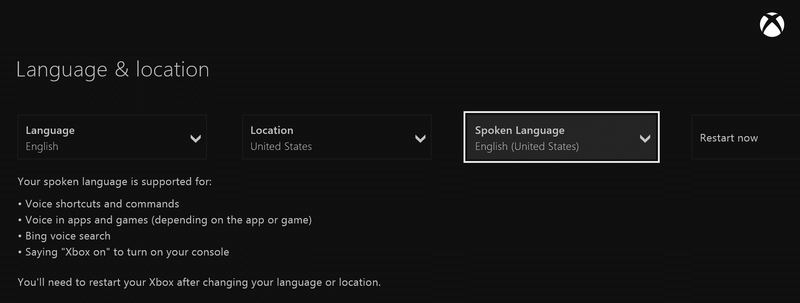
Preferred Spoken Language is a new setting on the Xbox One “Language & location” settings page. It allows users to choose their speech experience independent of their primary on-screen language experience. Users can choose to have the display language and the spoken language be the same, or they can opt for the two languages to be different. This feature was added to enable speech experiences for users who might wish to select a different spoken language from the app’s display language. For example, the user might live in a foreign location but would prefer the app’s acoustic model to use his or her native language. Alternatively, users might want to select a different spoken language because there isn’t a dedicated acoustic model available for their locale.
The image in Figure 1 shows the Language & location settings page as it appears with the addition of the Spoken Language option.
Figure 1. Settings for Preferred Spoken Language.
Voice capability levels and markets
Different markets offer varying levels of application voice support, and the capability level will determine which languages are available in that market. Broadly speaking, there are three capability levels:
- Fully supported acoustic model.
- Ability to select a preferred spoken language.
- Limited or no in-application voice support.
These capability levels, and the markets where the capability levels apply, are described in the following three sections.
Fully supported acoustic model markets
The following table lists by location the locales that include full voice support. All of the combinations include a fully supported acoustic model for voice support throughout the experience, including in-application voice support.
Canada supports both English and French language and voice.
Table 1: Markets with fully supported acoustic model language support.
| Location | Locale | Language (written) |
|---|---|---|
| Australia | en-AU | English (GB) |
| Brazil | pt-BR | Portuguese (BR) |
| Canada | en-CA | English (GB) |
| Canada | fr-CA | French (CA) |
| France | fr-FR | French |
| Germany | de-DE | German |
| Italy | it-IT | Italian |
| Japan | ja-JP | Japanese |
| Mexico | es-MX | Spanish (MX) |
| Spain | es-ES | Spanish (ES) |
| United Kingdom | en-GB | English (GB) |
| United States | en-US | English (US) |
Limited or no in-application voice support markets
There are a number of markets that offer limited or no voice support. The user language is primarily used for the on-screen (written) language for Xbox One. Some markets will have an alpha (pre-release) acoustic model that a user can optionally configure using the Spoken Language setting. However, this only enables voice for global speech commands and “see-it-say-it” in the Xbox One shell. The markets listed in Table 2 will not have in-app speech enabled at the time of launch, September 2014, although full support including in-app speech might be added in a future release.
Table 2. Markets with limited or no in-application voice support.
| Location | Locale | Language (written) |
|---|---|---|
| Belgium | nl-BE | Dutch |
| China (alpha) | zh-CN | Chinese (Simplified) |
| Denmark | da-DK | Danish |
| Finland | fi-FI | Finnish |
| Hong Kong SAR | zh-HK | Chinese (Traditional) |
| Netherlands | nl-NL | Dutch |
| Norway | nb-NO | Norwegian |
| Poland | pl-PL | Polish |
| Portugal | pt-PT | Portuguese (PT) |
| Russia | ru-RU | Russian |
| Singapore | zh-SG | Chinese (Simplified) |
| South Korea | ko-KR | Korean |
| Sweden | sv-SE | Swedish |
| Taiwan | zh-TW | Chinese (Traditional) |
| Turkey | tr-TR | Turkish |
Preferred Spoken Language markets
Table 3 shows markets in which one or more locales can be set by the user to enable voice. With the Spoken Language drop-down menu on the Language & locale settings page, users can choose their preferred spoken language to be the same as or different from the written (display) language. By default, voice support is turned off in these markets, but when a user selects a PSL, voice support will be turned on.
In addition to the new markets, the list in Table 3 includes three existing markets—Austria, Ireland, and New Zealand—where Xbox One will support user-selected PSLs.
Table 3. Markets with Preferred Spoken Language support.
| Location | Locale | Language (written) |
|---|---|---|
| Argentina | es-AR | Spanish (MX) |
| Austria | de-AT | German |
| Belgium | fr-BE | French |
| Chile | es-CL | Spanish (MX) |
| Colombia | es-CO | Spanish (MX) |
| Czech Republic | en-CZ | English (GB) |
| Greece | en-GR | English (GB) |
| Hong Kong SAR | en-HK | English (GB) |
| Hungary | en-HU | English (GB) |
| India | en-IN | English (GB) |
| Ireland | en-IE | English (GB) |
| Israel | en-IL | English (GB) |
| New Zealand | en-NZ | English (GB) |
| Saudi Arabia | en-SA | English (GB) |
| Singapore | en-SG | English (GB) |
| Slovakia | en-SK | English (GB) |
| South Africa | en-ZA | English (GB) |
| Switzerland | de-CH | German |
| Switzerland | fr-CH | French |
| United Arab Emirates | en-AE | English (GB) |
Requirements
Based on the market and language-support levels described above, applications must support voice according to the following requirements.
- If the application ships in one of the “Fully supported acoustic model” markets with full voice support and the display language is localized in that language, then the application must support in-app voice across all markets that support voice (including PSLs). If the application’s display language is not localized in the supported languages for the locale, then voice support should be disabled.
- If the application ships in a “Limited or no in-application voice support” market or a “Preferred Spoken Language” market, then application support for voice is not required for that market. It is optional for the application to support PSLs. Voice support should be disabled unless the application display language is localized in the supported PSL.
- If the display language of the application does not match the display or voice language of the Xbox system, the application must disable voice support.
Technical details
- Determining language match
- Disabling voice
- Locking to a set of acoustic models
- Existing applications that need content updates
- What happens when one of the unsupported markets becomes supported?
- Fonts
Determining language match
Applications that ship in multiple markets with different language support must determine whether there is a language match. If there is not a language match, voice should be disabled.
In order to determine language and locale match, the application can compare the user’s preferred languages (from Settings values: Language, Location, and Spoken Language) against the languages that the app has been localized in.
- User Preferences: Windows.System.UserProfile.GlobalizationPreferences.languages
The languagesproperty is an array of language and locale values, where the first one is the specific value in Settings and any others can be “equivalent” alternates. For example, in Belgium with the language set to Netherlands, the first value is nl-BE and the second is nl-NL.
- App Language: The app can determine the loaded resources language and locale for the app by checking the lang property of any resource string. For example, in the Xbox One Media Application Template, WinJS.Resources.getString(“homePivotLabel”).lang will return the language and locale. Note that this should be an application resource string rather than a system-level resource string because the system might implement a different level of language support than the application for the given market.
If there isn’t a direct match between user-preferred languages and languages that an application is localized in (that is, the full locale), the application should check to see whether there is a language-only match.
Note There are exceptions to this rule, such as for French and Spanish, where the specific language locales should not be mixed.
Consider the following example of an application in Greece:
- The app is only localized in en-US.
- The available settings in the GlobalizationPreferences.languages array are en-GR and en-GB.
- Although there isn’t a direct match, the app can compare the languages included in the GlobalizationPreferences.languages array and the app-localized language and determine that the languages are all English. For that reason, the app can keep voice enabled.
Note that in this scenario there is a minor mismatch in that the display language in the app will be en-US and the acoustic model will use en-GB. This is an acceptable configuration from a certification perspective.
Here is the sample code that is written as a module that an application can drop in the Utilities.js of the Xbox One Media Application Template.
  (function voiceLanguageInit() {
      "use strict";

      // Check to see if there is an exact match of the language AND locale
      function checkLanguageLocaleMatch(sysLanguageLocales, appLanguageLocale) {
          for (var i = 0; i < sysLanguageLocales.size; i++) {
              if (sysLanguageLocales[i].toUpperCase() === appLanguageLocale) {
                  return true;
              }
          }
          return false;
      };

      // Check to see if we match a language, but with a different acoustic model
      //   i.e. en-US instead of en-GB
      // Lots of different rules. sysLanguage is just the 2-byte language code.
      function checkLanguageOnlyMatch(sysLanguageLocale, appLanguageLocale) {

          var appLanguage = appLanguageLocale.substr(0, 2);
          var sysLanguage = sysLanguageLocale.substr(0, 2);
          var match = false;

          if (appLanguage === sysLanguage) {
              switch (appLanguage) {
                  // English will let all locales match. i.e. en-US is equivalent
                  // to en-GB, etc for voice
                  // (as this lets expats pick a better acoustic model)
                  case "EN":
                  // These are the languages that may not be a 2x2 BCP-47.
                  // i.e. 'ru' instead of 'ru-RU'.
                  case "RU":
                  case "DA":
                  case "FI":
                  case "JA":
                  case "KO":
                  case "NB": // for NB-NO
                  case "PL":
                  case "TR":
                      match = true;
                      break;
                  // Chinese can be traditional or simplified. zh-CN === zh-Hans-CN,
                  // zh-SG === zh-Hans-SG, zh-HK === zh-Hant-HK,
                  // and zh-TW === zh-Hant-TW. The sysLanguage will always be in the
                  // longer format. If the app uses a resource name that matches the
                  // long, then it will never use this check (it will match in
                  // checkLanguageLocaleMatch).
                  case "ZH":
                      if ((appLanguageLocale === "ZH-CH" &&
                           sysLanguageLocale === "ZH-HANS-CN") ||
                          (appLanguageLocale === "ZH-SG" &&
                           sysLanguageLocale === "ZH-HANS-SG") ||
                          (appLanguageLocale === "ZH-HK" &&
                           sysLanguageLocale === "ZH-HANT-HK") ||
                          (appLanguageLocale === "ZH-TW" &&
                           sysLanguageLocale === "ZH-HANT-TW")) {
                          match = true;
                      }
                      break;
                  // These need to be matched specifically in the
                  // checkLanguageAndLocaleMatch since you can't mix fr-CA with fr-FR or
                  // es-eS with es-MX or pt-BR with pt-PT
                  case "FR":
                  case "PT":
                  case "ES":
                  default:
                      match = false;
                      break;
              }
          }

          return match;
      };

      WinJS.Namespace.define("MyApp.Utilities.Voice", {
          //
          // Disable voice if the system language/locale doesn't match the app display
          // language/locale.
          // Note: this doesn't necessarily mean that voice is supported for all
          //       markets, but disabled when there isn't a match.
          //
          checkDisableVoice: function () {
              // This is the user preference for language as set in the Settings of
              // the shell. The first item is the specific setting. There may be
              // others in the array that indicate suitable language/locale.
              var sysLanguageLocales =
                  Windows.System.UserProfile.GlobalizationPreferences.languages;

              // Use one of the resource strings to get the language of the loaded
              // app resources. Resources already makes this upper case.
              // NOTE IF YOU RENAMED HOMEPIVOTLABEL TO SOMETHING ELSE THIS CALL WILL
              // FAIL. UPDATE THE CALL TO GETSTRING TO ENSURE IT OBTAINS A VALID
              // STRING FOR YOUR APP
              var langResource = WinJS.Resources.getString("homePivotLabel");
              if (langResource.empty === true) {
                  throw "This needs to be a string in your resource file!";
              }
              var appLanguageLocale = langResource.lang.toUpperCase();

              // Check for an exact match between primary user preference and supported
              // languages, otherwise determine if there is a suitable fallbacks
              if (checkLanguageLocaleMatch(sysLanguageLocales, appLanguageLocale) ===
                  false &&
                  checkLanguageOnlyMatch(sysLanguageLocales[0].toUpperCase(),
                                         appLanguageLocale) === false) {
                  XboxJS.UI.Voice.disableVoiceManager();
              }
          }
      });
  })();
Your application should call the checkDisableVoice method in the activated handler in Default.js:
  app.addEventListener("activated", function (args) {
      MyApp.Utilities.Voice.checkDisableVoice();
  }
Disabling voice
If your application needs to disable voice, add this method call in the activated handler in Default.js:
  app.addEventListener("activated", function (args) {
      XboxJS.UI.Voice.disableVoiceManager();
  }
Locking to a set of acoustic models
Because developers will be testing their applications against a set of acoustic models for voice support in a specific version of the system or Application Development Kit (ADK), an application can lock to the specific SpeechPipeline version in the AppXmanifest.
The following code excerpt is an example of the SpeechPipeline version being set to 1.14.6, which is in the June 2014 ADK. Because the SpeechPipeline attribute is always locked to a particular ADK version, it ignores the IsVersionLocked attribute.
  <mx:PackageExtension Category="windows.kinect">
      <mx:Kinect IsVersionLocked="false">
          <mx:SpeechPipeline Version="1.14.6" />
      </mx:Kinect>
  </mx:PackageExtension>
Existing applications that need content updates
Applications that have already shipped but plan to add support for the new markets available in September 2014 will need to perform a content update to localize the display language for new markets. For most apps, this is a matter of updating the manifest with the newly supported languages and adding localized string resources to the Strings folder, creating a new resource set for each new language, translating, and testing. To ensure that the new acoustic models are present, use the latest ADK release and update the SpeechPipeline version attribute to reflect the latest version.
What happens when one of the unsupported markets becomes supported?
When voice in a market where an application ships goes from unsupported to supported, publishers will have six months (from notification) to support voice for that market in their application. Applications will need to perform a content update to update the disabling logic, compile against a new ADK, and set the new SpeechPipeline version attribute to reflect the latest version.
Fonts
There are some languages that need to use alternate fonts in order to display all the necessary characters. If an app uses the system fonts (typically Segoe UI), then the app needs to explicitly set these alternate fonts for the following languages in the new markets.
Table 4. Default UI fonts by market.
| Script | UI font | UI weights |
|---|---|---|
| European scripts (Latin, Greek, Cyrillic) | Segoe UI | Light, Semilight, Regular, Semibold, Bold |
| Arabic | Segoe UI | Light, Semilight, Regular, Semibold, Bold |
| Hebrew | Segoe UI | Light, Semilight, Regular, Semibold, Bold |
| Traditional Chinese | Microsoft Jhenghei UI | Light, Regular, Bold |
| Simplified Chinese | Microsoft YaHei UI | Light, Regular, Bold |
| Korean | Malgun Gothic | Regular, Bold |
| Japanese | Meiryo UI | Regular, Bold |