Tutorial: Rendering Rectangles and Ellipses
The following tutorial shows how to add the rendering of some basic shapes (rectangles, ellipses) to the text output utility described in the previous tutorial.
- Updating the Game class
- Add definitions for the new shapes
- Add some calls to the new methods
- Building and deploying
Updating the Game class
First, open up your TextDisplay project.
To update the game class to support basic shapes
-
Open up game.h and add the following code to the private section of the class. Note that if you wanted to include the class in a larger project, you may wish to add these declarations to the public section of the class.
C++
VOID AddQuad( INT X, INT Y, UINT Width, UINT Height, CXMVECTOR vTexCoord, CXMVECTOR vTexCoordSize, const FLOAT ColorRGBA[4] ); VOID DrawRoundRect( INT X, INT Y, UINT Width, UINT Height, UINT EdgeThickness, const FLOAT ColorRGBA[4], UINT Style ); VOID DrawEllipse( INT X, INT Y, UINT Width, UINT Height, const FLOAT ColorRGBA[4] ); VOID DrawRect( INT X, INT Y, UINT Width, UINT Height, const FLOAT ColorRGBA[4] ); VOID DrawRectOutline( INT X, INT Y, UINT Width, UINT Height, UINT LineWidth, const FLOAT ColorRGBA[4] ); -
The first of these methods defines an alternative (overloaded) method to add a quad, the other four define basic shapes supported by the texture held in memory.
Add definitions for the new shapes
The five new methods added to the class need definitions.
To add shape definitions to the project
- Open up the Game.cpp file.
-
Add the following code above the existing definition for AddQuad:
C++
VOID Game::AddQuad( INT X, INT Y, UINT Width, UINT Height, CXMVECTOR vTexCoord, CXMVECTOR vTexCoordSize, const FLOAT ColorRGBA[4] ) { AddQuad( XMVectorSet( (FLOAT)X, (FLOAT)Y, 0, 0 ), XMVectorSet( (FLOAT)Width, (FLOAT)Height, 0, 0 ), vTexCoord, vTexCoordSize, ColorRGBA ); } -
At the end of the Game.cpp file, add the following code for the four shapes:
C++
VOID Game::DrawRoundRect( INT X, INT Y, UINT Width, UINT Height, UINT EdgeThickness, const FLOAT ColorRGBA[4], UINT Style )
{
  XMVECTOR RectSize;
  XMVECTOR RectOffset;

  switch( Style )
  {
    case 1:
      RectSize = XMVectorSet( 50.0f / 256.0f, 50.0f / 256.0f, 0, 0 );
      RectOffset = XMVectorSet( 100.0f / 256.0f, 156.0f / 256.0f, 0, 0 );
      break;
    case 0:
    default:
      RectSize = XMVectorSet( 100.0f / 256.0f, 100.0f / 256.0f, 0, 0 );
      RectOffset = XMVectorSet( 0.0f / 256.0f, 156.0f / 256.0f, 0, 0 );
    break;
  }

  const XMVECTOR Half = { 0.5f, 0.5f, 0, 0 };
  const XMVECTOR VHalf = { 0.0f, 0.5f, 0, 0 };
  const XMVECTOR HHalf = { 0.5f, 0.0f, 0, 0 };

  AddQuad( X, Y, EdgeThickness, EdgeThickness, RectOffset, RectSize * Half, ColorRGBA );
  AddQuad( X + EdgeThickness, Y, Width - EdgeThickness * 2, EdgeThickness, RectOffset + RectSize * HHalf, RectSize * VHalf, ColorRGBA );
  AddQuad( X + Width - EdgeThickness, Y, EdgeThickness, EdgeThickness, RectOffset + RectSize * HHalf, RectSize * Half, ColorRGBA );

  AddQuad( X, Y + EdgeThickness, EdgeThickness, Height - EdgeThickness * 2, RectOffset + RectSize * VHalf, RectSize * HHalf, ColorRGBA );
  AddQuad( X + EdgeThickness, Y + EdgeThickness, Width - EdgeThickness * 2, Height - EdgeThickness * 2, RectOffset + RectSize * Half, XMVectorZero(), ColorRGBA );
  AddQuad( X + Width - EdgeThickness, Y + EdgeThickness, EdgeThickness, Height - EdgeThickness * 2, RectOffset + RectSize * Half, RectSize * HHalf, ColorRGBA );

  AddQuad( X, Y + Height - EdgeThickness, EdgeThickness, EdgeThickness, RectOffset + RectSize * VHalf, RectSize * Half, ColorRGBA );
  AddQuad( X + EdgeThickness, Y + Height - EdgeThickness, Width - EdgeThickness * 2, EdgeThickness, RectOffset + RectSize * Half, RectSize * VHalf, ColorRGBA );
  AddQuad( X + Width - EdgeThickness, Y + Height - EdgeThickness, EdgeThickness, EdgeThickness, RectOffset + RectSize * Half, RectSize * Half, ColorRGBA );
}

VOID Game::DrawEllipse( INT X, INT Y, UINT Width, UINT Height, const FLOAT ColorRGBA[4] )
{
  const XMVECTOR GlyphRectSizeOffsets[] =
  {
    { 100.0f / 256.0f, 100.0f / 256.0f, 0, 0 }, { 0.0f / 256.0f, 156.0f / 256.0f, 0, 0 },
  };

  const UINT SizeIndex = 0;
  const UINT OffsetIndex = SizeIndex + 1;

  AddQuad( XMVectorSet( (FLOAT)X, (FLOAT)Y, 0, 0 ), XMVectorSet( (FLOAT)Width, (FLOAT)Height, 0, 0 ), GlyphRectSizeOffsets[OffsetIndex], GlyphRectSizeOffsets[SizeIndex], ColorRGBA );
}

VOID Game::DrawRect( INT X, INT Y, UINT Width, UINT Height, const FLOAT ColorRGBA[4] )
{
  AddQuad( X, Y, Width, Height, XMVectorSet( 50.0f / 256.0f, 206.0f / 256.0f, 0, 0 ), XMVectorZero(), ColorRGBA );
}

VOID Game::DrawRectOutline( INT X, INT Y, UINT Width, UINT Height, UINT LineWidth, const FLOAT ColorRGBA[4] )
{
  UINT XLineWidth = min( LineWidth, Width / 2 );
  UINT YLineWidth = min( LineWidth, Height / 2 );

  const XMVECTOR vUV = XMVectorSet( 50.0f / 256.0f, 206.0f / 256.0f, 0, 0 );
  AddQuad( X, Y, Width, YLineWidth, vUV, XMVectorZero(), ColorRGBA );
  AddQuad( X, Y + Height - YLineWidth, Width, YLineWidth, vUV, XMVectorZero(), ColorRGBA );
  AddQuad( X, Y, XLineWidth, Height, vUV, XMVectorZero(), ColorRGBA );
  AddQuad( X + Width - XLineWidth, Y, XLineWidth, Height, vUV, XMVectorZero(), ColorRGBA );
}
Add some calls to the new methods
All the hard work has now been done, so add a new color and some calls to the new methods.
To add calls to the new draw methods
-
Locate your definition of g_text_color and replace that line of code with the following:
C++
const FLOAT g_textColor[] = { 0.50f, 0.09f, 0.09f, 1.000f }; const FLOAT g_renderColor[] = { 0.99f, 0.08f, 0.08f, 1.000f }; - Next, locate the Render method and comment out the existing calls to DrawText.
-
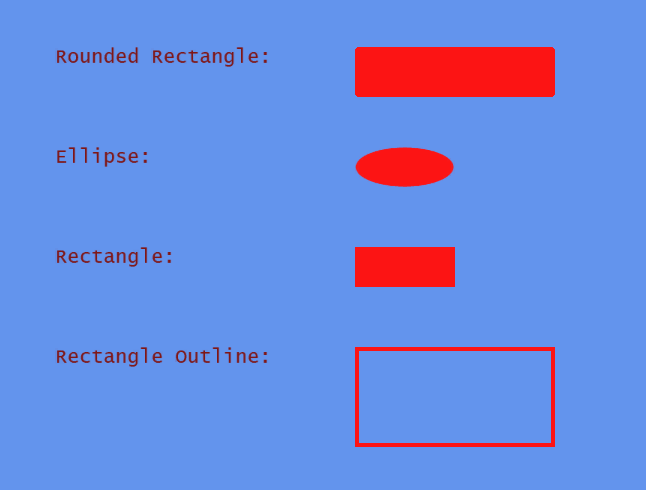
Add the following code just after the commented out calls to DrawText, and before the call to FlushQuads:
C++
DrawText(200,300,20,L"Rounded Rectangle:",g_textColor);
DrawRoundRect(500,300,200,50,4, g_renderColor,0);

DrawText(200,400,20,L"Ellipse:", g_textColor);
DrawEllipse(500,400,100,40,g_renderColor);

DrawText(200,500,20,L"Rectangle:", g_textColor);
DrawRect(500,500,100,40,g_renderColor);

DrawText(200,600,20,L"Rectangle Outline:", g_textColor);
DrawRectOutline(500,600,200,100,4,g_renderColor);
Building and deploying
If you’ve completed the preceding steps in this tutorial, you can now build and deploy your app to the dev kit.
To build and deploy your app
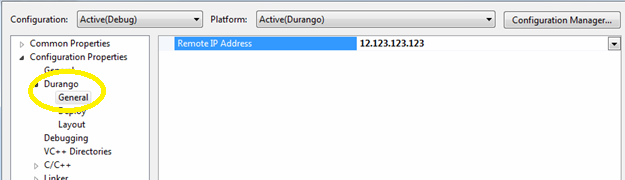
- Use Connect (xbconnect.exe) to set the default remote console, or set the IP address of the console in the project properties.
- On the Build menu, click Build Solution.
Wait for building to finish. - On the Build menu, click Deploy Solution.
- Navigate to the My games & apps page then select Games on the dev kit using the Xbox controller, and select TextDisplay.