What’s New in the March 2014 Xbox One XDK
The March 2014 release of the Xbox One XDK from Microsoft contains the following new features, tools, and documentation. For features that shipped in a previous release of the Xbox One XDK, see the What’s New document for that release, available from Features Introduced in Previous Releases.
Sections:
Release Notes and Xbox One XDK Updates
The most recent release notes for and updates to the Xbox One XDK can always be found on Xbox One XDK Software Downloads on the Xbox Game Developer site. For access, log in with your ID and password on https://developer.microsoft.com/en-us/games/xbox/partner/index; at the top of the page, point to Development and click Downloads.
You can check with your account manager for the latest information about upcoming Xbox One XDK releases.
Xbox One XDK Version Info
The March 2014 Xbox One XDK contains the latest tools and libraries for Xbox One.
What’s new in the March 2014 XDK
HW Accelerated Video Encode/Decode for the Monolithic D3D Runtime is now available for preview
HW Accelerated Video Encode/Decode for titles building against the Monolithic D3D runtime is available for preview in the March 2014 XDK. Given that we plan to retire the “Stock” D3D runtime in May 2014, we strongly advise that titles begin taking advantage of the Monolithic runtime now, if they have not already.
Be aware of the following breaking change and limitations in this preview of the HW Accelerated Video Encode/Decode functionality for Monolithic D3D:
- Titles building against the stock Direct3D runtime (i.e. it includes any of the stock Direct3D headers “d3d11.h” in any modules, links with the stock “d3d11.lib” or “d3d11i.lib”, and/or links with any supplemental libraries (including middleware) that themselves have been built against the stock DirectD3D headers or libraries) will not be able to use HW video acceleration in the March 2014 XDK.
- This change has no impact to titles using SW video encode/decode or to titles without video functionality.
- Consistent with previous releases, video processing and rendering must be executed in immediate context with DirectX Video Acceleration (DXVA). We are working on enabling video processing and rendering in a deferred context in a future release.
Async Compute support is now available in preview mode with the Monolithic runtime
With the March 2014 XDK, an asynchronous compute-only immediate context can be used to submit compute shader workloads to the GPU that run in parallel with graphics workloads. This functionality is being made available in preview mode. Please see the documentation Optimizing Monolithic Driver Performance for further information.
The Stock D3D Runtime will be deprecated in the May 2014 XDK
Starting with the May 2014 XDK, only the Monolithic D3D runtime will be available for XDK development. As has been the pattern with previous releases, Monolithic D3D runtime is where we are investing our energies to deliver the best console-specific performance improvements and Direct3D feature extensions for our customers. With the addition of hardware accelerated video encode/decode support for Monolithic D3D in the March 2014 XDK, we can now move forward with retiring the Stock D3D Runtime. If they have not done so already, titles should begin taking advantage of the Monolithic runtime immediately.
All CPU graphics allocations now utilize XMemAlloc
Starting with the March 2014 XDK release, all graphics driver CPU allocations now come from XMemAlloc. Previously, the graphics driver would allocate CPU memory directly from the heap. The graphics driver has always done GPU memory allocations via XMemAlloc. This new approach should make memory tracking much easier for title developers.
New SetFastResources and SetFastResourcesFromBatch APIs are the fastest way to set D3D resources
These two new D3D11.X APIs subsume the existing XxSetFast and XxSetPlacement APIs. They are pseudo-variadic template APIs that allow multiple resource types and stages to be set in a single invocation. They produce optimal X64 instructions that write directly to the Command Buffer Ring and can “dissolve” into title code by virtue of being implemented completely inline. In addition to taking D3D resources as arguments, they also support Descriptor Objects for purposes of better cache and instruction efficiency. The existing XxSetFast and XxSetPlacement APIs (with the exception of IASetFastIndexBuffer) are deprecated in favor of these new APIs. We recommend that all titles switch to using these APIs as much as possible whenever setting resources into the D3D pipeline.
Updates to Kinect Studio
Kinect Studio now allows you to record and playback the audio streams from the sensor. Additionally you can now also compress Kinect Studio recordings via KSConvert. Note this is compression of raw IR streams in .xrf files only.
SmartGlass Native SDK is now available
In addition to the existing SmartGlass Companion SDK, which allows title developers to build HTML/JavaScript applications that run inside the Xbox SmartGlass app, we are making the SmartGlass Native SDK available starting with the March 2014 XDK. The SmartGlass Native SDK provides a cross-platform (Windows, Windows Phone, iOS, and Android) set of libraries that can be embedded into any mobile application to make it SmartGlass-enabled. This gives the mobile application the ability to discover, connect and communicate with a title running on an Xbox One. The SmartGlass Native SDK is available as an optional download on the Xbox One XDK Software Downloads page
Installing an Xbox One recovery update from a USB flash drive
In addition to installing a recovery using the XboxOneUpdate script, you can now install the latest recovery using a USB stick — see Installing the XDK and Dev Kit Software for more details.
HostName support
In the March 2014 XDK, you can now address your console using a hostname rather than an IP Address. See Setting a Hostname for the Console IP Address for more details.
Improved reboot experience on power loss
In the March 2014 XDK, when the console reboots as a devkit after a power loss it will preserve settings such as HostName and IdleTimeout.
Opt-out for crash dumps is part of makepkg.exe (/nocrashdump option)
Developers can now opt-out of automatic crash dump creation on crash by using the /nocrashdump option with Make Package (makepkg.exe). Developers who link against the March XDK and don’t opt-out will have minidumps captured automatically for user-mode crashes.
New xbConfig Settings
Many more developer settings can now be manipulated from a PC using Configuration (xbconfig.exe). The new settings include various network settings and the ability to specify a default user (see below) and a key that controls which PCs can access your console.
Default user
You can now configure your developer console so that a particular user is signed in by default when the console starts up. See Configuring a Default User for more details.
Compiler and Linker Performance Improvements
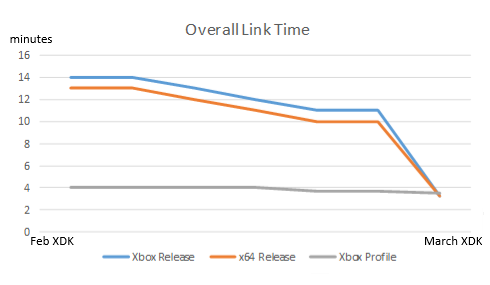
Several performance improvements have been made to the compiler and linker. The amount of improvement you’ll see will vary based on your title but we expect most people to see up to a 30% reduction in overall link time. These improvements can be seen without any change on your part. Some additional improvements can be gained by using the new switch /Zc:inline. This switch reduces the cases in which inlined functions and static data get exported from a module thereby reducing object file size. The smaller object files then result in faster link times. This chart shows the overall improvements we’ve seen in one of our internal test cases:
New option to preserve settings across recoveries
Prior to the March 2014 XDK, settings like the console’s host name, the idletimeout, and so on were deleted each time Remote Recovery (xbremoterecovery.exe) was run. In March, we’ve added a /factoryreset:savesettings switch that preserves these settings so you no longer have to specify them each time you run recovery or reset them using Configuration (xbconfig.exe).
CPU Function Captures in PIX
PIX introduces two new capture types in the March 2014 release aimed at helping you identify CPU performance bottlenecks in your titles. The first type of capture gives you information about every function that is called during a requested period of time. From there, you can select an individual function and take an additional capture to view the callgraph. Finally, a PIX bracket can be associated with a given function so you can see where it is called in a timing capture.
Console screenshot capture
Command line and XTF API support for capturing full display resolution console screenshots. See the Screen Capture (xbcapture.exe) and XtfCaptureScreenshot topics for details.
Console access control
Beginning with the March 2014 XDK release, you can now set an access key for your console to prevent inadvertent access using XTF APIs or tools. For example, you can prevent accidental reboots or recovery of the wrong console. You can specify the access key as part of the console address in the /X parameter of command line tools or in Connect (xbconnect.exe).