D3D11X_SAMPLER_DESC Structure
Describes a sampler state, for use with ID3D11DeviceX::CreateSamplerStateX.
Syntax
typedef struct D3D11X_SAMPLER_DESC {
    D3D11X_TEX_CLAMP ClampX : 3;
    D3D11X_TEX_CLAMP ClampY : 3;
    D3D11X_TEX_CLAMP ClampZ : 3;
    D3D11X_TEX_ANISO_RATIO MaxAnisotropicRatio : 3;
    D3D11X_TEX_DEPTH_COMPARE DepthCompareFunction : 3;
    BOOL ForceUnnormalized : 1;
    UINT AnisotropicThreshold : 3;
    BOOL MCCoordTrunc : 1;
    BOOL ForceDegamma : 1;
    D3D11X_UNSIGNED_1_5 AnisotropicBias : 6;
    BOOL TruncateCoordinates : 1;
    BOOL DisableCubemapWrap : 1;
    D3D11X_TEX_FILTER_MODE FilterMode : 3;
    D3D11X_UNSIGNED_4_8 MinLOD : 12;
    D3D11X_UNSIGNED_4_8 MaxLOD : 12;
    UINT PerfMip : 4;
    UINT PerfZ : 4;
    D3D11X_SIGNED_5_8 LODBias : 14;
    D3D11X_SIGNED_1_4 LODBiasSecondary : 6;
    D3D11X_TEX_XY_FILTER XYMagFilter : 2;
    D3D11X_TEX_XY_FILTER XYMinFilter : 2;
    D3D11X_TEX_Z_FILTER ZFilter : 2;
    D3D11X_TEX_MIP_FILTER MipFilter : 2;
    BOOL MipPointPreclamp : 1;
    BOOL DisableLSBCeil : 1;
    BOOL FilterPrecisionFix : 2;
    UINT BorderColorIndex : 30;
    D3D11X_TEX_BORDER_COLOR BorderColorType : 2;
} D3D11X_SAMPLER_DESC;
Members
ClampX
Method to use for resolving an X texture coordinate that is outside the 0 to 1 range. One member of D3D11X_TEX_CLAMP.
ClampY
Method to use for resolving a Y texture coordinate that is outside the 0 to 1 range. One member of D3D11X_TEX_CLAMP.
ClampZ
Method to use for resolving a Z texture coordinate that is outside the 0 to 1 range. One member of D3D11X_TEX_CLAMP.
MaxAnisotropicRatio
Sets the maximum ratio (degree of anisotropy) when using anisotropic filtering. One member of D3D11X_TEX_ANISO_RATIO.
DepthCompareFunction
Depth comparsion function to use. One member of D3D11X_TEX_DEPTH_COMPARE.
ForceUnnormalized
Treat floating point texture coordinates from the shader as being already in texel space, that is, in the range [0,width] instead of [0,1]. When this flag is set, floats (coordinates specifically) from the shader are treated as if already in texel space; [0..dim-1] spans a texture edge [0..1].
AnisotropicThreshold
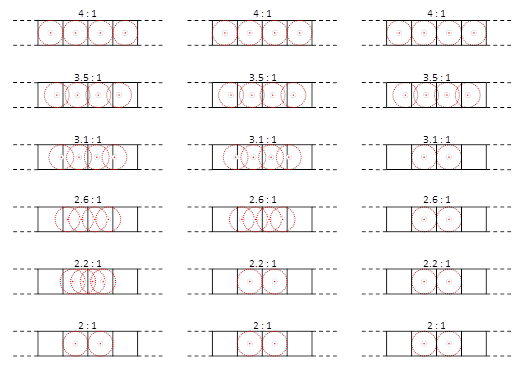
Limits the number of texture samples when the anisotropic ratio is not an even integer; 0=normal, 7=greatest reduction in samples (more details in the Remarks below).
MCCoordTrunc
This is intended for motion comp support. If set, it drops the 7 LSBs of horizontal and vertical blend fractions, so that the only fractions available are 0 and 0.5.
ForceDegamma
If set, forces degamma. This applies to:
- FMT_8 (if dst_sel_w != SEL_X), so long as the channel is not an alpha.
- FMT_2_10_10_10, on the 10-bit channels, but not the 2-bit channel.
- FMT_8_8.
- FMT_8_8_8_8, on the xyz channels, not w.
- BC1, BC2, BC3, BC7.
- YCbCr, supports degamma only on the X channel. Note that the Y component goes into the X channel in this format. This setting does not apply to Cr or Cb in the BC9 format.
AnisotropicBias
To reduce the computed anisotropy, this u1.5 field is subtracted from the computed aniso ratio. The subtract occurs in log space, so 1.0 would halve the aniso ratio and the number of samples taken. The larger the value, the more quality is sacrificed for performance. Anisobias can be scaled down on a per-resource basis by the resource PERF_MOD field.
The final_aniso_degree = 2^(aniso_degree_exp – AnisotropicBias). The maximum reduction with this bias is almost 4.
TruncateCoordinates
Typically, all coordinates are rounded to 8-bits of fractional precision. Setting this bit disables the rounding.
DisableCubemapWrap
If wrapping is not enabled (DisableCubemapWrap=TRUE), a cube face is treated as a 2D texture as far as clamping is concerned. The clamp_{x,y} settings are adhered to. Get close to DX9 cube clamping behavior by setting DisableCubemapWrap=TRUE and clamp_x,y=ClampToLast.
FilterMode
Filter mode function to use. One member of D3D11X_TEX_FILTER_MODE.
MinLOD
Lower end of the mipmap range to clamp access to, where 0 is the largest and most detailed mipmap level and any level higher than that is less detailed.
MaxLOD
Upper end of the mipmap range to clamp access to, where 0 is the largest and most detailed mipmap level and any level higher than that is less detailed. This value must be greater than or equal to MinLOD. To have no upper limit on LOD set this to a large value such as D3D11_FLOAT32_MAX.
PerfMip
Performance modification values that increase the interpolation slope when blending between two samples (see Remarks).
PerfZ
Performance modification values that increase the interpolation slope when blending between two samples (see Remarks).
LODBias
Offset from the calculated mipmap level. For example, if Direct3D calculates that a texture should be sampled at mipmap level 3 and LODBias is 2, then the texture will be sampled at mipmap level 5 (that is, 3 + 2).
LODBiasSecondary
Like LODBias, this secondary bias can also be added to the computed LOD. The difference between LODBiasSecondary and LODBias, is LODBiasSecondary can be scaled by the resource PERF_MOD field. LODBias is not. An app could set LODBiasSecondary to an aggressive positive bias for performance, and then PERF_MOD can be set for each resource according to the content to maintain quality where needed.
XYMagFilter
XY filter function to use for magnification. One member of D3D11X_TEX_XY_FILTER.
XYMinFilter
XY filter function to use for minification. One member of D3D11X_TEX_XY_FILTER.
ZFilter
Z filter function to use. One member of D3D11X_TEX_Z_FILTER.
MipFilter
MIP filter function to use. One member of D3D11X_TEX_MIP_FILTER.
MipPointPreclamp
True by default.
DisableLSBCeil
True by default.
FilterPrecisionFix
True by default.
BorderColorIndex
Only 12 bits of this field are used, the rest are for alignment. A border color base address can be specified with GFXDEC:TA_BC_BASE_ADDR{,_HI} for gfx state contexts 1-7, or GFXUDEC:TA_CS_BC_BASE_ADDR{,_HI}, instance per micro-engine, when the state context is 0. They are 256-byte aligned and, and the low and high registers provide bits [47:8] of address. The 12-bit pointer is an offset from the base in dwords.
BorderColorType
Border color function to use. One member of D3D11X_TEX_BORDER_COLOR.
Remarks
For fields such as MinLOD, MaxLOD there are inline functions in the header to convert from float to the appropriate fixed point representations:
      typedef UINT D3D11X_UNSIGNED_1_5;
      typedef UINT D3D11X_UNSIGNED_4_8;
      typedef INT D3D11X_SIGNED_5_8;
      typedef INT D3D11X_SIGNED_1_4;
      __forceinline D3D11X_UNSIGNED_1_5 D3DFloatToUnsigned_1_5(FLOAT f)
      __forceinline D3D11X_UNSIGNED_4_8 D3DFloatToUnsigned_4_8(FLOAT f)
      __forceinline D3D11X_SIGNED_5_8 D3DFloatToSigned_5_8( FLOAT f )
      __forceinline D3D11X_SIGNED_1_4 D3DFloatToSigned_1_4( FLOAT f )
PerfMip, PerfZ, and AnisotropicThreshold are performance modification values that increase the interpolation slope when blending between two samples. They allow you to trade visual quality for performance, by skipping some percentage of lerps as you sample across a texture. The default value of 0 is API standard behavior (no performance improvement), and increasing values up to the limit (7 for AnisotropicThreshold threshold, 15 for PerfMip and PerfZ) increase performance at the expense of quality.
For cases where the anisotropic ratio is not an even integer, some oversampling can occur due to the decreased step size. The closer the ratio gets to its smaller even integer neighbor, the more oversampling.
The AnisotropicThreshold sampler field addresses this oversampling by defining a region of ratios where a floor instead of a ceiling to the nearest even integer, is used to determine the number of samples. When a floor is used, the step magnitude remains one texel. AnisotropicThreshold is three bits and allows normal (0) behavior, as well as seven different thresholds (1..7).
Figure 1. Example anisotropic threshold settings: disabled (left), low (center), high (right).
The easiest way to determine how to fill in all of the many confusing fields of D3D11X_SAMPLER_DESC is to use CreateSamplerState to create the closest Direct3D equivalent, call GetDescX to get back the corresponding D3D11X_SAMPLER_DESC structure, override the appropriate fields, and then call CreateSamplerStateX.
If you looking to TriJuice your textures (called D3DSAMP_TRILINEARTHRESHOLD on the Xbox 360) then use CreateSamplerStateX and set the PerfMip field appropriately to make trilinear sampling cost the same as bilinear when sampling close to a mip - the higher the number, the more it does a bilinear fetch instead of a trilinear one.
Requirements
Header: Declared in d3d11_x.h.
Library: Use d3d11_x.lib.