Color and Depth Compression
This section describes the low level render target color compression and decompression formats used by the graphics hardware.
- Graphics Pipeline
- Terminology for color compression
- The Color Block
- Color Compression
- Color Compression Scheme
- Enhanced Quality Anti-aliasing (EQAA)
- Feature compatibility
- APIs for color compression
- Performance and Debugging
Graphics Pipeline
The following diagram shows the logical graphics pipeline; the depth and color blocks are the last two logical operations before rendering.
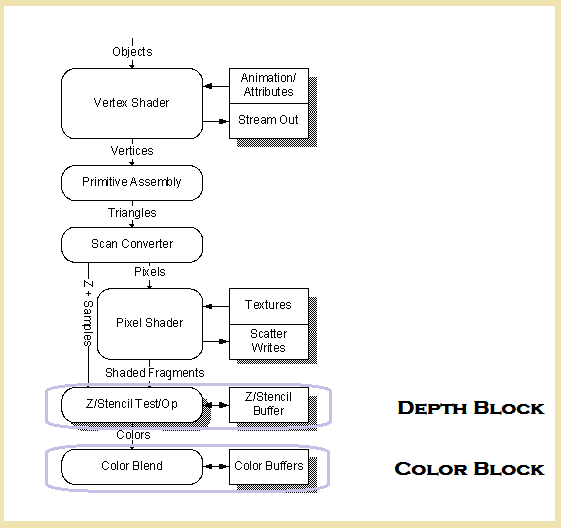
Texture compression formats are handled differently from color and depth; see Resources, Buffers, and Textures and Tiled Resources.
Terminology for color compression
The following are common terms used when describing compression systems.
| Term | Description |
|---|---|
| CMask | Data for tile level color compression. |
| FMask | Data for quad level color compression. |
| Quad | A 2x2 group of pixels. |
| Tile | An 8x8 group of pixels, or 4x4 group of quads. |
| Fragment | One sample of a compressed pixel. |
| Resolve | Produce a single sample surface from a multi-sample surface using a pixel-aligned box filter. |
| MRT | Multiple Render Targets; multiple surfaces that can be rendered to in a single state. They are sometimes overloaded for special functions (for example, resolve and dual-source blending). Performance is expected to fall off linearly with the number of MRTs, although there are many factors which may make performance worse than linear. Such performance-limiting factors include memory controller bandwidth efficiency, and reduction in cache’s ability to take advantage of spatial locality as the cache size in pixels reduces linearly with the number of MRTs. |
| ROP | Raster operation; a bit-by-bit logical operation performed on the source color, the destination color, and a user-defined field. An ROP is a bit-wise operation that uses the source and destination color to change the color written to memory. The standard ROP3 is a function of destination, source and a brush. The destination is the contents of the render target in formatted form. The source is the formatted shader output color when not blending, or the formatted blender output when blending. In the Color Block, the brush is identical to the source. |
| MSAA | Multi-sampling anti-aliasing; a technique to reduce geometry aliasing by storing more depth information than required for rendering. Without compression, there is a unique fragment color value per sample. |
| EQAA | Enhanced Quality Anti-aliasing; a version of MSAA utilizing fewer stored fragments than sample positions, potentially giving higher quality images for a given memory footprint. |
The Color Block
The Color Block is responsible for transferring the pixel shader color data output to memory. This process includes managing MSAA compression, color blending, color formatting, ROP, and writing to memory.
The Color Block allow shader output color for a pixel (source color, CS) to be combined with the current color in the render target for that pixel (destination color, CD) using blending factors (BF(S,D)) and a specified combination function. The general equation for this blending is known as the “blend equation”:
NewDestinationColor = CombinationFunction(BFS*CS, BFD*CD)
The Color Block is responsible for converting the shader output color that is formatted as either UINT32, SINT32, FP32 or FP16 to the render target format. Only uint->uint, sint->sint, unorm-> unorm, snorm->snorm, and FP->non-int conversions are supported. The shader outputs UINT32, SINT32 and FP32. The shader system converts FP32 to FP16 or U/SNORM16 as appropriate for performance reasons.
The Color Block supports a number of special features:
- A special blending mode called “dual-source” blending. While most blend factors are a function of the source color, destination color, or the blend constant color, dual-source blending uses a second shader output color (assigned to MRT1) as the blend factors. The source color in the blend equation is taken from MRT0.
- 2x,4x and 8x multi-sample anti-aliasing (MSAA). There are several MSAA specific features in the Color Block such as a hardware resolve of any blendable surface using a box filter (averaging the sub-samples of a pixel to get the final color of the pixel), and color compression (described in the next section).
- A gamma-corrected frame buffer using the format 8_8_8_8 sRGB.
- Fast clearing of the color surface. This is achieved by only clearing the CMask bits associated with each tile in the surface. As quads are drawn to fast-cleared tiles, the Color Block has special hardware to post fill the parts of the tiles that were not touched.
The fast clear needs to be replaced by a slow clear when the render surface is to be used as a texture. This is known as Fast Clear Eliminate (FCE). Effectively the areas cleared in the CMask need to be replicated as clear on the main surface.
The Color Block is implemented as a three-stage pipeline:
- CMask Cache manages tile level compression information
- FMask Cache manages quad level compression information
- Color Cache and Blender perform pixel updates.
Color Compression
Multi-sample anti-aliasing (MSAA) is a method to reduce visual artifacts caused by the limited resolution of pixels. In MSAA, each pixel’s final value is determined by 2, 4, or 8 color samples taken within the pixel. Each of these samples will receive the same color from the pixel shader, but each sample is depth-tested separately. This results in finer grained detail for geometry edges. Multi-sampled pixels will have larger memory and processing requirements than single-sampled pixels, which is why a color compression scheme is implemented.
Color compression is a lossless, per-pixel scheme where the goal is to save memory bandwidth and to minimize the amount of clock cycles required to operate on a multi-sampled pixel. In 8xMSAA (8 samples per pixel), each pixel potentially requires 8x the memory bandwidth and 8x the processing power of a simple single-sample pixel. Typically, the samples of a pixel are very redundant, with the samples of a pixel only containing one or two unique color values. Rarely do all the samples of an 8xMSAA pixel have 8 unique values. High disparity in the samples is not impossible; it can occur in a scene with finely tessellated geometry, or it could happen just by chance. The goal of the compression scheme is to take advantage of the sample redundancy in a typical scene.
Color Compression Scheme
To compress an MSAA pixel, advantage is taken of redundancy by only storing each unique color once. For example, in 8xMSAA, the 8 samples could look like the colors seen in the following table. There are only three unique colors, but currently they are taking the space of 8.
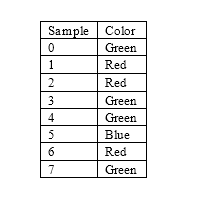
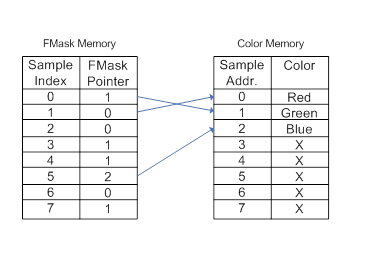
The lowest level of compression, called FMask compression, removes this redundancy by giving each sample of a pixel a pointer. The pointer tells the compression scheme which sample contains the actual color of this sample. An 8xMSAA pointer is only 3 bits, while 4xMSAA and 2xMSAA are 2 and 1 bits respectively. As the table above shows, this reduces the amount of necessary color data. Because we must always be able to have a pixel with the maximum amount of unique sample colors, the compression scheme will not reduce the memory footprint. Instead, the compression scheme allows us to save memory bandwidth by only reading/writing sample locations that are pointed to by at least one FMask pointer. In the example above, we have gone from reading/writing eight colors to reading/writing only three. Additionally, any Color Block operations (such as blending or ROP) will only operate on three colors instead of eight.
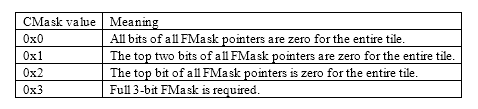
The compression scheme also implements a higher level of compression called CMask compression. In the above example, although we save bandwidth with less color data, we still have to read in eight FMask pointers per pixel. CMask compression saves memory bandwidth by minimizing the amount of pointer data read in. In the common case, there will only be one or two unique pointers. The CMask is a four bit value encoding which regions are fast cleared and how many bit planes need to be loaded for a given tile. There is 1 bit of fast clear data per region. A value of 0 means that it is fast cleared. There is a two bit encoding of how many bit planes need to be loaded for a given tile.
Enhanced Quality Anti-aliasing (EQAA)
This is lossy compression for anti-aliasing. It is an extension of the lossless color compression algorithm. The color storage is reduced so that there is not enough storage to have a unique color per sample. Most of the time, a pixel will only have a small number of unique colors and FMask will be able to map these to cover the entire pixel. For EQAA, the Color Block supports up to 16 samples. The Color Block does not support 16 samples for normal MSAA due to the excessive memory footprint.
The Color Block does not attempt to guess or interpolate colors. When it cannot determine what a color should be or cannot afford to store it, then it will mark the corresponding sample as unknown in FMask.
Rendering for EQAA happens as it normally does in MSAA but is subject to the limitations that only a certain number of samples are correct, and there is a limit to the number of samples per surface.
Feature compatibility
The following table shows allowed combination of operations in the Color Block.
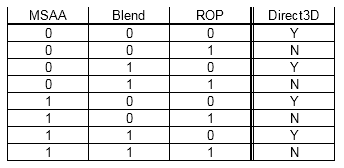
APIs for color compression
MSAA, EQAA, FMask and CMask are referenced from a number of APIs, structures and enums. The XG library provides a layout for the FMask and CMask settings, and see ID3D11DeviceX::CreatePlacementRenderableTexture2D.
Also note that the first call to ID3D11DeviceContextX::RSSetScanConverterMSAASettings, ID3D11DeviceContextX::RSSetEQAASettings, or ID3D11DeviceContextX::RSSetSamplePositions should be accompanied by a complete MSAA state setting. For example:
      D3D11X_MSAA_SCAN_CONVERTER_SETTINGS settings;
      D3D11X_MSAA_EQAA_SETTINGS eqaa;
      D3D11X_MSAA_SAMPLE_POSITIONS pos;
      D3D11X_MSAA_SAMPLE_PRIORITIES dist;
      HRESULT hr = pCtx->RSGetMSAASettingsForQuality( &settings, &eqaa, &dist, &pos, LogFragments, Quality );

      pCtx->RSSetScanConverterMSAASettings( &settings );
      pCtx->RSSetEQAASettings( &eqaa );
      pCtx->RSSetSamplePositions( &dist, &pos );
After that, calls to individual MSAA functions will work as expected.
Note that HLSL intrinsics to get the number of samples and sample positions will return incorrect sample positions when these APIs are used.
Refer to the parameters and remarks for the following methods:
- ID3D11DeviceContextX::DecompressResource
- D3D11XGetDecompressFlagsFromResourceCompression
- ID3D11DeviceContextX::RSGetMSAASettingsForQuality
Refer to the fields and remarks for the following structures and enums:
- D3D11X_MSAA_SCAN_CONVERTER_SETTINGS
- D3D11X_MSAA_EQAA_SETTINGS
- D3D11X_MSAA_SAMPLE_PRIORITIES
- D3D11X_MSAA_SAMPLE_POSITIONS
Performance and Debugging
The PIX tool has a number of specific tests for MSAA performance; see Dr. PIX.
There are a large number of counters, starting with CB_PERF_SEL_CM_FC_TILE_VALID_READY, that reference the FMask and CMask operations. See PIX Table of Hardware Counters.