Xbox One GPU Compute Units
Introduction
At a high level, a compute unit contains four single instruction multiple data (SIMD) units, and each SIMD executes one shader instruction on 16 threads per clock cycle. This simple view works as a good high-level model, but a graphics programmer needs a finer level of detail to resolve questions such as “How many registers are optimal to use in my shader?” or “Why did my compute shader’s performance fall off a cliff?” This document zooms into compute units (CUs) and explains how they work in more detail to help answer such questions.
This white paper has been updated with finalized hardware terminology and specifications. Shader cores are now called compute units. A shader execution vector of 64 threads is now referred to as a wave. Local and global shared memory are now respectively termed local data store and global data store.
Abbreviations and acronyms
| Abbreviation | Term | Description |
|---|---|---|
| CS | compute shader | General purpose shader program that uses no render state; for example, a GPGPU shader. |
| CU | compute unit | A unit that runs shaders. There are 12 CUs. Formerly shader core (SC). |
| DS | domain shader | Shader program that generates vertices from tessellated data. |
| GDS | global data store | 64 KB of on-chip memory shared between CUs. |
| GS | geometry shader | Shader program that runs on primitives and may produce zero or more output primitives. |
| HS | hull shader | Shader program that prepares data for tessellation. |
| LDS | local data store | 64 KB of fast dedicated memory shared among the 4 SIMDs in a CU. |
| PS | pixel shader | Shader program that runs one instance per pixel in a SIMD-like way. |
| SGPR | scalar general purpose register | A 32-bit register used by the scalar ALU in each CU, allocated on a per-wave basis. |
| SIMD | single instruction multiple data | One of four units in a CU that executes shader wave. It contains 4 vector scalar processors. |
| SQ | sequencer | A unit that schedules work inside the CU. Formerly scheduler. |
| SX | shader export block | A unit that forwards pixel and vertex shader outputs to their respective destinations. |
| TCC | texture cache per channel | GPU has four separate 8-way L2 caches of 128 KB, each composed of 2048 64-byte cache lines. Each TCC owns a certain subset of address space. |
| TCP | texture cache per pipe | 16 KB read-write L1 cache, one per CU. |
| TU | texture unit | A unit that handles texture and buffer memory requests, used collectively for TA / TCP/ TD. |
| VGPR | vector general purpose register | A 32-bit per element, 64-element wide register (one element for each of the 64 threads in a shader wave). |
| VS | vertex shader | Shader program that runs one instance per vertex in a SIMD-like way. |
| VSP | vector scalar processor | One of 4 units in a SIMD capable of 4 single-precision float MADDs; thus, a SIMD is a 16-vector of scalar ALUs. |
Hardware view of compute unit
Following is a high-level view of a single compute unit (CU). For basic information about the console, see Xbox One GPU Overview.
Figure 1. Hardware inside a compute unit.
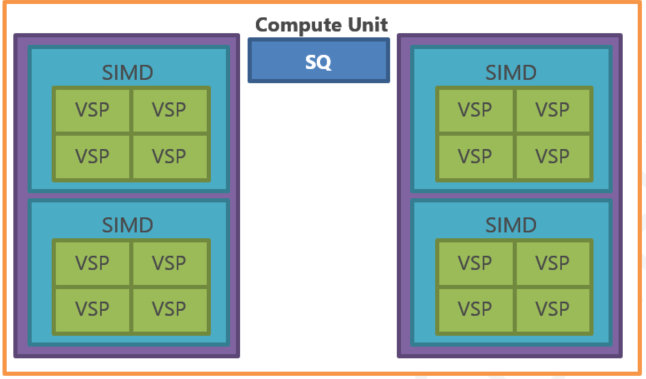
An Xbox One CU can be described as the largest unit of compute in the GPU. There are 12 instances of CU in the GPU, and a pair of CUs has the same or greater computational power than all three Xbox 360 ALUs. Similar to the Xbox 360 ALU, all types of shaders are executed on CUs. Different from the Xbox 360 ALU, a CU has its own local read-write memory and its own texture unit for accessing external memory.
Note One Xbox 360 ALU can perform 5 floating point operations on 16 threads per clock cycle; there are 3 ALUs in the GPU. This gives a figure of 240 operations per clock cycle for the entire GPU. One Xbox One CU performs 64 floating point operations per clock cycle, so two CUs can do 128 operations per clock cycle. Xbox One’s clock frequency is 1.6 times higher and the Xbox 360 ALU efficiency is 60 percent on average. Two Xbox One CUs have approximately the same compute power as the entire Xbox 360 GPU.
Each SIMD runs shader instructions and is capable of executing the same instruction on 16 shader threads per clock cycle. The 4 SIMDs are independent of each other; they always run different waves and therefore can be executing different shaders.
Down one level is a SIMD unit with a self-contradicting name, vector scalar processor (VSP). A single VSP can perform 4 single-precision floating point operations per clock cycle, one double-precision floating point operation per clock cycle (in case of double-precision operations, only one of the four VSPs per SIMD is active), or one single-precision transcendental operation per clock cycle. All 4 VSPs in a SIMD always execute the same shader instruction simultaneously across the 16 shader threads belonging to the same wave. A VSP comprises 4 multiply-accumulate engines; these engines are internally linked and pipelined together. The four linked engines work together and therefore can cooperate to eliminate pipeline stall. The engines support gradients for pixel shaders, so each VSP will always process a 2 x 2 pixel quad, even if only 1 pixel of that pixel quad is live.
Shader threads and waves
Draw calls and compute shader dispatch calls are broken up in shader waves. Each wave has 64 elements, and each element is a shader thread executing with the same shader code at the same address. The Xbox One GPU uses Unified Shader Architecture so a shader thread can be a vertex, a pixel, a primitive or a compute shader (CS) thread. Regardless of where it came from, a wave is always assigned to only one SIMD, and as one SIMD can process 16 threads per clock cycle, it takes 4 clock cycles to issue each instruction of a wave (64 threads / 16 threads = 4). Although each SIMD can accept a new instruction every 4 clock cycles by that design, the CU can issue a new shader instruction on every clock cycle because it contains 4 SIMDs, keeping the GPU constantly busy. It’s important to bear in mind that although the 4 SIMDs in a CU work on 64 threads per cycle simultaneously, those 64 threads come from four different waves.
The instructions issue rate alone, however, paints an incomplete picture. To fully understand how different ALU instructions affect the speed of shader execution, it’s important to know instructions throughput and latency. All modern CPUs and GPUs have a math pipeline at least a few cycles deep, and the Xbox One GPU is no different. The entire VSP (and therefore SIMD) pipeline is 12 cycles deep. This means that although a full-speed instruction takes only 4 cycles to issue, it takes 16 cycles to retire and write the result. A pipeline this deep can hold at least three shader instructions. Does this affect instruction throughput? The answer is no. Xbox One detects any dependent instructions from the same thread in the pipeline and the hardware automatically sends results between pipeline stages.
Following is the timing diagram that shows how regular full-speed instructions flow through the SIMD pipeline over 16 clock cycles. Along the top there are 12 pipeline stages, and each quarter-wave progresses through the pipeline stages sequentially every clock cycle. Note how there can be 3 instructions in the pipeline by the time the first instruction retires, and the pipeline does not have any idle waiting time even if the SIMD runs sequential instructions from the same wave.
Figure 2. SIMD pipeline timing for three instructions.
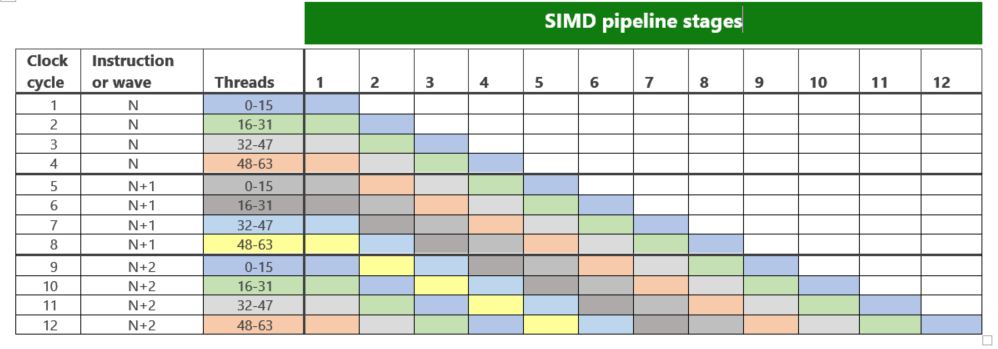
So far we used clock cycles per instruction per shader wave to describe performance. This gives a precise but very low-level description of shader performance. In the majority of real life cases, there will be many shader waves in flight and this allows us to use a more convenient metric of instructions per clock cycle instead. This is the same metric that Xbox 360 PIX uses to show shader performance in static analysis, so it should be familiar.
How do you move from a per SIMD performance metric to a per GPU performance metric? As described earlier, in every clock cycle one of the four SIMDs on a compute unit issues an instruction. So the overall throughput for the compute unit can be given as one instruction per cycle. In other words, if a shader has 80 instructions and runs on 300 waves, it should ideally take 24,000 cycles to execute on a single CU.
From this point forward, this document will use clock cycles per instructions to describe the performance of shader instructions.
Instruction types
There are no plans to enable microcode support in high-level shader language (HLSL), but it is important for a graphics programmer to understand shader microcode. This knowledge gives insight into performance characteristics of the shader and can be used to write more optimal HLSL. Following is an example of Xbox One shader microcode and the pixel shader that generated it.
| Xbox One Microcode | Original pixel shader |
|---|---|
s_mov_b32 m0, s4 s_load_dwordx4 s[0:3], s[2:3], 0x00 v_interp_p1_f32 v2, v0, attr2.z v_interp_p2_f32 v2, v1, attr2.z s_waitcnt lgkmcnt(0) s_buffer_load_dwordx4 s[4:7], s[0:3], 0x00 v_interp_p1_f32 v3, v0, attr2.y v_interp_p2_f32 v3, v1, attr2.y v_mul_f32 v4, v2, v2 v_interp_p1_f32 v5, v0, attr2.x v_interp_p2_f32 v5, v1, attr2.x v_mac_f32 v4, v3, v3 v_mac_f32 v4, v5, v5 v_rsq_f32 v4, v4 s_waitcnt lgkmcnt(0) v_mad_f32 v2, v2, v4, s6 v_mad_f32 v3, v3, v4, s5 v_mul_f32 v6, v2, v2 v_mad_f32 v4, v5, v4, s4 v_mac_f32 v6, v3, v3 v_mac_f32 v6, v4, v4 v_rsq_f32 v5, v6 v_mul_f32 v2, v2, v5 v_interp_p1_f32 v6, v0, attr1.z v_interp_p2_f32 v6, v1, attr1.z s_buffer_load_dword s7, s[0:3], 0x08 v_mul_f32 v3, v3, v5 v_interp_p1_f32 v7, v0, attr1.y v_interp_p2_f32 v7, v1, attr1.y v_mul_f32 v2, v2, v6 s_buffer_load_dwordx4 s[0:3], s[0:3], 0x04 v_mul_f32 v4, v4, v5 v_interp_p1_f32 v5, v0, attr1.x v_interp_p2_f32 v5, v1, attr1.x v_mac_f32 v2, v3, v7 v_mad_f32 v2, v4, v5, v2 clamp v_log_f32 v2, v2 v_mul_f32 v3, s6, v6 s_waitcnt lgkmcnt(0) v_mul_f32 v2, s7, v2 v_mac_f32 v3, s5, v7 v_interp_p1_f32 v4, v0, attr0.x v_interp_p2_f32 v4, v1, attr0.x v_interp_p1_f32 v6, v0, attr0.y v_interp_p2_f32 v6, v1, attr0.y v_interp_p1_f32 v0, v0, attr0.z v_interp_p2_f32 v0, v1, attr0.z v_exp_f32 v1, v2 v_mad_f32 v3, s4, v5, v3 clamp v_mul_f32 v2, s0, v4 v_mul_f32 v4, s1, v6 v_mul_f32 v0, s2, v0 v_mad_f32 v2, v2, v3, v1 v_mad_f32 v4, v4, v3, v1 v_mac_f32 v1, v0, v3 v_mov_b32 v0, 1.0 v_cvt_pkrtz_f16_f32 v2, v2, v4 v_cvt_pkrtz_f16_f32 v0, v1, v0 exp mrt0, v2, v2, v0, v0 done compr vm s_endpgm |
float3 dirToLight : register( c0 );
  float3 sunColor : register( c1 );
  float  specPower : register( c2 );

  float4 main ( float3 v : COLOR,
  float3 n : NORMAL,
  float3 toPixel : TEXCOORD0 ) : COLOR
  {
  float3 h = normalize( dirToLight +
  normalize( toPixel ) );

  float  NH = saturate( dot( h, n ) );
  float  NL = saturate( dot( dirToLight, n ) );
  v = v * sunColor * NL + pow( NH, specPower );

  return float4( v, 1 );
  }


Xbox 360 Microcode
  alloc colors
  exec
  dp3 r2.w, r1.zxy, r1.zxy
  rsq r2.w, r2_abs.w
  mad r1.xyz, r2.w, r1.xyz, c0.xyz
  dp3 r2.w, r1.zxy, r1.zxy
  rsq r2.w, r2_abs.w
  mul r1.xyz, r1.xyz, r2.w
  exece
  dp3_sat r2.w, r1.zxy, r0.zxy
  mul r1.xyz, r2.xyz, c1.xyz
  +  log r2.y, r2.w
  mulsc r2.x, c2.x, r2.y
  dp3_sat r2.y, r0.zxy, c0.zxy
  +  exp r2.x, r2.x
  mad oC0.xyz1, r1.xyz, r2.y, r2.x
  cnop


Performance comparison
  Given 1000 shader waves
  Xbox360 ~ 24 microseconds (12000 clock cycles)
  Xbox One ~ 6.45 microseconds (5166 clock cycles)
  Xbox One has a 3.7x advantage on this shader.
|
The first thing you will notice is that Xbox One microcode is longer. This, in part, is because it operates on scalar values, for example, v_mul_f32 v2, s0, v4. This is in sharp contrast to Xbox 360 where each instruction operates on a float4 and can be paired with a scalar. Xbox One shaders are therefore longer. This may make it seem like Xbox One is less efficient, but it really is not. Where one Xbox 360 ALU runs one instruction on a float4, the Xbox One CU runs 4 possibly different instructions of 4 floats, which means the ALU and CU have the same amount of “math” throughput per clock cycle. Xbox One has the advantage of higher clock frequency and higher utilization of floating point units. Utilization on Xbox One is always 100 percent and on Xbox 360 is on average 60 percent. This difference is because on Xbox 360 no shaders make full use of all five possible lanes per instruction for each instruction.
Another reason for the Xbox One microcode to be longer is that interpolation of pixel shader attributes is now performed in the shader, not on a fixed function block as it is on Xbox 360. This allows Xbox One to interpolate only those attributes that are used, and removes a potential scheduling inefficiency when Xbox 360 shaders can bound on the fixed function interpolator module.
The second thing you will notice is that some instructions have a prefix v_, some instructions have a prefix s_, and some have no prefix. These prefixes denote different types of shader instruction: v_ for vector ALU and memory instructions executed on SIMDs, s_ for scalar ALU and memory instructions executed on the sequencer (SQ), and prefix-less export instructions that are special instructions you will find in pixel shaders and vertex shaders. As these different types of instructions are dispatched to different hardware modules, given enough waves these types of instructions can run in parallel. Even though there is such parallel execution in the CU, the programmer sees these instructions executed serially for any particular shader thread. Conceptually, this is somewhat similar to hyperthreading on an in-order CPU.
There are no clauses in the Xbox One GPU instruction set. This absence of clauses greatly simplifies compile-time scheduling requirements placed on the compiler and moves instruction scheduling entirely into hardware.
You will also notice the lack of c[] registers and the usage of separate v# and s# registers because the Xbox One GPU does not have constant registers anymore. Access to constant buffers is done via explicit memory loads. The memory instructions can load constants into local data store (LDS), scalar GPR (SGPR), or vector GPRs (VGPRs), and the shader instruction format allows using loaded constants directly from LDS or SGPR or using up to three inline compile-time values per instruction.
Registers and vector ALU, scalar, and export and scalar instructions are discussed next.
Registers
The s# and v# registers in the code example above denote scalar and vector GPRs. They are different types of registers and are stored in separate on-chip memories.
There are 256 32-bit per element, 64-element wide registers called vector GPRs (VGPRs) per SIMD. These registers are used to store the state of each thread in a wave. Although registers are 64 elements wide, a shader thread can only see its own 32-bit element. A single wave can have all 256 VGPRs allocated to itself if needed; the allocation occurs in blocks of four VGPRs. To support reads and writes of multi-component types such as float4, adjacent VGPRs are used.
There are also 512 32-bit per element registers called scalar GPRs (SGPRs) per SIMD. These registers are allocated per wave and therefore the 32-bit values of SGPRs are shared between all threads of a wave. SGPR allocation happens in blocks of 8, and up to 104 registers can be allocated per wave. Among other things, SGPRs contain image, buffer, and sampler resource descriptors that are usually loaded from memory.
The GPRs represent a generic 32-bit storage so they can hold byte, word, int, FP32, or FP16. The type is determined by the opcode and not by the register, although arithmetic support for smaller-than-32 bit types is limited. Two consecutive registers are required to hold 64-bit wide values.
Figure 3. Depiction of register files and their assignment to threads and waves.
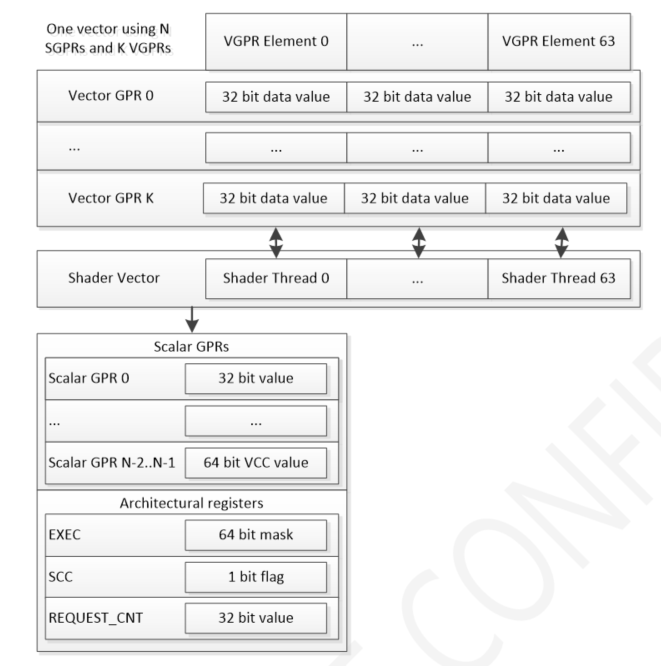
In addition to scalar and vector registers, the following architectural registers are used quite often:
- EXEC is the current execution mask. It is 64-bit wide (one bit per thread) and is used to switch off instruction execution in individual threads in a wave for shader predication.
- VCC is 64-bit wide (one bit per thread) and is used to store results from the last vector compare or integer carry out. This register is physically part of SGPRs and always occupies the top two SGPRs. This register can be used to determine conditions for control flow instructions.
- SCC is a single-bit register and holds the result from the last scalar compare or integer carry out. This register can be used to determine conditions for control flow instructions.
- REQUEST_CNT counts outstanding memory requests. When a request is issued, a field in this register is incremented. When a request returns, it is decremented. In the earlier microcode example, you can see s_waitcnt instructions. These instructions use the REQUEST_CNT register to insert waits in the shader instruction stream to ensure that the data is ready before operating on it.
Later, in the Instruction scheduling section, we learn that each CU can handle up to 40 waves. In most cases, it is important to keep as many waves as possible in flight on a CU. As GPRs represent a limited resource, full CU occupancy is possible if the shaders require fewer than 24 VGPRs and 48 SGPRs. Of course the minimal occupancy depends on the shader and, in some cases, 4 waves to 6 waves per SIMD might be enough to hide the latency. Twenty-four VGPRs have the same amount of storage as 6 GPRs in Xbox 360, and many shaders use more, so this might look like a restrictive number. The number of GPRs per wave, however, is not a hard limit as it is on Xbox 360. The Xbox One GPU can freely read and write to the LDS and scratch memory, thus enabling the shader compiler to spill registers into memory. It is expected that the shader compiler on Xbox One will be able to support equivalents to [maxTempReg()] in a more predictable way than it does on Xbox 360.
Vector ALU instructions
Vector ALU instructions perform single-precision and double-precision floating point and integer operations on VGPRs and usually form the bulk of a shader. They are executed on SIMD units with most of them having throughput of one instruction—that is, one instruction on all 64 shader threads in a wave—per 4 clock cycles per SIMD or one instruction per cycle per CU. Such instructions are called full-speed instructions and usually are single-precision floating point instructions such as floating point adds, multiplies, multiply-adds, conversions and compares, 32-bit integer add, and 32-bit logic and bit operations.
| Full speed instructions, 1 clock cycle per instruction |
|---|
| FP32 ADD, MUL, MAD, CMP, MIN/MAX, INT CONVERSIONS INT32 ADD, CMP, MIN/MAX, FP32 CONVERSIONS and BIT/LOGICAL |
As you probably guessed by the usage of the term “full-speed instruction,” there are slower instructions, and here is where the on-back-of-the-napkin rule of one instruction per clock cycle does not hold. Double-precision operations and transcendental operations take longer. A 32-bit integer multiplies run at one-quarter rate, a double-precision floating point adds run at one-eighth rate, and a double-precision floating point multiplies run at one-sixteenth rate.
| One-quarter speed instructions, 4 clock cycles per instruction | One-eighth speed instructions, 8 clock cycles per instruction | One-sixteenth speed instructions, 16 clock cycles per instruction |
|---|---|---|
| INT32 MUL, MAD | FP64 ADD, MIN/MAX, CMP, CONVERSIONS INT64 CMP | FP64 MUL, MAD |
A decrease in double-precision floating point performance is generally expected; a graphics programmer who needs doubles intuitively knows they’ll cost more. The reduced speed of transcendental operations and integer multiplies is perhaps less expected. Heavy usage of transcendental instructions may degrade shader performance. Following is the list of transcendental instructions.
| One-quarter speed instructions, 4 clock cycles per instruction | One-sixteenth speed instructions, 16 clock cycles per instruction |
|---|---|
| FP32 EXP, LOG, RCP, RSQ, SQRT, SIN, COS | FP64 RCP, RSQ, SQRT |
In cases where transcendental instructions pose a performance problem and precision is not critical, it might be possible to use various approximations to those functions. For example, a rough inverse square root approximation of i = 0x5f3759df – (i » 1) should only take two instructions.
The most commonly used instruction in the list is probably RSQ because it is used to implement normalization.
Vector ALU instruction format
As indicated in the Registers section, Xbox One GPU, unlike Xbox 360, does not have dedicated constant registers. For this reason, there is no hardware notion of a constant. Instead the instruction set has been made flexible with regard to loading from memory and using constant values. Each vector instruction is capable of directly using one SGPR or one 32-bit value from LDS. Also, each instruction can use up to three compile-time inline constants embedded in the opcode itself. These are called scalar constant values—values that are shared between all threads in a wave.
A vector memory load instruction must be used if it is needed to read a constant that may be different between the threads in a wave. Such constants are traditionally called indexed constant values. Using vector memory instructions is slower than loading and using an SGPR. Similar to shader constant waterfalling on Xbox 360, the cost will increase with the number of unique addresses referenced. The number of addresses should not pose a serious performance problem on Xbox One as it does on Xbox 360 because the data is fetched from the cache and the actual memory access happens via the texture unit (TU) that is designed for such use.
As on Xbox 360, some free modifiers can be used on the inputs and outputs of shader instructions. On Xbox One, optional input modifiers are:
- Negate the value
- Take absolute value
- Take absolute value then negate
Input modifiers can only be used on FP16, FP32, and FP64 types.
Output modifiers are:
- Multiply result by 2
- Multiply result by 4
- Divide result by 2
- Clamp
Output modifiers can be applied only to FP32 and FP64 types.
Scalar instructions
Scalar instructions are executed by the sequencer (SQ) and include scalar ALU instructions, program flow instructions, and scalar memory instructions. These instructions do not depend on individual threads, and their result is shared by all threads in a wave.
Scalar ALU instructions use SGPRs and can perform arithmetic bit and logical operation on 32-bit and 64-bit floating point and integer values. Results of these operations can be stored in an SGPR or put directly into the EXEC mask to support predication. Most of these instructions update SCC, the register that the shader compiler uses to steer branching.
TThe shader compiler uses scalar ALU instructions to implement counters in loops, for example, in the shaders. Also, the VCC (vector condition code) register is physically stored in the top two SGPR registers of the shader, so the shader compiler will generate scalar ALU instructions to perform operations on the results of vector ALU compare operations.
The scalar instruction set also includes instructions to directly interact with program counter and program flow instructions that include branches, skips, and fork/join instructions. These instructions have a throughput of 1 per clock cycle and latency of up to 16 clock cycles, but this is not observable by an individual wave as long as there are enough waves in flight.
The shader compiler uses program flow control instructions to implement, for example, conditional branches.
Vector memory, scalar memory, and export instructions
Memory instructions provide read/write/atomic access to buffers and images in ESRAM and DRAM and in local data store (LDS) and global data store (GDS) with or without data format conversion. Unlike the Xbox 360 console where the only way to load data is by using tfetch or vfetch instructions, Xbox One has a rich variety of memory instructions to move data between GPRs and different memory types. Memory instructions might take an extended time to complete, and this means that a shader might have to wait for the data to return.
Before the data loaded from memory can be used, a scalar instruction called s_waitcnt must be used to ensure the outstanding memory operation is complete. It is only at this point—if the data has not yet arrived—that the GPU will need to stall the current wave and switch to executing other waves. If the data is in the cache though, it is enough just to have several other instructions before the wait instruction to hide the data read latency.
To illustrate this, consider a 4-component texture read. It requires 16 clock cycles if the data is in the cache. If there are 16 ALU instructions between the texture read instruction and the wait, the read latency will be hidden. If the data is not ready and the shader needs the results, the s_waitcnt operation stalls and the GPU needs to switch execution to a different wave. In this case the number of waves in flight matters, and having more waves in flight will improve latency hiding.
The peak issue rate of most of these types of instructions is one per 4 cycles (compare with ALU issue rate of one instruction per cycle), except in case of scalar memory read, which is full speed.
Vector memory instructions
Whenever you use a load/store, atomic, or sample instruction, or use indexed access to a constant buffer in HLSL, the shader compiler emits a vector memory instruction. Vertex fetch is going to implicitly generate this kind of instruction as well. Vector memory instructions provide read/sample/write/atomic access to textures and buffers in ESRAM and DRAM. They allow access to signed, unsigned, and floating point 8-bit, 16-bit, 32-bit, or 64-bit wide values with optional data conversion to support formats such as 11_11_10.
Figure 4. Vector memory instruction data paths.
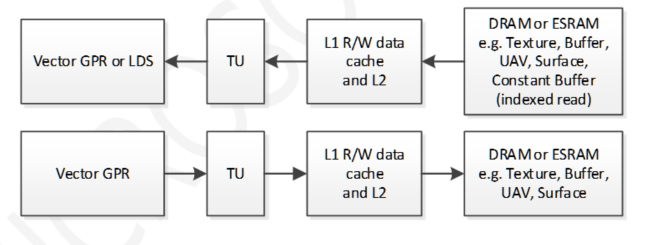
If the data is in the cache, the TU can return up to four 4-component floating point values per clock cycle. Buffer and texture reads have different performance characteristics. The peak rate of texture reads is 16 clock cycles per wave regardless of how many texture components are read. A buffer read can achieve 4 clock cycles per wave if one 32-bit or smaller element is read per shader thread.
All unordered memory write and atomic instructions go back into memory via the TU through the cache hierarchy at the same peak rate. Minimum latency of this type of instruction is about 25 cycles. If the data is not in the texture cache per channel (TCC) L2 cache, a latency of these instructions can be 100 cycles and more.
LDS instructions
When you access variables marked as [groupshared] in compute shader, or when the compiler decides to cache a constant in LDS, or when interpolants are used in the pixel shader, the compiler generates an LDS instruction. LDS instructions provide read/write/atomic access to LDS memory. The instructions can access signed, unsigned, and floating point 8-bit, 16-bit, 32-bit, or 64-bit wide values.
Figure 5. LDS instruction data path.
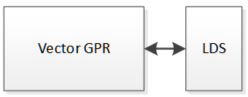
The peak data read and write rate of LDS instructions is 4 clock cycles per 64 32-bit words (one 32-bit word for each thread) in a shader wave, but this is also subject to LDS latency, so the peak data rate is not always achievable. Latency of LDS instructions is at least 39 cycles.
GDS instructions
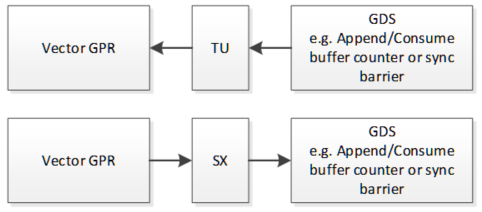
The LDS and GDS instruction set is close in nearly every aspect except their name. Although there is no direct way to use GDS from HLSL, the shader compiler will use GDS implicitly by using consume and append buffer instructions because the buffer counters are stored in GDS. GDS is also used whenever a GPU-wide barrier is used. The TU reads data from the GDS, and the shader export (SX) is used for GDS writes. The latency of GDS instructions is at least 45 cycles.
Figure 6. GDS instruction data path.
Scalar memory instructions
Whenever the shader compiler needs to read a scalar shader constant, a texture/sampler/buffer descriptor, or the address of a temporary buffer in the LDS, a scalar memory read instruction is used. Scalar memory instructions are intended to load data from ESRAM or DRAM into the SGPRs. Scalar memory read instructions cannot perform data format conversions and there is no write path from SGPRs. Peak issue rate of this instruction is 1 per clock cycle. Latency of a scalar memory read is at least 20 cycles from the cache.
Figure 7. Scalar memory instruction data path.

Export instructions
The shader compiler will use export instructions in the pixel shader to write depth/stencil and color data and in the vertex shader to export vertex positions and attributes. Export instructions are also called “ordered” and they write data via the SX bypassing the cache hierarchy.
Figure 8. Export instruction data path.

Instruction scheduling
Scheduling individual instructions inside a CU is done by the sequencer (SQ). The SQ supports up to 40 waves per CU in flight and up to 16 compute shader threadgroups (each CS threadgroup can comprise one or more shader waves).
Following is a description of the scheduling process. For each clock cycle, one of the four SIMDs is considered in a round robin format, and all 10 waves on that SIMD compete to execute one instruction each. If an instruction is of a type that takes longer than four cycles, for example, double-precision floating point multiply, it is continuously re-issued until complete. Instructions may be interleaved among shader waves from the same or from different shaders and also can come from the same shader wave. In this respect, Xbox One is different from Xbox 360, where waves can only be swapped out at clause boundaries.
Every cycle, the SQ can execute up to five instructions from the 10 waves on the currently selected SIMD, but they must be different types of instructions from different waves. The SQ can issue up to 5 instructions per clock cycle overall, and each of these 5 instructions should be a different category of instruction:
- Vector ALU, including instructions, using one constant from LDS at a maximum rate of one per cycle per CU
- Scalar ALU, or a memory read of a scalar into SGPR, at a maximum rate of one per cycle per CU
- A control flow instruction at a maximum rate of one per cycle per CU
- Up to two of the following instructions at a maximum rate of one per every four cycles per CU:
- Export or GDS read/write/atomic
- Vector memory read/write/atomic
- LDS read/write/atomic
Each shader wave is given a priority by the GPU and by the driver. These priorities decide which wave wins the arbitration. If there is a tie between the two shader waves trying to execute the instruction in the same category, the oldest wave wins. If two waves compete for a resource such as the TU, access to the resource is granted to the SIMD that made the request first.
Executing different types of instructions in parallel means several things to a graphics programmer:
- Execution of vector instructions, scalar instructions, branches, memory instructions, and export instructions is overlapped. This means that the shader’s performance will be bound to one type of instruction—the one that takes the longest. This is similar to how static analysis works on Xbox 360.
- Branch instructions have a latency of up to 16 cycles, but as long as there are enough waves in flight, they happen for free.
Summary
Xbox One GPU is very different from Xbox 360 GPU. In every conceivable use-case scenario, Xbox One is faster, more efficient, and has greater flexibility. Xbox One compute units are also very different from Xbox 360 ALUs and understanding how they work is important to help understand shader performance. This white paper explained in detail how the compute units work so that graphics programmers can understand shader performance on Xbox One.