HDR Display Mapping
Introduction
Most titles today render a high dynamic range (HDR) scene with values representing brighter values than White (for example: explosions, sunlight, or specular reflections). Since standard dynamic range (SDR) TVs are not capable of representing these bright values, titles use a tone mapping operator, such as Reinhard or Filmic, to map the HDR scene values to the range of [0..1]; that is, simulating bright values.
Even though HDR TVs are capable of displaying HDR scene values as HDR to the consumer, some mapping is still required to ensure that values in the HDR scene that are brighter than what the HDR TV can display will still be visible. We refer to this as “HDR display mapping” because it maps a full range of HDR values to a reduced range of HDR values suited to a specific TV/display’s capabilities, while still keeping the SDR values in the range of Black to White [0..1] the same.
Why HDR display mapping is needed
HDR display mapping is needed because different HDR TVs have different maximum brightness levels. For example, one TV could output a maximum of 600 nits, while another could output 2000 nits (with nits being a standard measurement of brightness).
If the maximum brightness value of an HDR scene is 1600 nits, a 2000-nit TV will be capable of displaying all the values in the HDR scene. However, on a 600-nit TV, all values above 600 nits will be naturally clipped by the TV to 600 nits, thus losing all the details in those bright areas of the scene. It is therefore very important to know what the maximum perceived brightness of the attached TV is. This can be determined by using a simple calibration method, such as demonstrated in the HDR Calibration sample on the XGD Samples page.
Scenarios
The following scenarios show interesting results with regards to tone mapping and display mapping, as demonstrated in the HDR Display Mapping sample on the XGD Samples page. In this example, we assume that the sun is the brightest object in the scene, rendered at 10,000 nits. In the example images that follow, the value of White (1,1,1) is represented as the 8-bit Grey values of (139, 139, 139) so that we can see a difference in SDR vs. HDR images in the Microsoft Word document. Some terminology:
-
Black = the HDR scene value (0, 0, 0)
-
White = the HDR scene value (1, 1, 1)
-
Paper White = how bright White is perceived, typically defined as 100 nits
-
10,000 nits = the maximum brightness defined for ST.2084
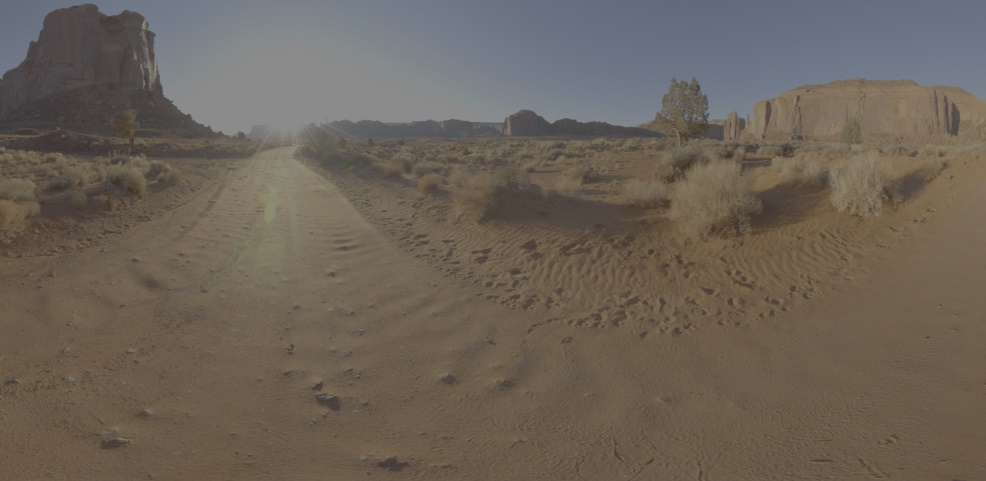
SDR TV with no tone mapping
| HDR scene values | SDR TV output |
|---|---|
| Black to White | Black to White |
| White to 10,000 nits | White |
Figure 1. All bright values around the sun are clipped to White; therefore, no details around the sun can be seen.
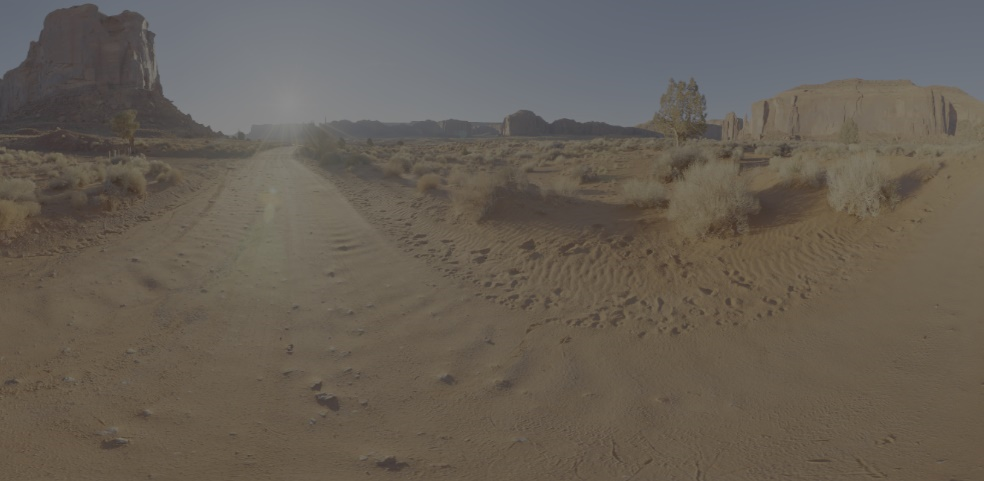
SDR TV with HDR to SDR tone mapping
| HDR scene values | SDR TV output |
|---|---|
| Black to White | Black to Light Grey |
| White to 10,000 nits | Light Grey to White |
Figure 2. Bright values around the sun are tone mapped to White. Because these values are not clipped anymore, you can see details around the sun, but at the cost of a dimmer image.
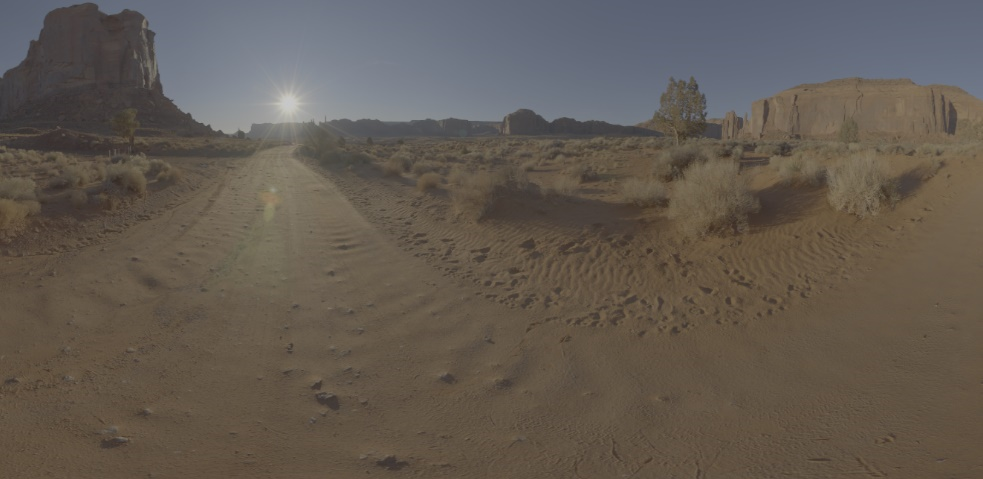
600-nit HDR TV with no HDR display mapping
| HDR scene values | HDR TV output |
|---|---|
| Black to Paper White | Black to Paper White |
| Paper White to 600 nits | Paper White to 600 nits |
| 600 nits to 10,000 nits | 600 nits |
Figure 3. Bright values around the sun are displayed as bright, but the very bright values inside the sun are clipped.
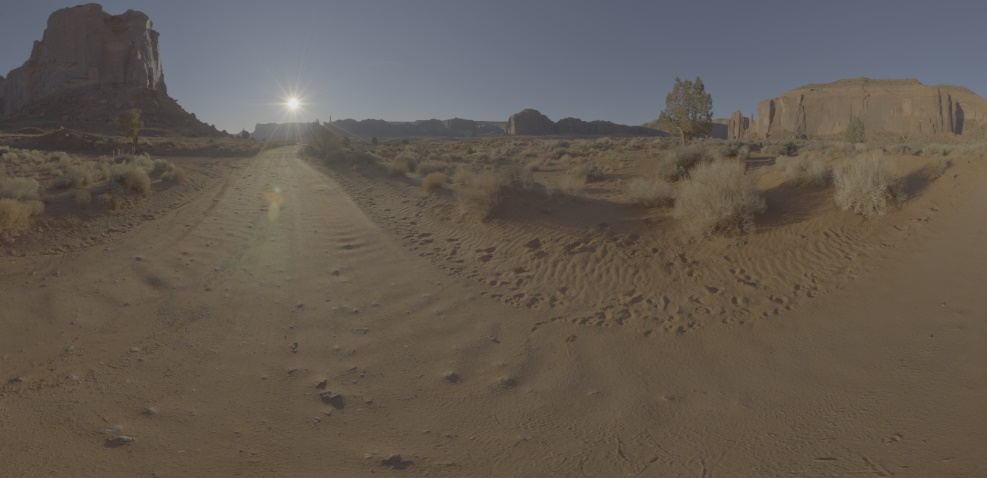
600-nit HDR TV with HDR display mapping, soft shoulder at 300 nits
| HDR scene values | HDR TV output |
|---|---|
| Black to Paper White | Black to Paper White |
| Paper White to 300 nits | Paper White to 300 nits |
| 300 nits to 10,000 nits | 300 nits to 600 nits |
Figure 4. All bright values, including those inside the sun, are displayed as bright. Note how you can see much more detail around the sun compared to Figure 3.
Implementation
HDR TVs apply their own display mapping. The reason for this is that HDR TVs are more focused on displaying finer details in dark and bright areas of an image than on just displaying a very high maximum brightness. For example, the measured maximum brightness of one TV could be 900 nits, but because it applies display mapping, the consumer perceives more details in the image than on a TV that has a measured brightness of 1000 nits but that does not apply display mapping. Display mapping varies between different TV models and TV modes, and even on the same TV with different firmware. For example, a TV’s Movie mode might map HDR values of up to 4000 nits to its capability, but in Game mode only map HDR values of up to 1000 nits to its capability, with higher values being clipped. HDR TVs that support HDR10 are guaranteed to map HDR values of up to 1000 nits to their capability. Therefore, to ensure a game displays the same amount of detail across different TVs, games must implement their own display mapping in a shader.
HDR display mapping can be implemented in several ways. The recommendation for BT.2390 suggests that TVs use a Hermite spline. The key idea is that a soft “shoulder” needs to be introduced at the higher end of the ST.2084 curve, which stretches towards the maximum brightness of the HDR scene. In the same way, a soft “toe” could be introduced at the bottom of the ST.2084 curve to ensure dark values are mapped to the TV’s minimum luminance. Developers might already have a sophisticated tone mapping operator that could be adjusted to do HDR display mapping. If not, something as simple as a Bezier spline could be used as a soft shoulder.
HDR display mapping can be implemented on either the luminance of a color or on each color channel separately. When implementing HDR display mapping on the linear HDR scene values, we recommend that you use the luminance of a color. When implementing HDR display mapping on the non-linear ST.2084 values, we recommend that you use separate color channels, as shown in the examples that follow.
The following points should be considered when implementing HDR display mapping:
-
P0, Paper White, e.g. 100 nits. Values in the range of [Black..PaperWhite] are SDR and should not be changed by the HDR display mapper.
-
P1, the start of a soft shoulder, adjustable for artistic look, e.g. 300 nits. Should not be lower than Paper White; otherwise, it will change SDR values.
-
P2, the maximum perceived brightness of the TV, e.g. 600 nits.
-
P3, the maximum brightness of the HDR scene, e.g. 1600 nits.
-
P4, the average brightness of the HDR scene, e.g. 250 nits.
Figures 5, 6, and 7 illustrate how HDR display mapping could be implemented.
Figure 5. The ST.2084 curve with input nits from the HDR scene represented on the horizontal axis, and TV output nits from the ST.2084 transfer function represented on the vertical axis.
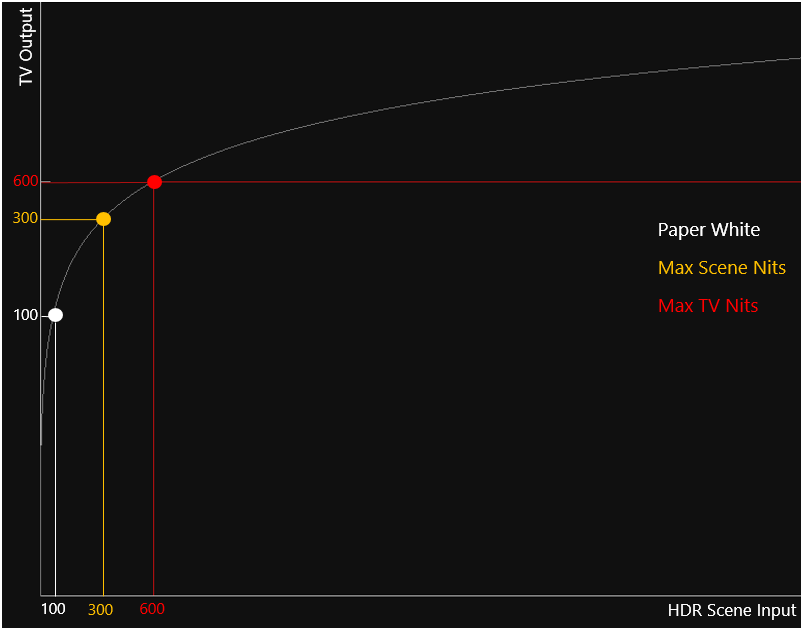
In this example, the maximum HDR scene value is higher than Paper White; that is, it is perceived as bright. The full range of the HDR scene values can be perceived by the consumer because the maximum HDR scene brightness is within the TV’s capability.
Figure 6. An example where the maximum HDR scene value is brighter than the TV’s capability.
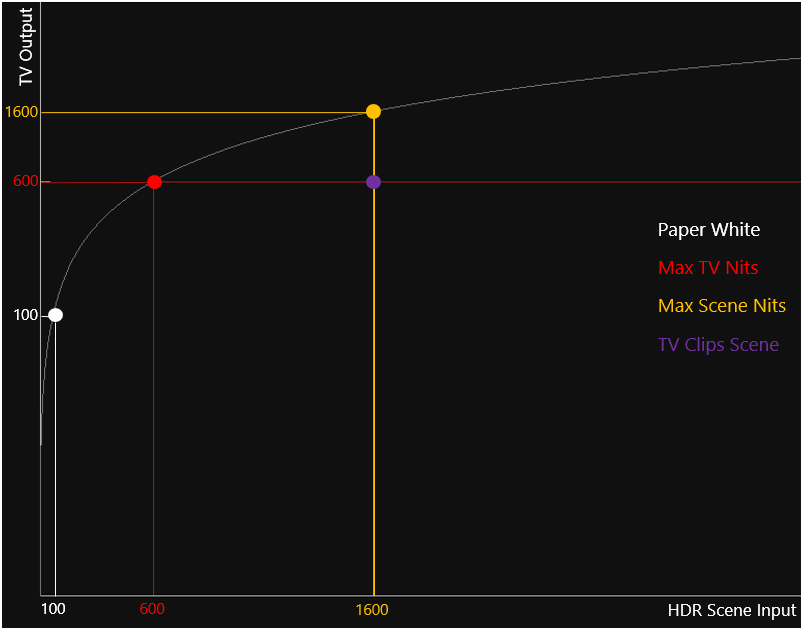
The purple dot indicates that the input HDR scene value of 1600 nits will be clipped to the TV output value of 600 nits; that is, all HDR scene values brighter than 600 nits will be clipped to 600 nits. A visual representation of this scenario can be seen in Figure 3.
Figure 7. The same example as in Figure 6, but here HDR display mapping is applied by introducing a soft shoulder at 300 nits.
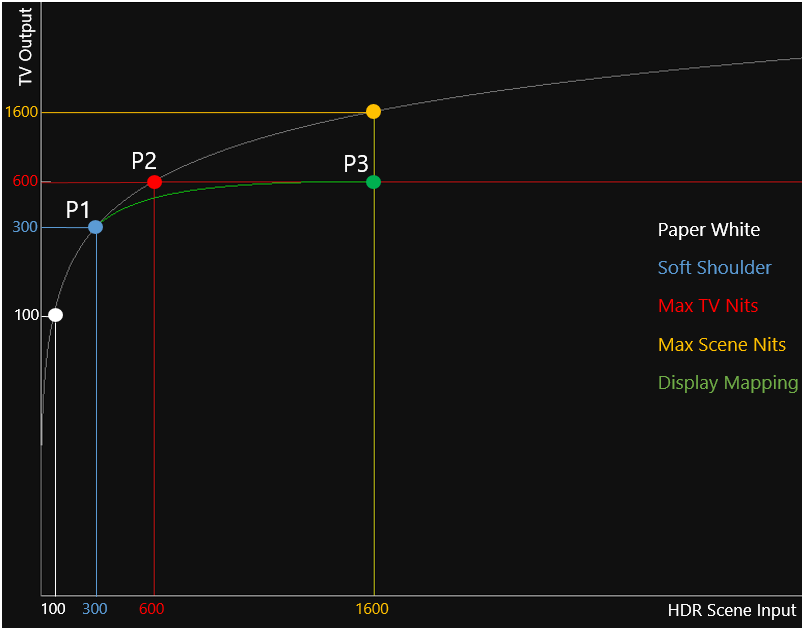
Notice how the full range of the HDR scene values, 100 nits to 1600 nits, are mapped within the range of 100 nits to 600 nits, which falls within the TV’s capabilities. A visual representation of this scenario can be seen in Figure 4.
Content creation
HDR display mapping allows HDR content to be created independently of the maximum brightness levels of different TVs. An object can simply be created as its physical based brightness in the real world, instead of using a vague HDR scene value. Without HDR display mapping, the creation of HDR content would be quite challenging; in some cases, the bright values might be clipped by the TV, and in other cases, the maximum brightness of a TV could be underutilized.
Summary
For an HDR game to look similar on HDR TVs with different maximum levels of brightness, it is essential to apply HDR display mapping. HDR display mapping maps the full range of HDR scene values into a range of brightness levels that each specific HDR TV is capable of displaying. When not applied, all values brighter than the capability of the HDR TV will simply be clipped, thus losing the details of those bright values. It also allows content creation to be more physically based, which is independent from the maximum brightness that an HDR TV can display.