Secure Sockets Introduction
Many apps require low-level network communication between devices. This communication might be between two consoles, a console and a PC, or a console and a dedicated server. Many other scenarios and combinations are possible. Developers on the Xbox 360 or Windows are used to using Winsock to make these connections. Xbox One supports Winsock, but adds secure socket functionality to make network traffic more resistant to being compromised and affecting gameplay or user privacy.
The secure sockets functionality on Xbox One makes it easy to establish secure communications between two devices using a secure device association. This API is designed to integrate seamlessly with other multiplayer features, and services such as the matchmaking service. It is built on industry standard, cross-platform connection technologies such as IPv6 and Teredo, and uses IPsec for security.
You use secure sockets by combining information in your app manifest with secure socket APIs you call in your code. The manifest is used to describe the endpoints your communications use and to specify templates for the ways two endpoints are associated. Your code uses secure socket APIs to specify which of the association templates is being used for a particular connection. When your code instantiates a secure device association from a template, the Xbox One system software performs network tests to determine the best way to connect the endpoints given factors like connectivity, native IPv6 availability, and NAT traversal. It establishes a secure connection that offers the current best connectivity for the given endpoints. This connectivity takes advantage of native IPv6 when possible, or uses Teredo (an IPv6-over-IPv4 technology) when necessary. (Note that while the Teredo spec includes relaying, Xbox One does not use Teredo relays for connectivity.)
- Concepts and usage
- Xbox One socket security restrictions
- Secure socket port usage
- Maximum UDP transmission unit size
- Efficient IPsec payloads
- NAT
Concepts and usage
Central to the secure sockets API is the concept of a secure device association, represented by the SecureDeviceAssociation class. This is an association of two devices that encapsulates not only the addresses of the devices, but also the security tokens used to mutually authenticate the two devices to each other, and other information used to establish and authenticate communication over the network. App code uses SecureDeviceAssociation objects, along with app-specific configuration information, to establish communications between the devices participating in a multiplayer game.
Association prerequisites
Establishing a secure device association between two devices depends on certain prerequisites. First, some way of addressing the two devices must be established. Next, there must be a definition of the parameters of the communication—which protocol, ports, and so forth will be used. Third, the two devices must be capable of establishing an association, given their current configuration, policies, and network connectivity. And finally, the Xbox One console must be able to connect to Xbox Live to authenticate the devices’ credentials. Once these prerequisites are established, then one device establishes an association with another, and both devices use the mutual association to establish mutual communication.
The typical secure sockets networking flow starts when the app has determined that two specific devices should begin communicating. That may be a result of Matchmaking building a set of users to begin participating in a multiplayer session, the app deciding to connect to a dedicated server, or one of many other scenarios. The specific means is not important to the secure sockets API. The only requirement is that the app has acquired a remote device’s opaque SecureDeviceAddress through an Xbox Live service or console API.
Another prerequisite is that the app has defined the protocol, port numbers, and general traffic pattern it will use to communicate and specified them in the app manifest so that a SecureDeviceAssociationTemplate can be created. The SecureDeviceAssociationTemplate enables the specified traffic pattern to be sent or received securely and with appropriate quality guarantees on a Xbox One console. SecureDeviceAssociationTemplate objects are declared statically in the app’s manifest. These templates enable specific SecureDeviceAssociation objects to be instantiated between the individual devices. With the exception of two specific ports allocated for use only during development, no sockets-based network traffic is allowed on Xbox One without an Xbox secure device association.
The third prerequisite is that both devices must be ready and able to establish an Xbox secure device association. This means that the two devices are actually authorized by app configuration, Xbox Live policy, or user settings to perform the communication. This also typically means that both devices have users that are actively participating in some kind of multiplayer session. Lastly, the devices and at least one network path between them must currently have sufficient network resources to meet the requirements that the app defined in the Xbox secure device association template.
The final prerequisite is that the console must have connectivity to Xbox Live. Check connectivity by calling the GetInternetConnectionProfile and GetNetworkConnectivityLevel methods. The current NetworkConnectivityLevel value must be XboxLiveAccess. The NetworkStatusChanged event signals changes in the connectivity level. Your code should handle this event to track changes in network connectivity. Note that network status changes can happen while a call is in progress, so all of your secure sockets API calls should anticipate errors caused by a sudden loss of connectivity. You should also consider maintaining your own timeout logic around these calls. We recommend that your code not initiate network activity when the connectivity APIs indicate that the current connectivity level is not XboxLiveAccess.
Using a SecureDeviceAssociation
When the prerequisites listed in the previous section have been met, one device can begin establishing a SecureDeviceAssociation to another device by calling the SecureDeviceAssociationTemplate.CreateAssociationAsync method. The secure sockets API determines the best available network path between the devices, mutually authenticate the devices, and exchange cryptographic keys. Once creation completes successfully, the primary job of the Windows.Xbox.Networking API is finished. The resulting SecureDeviceAssociation objects on the respective devices describe the specific IP addresses the app should use in subsequent sockets-based API calls.
Important
If two devices simultaneously initiate SecureDeviceAssociationTemplate.CreateAssociationAsync operations to each other that would otherwise succeed on their own, only one initiator will see its operation succeed and create a secure device association. The other device’s operation will fail, and that device will instead be notified of the new, incoming association via the SecureDeviceAssociationTemplate.AssociationIncoming event, like a normal acceptor. Which device’s operation succeeds instead of fails is not specified. Your code should recognize that an association has been created in either case.
A socket is an application-specific handle to networking resources such as a reserved port number and buffers. In the case of TCP, a socket represents a single bidirectional connection (or a “listener” for accepting incoming connections), and all data is sent as a continuous stream of bytes with automatic (and mandatory) retries in case of network packet loss. In the case of UDP, sockets are connectionless and can be used to send and receive individual messages between any number of remote destinations simultaneously. When an app uses UDP, the app must detect packet loss and then resend if desired.
Apps use Internet Protocol version 6 (IPv6) sockets on Xbox One, as the platform is optimized for IPv6 communication. For developers unfamiliar with IPv6, it is the next-generation Internet Protocol and standard addressing mechanism. It serves the same function as the more widely recognized IPv4 (a 32-bit value represented in decimal dotted notation as “1.2.3.4”), but with a larger, 128-bit address space to accommodate the exponential growth in Internet-connected devices and avoid the need for address sharing and Network Address Translation (NAT), which causes connectivity problems, especially in multiplayer peer-to-peer scenarios. Although IPv6 is a replacement for IPv4 and therefore technically incompatible, Xbox One leverages Teredo, a standardized transitional technology, in the ongoing migration from IPv4 to IPv6 using existing networks. Establishing the Teredo session when necessary, is automatically handled as part of establishing Xbox secure device associations. Apps can simply use the remote IPv6 address reported for a secure device association as the destination address for a TCP connection or UDP message. The platform automatically ensures optimal connectivity regardless of whether the underlying network supports IPv6.
Developers should note, however, that until IPv6 is fully deployed, just as was the case with Xbox 360 there will still be some Xbox One users who are simply unable to communicate directly because they are behind separate IPv4 NAT devices that are incompatible with every means of traversal or transitional mechanism. These appear as failures to establish an Xbox secure device association. App developers are encouraged to consider providing an alternate experience or fallback mechanism such as routing traffic through a peer when these failures occur. Advice to network operators and router manufacturers on how to ensure compatibility with Xbox One, including guidance on which ports should be forwarded, UPnP behavior, etc., is provided in this white paper.
All packets sent using sockets APIs over a successfully established Xbox secure device association are encrypted and integrity-checked by the platform, transparently to the app. This provides a strong defense against network-based attacks and cheating. Apps should not implement their own authentication or encryption mechanisms. However, they should still design their network protocols and game logic to be robust to misconfiguration, bugs, or exploits that can cause unexpected data or loopholes above the network transport layer.
A secure device association can be explicitly destroyed when the app no longer needs to send or receive messages, by calling the SecureDeviceAssociation.DestroyAsync method. Established SecureDeviceAssociation objects can also change state due to operations outside of the local title’s control, such as the remote device destroying the SecureDeviceAssociation or ungracefully disconnecting from the network. Your title can use the SecureDeviceAssociation.State property to determine the current state of the secure device association, or register a handler for the SecureDeviceAssociation.StateChanged event to be notified when state changes occur. Finally, a secure device association can be destroyed by the system if it is determined that communication with the remote device is no longer possible.
The recommended maximum number of SecureDeviceAssociations active in parallel from your title should be less than 384 to/from unique devices. Beyond this number, your code can still create a new SecureDeviceAssociation, but your title might begin to use unanticipated additional CPU processing and bandwidth. (The number 384 is a guideline rather than a fixed limit since connection cost is dependent on network and routing factors.) Best practice for secure sockets is to establish Secure Device Associations with 32 or fewer unique devices for peer-to-peer topologies. For titles that intend to connect a larger number of players, it may be more appropriate to use a different secure networking topology, such as dedicated servers using Xbox Live Compute.
Xbox One socket security restrictions
Developers accustomed to using Winsock will find all familiar functionality exposed on Xbox One. However, it should be noted that by default, consumers’ Xbox One consoles block all packets into and out of the console that are not associated with an existing Xbox secure device association. Two dedicated ports (4600 and 4601, TCP and UDP) are available for development purposes, but blocked on consumer consoles. Apps are able to temporarily disable the restriction during development, but all communication in released games must have properly configured secure device association templates and specific secure device associations instantiated from them in order to send or receive traffic.
This means that finished, certified Xbox One apps are restricted to using unicast addresses, since sending or receiving using broadcast or multicast addresses does not afford a one-to-one security relationship between devices. If you are used to using broadcast or multicast addresses to perform server discovery or matchmaking, then you should plan to use Xbox One matchmaking and party services, instead. These services provide great ways for getting together people with social relationships or high quality interconnections, without requiring the use of multicast or broadcast messages on the local network.
Insecure multicast is supported during development, over sockets for which the appropriate usages have been defined. As with all insecure development traffic, you must define a secure device association template that specifies the socket or sockets you are using for multicast, but you do not need to create a secure device association from this template. Typically, insecure sockets involve the SendDebug and ReceiveDebug usages, which are only supported during development, for connecting to tools and debuggers.
Exemptions for specific use cases are available, on a case-by-case basis. If your design requirements call for a finished, certified title to use multicast sockets, contact your Developer Account Manager (DAM) for support in implementing your scenario using secure device associations, or to apply for a certification exemption.
Secure socket port usage
The ports specified in the app manifest are used by title code for all Winsock actions, such as binding, receiving, and sending. Because secure sockets are working over an encrypted virtual channel, network traffic to and from the title does not appear in network traces as traffic to or from the port numbers that appear in the app manifest. Rather, all secure socket traffic travels over the port or ports used for secure socket communications.
The selection of connectivity method (native IPv4, native IPv6, or Teredo) is performed by the console and decided on a per-connection basis to maximize reliability and performance. The console system software performs all necessary Teredo qualification and device address creation automatically and invisibly to the application. In practical terms, peer-to-peer connectivity over the Internet almost always leverages Teredo. Direct usage of IPv4 rarely works, because of NATs and other firewalls in consumer environments. Native IPv6 is rarely available. Connectivity to Xbox Live Compute instances also uses Teredo.
- Teredo qualification sends a series of UDP bubbles to Microsoft-hosted servers. This qualification traffic targets remote ports 3544 and 65444.
- The local port used for qualification is generally 3074 and subsequent data traffic uses the same source local port.
IPsec is an Internet standard for strong network-layer security between devices on the Internet. Visible IPsec behavior differs depending on the connectivity technology used.
- When native IPv4 is used for connectivity then IPSec uses UDP ports 500 for security negotiation through IKE and port 4500 for title traffic.
- When native IPv6 is used for connectivity, than IKE is still used for security negotiation, over UDP port 500. Subsequent title traffic does not actually use any porta title’s transport data and ports are obfuscated by IPsec.
- When Teredo is used for connectivity, than IKE is used for security negotiation, over UDP port 500. It is important to note that this traffic is not visible on the wire, because IPsec negotiation happens within Teredo datagrams. The ports used by Teredo are what is visible to IPv4 middle boxes—only by looking at the embedded IPv6 packets does IPsec traffic show up.
Maximum UDP transmission unit size
While there is a theoretical maximum payload size on Xbox One, the practical maximum can vary for any given network path, even potentially over time. Instead of attempting to determine the specific maximum transmission unit (MTU) for a given network path, you should design your networking code to assume a max UDP payload per packet of 1,264 bytes. This value is safe to use under all networking configurations supported by Xbox One in order to avoid in-transmission fragmentation. It is validated as part of the platform network connection test, such that any users whose environments do not support this are provided standard troubleshooting support.
Note that if you try to send payloads greater than 1,264 bytes, you will not receive an error. In fact, doing so may work in some network configurations, but not in others. We recommend that you use 1,264 as a safe maximum that works for all configurations. Titles choosing to send more than this are susceptible to the intermittent or 100% packet loss that can result from exceeding the size supported over a given network path depending on the actual size and circumstances.
Efficient IPsec payloads
The following guidelines will help you use IPsec efficiently:
- Maximize the amount of data in the packet to reduce the overhead to payload ratio.
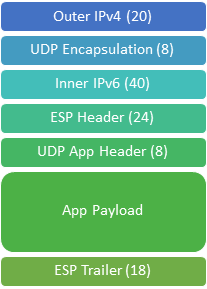
- Be aware that encryption may pad the packet to round up to the next 16 byte block size. For UDP that means if ((title_payload_size + 10) % 16 isn’t zero, you’re paying 15 - that many bytes in padding.
- Avoid sending your own packet-level encryption or checksums, because they are redundant; IPsec’s robust implementation handles detecting things like network corruption or replays for the title.
Figure 1. Xbox One Teredo and IPsec UDP Packet Structure
NAT
Similar to the Xbox 360’s NAT traversal mechanism, the Teredo protocol (RFC 4380) used with Xbox One implements the same pattern involving rendezvous servers that basically every scalable generic NAT traversal technique needs to implement. This involves telling the “acceptor” to punch a hole in the reverse direction back to the “connector” via a message relayed through a mutually-reachable third party (e.g., RFC 5128 section 3.3). Xbox One provides this at a platform layer below the socket operations to avoid requiring every title to implement the same thing (for every socket), as well to allow TCP to have the same success rates that UDP does with this technique (because it all appears as UDP to network devices).
While the Teredo spec includes relaying for IPv4 to IPv6 transition purposes, Xbox One does not use Teredo relays for connectivity. All secure device associations are directly peer-to-peer. This includes local networks, where Teredo will automatically use direct on-link connectivity if the two peers are discovered to be on the same link.
The Technical Information on P2P Networking Behavior document provides additional information regarding IPv6, IPsec and Teredo on Xbox One from a network operator and equipment manufacturer perspective.