Managing Profiles
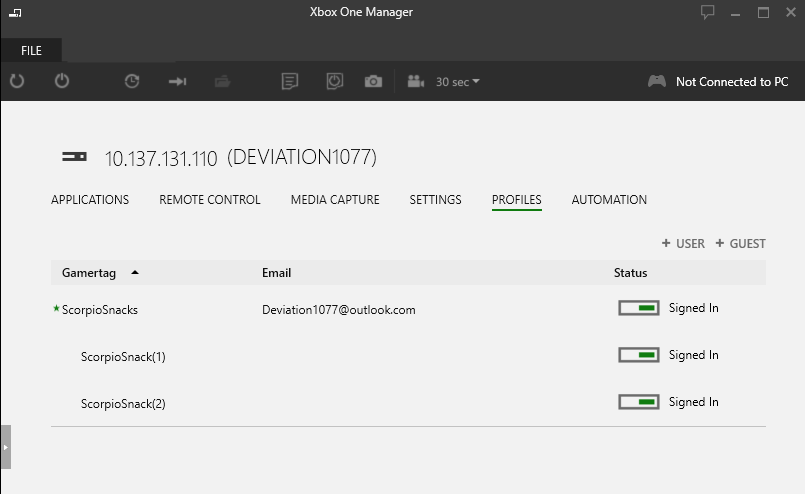
The Profiles tab allows you to sign in users and create guest users on a console.
- Adding a New User
- Signing in a Guest User
- Signing In or Signing Out an Existing User
- Removing a User from the Console
- Setting a Default User
- Sorting the User List
- Maximum Number of Users
Adding a New User
- Run Xbox One Manager from the start menu shortcut created by XDK setup.
- In the console selector, click the console you want to sign in a user on.
- Click the PROFILES tab.
- Under the PROFILES tab, click +USER.
- In the Sign in user dialog, type in the user email address and password and then click the Sign in user button.
Signing in a Guest User
- Sign in a user following the steps above.
- Once a user is signed in, click the +GUEST button.
- A new guest will appear under the signed in user.
Signing In or Signing Out an Existing User
You can toggle an existing user’s state in two ways:
- Click the status indicator in the Status column for the user.
- Right click on the user and select Sign In or Sign Out.
Signing out a user will automatically sign out all guest accounts associated with that user. Signing out a guest user will remove the guest user from the user list.
Removing a User from the Console
You can remove a user from the console by right clicking on the user and selecting Remove User From Console. This will remove the user from the list of users in the Profiles tab and from the list of users on the console itself.
Setting a Default User
You can set a default user by right clicking on a user and selecting Set as Default User. Setting the default user will cause that user to automatically sign in each time the console boots. The default user is indicated with an asterisk next to the user name.
Sorting the User List
You can sort the user list by clicking the Gamertag, Email, or Status column headers.
Maximum Number of Users
There is a limit of 16 signed in users on a console. This total includes all users and all guests. The +USER and +GUEST buttons will be grayed out once the limit is reached.