Presentation Queue and Display Planes on Xbox One
On Xbox One, presentation runs on an asynchronous mechanism. The system maintains a separate back-buffer presentation queue that is managed in parallel with the CPU and GPU. The most common issue reported with the Xbox One presentation system is that of throttling inside Present, despite the fact that both the CPU and the GPU run in-frame. This topic is intended to demystify the Xbox One presentation system.
In this topic:
- Introduction
- Types of stalls
- Present flow
- Scenario C: moving Clear to the end of the frame
- Present frame statistics
- Summary
Introduction
By default, presentation of back buffers on Xbox 360 is synchronous and is performed by the GPU. The CPU first inserts a command into a GPU command buffer to stall the GPU until vertical synchronization (VSync) occurs, then inserts a GPU command to swap (“flip”) buffers. This means that the next frame can’t start on the GPU until the last frame’s back-buffer flip is finished. However, Xbox 360 also supports asynchronous swaps that work off the vertical blanking interval (VBlank) interrupt on the CPU, helping to ensure that no processor is unduly stalled.
The Xbox One presentation system uses a mechanism that is similar to these asynchronous swaps on Xbox 360. It maintains a separate presentation queue for back buffers, which is managed in parallel with the CPU and GPU. This provides automatic hazard detection for back buffers and front buffers on both the GPU and the CPU. The system also uses Direct3D objects, referred to as swap chains, which contain presentable back buffers. Xbox One supports multiple swap chains that can run at different frame rates and have different settings, called display planes.
The CPU, GPU, and presentation queue work together to produce a visible frame:
- The CPU submits rendering commands that are followed by a call to Present().
- The GPU executes rendering commands to prepare visible data in a back buffer.
- The presentation queue shows the completed back buffer on the screen, optionally synchronizing to VSync.
A swap chain can contain one, two, or three back buffers, and VSync can be set to flip buffers immediately (SyncInterval = 0), at 60 FPS (SyncInterval = 1), at 30 FPS (SyncInterval = 2), and so on up to SyncInterval = 4. Xbox One can present up to two swap chains at the same time and blend between them (display planes). Additionally, a presentation interval threshold might be specified, which would allow the flip to occur at some point past the VSync.
For example, a presentation interval threshold of 10 allows a flip to occur up to the point where 10 percent of the frame has been shown. This allows your title to dip briefly below its target frame rate without causing a full frame stall. The cost is some visual tearing, in which both the current buffer and the immediately preceding buffer are visible on different parts of the screen.
Types of stalls
Disabling VSync prevents Present stalls from occurring, although there will be tearing. If VSync is disabled, performance is limited only by the CPU or the GPU. If VSync is enabled, several types of Present-related stalls are possible, because the last step of the CPU-to-GPU-to-Present queue can only process requests at specific time intervals.
All back buffers in a swap chain can be in one of three states: available, pending, or visible.
- Available: the driver can target it for rendering.
- Pending: the game enqueued the buffer into the presentation queue by calling ;b;Present();; on it at some time in the past, but the driver has not yet shown it on the screen yet.
- Visible: the back buffer is currently being displayed on the screen.
On any swap chain, one buffer, called the front buffer, is always in the visible state. As of December 2013, Xbox One doesn’t allow frames to be dropped—that is, to convert directly from pending to available without having been displayed.
Common target frame rates in games are usually 60 or 30 frames per second, which translates into approximately ~33 ms and ~16 ms intervals, respectively, between the back-buffer presentations. On Xbox One, VSync runs at 16.6 ms intervals. 30 FPS translates into one Present for every two VSync intervals, and 60 FPS translates into one Present for every VSync interval.
Scenario A: CPU running ahead
When the CPU is running ahead of the target frame rate, the driver will stall inside Present() if no back buffers are in the available state. This situation can be detected by looking for BlockOnFence_SwapThrottle in Performance Investigator for Xbox (PIX). With double buffering, this means that the CPU is almost two frames ahead of the target frame rate. With triple buffering, it means that the CPU is almost three frames ahead of the target frame rate. Note that this doesn’t automatically mean that the game is not GPU-bound, only that the CPU is calling Present fast enough to require the driver to stall until a back buffer becomes available.
Figure 1. Double buffering at 30 FPS
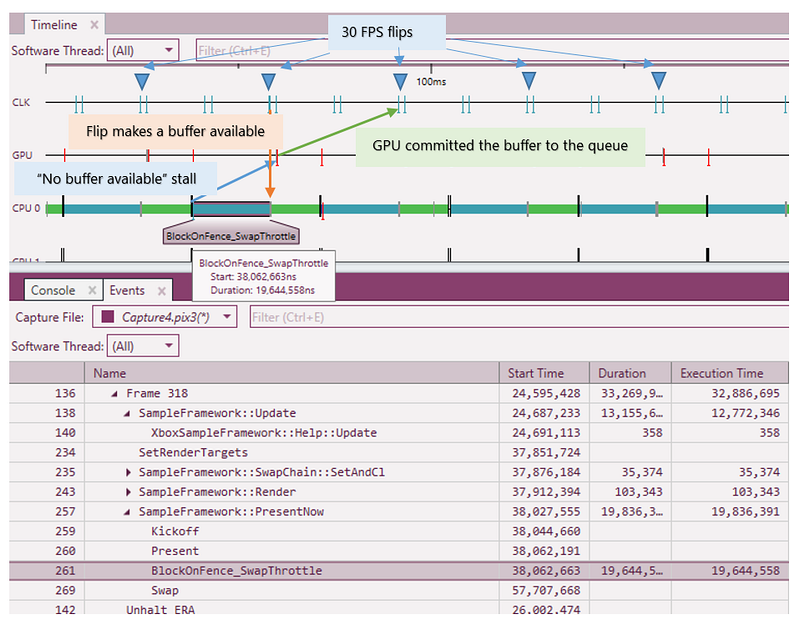
In the scenario depicted in Figure 1, the title is running too fast on the CPU, and therefore BlockOnFence_SwapThrottle is throttling the CPU in each Present call. Note that the CPU is running one frame ahead of the GPU and nearly two frames ahead of the corresponding flip.
It might be possible in the future to remove the CPU block at Present when there is no back buffer available because when FLIP_SEQUENTIAL is specified, the back buffers are guaranteed to be flipped in order. However, a CPU block is currently enforced when the CPU is running too far ahead.
Scenario B: GPU running ahead
The driver makes sure that when the GPU is running too fast, it will internally block before setting a visible back buffer as a render target, although a bug currently exists when this hazard isn’t tracked for unordered access views [UAVs]. This is accomplished by adding a GPU semaphore before any back buffer is bound as a target to make sure that it’s not currently visible. Note that this is happening between the GPU and presentation queue, and this particular condition doesn’t give any indication of what the CPU is up to.
Figure 2. CPU 16.2 ms, GPU 15.4 ms, SyncInterval = 1, double buffering
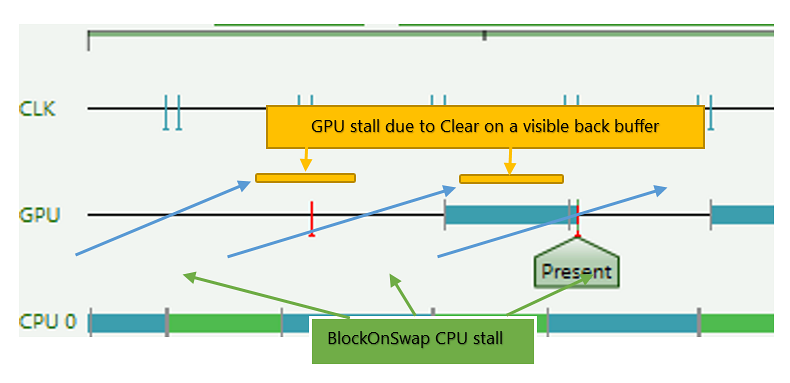
In the scenario depicted in Figure 2, the frame rate should be 60 FPS, but it is running at 30 FPS because the back buffer is set as the render target early in the frame. This case, which is currently not apparent in PIX, is described in more detail later in this document.
It might be counterintuitive, but in both cases the synchronization happens between the CPU and presentation queue (A) and the GPU and the presentation queue (B). This is different from synchronous presentation on Xbox 360, on which synchronization happened between the CPU and the GPU (BlockOnSwap) and between the GPU and VSync (SyncToVBlank). Xbox One presentation is the same as asynchronous swaps on Xbox 360 where swaps were performed by the CPU in the VBlank interrupt instead of on the GPU.
Real-world cases are rarely as simple as this, but they can be analyzed by applying some knowledge about how Xbox One Present works internally.
Present flow
When the CPU calls Present(), the driver ensures that the CPU isn’t running too far ahead, as in Scenario A. This is done by waiting for a back buffer to become available and stalling the CPU if needed.
Next, the CPU inserts a Present command into the GPU command buffer attaching the index of the back buffer used to swap to the packet payload. The Present command on the GPU triggers the CPU callback.
Whether the GPU finishes the frame and triggers Present, or a VBlank interrupt comes first, it’s handled in a similar way. In both cases the driver ensures that the right number of VSyncs have elapsed since the last Present, to satisfy the SyncInterval setting. If SyncInterval is 0, no extra synchronization is performed and the buffers are swapped immediately. If SyncInterval != 0, and if the right number of VSyncs have elapsed, then the buffers are swapped. If it is currently a little bit late for the VBlank, the driver still has to verify whether it can swap buffers due to the PresentIntervalThreshold setting. It is done by first checking where the vertical retrace is relative to the height of the screen and then performing a buffer swap if the vertical retrace is in the area allowed by PresentIntervalThreshold. PresentIntervalThreshold = 100 and SyncInterval = 0 are therefore equivalent.
Each Present also optionally performs display plane blends, and each display plane can choose to present at different rates.
Scenario C: moving Clear to the end of the frame
If the title is using double buffering, it is essential not to bind the back buffer as a target until as late as practically possible. Here is the example from Scenario B again, when the back buffer is bound at the very beginning of each frame to perform a Clear.
Figure 3. CPU 16.2 ms, GPU 15.4 ms, SyncInterval = 1, double buffering
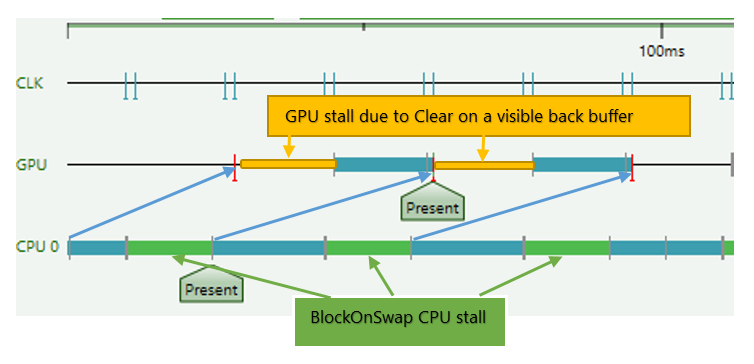
In this scenario, the resulting frame rate is 30 FPS because one back buffer is always visible and another one is pending. When a back buffer is used at the start of a frame, the GPU must wait for a semaphore so that the currently visible back buffer is not overwritten. This causes a stall on the GPU until a visible back buffer is swapped out, and it adds up to 16 ms to the cost of the GPU frame time. At the same time, the CPU can’t swap at 60 FPS any longer because the GPU is essentially running at 30 FPS. Because there are no available back buffers, it has to wait until a buffer becomes available, stalling in BlockOnSwap.
This is not limited to a 60 FPS case: the same can happen to a 30 FPS game.
This issue can be easily remedied by binding a back buffer as a target at the very end of the frame. Here is what it looks like in the same scenario, with only one difference: the Clear is moved to the end of the frame.
Figure 4. CPU 16.2 ms, GPU 15.4 ms, SyncInterval = 1, double buffering, 60 FPS, back buffer only touched very late in the frame
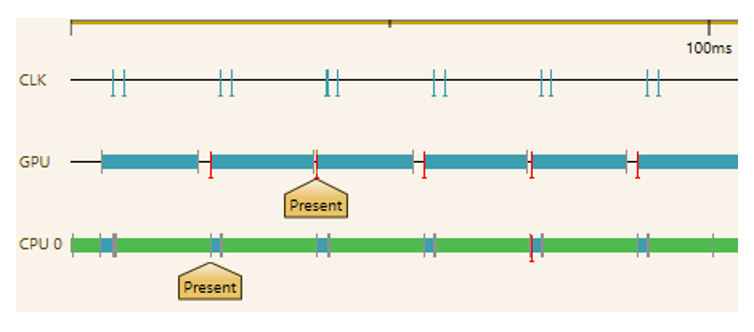
60 FPS is achieved in this scenario, albeit still with a short BlockOnSwap on the CPU.
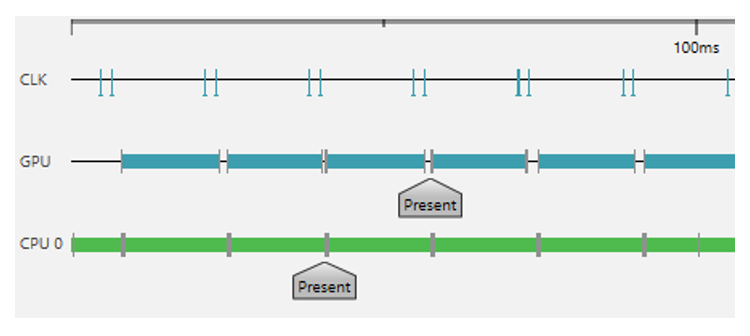
Enabling triple buffering is another way to achieve 60 FPS in either Scenario B or C and thereby enable full parallelism between the CPU and the GPU. With triple buffering, the CPU is double-buffered against the GPU and triple-buffered against the presentation queue, while the GPU is double-buffered against the presentation queue. In cases when neither the CPU nor GPU time exceed the frame-rate limit, this leads to 60 FPS regardless of the point in the frame at which the back buffer is touched, but it does add one frame of latency. See Figure 5.
Figure 5. CPU 16.2 ms, GPU 15.4 ms, SyncInterval = 1, triple buffering, 60 FPS even though the back buffer is touched early in the frame.
Present frame statistics
The DXGIXGetFrameStatistics API is used to obtain timing and other pertinent information about frames that have been already displayed-in real time. This information is useful for the application because it allows the application to vary the content of frames that will be rendered in the future to match the latency between calls to DXGIXPresentArray and when the presented frame is actually displayed for viewing. It also allows the application to know whether it is queuing more frames than the rate at which they can be displayed, or if it is not generating frames quickly enough.
typedef struct _DXGIX_FRAME_STATISTICS
{
	// CPU time line
	UINT64 CPUTimePresentCalled;
	UINT64 CPUTimeAddedToQueue;
	UINT32 QueueLengthAddedToQueue;

	// GPU time line
	UINT64 CPUTimeFrameComplete;
	UINT64 GPUTimeFrameComplete;
	UINT64 GPUCountTitleUsed;
	UINT64 GPUCountSystemUsed;

	// Display time line
	UINT64 CPUTimeVSync;
	UINT64 GPUTimeVSync;
	UINT64 CPUTimeFlip;
	UINT64 GPUTimeFlip;
	UINT64 VSyncCount;
	FLOAT  PercentScanned;

	VOID*  Cookie[2];
} DXGIX_FRAME_STATISTICS;

HRESULT D3DAPI DXGIXGetFrameStatistics(
	_In_ UINT NumberFramesRequested,
	_Out_writes_(NumberFramesRequested) DXGIX_FRAME_STATISTICS *pStats
	);
The parameter NumberFramesRequested specifies the number of frames to obtain statistics for. The parameter pStats is a pointer to an array of DXGIX_FRAME_STATISTICS structs. The array should contain at least NumberFramesRequested elements. For descriptions of the structure members, see the DXGIX_FRAME_STATISTICS structure.
The statistics are returned in temporal order, meaning that element zero will contain statistics for the most recent frame queued or presented, element 1 will contain statistics for the frame prior to that, and so on. The history buffer in the runtime currently holds only enough space for the last 17 queued and displayed frames.
For frames that are queued but not displayed, only CPUTimePresentCalled, CPUTimeAddedToQueue, and QueueLengthAddedToQueue will contain actual, valid data. The elements that correspond to queued but not displayed frames will have VSyncCount set to zero. For example, if 4 frames are currently queued and 13 have been displayed, if NumberFramesRequested is 16, the first 4 elements will have VSyncCount set to zero, and the last 12 elements will have VSyncCount set to the actual non-zero data that is returned.
Summary
CPU stalling inside Present simply means that the CPU is running too far ahead already. However, you always need to verify that a back buffer is not touched early in the frame: This causes the GPU to stall on the presentation queue, and then the CPU stalls on the GPU.