Introducing the Xbox One X Dev Kit
Important The initial set of Xbox One X dev kits shipped in April 2017 do not have a wireless adapter.
The Xbox One X dev kit is designed from the ground up to make development for the Xbox One family of devices as productive as possible.
- Front view of the Xbox One X dev kit
- Back view of the Xbox One X dev kit
- Summary of the features of the Xbox One X dev kit
- XDK Transfer Device
- Console placement and lab management considerations
Front view of the Xbox One X dev kit
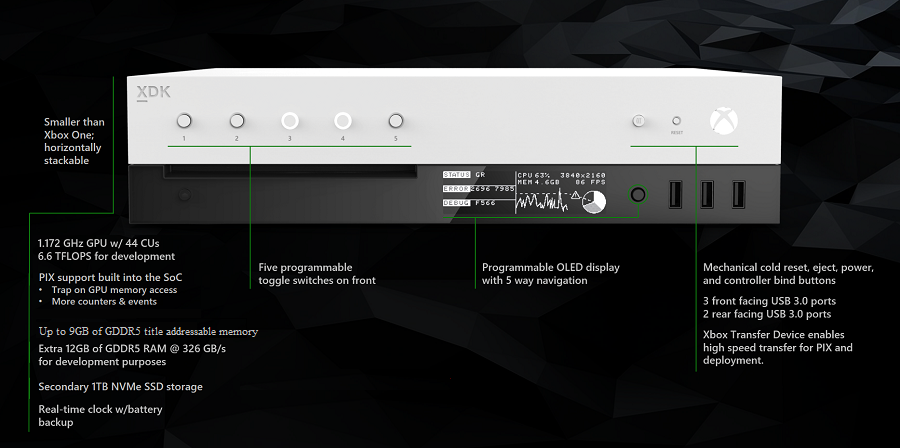
Back view of the Xbox One X dev kit
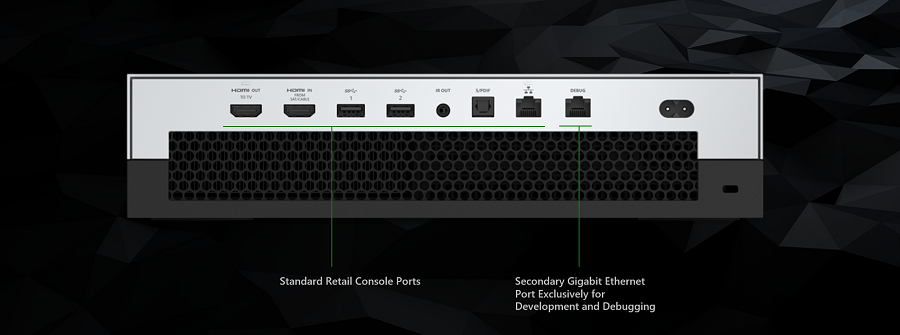
Summary of the features of the Xbox One X dev kit
For an overview of the hardware specs for the Xbox One X retail console see: Xbox One X Retail Console Hardware Specs
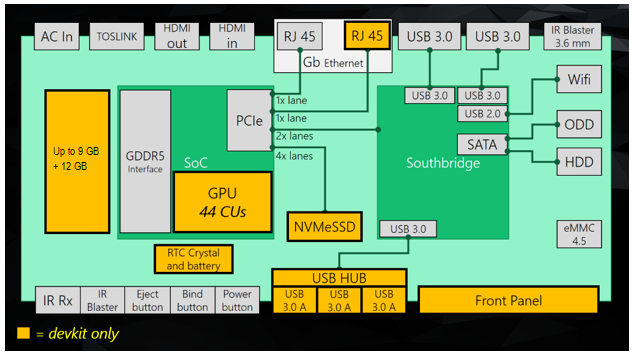
The Xbox One X dev kit adds the following to the Xbox One X retail console:
- 4 more CUs: GPU with 44 (CUs) running at 1.172GHz, giving a total of 6.6 TFLOPs
- 12 GB of GDDR5 RAM for development purposes
- An additional Gigabit ethernet port for debugging and tool network traffic
- A 1TB NVMe SSD in addition to the 1TB retail drive. This is the default drive during title development
- 3 additional front facing USB 3.0 ports (Note: Use these for accessories not for XTD)
- 256 x 64 x 4bbp Programmable Front Panel OLED display
- 1 Programmable 4-way directional input (DPAD) with select
- 5 Programmable Buttons and LEDs
- Real-time clock with battery backup
Figure 1. Schematic comparison between Xbox One X retail console and Xbox One X dev kit
XDK Transfer Device
In addition, each Xbox One X dev kit comes with an XDK Transfer Device (XTD). This is a high-speed USB 3.0 transfer cable with a bandwidth of up to 350MB/s that enables fast title deployment and fast PIX capture and analysis.
Console placement and lab management considerations
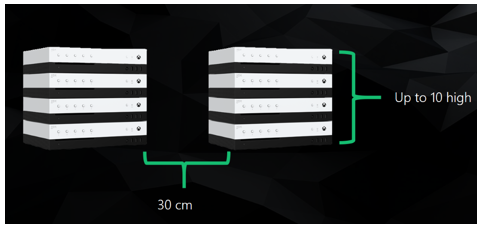
Xbox One X consoles should be placed horizontally, and can be stacked up to 10 high. It is important to remember the following:
- Air vents are on the sides and the back
- Cool air flows in through the sides and warm air is vented through the back
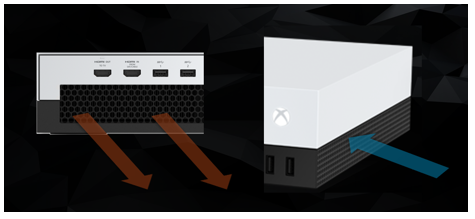
Because the air flows through the sides and back, it’s now possible to stack the consoles. You can stack up to 10 of them. You do need to pay attention to where the air flows. Assuming an ambient temperature of 30C:
- Allow 30 cm clearance between dev kits side-by-side
- Allow 30 cm behind them as well
See also
Xbox One X Retail Console Hardware Specs
Using Console Modes on Xbox One X Dev Kits to Test Your Game