Configure Tournament Definitions (Service Configuration)
This topic provides procedures for adding and changing tournament definitions in the service configuration for a title.
For an overall introduction to the various elements of service configuration, see Introducing Service Configuration.
Sections in this topic:
- What is a tournament definition?
- Create a tournament definition
- Change a tournament definition
- Delete a tournament definition
- Set up multiplayer session templates to enable tournaments
- Third party tournament organizers
What is a tournament definition?
Tournament definitions are JSON documents that are used as templates to define the shape and schedule for tournament instances. They can be used to set up recurrences for tournaments, such as weekly or monthly, as well as define how many teams can compete in a tournament, among other things. For more information on tournaments and how to implement them in your games, refer to Getting Started with Xbox Live Tournaments in the Xbox Live SDK documentation.
Create a tournament definition
To create a new tournament definition
- On the Service Configuration Tasks page for the product instance, click Multiplayer & Matchmaking.
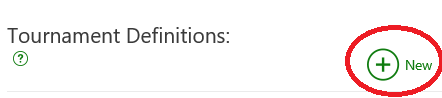
- On the Multiplayer & Matchmaking page, under Tournament Definitions, click New.
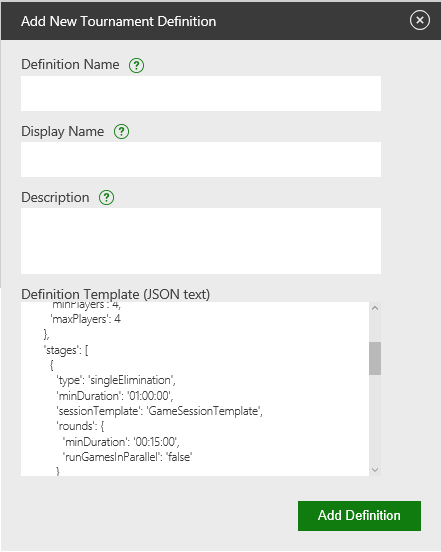
- In the Add New Tournament Definition dialog box, specify values in the following fields.
- Definition Name - A name that characterizes the tournament definition, and that you will easily remember and recognize. Must be a text string with a maximum of 100 characters.
- Display Name - A short display name for the tournament which will be the default locale string. This string is localizable.
- Description - The description for the tournament. All instances of this tournament definition will use this string as the default description. This string is localizable and overridable for each instance.
- Definition Template (JSON text) - Tournament definitions are JSON documents, and the Display Name and Description fields that you specified above are simply fields in the definition’s JSON. Here you can define the rest of the fields for your tournament, such as the sizes of teams, length of registration period, and number of teams. For more information about these fields, refer to Getting Started with Xbox Live Tournaments in the Xbox Live SDK documentation.
Here is an example tournament definition:
{
  'registration': {
      'duration': '12:00:00',
      'maxTeamCount': 1024,
      'minTeamCount': 2
    },
    'teams': {
      'sessionTemplate': 'TeamSessionTemplate',
      'minPlayers': 4,
      'maxPlayers': 4
    },
    'stages': [
      {
        'type': 'singleElimination',
        'minDuration': '01:00:00',
        'sessionTemplate': 'GameSessionTemplate',
        'rounds': {
          'minDuration': '00:15:00',
          'runGamesInParallel': 'false'
        }
      }
    ],
    'scheduling': {
      'once': [
        {
          'name': 'IndependenceDay',
          'startTime': '2016-07-05T03:00:00.0000000Z'
        },
        {
          'name': 'LaborDay',
          'startTime': '2016-09-08T03:00:00.0000000Z'
        }
      ],
      'periodic': [
        {
          'name': 'daily',
          'period': 1,
          'unit': 'days',
          'start': '2016-09-08T03:00:00.0000000Z'
        },
        {
          'name': 'weekly',
          'period': 7,
          'unit': 'weeks',
          'start': '2016-09-08T03:00:00.0000000Z'
        }
      ]
    }
  }
- Definition Name - A name that characterizes the tournament definition, and that you will easily remember and recognize. Must be a text string with a maximum of 100 characters.
- When you are finished, click Add Definition to add the new tournament definition and close the dialog box.
Your tournament definition is now listed under Tournament Definitions on the Multiplayer & Matchmaking page.
Change a tournament definition
To make changes to an existing tournament definition:
- On the Multiplayer & Matchmaking page, under Tournament Definitions, click the Edit icon (a pencil) for the tournament definition that you want to make changes to.
- In the Edit Definition dialog box, make the changes that you want.
- When all of the options are the way that you want them, click Save Definition.
Tournament definitions can be updated and published with service configuration at any time, even after the game is live.
Delete a tournament definition
To delete an existing tournament definition:
- On the Multiplayer & Matchmaking page, under Tournament Definitions, click the Delete icon (a trash can) for the tournament definition that you want to delete.
- In the Delete Definition dialog box, confirm the deletion by clicking Delete.
 Important Deletion of a definition is a permanent action and can’t be undone or reversed.
Set up multiplayer session templates to enable tournaments
In addition to configuring tournament definitions, you will also need to set up multiplayer session templates to enable tournaments. For more information, see Configure Multiplayer Session Templates (Service Configuration).
Third party tournament organizers
Third party tournament organizers can operate tournaments for your game. This allows you to offload some of the UI and management costs to these organizers.
For information on enabling third party tournament organizers, see Configure Access Policies (Service Configuration).