Software Antialiasing
The following sections explain how to implement FXAA and SMAA on the Xbox One dev kit. FXAA.hlsl and SMAA.hlsl can be downloaded from the ATG Antialiasing sample.
In order to utilize anti-aliasing, you must be able to render your scene to a texture. For instructions, see the Render to Texture tutorial.
What is Anti-aliasing?
Aliasing is the term for straight lines appearing jagged and uneven when represented by pixels. Anti-aliasing is a method that removes the jagged appearance by blending pixel colors together to make the pixel grid less apparent.
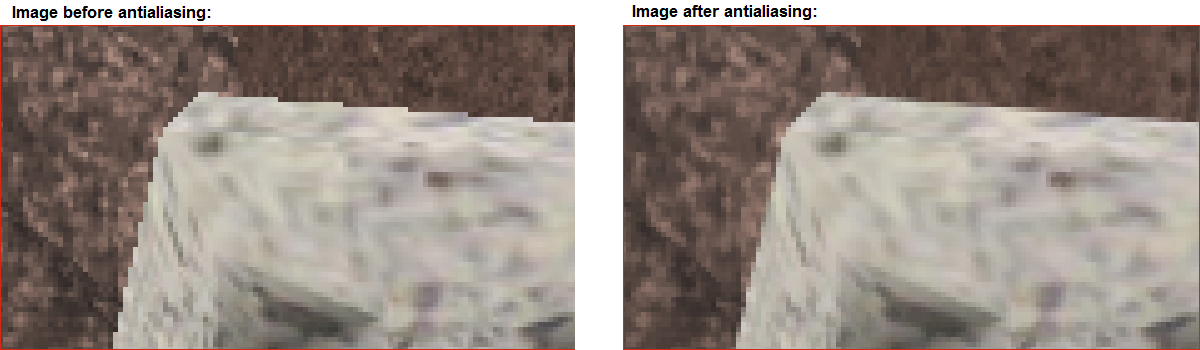
How anti-aliasing works
Anti-aliasing is a post-processing technique applied by a secondary vertex and pixel shader. Instead of rendering a scene directly onscreen, the scene is rendered onto a texture. Next, that texture is rendered directly onscreen, using the anti-aliasing shaders. The anti-aliasing shaders will smooth out the texture, resulting in a better overall appearance.
Render Texture Quad:
You will need a quad to display the rendered texture directly onscreen during the anti-aliasing pass. Store the vertex positions directly in screen space to avoid any matrix transformations. The only other information you need to store is the texture coordinates.
Sample vertex struct for quad:
C++
struct VertexTexture
{
    XMVECTOR position;
    XMVECTOR texcoord;
};
Create and initialize quad. Set vertex data so that quad occupies entire screen, and texture occupies entire quad.
C++
m_pVertexDataQuad[0].position = XMVectorSet( -1.0f,  1.0f,  0.5f,  1.0f );
m_pVertexDataQuad[1].position = XMVectorSet(  1.0f, -1.0f,  0.5f,  1.0f );
m_pVertexDataQuad[2].position = XMVectorSet( -1.0f, -1.0f,  0.5f,  1.0f );
m_pVertexDataQuad[3].position = XMVectorSet( -1.0f,  1.0f,  0.5f,  1.0f );
m_pVertexDataQuad[4].position = XMVectorSet(  1.0f,  1.0f,  0.5f,  1.0f );
m_pVertexDataQuad[5].position = XMVectorSet(  1.0f, -1.0f,  0.5f,  1.0f );

m_pVertexDataQuad[0].texcoord = XMVectorSet(  0.0f,  0.0f,  0,  1.0f );
m_pVertexDataQuad[1].texcoord = XMVectorSet(  1.0f,  1.0f,  0,  1.0f );
m_pVertexDataQuad[2].texcoord = XMVectorSet(  0.0f,  1.0f,  0,  1.0f );
m_pVertexDataQuad[3].texcoord = XMVectorSet(  0.0f,  0.0f,  0,  1.0f );
m_pVertexDataQuad[4].texcoord = XMVectorSet(  1.0f,  0.0f,  0,  1.0f );
m_pVertexDataQuad[5].texcoord = XMVectorSet(  1.0f,  1.0f,  0,  1.0f );

D3D11_BUFFER_DESC bufferDesc;
ZeroMemory( &bufferDesc, sizeof( bufferDesc ) );
bufferDesc.ByteWidth              = sizeof( m_pVertexDataQuad );
bufferDesc.Usage                  = D3D11_USAGE_DEFAULT;
bufferDesc.BindFlags              = D3D11_BIND_VERTEX_BUFFER;
bufferDesc.StructureByteStride    = sizeof( m_pVertexDataQuad[0] );

D3D11_SUBRESOURCE_DATA initialData;
ZeroMemory( &initialData, sizeof( D3D11_SUBRESOURCE_DATA ) );
initialData.pSysMem = m_pVertexDataQuad;

XSF_ERROR_IF_FAILED( pDev->CreateBuffer( &bufferDesc, &initialData, m_spVertexBufferQuad.ReleaseAndGetAddressOf() ) );
Pixel Size
FXAA and SMAA both require a constant buffer that defines the dimensions of a pixel. For both algorithms, the buffer is a simple pair of floats stored in register( c0 ). The ideal pixel size settings depends on the resolution being displayed, which is stored in the back buffer.
Calcluate pixel size:
C++
m_defaultWidth  = ( UINT )GetBackbuffer().GetViewport().Width;
m_defaultHeight = ( UINT )GetBackbuffer().GetViewport().Height;
m_defaultPixelSize[0] = 1.0f / m_defaultWidth;
m_defaultPixelSize[1] = 1.0f / m_defaultHeight;
FXAA
Fast approximate anti-aliasing, or FXAA, is fast and simple to implement. Include the FXAA.hlsl file (available from the DirectX Antialiasing sample) in your project and create the vertex and pixel shaders. Use your regular vertex and pixel shaders to render the scene. Render the scene to a texture instead of directly onscreen. Once the scene has been rendered to a texture, prepare to anti-alias the texture. Set the FXAA vertex and pixel shaders, and prepare for rendering. Once you are ready to render, draw the quad, and let the FXAA shaders do the rest.
C++
UINT strides[1] = { sizeof( VertexTexture ) };
UINT offsets[1] = { 0 };
pCtx->IASetVertexBuffers( 0, 1, m_spVertexBufferQuad.GetAddressOf(), strides, offsets );
pCtx->IASetPrimitiveTopology( D3D11_PRIMITIVE_TOPOLOGY_TRIANGLELIST );

pCtx->IASetInputLayout( m_spInputLayoutFS );
pCtx->VSSetShader( m_spFXAAVS, nullptr, 0 );
pCtx->PSSetShader( m_spFXAAPS, nullptr, 0 );
pCtx->PSSetConstantBuffers( 0, 1, m_spPixelSizeCB.GetAddressOf() );
pCtx->PSSetShaderResources(0, 1, m_spMeshSRV[0].GetAddressOf() );
pCtx->PSSetSamplers(0, 1, m_spLinearSamplerState.GetAddressOf() );
pCtx->RSSetState( m_spRasterizerState );

pCtx->Draw( _countof( m_pVertexDataQuad ), 0 );
SMAA
Enhanced Subpixel Morphological Antialiasing, or SMAA, requires a more complicated setup. SMAA contains multiple different shaders and edge detection methods, you must choose the methods that work best for your paraticular project. Additionally, SMAA requires two precomputed textures, known as AreaTex.h and SearchTex.h.
Load AreaTex.h and SearchTex.h
The SMAA algorithms make use of two precomputed texture files called AreaTex.h and SearchTex.h. These files are prewritten for you, and can be found along with the SMAA algorithm in the ATG AntiAliasing sample available on XGD.
Loading the area texture. Note that AREATEX_PITCH, AREATEX_WIDTH, and AREATEX_HEIGHT are all defined in AreaTex.h.
C++
D3D11_SUBRESOURCE_DATA data;
data.pSysMem = areaTexBytes;
data.SysMemPitch = AREATEX_PITCH;
data.SysMemSlicePitch = 0;

D3D11_TEXTURE2D_DESC descTex;
ZeroMemory( &descTex, sizeof( descTex ) );
descTex.Width = AREATEX_WIDTH;
descTex.Height = AREATEX_HEIGHT;
descTex.MipLevels = 1;
descTex.ArraySize = 1;
descTex.Format = DXGI_FORMAT_R8G8_UNORM;
descTex.SampleDesc.Count = 1;
descTex.SampleDesc.Quality = 0;
descTex.Usage = D3D11_USAGE_DEFAULT;
descTex.BindFlags = D3D11_BIND_SHADER_RESOURCE;
descTex.CPUAccessFlags = 0;
descTex.MiscFlags = 0;
XSF_ERROR_IF_FAILED( pDev->CreateTexture2D( &descTex, &data, m_spAreaTex.ReleaseAndGetAddressOf() ) );

D3D11_SHADER_RESOURCE_VIEW_DESC descSRV;
ZeroMemory( &descSRV, sizeof( descSRV ) );
descSRV.Format = descTex.Format;
descSRV.ViewDimension = D3D10_SRV_DIMENSION_TEXTURE2D;
descSRV.Texture2D.MostDetailedMip = 0;
descSRV.Texture2D.MipLevels = 1;
XSF_ERROR_IF_FAILED( pDev->CreateShaderResourceView( m_spAreaTex, &descSRV, m_spAreaTexSRV.ReleaseAndGetAddressOf() ) );
Loading the search texture. Note that SEARCHTEX_PITCH, SEARCHTEX_WIDTH, and SEARCHTEX_HEIGHT are all defined in SearchTex.h.
C++
D3D11_SUBRESOURCE_DATA data;
data.pSysMem = searchTexBytes;
data.SysMemPitch = SEARCHTEX_PITCH;
data.SysMemSlicePitch = 0;

D3D11_TEXTURE2D_DESC descTex;
ZeroMemory( &descTex, sizeof( descTex ) );
descTex.Width = SEARCHTEX_WIDTH;
descTex.Height = SEARCHTEX_HEIGHT;
descTex.MipLevels = descTex.ArraySize = 1;
descTex.Format = DXGI_FORMAT_R8_UNORM;
descTex.SampleDesc.Count = 1;
descTex.SampleDesc.Quality = 0;
descTex.Usage = D3D11_USAGE_DEFAULT;
descTex.BindFlags = D3D11_BIND_SHADER_RESOURCE;
descTex.CPUAccessFlags = 0;
descTex.MiscFlags = 0;
XSF_ERROR_IF_FAILED( pDev->CreateTexture2D( &descTex, &data, m_spSearchTex.ReleaseAndGetAddressOf() ) );

D3D11_SHADER_RESOURCE_VIEW_DESC descSRV;
ZeroMemory( &descSRV, sizeof( descSRV ) );
descSRV.Format = descTex.Format;
descSRV.ViewDimension = D3D10_SRV_DIMENSION_TEXTURE2D;
descSRV.Texture2D.MostDetailedMip = 0;
descSRV.Texture2D.MipLevels = 1;
XSF_ERROR_IF_FAILED( pDev->CreateShaderResourceView( m_spSearchTex, &descSRV, m_spSearchTexSRV.ReleaseAndGetAddressOf() ) );
Initialize SMAA vertex and Pixel Shaders
SMAA requires three pairs of Vertex and Pixel shaders: edge detection shaders, blending weights shaders, and neighborhood blending shaders. There are three possible edge detection Pixel Shaders to choose from: Luma Edge Detection, Color Edge Detection, or Depth Edge Detection. Luma and Color edge detection both utilize a color texture for edge detection, and require gamma-corrected colors. The texture you provide to these pixel shaders should be non-sRGB textures. The depth algorithm uses a depth stencil instead of a traditional texture for edge detection.
List of SMAA shaders, arranged in the order they will be called
- Edge Detection Vertex Shader: SMAAEdgeDetectionVS
- Edge Detection Pixel Shader options: (choose one)
- Luma Edge Detection: SMAALumaEdgeDetectionPS
- Color Edge Detection: SMAAColorEdgeDetectionPS
- Depth Edge Detection: SMAAEdgeDetectionPS
- Blending Weight Vertex Shader: SMAABlendingWeightCalculationVS
- Blending Weight Pixel Shader: SMAABlendingWeightCalculationPS
- Neighborhood Blending Vertex Shader: SMAANeighborhoodBlendingVS
- Neighborhood Blending Pixel Shader: SMAANeighborhoodBlendingPS
Render SMAA
The SMAA algorith requires three passes, once with each set shaders.
The first pass uses the Edge Detection shaders.
C++
FLOAT clearColors[4] = { 0, 0, 0, 0 };
pCtx->ClearRenderTargetView( m_spSMAAFirstPassRTV, clearColors );
pCtx->OMSetRenderTargets( 1, m_spSMAAFirstPassRTV.GetAddressOf(), nullptr );

// Render SMAA Edges
UINT strides[1] = { sizeof( VertexTexture ) };
UINT offsets[1] = { 0 };
pCtx->IASetVertexBuffers( 0, 1, m_spVertexBufferQuad.GetAddressOf(), strides, offsets );
pCtx->IASetPrimitiveTopology( D3D11_PRIMITIVE_TOPOLOGY_TRIANGLELIST );
pCtx->IASetInputLayout( m_spInputLayoutFS );
pCtx->VSSetShader( m_spSMAAEdgeDetectVS, nullptr, 0 );
pCtx->PSSetShader( m_spSMAAEdgeDetectPS, nullptr, 0 );
pCtx->VSSetConstantBuffers( 0, 1, m_spPixelSizeCB.GetAddressOf() );
pCtx->PSSetConstantBuffers( 0, 1, m_spPixelSizeCB.GetAddressOf() );
if( SampleSettings().FastSemanticsEnabled() )
{
    XSF::D3DResourcePtr spDepthResource;
    (*depthStencilSRV)->GetResource( spDepthResource.GetAddressOf() );
    pCtx->DecompressResource( spDepthResource, 0, nullptr, spDepthResource, 0, nullptr, DXGI_FORMAT_UNKNOWN, D3D11X_DECOMPRESS_ALL );
}
pCtx->PSSetShaderResources( 0, 1, meshSRV );
pCtx->PSSetShaderResources( 1, 1, depthStencilSRV );
pCtx->RSSetState( m_spRasterizerState );
pCtx->Draw( _countof( m_pVertexDataQuad ), 0 );
The second pass uses the Blending Weight Calculation shaders.
C++
pCtx->ClearRenderTargetView( m_spSMAASecondPassRTV, clearColors );
pCtx->OMSetRenderTargets( 1, m_spSMAASecondPassRTV.GetAddressOf(), nullptr );

// Render SMAA Blend Weights - The second pass of the SMAA algorithm to blend
// weights and maintain corners of the mesh
pCtx->IASetVertexBuffers( 0, 1, m_spVertexBufferQuad.GetAddressOf(), strides, offsets );
pCtx->IASetPrimitiveTopology( D3D11_PRIMITIVE_TOPOLOGY_TRIANGLELIST );
pCtx->IASetInputLayout( m_spInputLayoutFS );
pCtx->VSSetShader( m_spSMAABlendingWeightsVS, nullptr, 0 );
pCtx->PSSetShader( m_spSMAABlendingWeightsPS, nullptr, 0 );
pCtx->VSSetConstantBuffers( 0, 1, m_spPixelSizeCB.GetAddressOf() );
pCtx->PSSetConstantBuffers( 0, 1, m_spPixelSizeCB.GetAddressOf() );
pCtx->PSSetConstantBuffers( 1, 1, m_spSMAASubSampleIndicesCB.GetAddressOf() );
if( SampleSettings().FastSemanticsEnabled() )
{
    pCtx->DecompressResource( m_spSMAAFirstPassTexture, 0, nullptr, m_spSMAAFirstPassTexture, 0, nullptr, DXGI_FORMAT_UNKNOWN, D3D11X_DECOMPRESS_ALL );
}
pCtx->PSSetShaderResources( 0, 1, m_spSMAAFirstPassSRV.GetAddressOf() );
pCtx->PSSetShaderResources( 1, 1, m_spAreaTexSRV.GetAddressOf() );
pCtx->PSSetShaderResources( 2, 1, m_spSearchTexSRV.GetAddressOf() );
pCtx->PSSetSamplers(1, 1, m_spPointSamplerState.GetAddressOf() );
pCtx->RSSetState( m_spRasterizerState );
pCtx->Draw( _countof( m_pVertexDataQuad ), 0 );
The third pass uses the Neighborhood Blending shaders.
C++
// Clear the render target if only the current result is being used
// and no blending is necessary
if (blendFactor == 1.0f )
{
    pCtx->ClearRenderTargetView( *finalPassRTV, clearColors );
    pCtx->OMSetBlendState( NULL, 0, D3D11_DEFAULT_SAMPLE_MASK );
}
else
{
    // Set blend state. Used while running SMAA2x
    float blendFactorArr[4] = { blendFactor, blendFactor, blendFactor, blendFactor };
    pCtx->OMSetBlendState( m_spBlendState, blendFactorArr, D3D11_DEFAULT_SAMPLE_MASK );
}

pCtx->OMSetRenderTargets( 1, finalPassRTV, nullptr );

// Render SMAA Neighborhood Blending - The third pass of the SMAA algorithm to blend
// with the neighboring pixels
pCtx->IASetVertexBuffers( 0, 1, m_spVertexBufferQuad.GetAddressOf(), strides, offsets );
pCtx->IASetPrimitiveTopology( D3D11_PRIMITIVE_TOPOLOGY_TRIANGLELIST );
pCtx->IASetInputLayout( m_spInputLayoutFS );
pCtx->VSSetShader( m_spSMAANeighborhoodBlendingVS, nullptr, 0 );
pCtx->PSSetShader( m_spSMAANeighborhoodBlendingPS, nullptr, 0 );
pCtx->VSSetConstantBuffers( 0, 1, m_spPixelSizeCB.GetAddressOf() );
pCtx->PSSetConstantBuffers( 0, 1, m_spPixelSizeCB.GetAddressOf() );
if( SampleSettings().FastSemanticsEnabled() )
{
    pCtx->DecompressResource( m_spSMAASecondPassTexture, 0, nullptr, m_spSMAASecondPassTexture, 0, nullptr, DXGI_FORMAT_UNKNOWN, D3D11X_DECOMPRESS_ALL );
}
pCtx->PSSetShaderResources( 0, 1, m_spMeshSRV[0].GetAddressOf() );
pCtx->PSSetShaderResources( 1, 1, m_spSMAASecondPassSRV.GetAddressOf() );
pCtx->PSSetSamplers(1, 1, m_spPointSamplerState.GetAddressOf() );
pCtx->RSSetState( m_spRasterizerState );
pCtx->Draw( _countof( m_pVertexDataQuad ), 0 );

pCtx->OMSetBlendState( NULL, 0, D3D11_DEFAULT_SAMPLE_MASK );