Xbox One Graphics Driver Architecture
Updated July 8, 2013
In this topic:
Introduction
The initial releases of the Xbox One Alpha Development Kit (XDK) shipped with a simple Windows-like operating system and a graphics driver provided by the Alpha GPU vendor. With the introduction of the final Xbox One operating system architecture in December 2012, the Alpha graphics driver was retired in favor of a new driver designed by Microsoft specifically for Xbox One.
The Xbox One operating system architecture contains a hypervisor running three separate operating systems:
- The exclusive OS is a slim operating system designed to provide minimal overhead and maximum performance for game titles.
- The shared OS is a Windows-like operating system designed for running general-purpose applications and system services.
- The host OS is a small special-purpose operating system that manages the other two. It also contains the low-level physical device drivers.
This paper focuses on the graphics driver used by high-performance game titles running in the exclusive OS.
Design philosophy
In the Xbox 360 console, the graphics stack consists of only a single layer, encapsulated in the Direct3D 9 static libraries. Xbox 360 developers also have limited direct access to the GPU through the Xbox graphics (XG) static libraries.
In contrast, the modern Windows graphics stack consists of many components, and it is designed to support many simultaneous processes sharing one or more GPUs that might be of varying types. For more details about the Windows graphics-driver architecture, see Introduction to the Windows Vista and Later Display Driver Model (WDDM) on MSDN.
The Xbox One graphics stack lands somewhere between these two extremes. Some important design goals for the driver are:
- Familiarity. The graphics stack retains the well-understood framework of the High Level Shader Language (HLSL) and Direct3D (D3D).
- Compatibility. The same code and shaders should run on both Xbox One and Windows wherever possible.
- Efficiency. Console performance should approach the maximum that the hardware supports.
For familiarity and compatibility, the application interface to the Xbox One graphics driver remains similar to the interface to the Windows graphics stack. For efficiency, the Xbox One XDK strips away much of the Windows infrastructure—particularly the pieces designed to support multiple heavyweight processes.
The XDK also reduces the number of layers between the title and the hardware, in addition to the number of expensive system calls and transitions between user and kernel mode. The following diagrams show the evolution of the console graphics stack over time.
Figure 1. The Xbox 360 graphics stack.
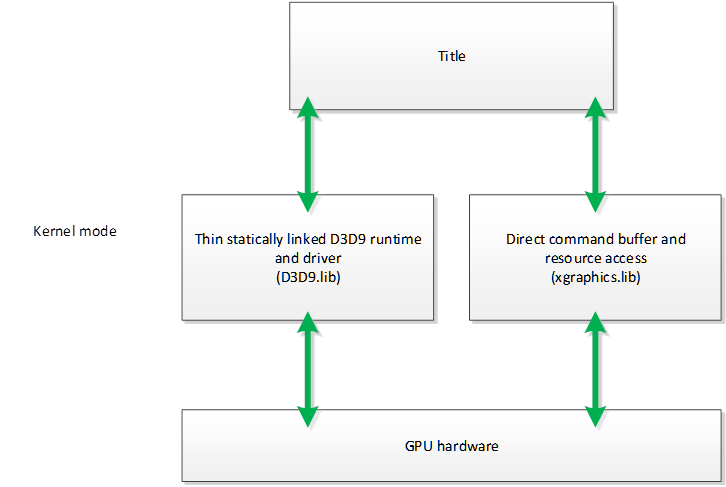
Figure 2. The standard Windows graphics stack on Xbox One Alpha kits (October 2012 XDK and earlier).
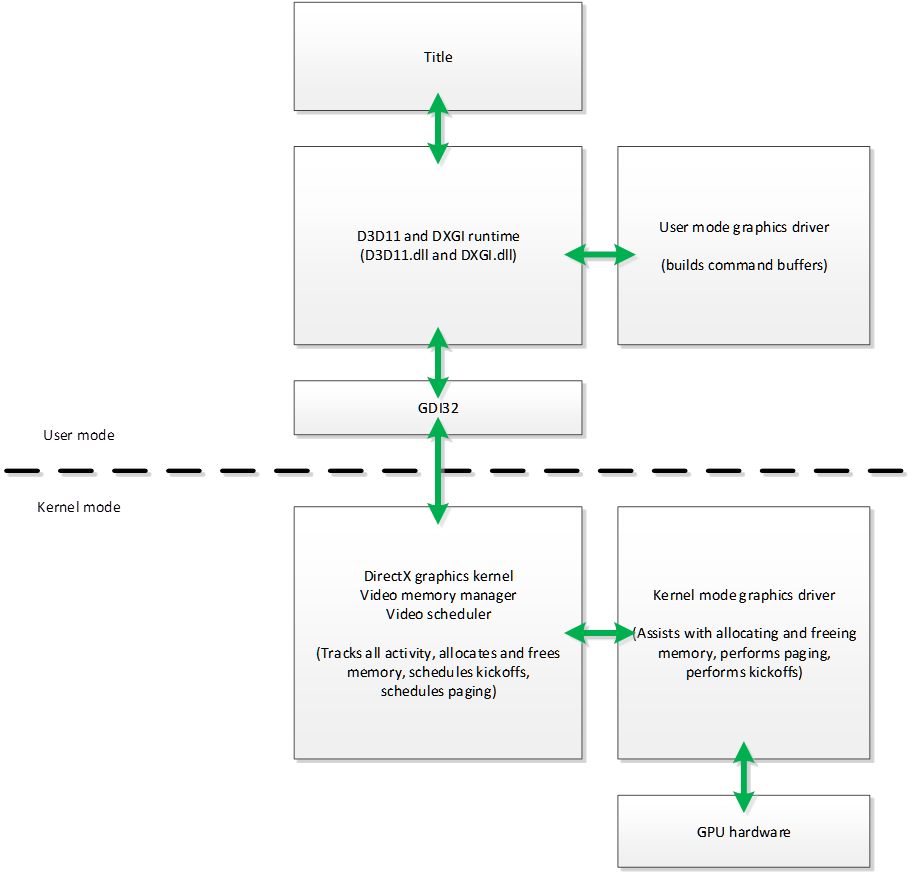
Figure 3. The Xbox One graphics stack in the December 2012 XDK through the July 2013 XDK.
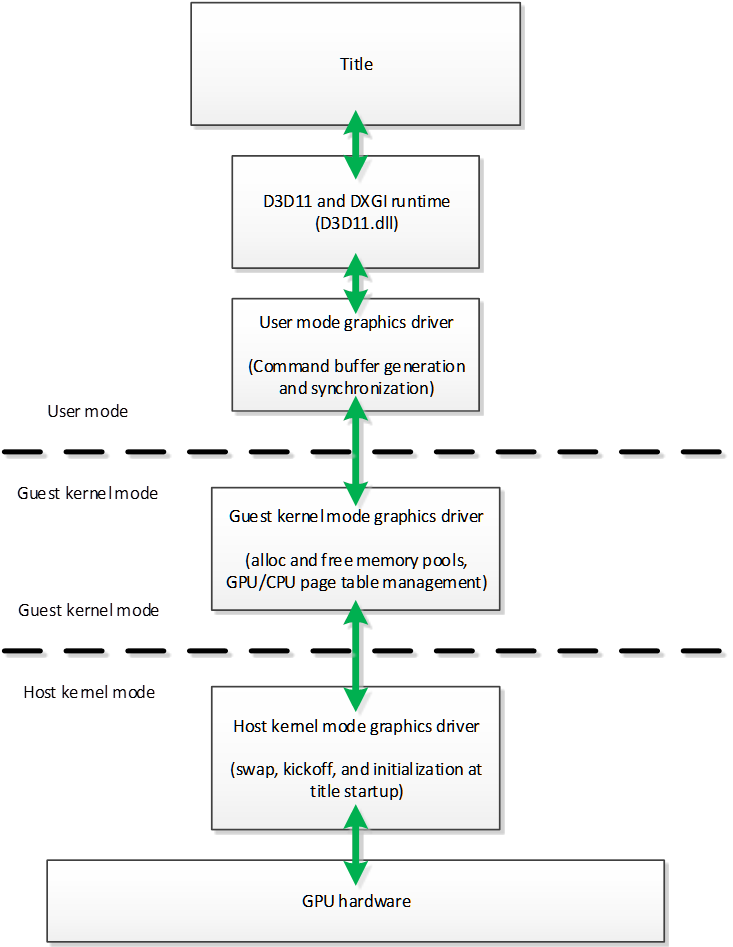
Figure 4. The final Xbox One “Monolithic runtime” graphics stack.
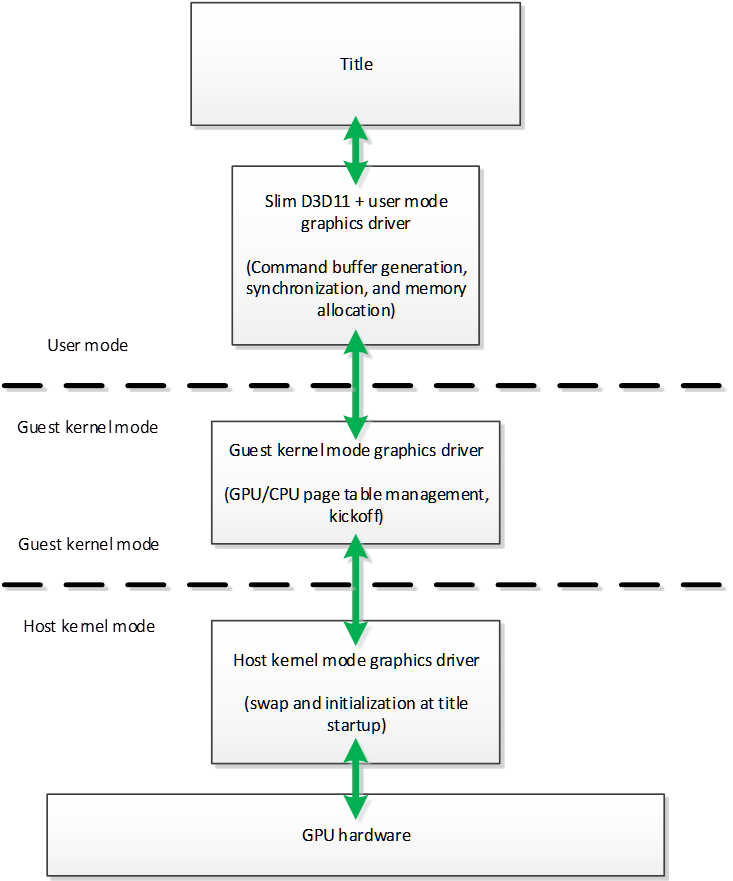
As the preceding diagrams illustrate, the Xbox One driver abandons WDDM in favor of a more streamlined approach. The vast majority of CPU graphics work resides in the user-mode component.
In this section:
- Kernel-mode driver
- Direct3D runtime and user-mode driver
- Direct3D extensions
- Differences from Windows drivers
- Multithreading
- Redundant state setting
- Memory management and resource allocation
- Resource zero initialization
- Shader precompilation
Kernel-mode driver
The kernel-mode driver (KMD) is split into two parts, one residing in the exclusive OS and one residing in the host OS. In the July 2013 XDK, the exclusive OS KMD is primarily responsible for memory allocations and frees, while the host OS driver is called to perform kickoffs and swaps. The May 2013 XDK introduced the D3D11_CREATE_DEVICE_FAST_KICKOFFS flag, an experimental option designed to avoid the costly transition to the host OS for kickoffs. This option currently disables natural user interface (NUI) functionality. After such functionality has been restored, this option will be made the default.
Direct3D runtime and user-mode driver
In Windows, the graphics runtime must be generic enough to support many simultaneous processes, running against different drivers and hardware configurations. Thus, the D3D11 and DirectX Graphics Infrastructure (DXGI) runtimes are separate from the driver to provide a consistent abstraction layer to graphics developers.
In Xbox One, by contrast, the hardware platform is fixed, with a known GPU and driver. This allows much of the generic, heavyweight Direct3D layer to be stripped out and merged with the user-mode driver, significantly reducing the CPU overhead associated with graphics API calls. This merged combination of user-mode driver and slim Direct3D API overlay is known as the Monolithic runtime. Memory-management operations are also planned to be moved out of the kernel-mode driver and into the user-mode component of the Monolithic runtime, eliminating the context-switch overhead for allocations and frees. A preview of the Monolithic driver is available in the July 2013 XDK, and a production-ready version is expected to be available before the launch of Xbox One.
Direct3D extensions
Xbox One also introduces several extensions to the core Direct3D APIs to give titles more direct access to the hardware. These extensions reside in the user-mode component of the driver, and they include APIs for manual graphics memory management, title control over the direct memory access (DMA) engine hardware, and “Draw Bundles,” which refers to a method for recording draw calls and playing them back in a highly efficient manner.
Differences from Windows drivers
Windows graphics drivers contain logic designed to compensate for inefficiencies by the application. The Xbox One driver leaves this task to the title instead. Driver-side optimization is convenient, but the title can always do a better job based on knowledge of its own calling patterns. The following table contains some examples of differences in driver design. Subsequent sections elaborate further on the ramifications of these differences.
Table 1. Design differences between Windows graphics drivers and the Xbox One graphics driver.
| Feature | Legacy (Windows) driver | Xbox One driver |
|---|---|---|
| Multithreading | Automatic | Explicit |
| Redundant state setting | Culled | Transmitted |
| VRAM management | Automatic | Custom |
| Resource allocation | Generic | Fast path |
| Resource zero initialization | Yes | No |
| Shader precompilation | Partial | Complete (optional) |
Multithreading
Graphics drivers on computers generally maintain an auxiliary worker thread. This worker thread can provide a frame-rate boost, even for renderers that are not explicitly multithreaded. The worker thread, however, also consumes a core that the title might wish to use for other purposes. The Xbox One driver respects only explicit multithreading. In other words, all immediate context activity will remain on a single core, and titles can move rendering work to other cores only by using deferred contexts.
Redundant state setting
On computers, graphics drivers generally perform some checking for redundant state submission. For example, if a title repeatedly sets the same texture into the same shader resource slot, most Windows drivers will submit the associated commands to the GPU only once, and the driver will ignore the redundant submissions. The Xbox One driver does not check for redundant state submission, nor does it maintain a shadow state; all state changes are passed along to the GPU. The responsibility for these checks lies with the title.
Memory management and resource allocation
Gaming computers generally contain a discrete graphics card with dedicated video memory not directly accessible by the CPU. The graphics driver bears the responsibility for allocating resources in main memory or video memory and for transferring data between the two memories as needed. Additionally, computers also have multiple running processes contending for the same set of physical memory.
The Xbox One console, by contrast, contains a large unified main memory dedicated to the title process, along with a small amount of high-speed embedded static RAM (ESRAM). ESRAM can be used to accelerate bandwidth-intensive rendering and compute operations.
Xbox One titles can choose either to manually allocate and manage memory for graphics resources or to allow the graphics driver to do this automatically. The driver will not automatically allocate ESRAM. Allocations from the driver can be tracked by hooking the XMemAlloc and XMemFree functions.
You can learn more about the important considerations involved in GPU memory access by viewing the Xfest 2013 presentation, Memory Management for Graphics Resources, and by reading the white paper, Xbox One GPU Memory Access: ONION, GARLIC, and more.
Resource zero initialization
WDDM mandates that all graphics resources start from a predictable state: initialized with zeroes. Initialization by the driver can impose an unnecessary performance cost, because applications generally initialize resources explicitly. Therefore, the Xbox One driver skips this step.
You can optionally re-enable zero initialization by following the steps described in the Failsafe bits section of this paper.
Shader precompilation
On Windows PCs, shader compilation occurs in two stages:
- Fxc.exe or the D3DCompile function converts HLSL code into DirectX bytecode (sometimes called DirectX token assembly).
- The driver=”” converts DirectX token assembly into GPU instructions.
The first stage occurs either offline or at run time. On Windows, the second stage must occur at run time, because its output depends on the instruction set supported by the GPU, which is not known in advance.
The arrangement is very flexible—the outputs of Fxc.exe can be consumed by any combination of the Direct3D 11 GPU and driver. But it can be costly to perform the final compilation stage at run time, especially when a title uses thousands of shader permutations.
The Xbox One graphics driver can take advantage of the fact that the target GPU is known in advance. The versions of Fxc.exe and D3DCompile that ship with the XDK have the ability to perform both stages of shader compilation offline, which can greatly reduce run-time startup cost. For more information, refer to the white paper, Xbox One Shader Compiler
Changes to the HLSL compiler often require that precompiled data be invalidated. When this occurs, existing compiled shaders will still work, but the second stage of compilation will again shift to run time. For this reason, you should perform a full shader rebuild after installing a new XDK release.
GPU performance
The Xbox One graphics driver takes advantage of a number of performance enhancements built into the GPU hardware.
In this section:
- Fast clears
- Hierarchical depth-stencil
- Early depth-stencil
- Depth-stencil compression
- Color compression
- Custom MSAA modes
- Optimized texture tiling
Fast clears
By default, the GPU performs a clear of a color or depth-stencil surface by writing the clear value to every sample. The performance of this operation is limited by bandwidth-to-memory or by the throughput of the depth and color blocks. The GPU can instead implement clears by marking each tile of the surface as cleared without actually writing the clear value. This form of clear operation is naturally much faster.
Subsequent rendering to a fast-cleared buffer can be either faster or slower than rendering to an explicitly cleared buffer. If a shader or the CPU ever accesses the buffer, the GPU must perform a fast clear elimination pass. On a mostly clear buffer, the elimination pass can take longer than an explicit clear.
Optionally, you can disable fast clears by following the steps outlined in the Failsafe bits section.
Hierarchical depth-stencil
Hierarchical depth-stencil is a coarse, conservative depth-stencil test that provides certain performance advantages without changing the rendering output.
Early depth-stencil
Early depth-stencil refers to the ability of the GPU to reorder depth-stencil operations to execute before the pixel shader in cases where this reordering preserves correctness. Early depth-stencil generally provides a performance advantage, because pixels that fail the depth or stencil test do not need to be shaded.
Depth-stencil compression
The Xbox One GPU has the ability to conditionally store depth and stencil in a losslessly compressed form. When compression is possible, the bandwidth cost of depth-stencil tests and writes is reduced. If a shader or the CPU ever accesses a compressed depth-stencil buffer, the GPU must perform a compression elimination pass. Depth-stencil compression is discussed in the XFest 2013 presentation Depth and Stencil Deep Dive.
Optionally, you can disable depth compression by following the steps described in the Failsafe bits section of this paper.
Color compression
When Multisample Antialiasing (MSAA) is in use, the Xbox One GPU has the ability to conditionally store color in compressed form. When color compression is possible, the cost of color blends and writes goes up less-than-linearly with the number of samples.
If a shader or the CPU ever accesses a compressed MSAA color buffer, the GPU must perform a compression elimination pass. Color compression is discussed in the XFest 2012 presentation Color Compression and Multisampling on Xbox One (Conference Material > Xfest 2012).
Optionally, you can disable color compression by following the steps described in the Failsafe bits section of this paper.
Custom MSAA modes
The Xbox One GPU supports custom MSAA modes, as allowed by Direct3D 11. These modes internally use more samples than the API-visible sample count. Custom MSAA modes are discussed in the XFest 2012 presentation Color Compression and Multisampling on Xbox One (Conference Material > Xfest 2012). The multisampling code sample in the July 2013 XDK is written such that custom MSAA modes are automatically exposed whenever the driver reports that they exist.
Optimized texture tiling
The Xbox One GPU can read textures from various memory layouts, with consequent differences in performance. The best results are usually achieved with tiled layouts (also known as swizzled layouts). Tiled layouts map small rectangular areas of the texture to contiguous blocks of memory. Fabian Giesen gives a good explanation of texture tiling on his blog.
The graphics driver will automatically tile texture resources at creation time. This is a costly operation that can be avoided by using the placement resource-creation functions to populate resources with pretiled data generated offline by the XG library. Textures created with D3D11_USAGE_DYNAMIC are assumed to be frequently modified by the CPU and are kept in a linear format.
Failsafe bits
Often, newly introduced driver features can cause unexpected changes or might not yet be fully robust. The XDK, therefore, includes associated failsafe bits, which are settings designed to help isolate whether the new features are causing unexpected behavior and to help track down other issues in title or driver code.
The failsafe bits are implemented as file-existence checks in the root of the *g:* drive mapped to the title. The file names are:
- D3D__DisableColorCompression. Disables color compression and fast color clears.
- D3D__DisableDepthStencilHTile. Disables depth compression, fast depth clears, HiZ, and HiStencil.
- D3D__EnableResourceZeroInit. Initializes most graphics resources to zero on allocation.
- D3D__DisableDeferredContexts. Disables native driver deferred contexts; switches back to the emulated deferred context behavior used before the April 2013 XDK.
- D3D__EnablePerDrawFlush. Flushes the GPU pipelines before each draw call and compute-shader dispatch.
- D3D__DisableHangTimeout. Disables the four-second timeout that is used to detect GPU hangs.
- D3D__CpuSingleStepper. Forces a kickoff and blocks until the GPU is idle after every draw call and compute-shader dispatch. Useful for locating the source of GPU hangs.
- D3D__EnableAllOverrides. Applies D3D__DisableColorCompression, D3D__DisableDepthStencilHTile, D3D__EnableResourceZeroInit, D3D__DisableDeferredContexts, and D3D__EnablePerDrawFlush.
To deploy a failsafe file using the tools in the XDK, using the zero initialization bit as an example:
- Create an empty file called D3D__EnableResourceZeroInit, such as in c:\temp of your local PC.
- Find the name of your deployed package ({PACKAGE_FULL_NAME}). To find your package name, you can list all packages with xbapp list. The package name is also displayed in the Visual Studio Output Window.
- xbcp c:\temp\D3D__EnableResourceZeroInit *{PACKAGE_FULL_NAME}:*
To deploy the failsafe file as part of a packaged title application deployment in Visual Studio:
- Right-click on the project in Solution Explorer and add the failsafe file as a new file, D3D__EnableResourceZeroInit, in the root of the project.
- In Solution Explorer, right-click the failsafe file and then select Properties.
- In the Property Pages dialog box, under Configuration Properties, set the Content option to Yes, and set the Item Type option to Does not participate in build.
- To apply the failsafe file settings, deploy the packaged application and execute it.
To disable the failsafe bit, delete the associated file on the console and/or remove it from your Visual Studio project and redeploy.
Conclusion
Graphics work consumes a large proportion of overall processing power on modern consoles. For this reason, careful design of low-level graphics components is critical to overall game performance. The graphics driver architecture described in this paper is intended to strike a fine balance between efficiency and ease of use. The Xbox One team welcomes your feedback and questions on the developer forums at https://forums.xboxlive.com/.