Symbol Proxy (xbSymbolProxy.exe)
Allows a development PC to be configured as a symbol proxy so that calls made to the GetSymbolFromAddress and GetSourceLineFromAddress APIs from within a title can return symbol names and source file path information.
xbsymbolproxy [/i] [/p <path/>] [/v] [/X[:address] [+accesskey] [/title] ]
|
| Option | Description | ||
|---|---|---|---|
| /i | By default, xbSymbolProxy will include all directories that are specified using the _NT_SYMBOL_PATH variable in the list of directories it searches. The /i option causes the contents of _NT_SYMBOL_PATH to be excluded from the search list. | ||
| /p <path/> | A semi-colon delimited list of symbol paths to search. Paths to symbol servers are allowed. | ||
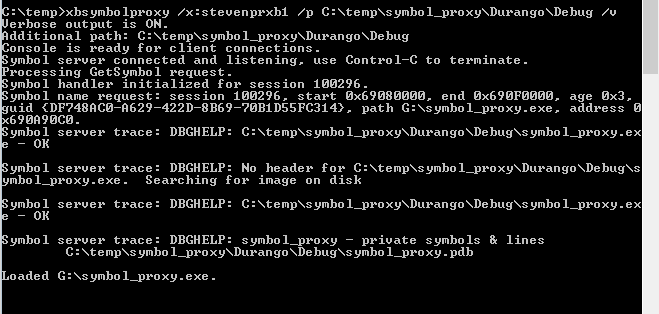
| /v | Displays verbose status output, including the list of requests received, the PDBs that are opened and so on. | ||
| /X[:address] [+accesskey] [/title] | Specifies the host name or address (shown as Tools IP on the console) of a targeted console, but does not change the default console. For information about setting a host name for a console, see Setting a Hostname for the Console IP Address. If you do not use this option, the default console (previously set by Connect (xbconnect.exe)) is used. Accesskey is a string that you can use to restrict access to a console to only those people who know the access key. Set the access key by using the command xbconfig accesskey=your-key; then, restart your console to make the access key effective. To access a console that is configured with an access key, you must include a plus sign (+) and the access key after the IP address or host name of the console. For more information about access keys, see xbconfig accesskey.
/X/title xd:\ would provide access to the default console's scratch drive partition that is visible to running exclusive apps. |
 Note
Note Remarks
xbSymbolProxy is used in conjunction with the GetSymbolFromAddress and GetSourceLineFromAddress APIs to obtain symbol names and source file information given the address of a function in your title. This capability is useful for generating callstacks that contain full symbol information when errors occur in your title, for example. A typical usage pattern is the following:
- Use xbSymbolProxy to establish a connection between your console and your PC and to specify the location of your title’s PDBs on a PC or a symbol server that can be accessed from your PC.
- Call GetSymbolFromAddress and/or GetSourceLineFromAddress from your title running on the console. These APIs will connect back to your PC and use the PDB location information you supplied using xbSymbolProxy to resolve the addresses you provide.
The following example command uses xbSymbolProxy to connect to the console and to indicate that your title’s symbols can be found in C:\temp\DeferredContext\graphics\DeferredContext\Durango\Profile140\bin:
xbSymbolProxy /p C:\temp\DeferredContext\graphics\DeferredContext\Durango\Profile140\bin
You’ll need to include SymbolResolve.h and link with toolhelpx.lib to call GetSymbolFromAddress or GetSourceLineFromAddress. The following code snippets show sample calls to the APIs:
// See SymbolResolve.h for the callback prototype
BOOL SymCallback

(
    LPVOID    context,
    ULONG_PTR address,
    HRESULT   result,
    PCWSTR    name,
    ULONG     offset
)
{
    return TRUE;
}


// See SymbolResolve.h for the callback prototype
BOOL SrcCallback
(
    LPVOID    context,
    ULONG_PTR address,
    HRESULT   result,
    PCWSTR    filepath,
    ULONG     linenumber
)
{
    return TRUE;
}

ULONG_PTR addresses[] =
{
  (ULONG_PTR)myTitleFunction
};


hr = GetSymbolFromAddress(
       ResolveDisposition::DefaultPriority,
       _countof(addresses),
       addresses,
       SymCallback,
       this);

hr = GetSourceLineFromAddress(
       ResolveDisposition::DefaultPriority,
       _countof(addresses),
       addresses,
       SrcCallback,
       this);
If you’ve specified the /v option to xbSymbolProxy, information about the requests it receives, the PDBs it loads and so on will be displayed as in the following example.