PIX Programmatic Callgraph and Instruction Trace Captures
The PIXBeginCapture and PIXEndCapture APIs can be used to initiate CPU callgraph or instruction trace captures from your title rather than from the PIX UI. Starting and stopping captures programmatically gives you a high degree of control over the portions of your title that are captured.
To program callgraph or instruction trace captures
Before you can start a capture using PIXBeginCapture, you must put PIX into a “listening” mode so it can process the capture properly. This mode is required because PIX must dynamically insert profiling hooks or its tracing runtime into your code in order for a capture to be taken.
To put PIX into the mode in which programmatic captures can be taken, drop down the options pane under either the Callgraph Captures button or the Instruction Trace button on the Home tab, and select Next call to PIXBeginCapture:
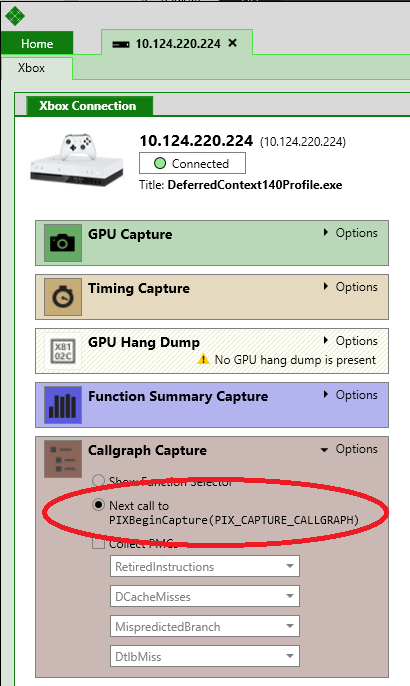
After the Callgraph Captures or Instruction Trace button is pressed, PIX will be in a mode in which it can take captures for 30 seconds. If your title calls PIXBeginCapture within that time, a capture will be started. Set the value for the captureFlags parameter of PIXBeginCapture to PIX_CAPTURE_CALLGRAPH to take a callgraph capture or PIX_CAPTURE_INSTRUCTION_TRACE to take an instruction trace.
void Game::Tick()
{
  PIXBeginEvent(EVT_COLOR_FRAME, L"Frame %I64u", m_frame);
  m_timer.Tick([&]()
  {
    Update(m_timer);
  });
  if(shouldCapture)
  {
    PIXBeginCapture(PIX_CAPTURE_CALLGRAPH, nullptr);
  }
  Render();
  PIXEndCapture(FALSE);
  PIXEndEvent();
  m_frame++;
}
When you’re ready to end the capture, call PIXEndCapture.
BOOL discard = engine->frameNormal();
PIXEndCapture(discard);
PIXEndCapture takes a parameter named discard that describes whether you’d like to discard the capture or display it in PIX. The discard parameter is useful to throw away captures that didn’t meet the criteria you were looking for. For example, you can use PIXBeginCapture and PIXEndCapture to attempt to capture calls to a function that fall within a predefined time range. You might want to only display captures for calls to a function that fall within this range. If discard is FALSE, your capture will be opened in PIX.
Note PIX timing captures can also be taken programmatically. It is not necessary to put PIX into listening mode to take a programmatic timing capture. Pass PIX_CAPTURE_TIMING to PIXBeginCapture to start the capture and PIXEndCapture to stop the capture. Note that the discard parameter to PIXEndCapture is ignored when taking a programmatic timing capture.