PIX Shader Register Lifetime Flow
Shader lifetime flow
To view the lifetime flow of the Vector General Purpose Registers (VGPR) and Scalar General Purpose Registers (SGPR), go to the right of the Original GPU Instructions view in the Shaders tab. Depending on your screen setup you might have to scroll right to see the register lifetime data.
There are two sections, the first represents VGPR lifetimes. The second, further to the right, represents SGPR lifetimes.
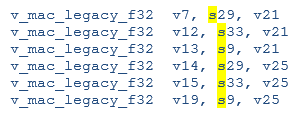
Figure 1. The assembly operand lists show the use of “s” and “v” registers.
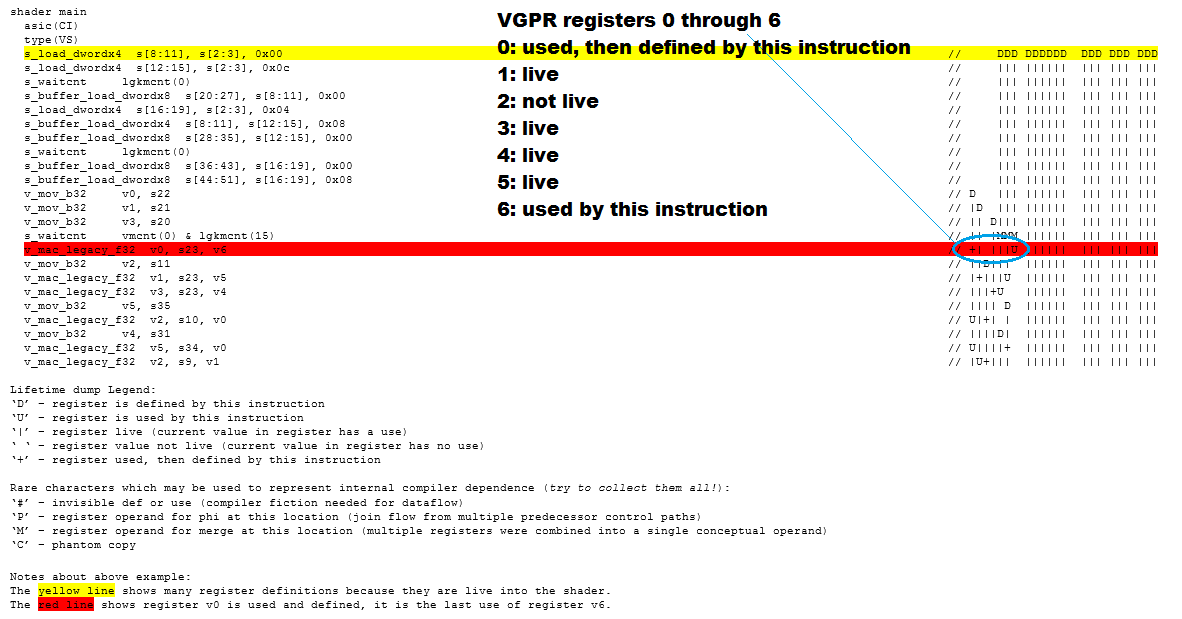
Lifetime view is shown to the right of the machine instructions. There are two sections, the first represents VGPR lifetimes, the second, further to the right, represents SGPR lifetimes. Within each section the columns represent successive registers. First column is register 0, second is register 1, etc.
Figure 2. The VGPR view
To enable shader lifetime flow views
PIX requires shader debug information to be available in order to show register lifetimes. The PDB is generated by the D3Dcompiler, using the following process:
- Define __XBOX_PDB_NAME (per existing instructions) to d3dcompiler (either in source, or in pdefines array).
- Enable debug info generation from D3Dcompiler (using arguments shown below).
- Obtain debug info from the blob and write it to disk.
- Strip debug info from blob.
The FCX command line to achieve this should include the following:
... /Zi /Fd <pdbfilename> /Qstrip_debug
Refer to the Symbol / PDB Options section of PIX Settings page to locate the debug information from PIX.