PIX Tracelog Captures
Overview
Pix can profile Event Tracelog (ETL) events on the console and launch either Visual Studio or Windows Performance Analyzer (WPA) to analyze the resulting data. The trace file is written to your development PC. The log should be useful in identifying problems with CPU bound apps, such as excessive context switching between threads.
These captures, and the options offered, are the same as those for the CPU Performance (xbperf.exe) command line tool.
Capture Process
- To take a capture and launch WPA or Visual Studio, click on the Tracelog Capture button on the Home tab.
Figure 1. The Tracelog capture button 1. You can expand the dropdown for capture options or just click the button to being profiling. A dialog will launch and profiling will begin. The options available are configured in the dialog:
Figure 2. The Tracelog dialog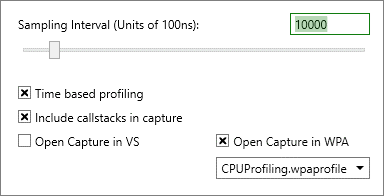
- Sampling Interval : sets the CPU sampling interval in units of 100ns. A value of 10000 collects 1 sample per millisecond.
- Time based profiling : enables/disables CPU time based profiling collection. Disabling profiling will make diagnosing application performance problems difficult, but reduces the overhead of the command. Default is enabled.
- Include callstacks in capture : disables CPU call stack collection. Disabling collecting stacks will make diagnosing some performance problems harder, but reduces the overhead of the command. Default is enabled.
- Open capture in VS : opens the resulting log file in Visual Studio.
- Open Capture in WPA : opens the capture in WPA using the preconfigured WPA layouts used to make analysis easier. Symbols configured in PIX are automatically added on to the symbol path for WPA.
- Press stop to end tracing and open the viewer of choice.
Best Practices and Limitations
Using the tool can affect title performance on the console, so consider extending the timing interval, or disabling the capture of call stacks, if that is the case.