The User Says What? Testing and Tuning Guidelines for Speech Recognition for Xbox One
While programming speech recognition using NUI speech in titles is a relatively lightweight process, validating and tuning the selected phrases can be broadly scoped project. The Xbox One Software Development Kit (XDK) and Xbox One Application Development Kit (ADK) contain tools to help with phrase selection, voice data collection, automated testing and analysis, and recommendations. These tools enable title developers to feel confident about using NUI speech confidence values to create robust speech-recognition experiences.
In this topic:
- Terminology
- Speech data collection goals and methodology
- Testing and tuning process flow
- Strategies for responding to poor speech recognition performance
- Workflow and goals
- Grammar construction and preparation
- Summary
- Additional resources
Terminology
The following terms are important for a basic understanding of testing and tuning speech-enabled apps.
In-grammar speech (IG)
Word or phrase within the currently active set of NUI speech rules.
Out-of-grammar speech (OOG)
Word or phrase not within the currently active set of NUI speech rules.
Correct accept (CA)
In-grammar utterance, successfully signaled by NUI speech.
Correct reject (CR)
Out-of-grammar utterance, successfully signaled as out-of-grammar.
False accept (FA)
In-grammar or out-of-grammar utterance incorrectly signaled as the wrong in-grammar phrase.
False reject (FR)
In-grammar utterance, incorrectly signaled as out-of-grammar.
Side speech
Speech that occurs around the Xbox that is not directed towards the device for speech commands. Typically manifests as conversation that is out of context between two or more speakers.
Speech data collection goals and methodology
Creating a consistent, high-quality corpus of collected voice data—often called utterances—is key to validating the robustness of grammars. These are our recommended practices for selecting and recording speakers.
| Best practices for . . . | |
|---|---|
| User selection and data gathering | Recording environment |
|
|
Testing and tuning process flow
Grammar creation is deceptively easy to approach, but putting together a tuned set of phrases in a grammar can be challenging. How do you know that a grammar works as expected? Are the unusual words that are specific to a title correctly matched to intended pronunciations? Can phrases within a grammar be confused with each other? The following section walks through the basic steps of testing and tuning a grammar for use by a production title.
Step 1: SpeechLab simple testing
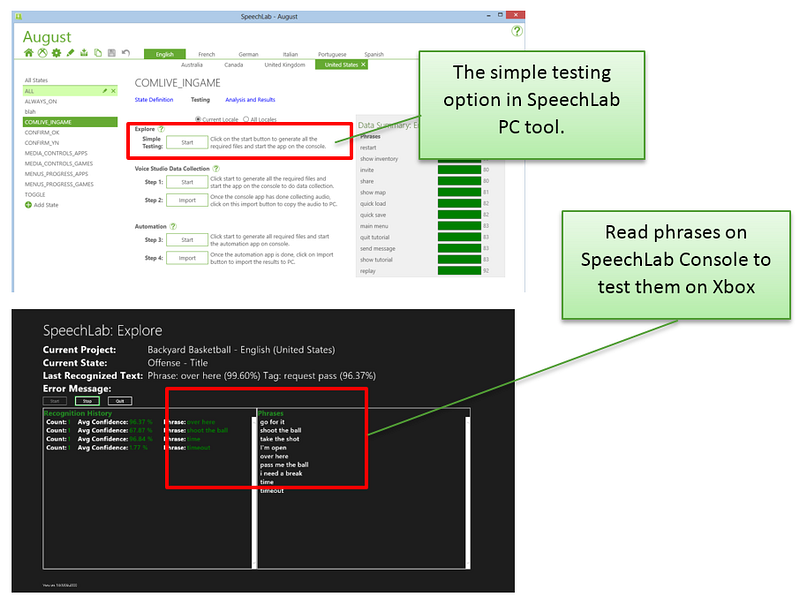
Ad hoc testing is a reality check for developers before they start costly data collection efforts. Ad hoc testing a grammar is the fastest and easiest way to become aware of potentially troublesome phrases, and it’s a way to gain confidence about phrases that are chosen.
| Ad hoc Testing Guidance | |
|---|---|
| Goals | Use ad hoc testing to:
|
| Tools and resources | SpeechLab PC and SpeechLab ConsoleSpeechLab XDK/ADK documentation |
| Process and actions | In-grammar: Speak all phrases per action in the grammar. The phrases are listed on the right-hand side of the screen when SpeechLab Console is running on Xbox One. Out-of-grammar: Be sure to test common OOG scenarios. These include:
|
Titles that use more than one grammar at once will also need to watch out for confusability between and overlapping of phrases. Test appropriate combinations of grammars that you expect to be simultaneously active by merging states in SpeechLab. Note collisions, FAs, and FRs.
Figure 1. Screenshots of the SpeechLab PC and SpeechLab console tools
Step 2: SpeechLab/Voice Studio data collection
Testing a speech solution with only one or two speakers is not enough for title development. Whenever you can, test a speech scenario with at least 10 different native speakers per locale. Ideally, test with at least 20 participants per locale. We recommend testing equally with men and women to ensure that the speech solution is accessible to both, although it also makes sense to skew data collection towards the target demographic. With games targeted for children, test groups should include children as well as adults. Creating an audio repository is the ideal way to test speech scenarios for confusability and pronunciation issues. The more voice data developers collect for speech testing, the more statistically relevant the accuracy results will be.
| Data Collection Guidance | |
|---|---|
| Goals | Create corpus of voice utterances that can be tested as grammars are tuned. |
| Tools and resources | SpeechLab PC and Voice StudioSpeechLab XDK/ADK documentation |
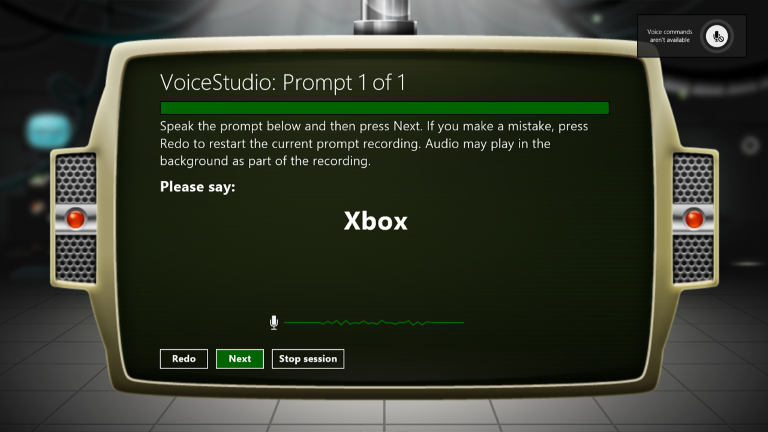
| Process and actions | In-grammar testing: After states have been generated in SpeechLab and ad hoc tested, send phrases to Voice Studio App on the Xbox One console for data collection. Out-of-grammar testing: Add a state with long sentences to your data collection to test side speech scenarios. When generating accuracy results, SpeechLab will use these phrases as examples of OOG speech. When voice collecting, make sure to keep data from multiple states in the same repository. For each state, SpeechLab tests out-of-grammar speech using data in the repository from the same locale. This includes phrases from other states that are not currently active. Bring through users to record phrases. |
Figure 2. Voice studio data collection on Xbox One
Step 3: SpeechLab analysis and results
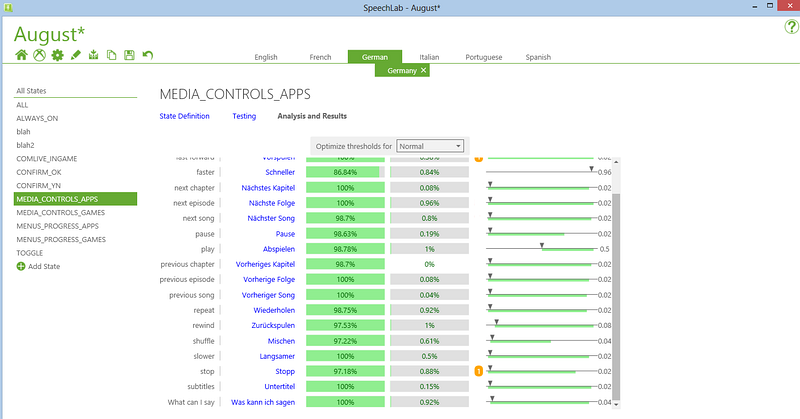
The SpeechLab PC and console apps include an automation tool, Voice Studio, that tests collected wave files in the audio repository against phrases used in Xbox One speech grammars. The tool set makes it easy to analyze data from all supported locales and to identify where problems occur in a grammar. In addition, the tool makes the traditionally difficult task of setting confidence thresholds in a grammar much simpler by showing how different confidence thresholds affect accuracy statistics. Last, the automation tool exports per-phrase confidence threshold XML and ResJSON files that can be used in game code.
| Data Analysis Guidance | |
|---|---|
| Goals |
|
| Tools and resources | SpeechLab PC and console apps SpeechLab XDK documentation |
| Process and actions | The outcome report includes:
|
Figure 3. Results of automation testing. Changing the recommended confidence thresholds on the side effect the CA and FA rates presented.
Step 4: Test in title
Speech testing and tuning is the final step to test within the game or app title being developed. Be sure to collect plenty of telemetry, and test often. Although the SpeechLab tools give great insight on how grammars will work in general, frequent play testing is needed to provide the whole story. When you generate speech solutions, keep in mind that there are many variables that significantly affect how users speak to devices, including:
- Presence of background audio, which may cause users to yell.
- Perceived intelligence of the listening agent.
- Age of the speaker.
- Readability of text on the screen.
- Difficulty of the word being spoken.
- Frustration level of speaker.
Because of these variables, we recommend that developers test speech scenarios often and log variables that could significantly impact how users speak to their device.
| Data Analysis Guidance | |
|---|---|
| Goals | Ensure that the user experience remains satisfactory. Identify what design elements negatively impact user speech and speech technology performance. |
| Tools and resources | Speech Design Overview for Game Designers |
| Process and actions |
|
Strategies for responding to poor speech recognition performance
What should you do when you find words or phrases that perform poorly in a grammar? The following table lists the most common and effective strategies for debugging and adjusting either the environment or the grammar to provide better performance.
| Observed behavior | Steps to mitigate |
|---|---|
| False rejects (FRs) or low-confidence accepts |
|
| False accepts (FAs) |
|
Workflow and goals
For an app’s speech implementation to be robust, the workflow process should be distilled into two separate but equally important processes:
- Designing well-performing grammars that maximize the chance of a successful match. A successful match is indicated by NUI speech returning the correct phrase—a correct accept (CA) with a high corresponding confidence value.
- Defining for the title’s grammars a confidence threshold that maximizes CAs while minimizing FAs and FRs. The confidence threshold is how the title determines, though a data set of user utterances collected by the title, what confidence value for a returned spoken phrase delineates between acting on the phrase or rejecting it.
Gameplay design is an important consideration for defining acceptable rates of FA and FR. For destructive actions, like deletion of a saved game, a higher confidence threshold and/or explicit user confirmation is desirable. For lesser actions, or when there is little penalty for an FA, you can allow the confidence threshold to be significantly lower. Additionally, consider the engagement model: when is NUI speech actively listening for commands? Always? In context-sensitive gameplay scenarios? Only in menus? Also consider how this information is conveyed to the user.
For default confidence thresholds, we recommend using a value that allows greater than 85 percent for successful recognitions and less than 2 percent FAs for OOG based on collected voice data. Very rarely should this confidence threshold go above 0.4. Note that Xbox Home App and system grammars further defend against FAs by using a gating keyword (“Xbox”) that protects from side speech-user conversation not intended to be directed at the console. Using the “Xbox” keyword in title grammars is prohibited, but it is recommend that titles that wish to distinguish normal and active listening gate behind a gesture or button interaction.
Grammar construction and preparation
Grammars that are used for testing should be identical to the grammars used by the run-time title. However, the speech testing tools do not support all possible run-time grammar configurations. The following list shows unsupported features and potential workarounds and mitigations that allow for testing and tuning:
- Custom pronunciations: Using <token> tags and UPS pronunciations. To retain automated test support, titles may phonetically hint at pronunciations if the default pronunciation for a spelled word demonstrates poor returned confidence.
- Dynamic grammars: In particular, programmatically injecting new words or phrases into an active grammar. For testing purposes, dump CFGs from title grammars that are generated at run-time and import the CFG into a SpeechLab project.
For titles requiring more flexible grammars that cannot be represented using the above scenarios, in-app testing will generally be the best method to collect data.
Custom pronunciations and testing
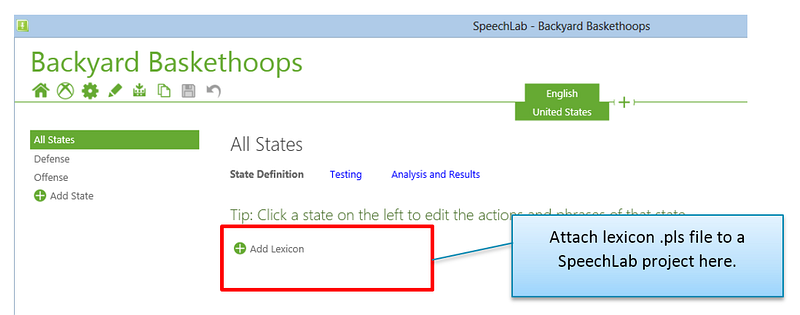
SpeechLab and VoiceStudio tools support custom pronunciations during tuning and testing. If the grammar contains custom pronunciations, the phrases must be specified in a separate lexicon (.pls) file that accompanies the SpeechLab project. We recommend that custom pronunciations be defined in UPS format, which is based on the International Phonetic Alphabet (IPA).
Figure 4. In SpeechLab, a lexicon can be attached on the “all states” page.
Lexicons are XML files, but we recommend that you use the common file extension .pls, a name derived from the Pronunciation Lexicon Specification from W3C. The following example shows how a lexicon allows NUI speech to interpret the pronunciations given in the preceding grammar-embedded custom pronunciation:
  <?xml version="1.0" encoding="utf-8"?>
  <lexicon version="1.0"
  xmlns="http://www.w3.org/2005/01/pronunciation-lexicon"
  xmlns:xsi="http://www.w3.org/2001/XMLSchema-instance"
  xsi:schemaLocation="http://www.w3.org/2005/01/pronunciation-lexicon
  http://www.w3.org/TR/2007/CR-pronunciation-lexicon-20071212/pls.xsd"
  alphabet="x-microsoft-ups" xml:lang="en-US">
     <lexeme>
  <grapheme>Urdnot</grapheme>
  <phoneme>ERR D N AO T</phoneme>
  <phoneme>ER rho D N AA T</phoneme> <!-- illustration of multiple acceptable pronunciations -->
     </lexeme>
  <lexeme>
  <grapheme>Wrex</grapheme>
  <phoneme>RA EH K S</phoneme>
     </lexeme>
  </lexicon>
Note that phoneme labels are case-sensitive and must be space-delimited. For more information about the UPS custom pronunciation specification, please visit the MSDN UPS listings at the following locations:
| NUI speech Language | UPS Listing |
|---|---|
| English — United States | Phoneme Table for English (United States) |
| English — United Kingdom | Phoneme Table for English (United Kingdom) |
| French — Canada | Phoneme Table for French (Canada) |
| German — Germany | Phoneme Table for German (Germany) |
| Spanish — Mexico | Phoneme Table for Spanish (United States) |
Summary
Testing and tuning for speech recognition is a critical aspect of creating successful speech-recognition scenarios that provide a magical experience for a wide range of users. The mature pipeline of tools offered in the Xbox One Development Kit enables many parts of this process to be automated and measured. However, the title developer is responsible for acquiring data from a set of speakers and utterances, data that is as broad as necessary to validate the title’s specific needs.
With a robust collection of data at hand, developers can tune with increasing accuracy and provide significant and consistent behavior to the broad range of users who will interact with the title using their voices. Developers who are interested in maximizing their speech investment should reuse gathered speech data, much as they might reuse other training data. Speech intended for one in-grammar scenario can provide entirely valid test data for false accepts and false rejects in other out-of-grammar scenarios. Developers should also consider collecting audio data while collecting other forms of data, such as gesture recording. This way, users can provide a broad set of data that informs multiple aspects of natural user input.
Additional resources
For more information about speech design and implementation guidance on Xbox One, see the “Speech Design Overview for Game Designers” and “Silver Tongue: Xbox One Speech Cheat Sheet” white papers, which are available for download on the Xbox Game Developer (XGD) site. Use the appropriate link for your partner program:
Game titles and hub apps: https://developer.microsoft.com/en-us/games/xbox/partner/development-education-whitepapers
For SpeechLab documentation and lists of stock grammars phrases, see the NUI speech-related sections in the Xbox One Development Kit (XDK).
XDK:
https://developer.microsoft.com/en-us/games/xbox/partner/development-documentation