Users
Xbox One manages identity through two concepts: users and controllers. A user represents a unique person who is signed into Xbox One. A controller represents any form of input used to interact with the system. The system supports many different types of controllers including gamepads, navigation devices (for example SmartGlass), human bodies tracked by Kinect, and third-party accessories. A user may be paired to any number of controllers to associate interaction with a particular user profile, but a controller may be paired to only one user at a time. The system also supports controllers that aren’t paired to a user, referred to as unknown controllers. Examples include a person who has just walked into the field of view of Kinect, a recently connected gamepad, and a SmartGlass device that has not been signed into the console.
Your title is responsible for associating progress, saved state, preferences, achievements, and other content with the appropriate user who has earned it, based on its paired controllers.
The User abstraction and the User class are how Xbox One apps identify users and associate them with other information such as their display information, privileges, sign in status, and input methods and devices. The User API is closely associated with the Controller API, which Xbox One apps use to get user input from NUI data or physical controllers. The legacy concepts of a controller as a physical device with buttons or joysticks on it, and a user represented simply by a User Index between 0 and 3, are no longer applicable in the Xbox One environment.
User Display Information
The User::DisplayInfo property returns a UserDisplayInfo object gives information that is used to display a user’s identity, such as their gamer tag and gamer score. It also contains information about the user’s privileges and reputation. Note that the information in the UserDisplayInfo class is carefully designed to avoid exposing Personally Identifiable Information (PII) about players that may be regulated by local laws. You should only use information from this class to identify users, so as to avoid the possiblity of exposing other user information that might be regulated in some legal jurisdictions.
When you want to display a gamer’s picture, you must follow the proper procedure, as determined by whether the gamer is signed in to the local console or is signed in to a remote console.
User Identifiers and Users Interacting with the Console
The User class contains three properties used to identify a user and a static property listing the users interacting with the console:
The User::XboxUserHash property is an opaque hash value that uniquely identifies a user to Xbox Live. It is used in interactions with Xbox Live to identify a particular user.
The User::Id property is an ID that is unique to the current console.
The User::XboxUserId property is a unique ID tied to the user’s account that persists accross multiple consoles.
The User::Users property lists all of the users currently using the console.
Associated Audio Devices and Controllers
The User class lists the audio devices and controllers associated with a user in the AudioDevices and Controllers properties.
Controller API
The Controller API’s Controller class describes much more than simple physical devices—it also represents the skeleton of a person being tracked by the NUI system. The User class consolidates the controller-based User Index number with the NUI concept of a NUI enrollment ID, combining them into a single class that holds important information the system has about a given user.
A given user can be associated with more than one controller, and the controllers associated with a given user are reported in the User::Controllers property.
Types of users and online status
The User object reports information about a user’s signed-in and online status. Users can be in one of three states with respect to being signed in to the console. (If the console is online, users can also be optionally signed in to Xbox Live.)
Signed in Xbox Live User
The user is signed in to the console and the console knows how to associate the user with a durable identity on Xbox Live because it knows the user’s PUID/XUID combination. Signed-in users can earn and make progress toward achievements, and would normally have access to all of the experiences offered by a title. Title developers are allowed to require that a user be signed in, in order to participate in particular experiences such as multiplayer.
If a user is signed in, the User::IsSignedIn property value is true, and the User::IsGuest property is false.
Sponsored
A sponsored user has not signed in to the console, but they have chosen to sign in as a sponsored user, they have designated a signed-in user as their sponsor. They remain signed in as sponsored users until they explicitly sign out or are implicitly signed out when their sponsor signs out. They are not connectable with any durable identity on Xbox Live or the console, but if the console is online their presence is reported on Xbox Live. Individual title designers can choose whether to require that a user have a durable identity in order to participate in particular title experiences such as multiplayer.
While the details of the Sign In user interface are not final, a user who wants to sign in as a sponsored user will do so by making that choice in the Sign In user interface. The ability to create a sponsored user can be disabled by a parental control setting. Your code should be designed with sponsored users in mind, and also with this parental control setting taken into consideration.
Note While sponsored users are similar in some ways to the offline accounts provided on Xbox 360, they are functionally different. Sponsored users cannot be connected to a durable identity on Xbox Live, for example, and at this time Microsoft does not offer a way for a sponsored user to migrate to a signed-in Xbox Live identity while keeping any status or progress earned while sponsored.
If a user is sponsored, the User::IsGuest property is true, and the User::Sponsor property is a reference to the User object of the sponsor.
The following table shows user types and the associated property values.
| User Type | User.IsSignedIn | User.IsGuest | User.Sponsor |
|---|---|---|---|
| Unknown | FALSE | TRUE | Null |
| Sponsored Guest | TRUE | TRUE | Sponsoring User |
| Signed In Xbox Live User | TRUE | FALSE | Null |
Users, Controllers, and Pairing
Xbox One provides a rich model for managing associations between users and forms of input. Your title can use this information to personalize gameplay experiences for your customers.
This topic discusses Xbox One’s identity model, the APIs used to access it, and the system-provided mechanisms that tie together user and input identity. It also discusses how a title can use the system’s identity state to provide a personalized, consistent, and reliable customer experience. Furthermore, it provides the guidance needed for your title to leverage the system’s identity state to provide a personalized, consistent, reliable experience for your customers.
Xbox One, embracing the dynamic nature of users and input across multiple games and apps, is designed for multi-user experiences. The system provides a holistic model and APIs for managing identity. It combines awareness of the room and of users’ sign-in intents to bind users automatically to their input. While it provides the real-time state of this information, players expect a consistent experience in the title in which they’re playing. The player’s experience should not be affected negatively by the system’s own state changes.
Compared to Xbox 360, Xbox One features many advances in identity management across the system:
| Capability | Xbox 360 | Xbox One |
|---|---|---|
| User representation | dwUserIndex | User object that represents a signed-in user, which may be paired to one or more input devices |
| Input device representation | Gamepad input polled via XInput; human body input via NUI API | Controller object that represents any input device that can be paired to a user, with dedicated types for specific forms of input |
| Biometric identity | Title-managed | System-managed; consistent behavior across experiences |
| Automatic controller pairing | Not available | Detects who is holding supported input devices |
| Title callable sign-in UI | XShowSignInUI and XShowNuiSignInUI | SystemUI.ShowAccountPickerAsync Method |
The user and controller model
Xbox One manages identity with two concepts: users and controllers. A user represents a unique person who is signed into Xbox One. A controller represents any form of input device that interacts with the system. The system supports several types of controllers, including gamepads, navigation devices (for example, SmartGlass), human bodies tracked by Microsoft Kinect, and third-party accessories.
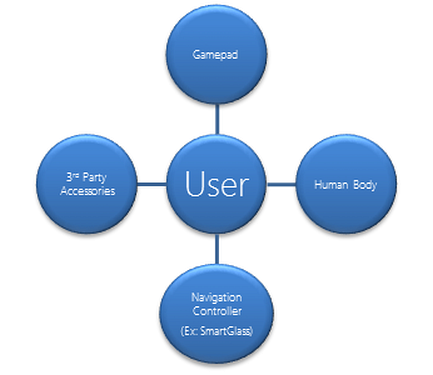
A user may be paired to any number of controllers to associate interaction with a particular user profile, but a controller may be paired only to one user at a time. The system also supports controllers, called unknown controllers, that aren’t paired to a user—for example, a person who has just walked into the Kinect field of view, to a recently connected gamepad, or to a SmartGlass device that has not been signed into the console.
Your title is responsible for associating progress, saved state, preferences, achievements, and other content with the appropriate user, based on the paired controllers.
Types of users
Xbox One supports two types of users: Xbox Live users and sponsored users.
Xbox Live users have full capabilities as users on the system. They are created initially by adding a new account in the Account Picker, a system-provided UI for signing users in. During account creation, they can optionally be enrolled biometrically. Thereafter, they can be signed in via Kinect if they were biometrically enrolled or via manual sign-in through the Account Picker. Xbox Live users persist on the console until they are removed explicitly with the Settings app.
Sponsored users enjoy Xbox One for a single session on a console. They are created when they choose in the Account Picker to play as a guest and are sponsored by another signed-in Xbox Live user. They can also be enrolled biometrically for the session. Sponsored users persist until they sign out, until the sponsoring Xbox Live user signs out, or until the console is turned off.
In this section
How to: Enumerate Users
Discusses how to enumerate all connected users.
How to: Enumerate Controllers
Discusses how to enumerate all controllers connected to the console
How to: Handle User System Events
How to add handlers for the events signaled when users are added to, or removed from the console
How to: Retrieve a remote user’s picture
Describes how to retrieve a remote user’s picture
How to: Retrieve a local user’s picture
Describes how to retrieve a local user’s picture
Configuring a Default User
How to set a default user on your developer console.
User and controller APIs
Properly handling user and controller state changes through the User and Controller APIs is the key to understanding who’s playing your game and attributing content correctly.
System-provided user-controller pairing
Discusses how users and controllers are paired biometrically, automatically via controller pairing, and using SmartGlass and the Account Picker.
Managing players in your title
Discusses how titles can establish subsets of active users and controllers that are participating in the game experience, and cache their pairing state during gameplay.
Users, controllers, and pairing FAQ
Frequently-asked questions concerning users, controllers, and pairing.