An Overview of Content Submission
The Xbox Developer Portal (XDP) is a secure, end-to-end environment for managing your Xbox One product from the day when you first propose a new product group, through the release of each individual product in that group, and beyond-for as long as your product is publicly available.
This topic provides a high-level overview of the process of submitting and releasing the core game product for an Xbox One title by using XDP. A core game product includes most of the tasks and stages of development that are represented in XDP, while other product types do not include all of the stages described here.
Figure 1. A simplified process model for a title in XDP.
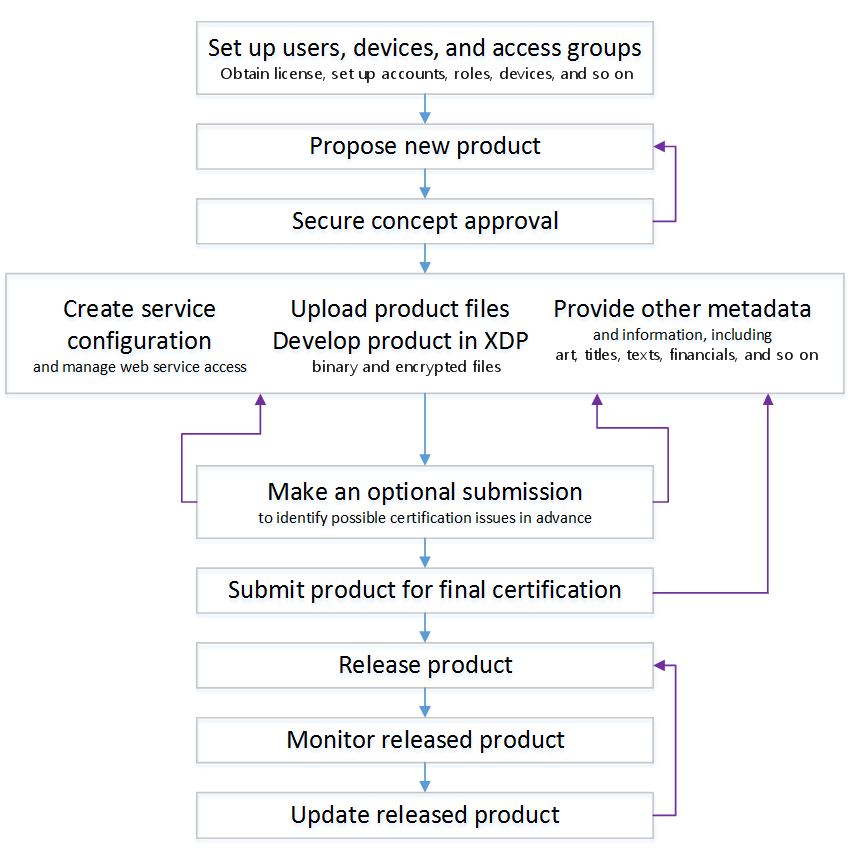
The stages shown in the flowchart are described in the following sections:
- Setting up users, devices, and access groups
- Proposing a new product group and securing concept approval
- Developing your product
- Copying a product instance from one sandbox to another sandbox
- Creating the service configuration and managing web-service access
- Providing other metadata, art, and information
- Making an optional or final submission for certification
- Releasing, monitoring, or updating a product
Setting up users, devices, and access groups
After your company has an agreement to create products for Xbox One, you can begin to configure your content in the XDP. If your company does not yet have an agreement for Xbox One and you are developing a game, contact your Microsoft account manager; if you are developing an application, contact Xbox App Partner Requests (xboxapps@microsoft.com); and if you are working with the ID@Xbox program contact ID Setup (idsetup@microsoft.com). Your Microsoft account manager will set up a user with the Publisher Management permission, and that user can then assign permissions to other users within your XDP organization.
Before you begin to submit product information and material, you set up your XDP organization, which includes the following:
User accounts
A user account provides access to your products and content by assigning users to access groups. Each user account may own one or more development accounts.
Note
To run products during development so that they have access to their service configurations and to Xbox Live services, you must use the credentials of a development account and not the credentials of the user account that is associated with that development account.
Trusted devices
A trusted device is an Xbox One development kit that you have added to your XDP organization by provisioning it.
For more information about provisioning and adding a development kit, see “Enabling Your Dev Kit Entitlement” in the Xbox One XDK documentation.
Access groups
An access group manages access to content on Xbox Developer Portal (XDP) and in sandboxes on dev kits. Each access group may include user accounts (along with any development accounts that are associated with those user accounts), trusted devices, or both user accounts and trusted devices.
Permissions and run-time access for each product build are assigned to groups of users and/or devices, and not to individual users or devices.
Development accounts automatically inherit the access of the user account with which they’re associated. For example, if a person’s user account is added to the Group1 access group, then all of the development accounts that are owned by that person’s user account are automatically included in Group1, acquiring the same run-time permissions and access that the user account does.
Related conceptual topics:
- Introducing User Accounts and Development Accounts
- Introduction to Access Groups
- About Product Groups, Products, Product Instances, and Content Packages
- About Product Builds, Sandboxes, and Run-time Access
Proposing a new product group and securing concept approval
The product group is the highest level in the organization of your content. One product group contains all of the products that belong together in one game title.
Each of your products will be included in a product group. For example, if you are planning a game title named My New Game, that product group might include one or more versions of the core game for My New Game, along with downloadable content (DLC) and other related products.
The product group should be created early in your development process in order to produce essential data that is specific to your product, such as the game product’s unique title ID, as well as the events that your product will report through Event Tracing for Xbox (ETX). One reason that you need the title ID for development is that your title must have a title ID to access services that use Xbox service authentication.
The first step in creating a new product group is to submit a proposal of your concept for that product group to Microsoft for review. To submit the proposal for a new product group, request a Title Information Form (TIF) from your Microsoft Account Manager, complete the form, and then return it to your Account Manager.
To submit the proposal for a new application, rather than a game title, contact xboxapps@microsoft.com.
For more information about submitting concepts for approval, see About Concept Submission.
Developing your product
After the concept for your new product group has been approved, you can begin to use XDP to upload the service configuration, as well as other information and materials that will be associated with the products in the group.
During the development of each product build, you will run a build by accessing it in the development sandbox to which it is assigned.
A development sandbox is a special content isolation container to which product instances, and all of the product builds or content packages associated with them, can be assigned. By using development sandboxes, content isolation safeguards your products, along with their configuration information and other related materials, from unauthorized access.
For more information about using sandboxes in development, see About Product Builds, Sandboxes, and Run-time Access.
Related conceptual topics:
- Introducing User Accounts and Development Accounts
- Introduction to Access Groups
- About Product Groups, Products, Product Instances, and Content Packages
- About Product Builds, Sandboxes, and Run-time Access
Copying a product instance from one sandbox to another sandbox
You can make an existing product instance that is assigned to one sandbox available in another sandbox-either another existing sandbox, or a newly created one. This makes it possible for the same product instance to be available in connection with two separate configurations of other product instances simultaneously.
In this operation:
- If the destination sandbox that you specify already exists, any instance of the same product currently assigned to that sandbox will be completely replaced by the instance that is copied from the origin sandbox.
- If the destination sandbox that you specify does not already exist, it will be created for you during the operation.
- The origin and destination sandboxes must have identical 4-letter monikers. For example, a product instance can be copied from Sandbox XDKS.3 to Sandbox XDKS.7, but not from Sandbox XDKS.3 to Sandbox MSFT.7.
For more information about copying a product instance from one sandbox to another sandbox, see Create and Manage Product Instances.
Creating the service configuration and managing web-service access
The service configuration for a game title or application is the collection of all of the configuration data provided by the developer of the title or application.
For example, the service configuration for a title includes definitions of events, user statistics, achievements, multiplayer sessions, matchmaking hoppers, Rich Presence strings and Game DVR strings, along with the Network Security Authorization List (NSAL), data-storage information, and all localized text strings for all localized versions of the title.
For more information about service configuration, see Service Configuration for a Game or Application.
Providing other metadata, art, and information
In addition to the information that you provide for the service configuration, you will enter or upload text, art assets, and other information to be used in the catalog listing of your product, as well as the details about the availability of your product.
Each availability of a product is a unique combination of four pieces of information: which product is being offered, in which sales regions, during what period of time, at what wholesale price. For more information about availability, see About Marketplace Availabilities and Financial Information.
Making an optional or final submission for certification
During development, each build of each individual product is contained in a content package. When the product build in a content package is ready for certification, you submit the content package to Microsoft, and Microsoft performs a series of reviews of the build.
There are two types of certification review, each of which checks the submitted product both for functionality and for compliance with Xbox One standards and requirements:
Optional submission
An optional submission is a preliminary pass through the certification process that you can request for a content package before you have completely finished developing the product build in that content package.
An optional submission can help you identify any problematic aspects of the build that might slow down your submission for final certification later on.
Final Certification
Final certification is the submission that you make when you believe that the product build in a content package is complete and ready for release.
At least a month before you expect to make either a preliminary, optional submission or a final certification submission for any product, contact your Release Manager to make an appointment for the game submission. If you have an application, contact xboxapps@microsoft.com or your assigned developer account manager (if you have one) to schedule an appointment for the submission.
Of course, the actual date of any scheduled submission may need to be adjusted to accommodate last-minute issues, but identifying a target date allows the Certification team to plan for your submission in advance. Being able to plan for your submission generally enables certification to be completed more quickly, as well as possibly producing other benefits.
If you want to request that an exception to the usual Xbox One product guidelines be made for your game, contact your Release Manager; if the exception is for an application, contact xboxapps@microsoft.com or your assigned developer account manager (if you have one) before you submit the content package for certification review.
If your submission for certification fails, Microsoft will provide you with a list of conditions for resubmission (CFRs). If you believe that any of the CFRs is in error, you can submit a CFR challenge to explain why you believe that the submitted product does not actually infringe upon the identified guideline or rule.
Related conceptual topics:
Releasing, monitoring, or updating a product
When your individual product or product group has successfully passed its final certification review and is ready to be released-if it is a game-the Release Manager will work with you to arrange the necessary final details. If your product is an app, then the Xbox Apps Partner team (xboxapps@microsoft.com) or your developer account manager will work with you on the final details.
After your products have been released, you can monitor their performance by using Xbox Developer Insights (XDI), which provides data about purchases, usage, events, statistics, and achievements for your products. New data is usually available on the day after it is collected. For more information about using XDI to monitor the performance of a released product, send mail to XDIHelp@microsoft.com.
Updating a product can entail making changes to the service configuration, to the marketing information, or to financial settings. Alternatively, it can mean replacing a binary file or other content for the product. Depending upon the sorts of changes that you are making, the updated product may or may not need to pass through another final certification review.
For each binary-file update, you must specify an available date, the first date on which the new version first will be available for download, and a mandatory date, the date by which users must download the new version if they wish to continue to use the product.
Related conceptual topics: