Command Lists, Draw Bundles, and Deferred Contexts
Introduction
When a title is render-thread bound, command lists and draw bundles are two techniques for potential performance improvements. Correctly using command lists and/or draw bundles can significantly improve CPU rendering performance.
Command lists and draw bundles have the following similarities:
- They both are encapsulations of state setting and draw calls.
- They are recorded using a deferred context (draw bundles can also be recorded on the immediate context through a future API update).
- They are typically executed from an immediate context.
If a title is render-thread bound and has parallelizable rendering tasks, you can use a deferred context on another CPU thread to perform some of these rendering tasks and record the graphics commands (state settings and draw calls) into a command list. The command list is then executed on the immediate context at a later time. Furthermore, multiple command lists can be recorded in parallel on different threads, giving even more performance improvements. By doing this, you allow the rendering tasks to be effectively spread out over multiple CPU threads.
In addition to finding out parallelizable rendering tasks, you can also identify reusable and repetitive rendering tasks, such as rendering a character. These tasks can be recorded into a draw bundle from either a deferred context (supported right now) or an immediate context (supported through a planned future API update). Using draw bundles saves you CPU time because executing a draw bundle costs significantly fewer CPU cycles than issuing the graphics commands that are contained in the draw bundle directly.
Please note that these technologies are for improving CPU performance. They won’t help if your title is GPU bound, because the amount of work that the GPU has to perform remains the same whether you use these technologies or not.
Note An exception: Command lists clear and restore state, which costs some GPU time. For now, the first call of a draw bundle will always roll the context. So will the first call after a draw bundle. In an anticipated future release of the driver, draw bundles will offer the opportunity for the driver to be optimized by removing the redundant state.
Command lists
The following sections describe basic usage and performance considerations of command lists.
Basic usage
Using command lists generally consists of the following steps.
During initialization:
- Create one or several deferred-context instances through the ID3D11Device::CreateDeferredContext Method
- Create one CPU thread (referred to as a deferred-context thread) for each deferred context instance that you obtained in the previous step.
During rendering:
- Perform graphics operations on the deferred-context thread using the methods of the deferred context.
- This step can be parallelized because you can have multiple threads running in parallel, with each thread using its own instance of the deferred context.
- It’s perfectly fine to use more than one deferred context on a given thread, or to use both immediate context and deferred contexts on the main thread—although this does not save CPU time.
- Call FinishCommandList method on the deferred-context thread to get a pointer to the recorded command list.
- Play back the recorded command list by using the immediate context on the main thread.
Performance considerations
Determining the number of deferred contexts
The number of deferred contexts you want to create during initialization time depends on the maximum number of parallel rendering tasks the engine needs to perform anytime during rendering. Although the system allows a maximum of 48 deferred contexts to exist at any one time, in general you shouldn’t create more than six deferred contexts at once, because that’s how many cores you have in the game OS. Of course, it is up to you to precisely tailor your thread usage for maximum efficiency. For example, if one deferred-context thread is waiting for a direct memory access (DMA) operation, you can swap in another deferred context thread to use the otherwise-wasted CPU time on the same core. In this case, having more than one deferred context and deferred context threads per core prevents a CPU bubble.
State management
A command list does not inherit any states from the immediate context. All of the states are defined during command-list recording time by using the state-settings call on the deferred context. The states on the immediate context are ignored when the recorded command list is executed.
The restore-context-state flags in FinishComandList and ExecuteCommandList
Every time you call FinishCommandList on a deferred context, you get a pointer to the recorded command list, and the deferred context is ready for recording another command list. The restore-state flag in FinishCommandList determines how the states change after FinishCommandList on a deferred context is called. Setting the flag to true in FinishCommandList tells Direct3D to save all the states associated on the deferred context before FinishCommandList and to restore them after FinishCommandList. When you use false, the states are only restored to their defaults, as defined by ID3D11DeviceContext::ClearState. In most cases, it is more efficient to leave the flag set to false and set up necessary states yourself, because saving and restoring all states is a costly operation.
Similarly, during playback, the restore-state flag in ExecuteCommandList determines how the states change after ExecuteCommandList on the immediate context is called. Setting the flag to false only restores all the states to their defaults after the ExecuteCommandList call (again, as defined by ID3D11DeviceContext::ClearState), which are not necessarily the same as before the ExecuteCommandList call. This is cheaper than the flag being set to true, where the system has to dump and restore all the state blocks.
Recording cost
During command-list recording on a deferred context, the memory needed to hold the recorded command list grows on demand, in chunks of 64 KB by default. The allocation cost might become significant and could be problematic if memory needs increase too many times. To address this issue, you can override the default XMemAlloc by hooking up your own allocator through XMemSetAllocationHooks. In your custom allocator, you can potentially grow the memory more aggressively, depending on how you record the command lists.
Playback cost
Split point
A split point gets created when some information about a resource being used on the deferred context during command-list recording time won’t be known until playback time. Typically such information includes the address of the resource and the compression state of the resource. Having too many split points can be a big performance problem. They essentially kill the pipelining and efficiency of command-list playback, as the draw call in question must be separated out from the recorded command list and reissued on the immediate context. Generally, a split point gets created if any of the following happens on the deferred context:
- Clear render target is called.
- Clear depth stencil is called.
- Set render target view is called.
- Set unordered access view is called.
- Set depth stencil state is called.
- Set any resource of dynamic usage, such as setting the index buffer, vertex buffer, constant buffer, and the shader-resource view.
One exception is if you map the dynamic buffer as D3D11_MAP_WRITE_DISCARD before using it on a deferred context, then no split point is created.
As the preceding list implies, some split points are avoidable, while some are not. Here are some tips to help you minimize the number of split points:
- If possible, use immutable resources instead of dynamic resources on deferred contexts. The address of an immutable resource is known at creation time and doesn’t change throughout its lifecycle.
- If you have to change the content of a resource, you can choose to use a dynamic resource and map it using D3D11_MAP_WRITE_DISCARD before using it on the deferred context.
- You can also use default resources, and map the resource using D3D11_MAP_WRITE_NO_OVERWRITE as MapType and D3D11_MAP_FLAG_ALLOW_USAGE_DEFAULT as MapFlags on the deferred context. This is an Xbox One extension and is not available on standard Direct3D 11. When using this approach, you will have to take care of the multi-buffering yourself because the CPU always runs one or two frames ahead of the GPU.
- Similarly, you can use SetPlacement/SetFastPlacement to modify the address of a default resource as you set it.
PIX split-point counters
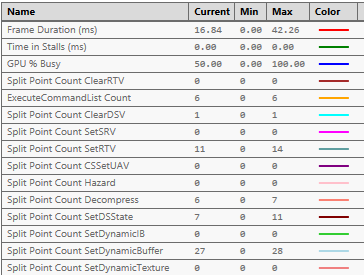
PIX sysmon contains several counters to help you identify what types of split points are being created, making it easier to remove unnecessary ones. You can find and add split-point counters from the counters tab, under the GPU category.
Figure 1. PIX split-point counters
Stock Direct3D vs. Monolithic Direct3D
In older Xbox One releases, the graphics driver was based on D3D11.dll, referred to below as “stock Direct3D”. With stock Direct3D, CPU performance of command-list playback is less than it should be; the DLL performs processing that is unnecessary on Xbox One.
On the other hand, Monolithic Direct3D is designed to be “lean and mean” and to take full advantage of Xbox One hardware, providing significantly better CPU playback performance and better CPU performance overall. Porting your title from stock Direct3D to Monolithic Direct3D is recommended but not required. You can submit your title to Certification with either stock Direct3D or Monolithic Direct3D.
Draw bundles
Draw bundles significantly reduce CPU overhead for rendering in comparison to using either Direct3D immediate-context rendering or Direct3D 11 command lists. Draw bundles provide no GPU performance benefit relative to immediate-context rendering.
Draw bundles are intended to be used in the same way that the majority of Xbox 360 titles used command buffers. Xbox One hardware allows a cleaner API model than Xbox 360 hardware did.
Draw bundles are objects that are similar to Direct3D 11 command lists. They encapsulate a collection of state setting and draw calls, are recorded using a deferred context, and are typically executed from an immediate context.
For a high-level comparison of draw bundles and command lists, see Summary, below.
In this section:
- Recommended usage
- Constant-engine size restriction
- The API in stock Direct3D
- The API in Monolithic Direct3D
- Recording
- Remapping slots for multiple draws
- Execution
Recommended usage
Use draw bundles when you want to save CPU overhead on your rendering thread. Even if no state other than the shaders, input layout, and draw are bound into the bundle—all other states can be inherited—it is still a significant CPU performance win relative to having Direct3D do the shader and input-layout changes on the immediate context.
Constant-engine size restriction
Draw bundles are designed for small numbers of draw calls. There is a fixed hardware-imposed limit on how much aggregate state can be encapsulated with the draw bundle. A maximum of approximately 6 KB of accumulated slot overrides are available for encapsulation. The amount each type of override contributes to this 6-KB limit is as shown in Table 1:
Table 1. Footprint of resource overrides.
| Resource Override | Size (Bytes) |
|---|---|
| Shader resource | 64 |
| Constant buffer | 32 |
| Vertex buffer | 32 |
| Sampler | 32 |
This applies to the accumulated set of overridden resource slots for the duration of the draw bundle. In other words, updating shader resource slot 0 to a different encapsulated resource before every draw call in a draw bundle with 10 draws contributes only 64 bytes of memory to this total. In contrast, a draw bundle with only one draw that sets shader-resource slots 0 through 9 will contribute 640 bytes of memory to this total.
The API in stock Direct3D
Support for draw bundles is supported in stock Direct3D. However, the existing D3D11.dll runtime limits the ability to add new Direct3D methods to existing Direct3D objects.
Draw bundles are created by recording state and draw calls using a special deferred context. Such a deferred context must be created by passing the D3D11_CREATE_DEFERRED_CONTEXT_DRAW_BUNDLES flag to CreateDeferredContext. The resulting deferred context may be used only for draw-bundle recording.
FinishCommandList is used with such a deferred context to create the resulting command list, which represents the recorded draw bundle. The Boolean value of false must always be used for the RestoreDeferredContextState parameter when a draw bundle is recorded.
ExecuteCommandList is used to execute the command list that represents the draw bundle. The Boolean value of false must always be specified for the RestoreContextState parameter when executing a draw bundle. ExecuteCommandList can continue to be used for executing real command lists in addition to draw bundles.
The API in Monolithic Direct3D
In Monolithic Direct3D, draw bundles work in the same way as described in The API in stock Direct3D above. Note that this will be the only way to use draw bundles in Monolithic Direct3D through the Xbox One launch.
In future versions of Monolithic Direct3D, a new set of methods will be introduced to support draw bundles. The following objects and methods are in the current specifications, and they are subject to change:
  // Draw Bundle APIs for Monolithic UMD
  void ID3D11DeviceContext::StartBundle(
      [in] UINT Flags
  );

  void ID3D11DeviceContext::FinishBundle(
      [in] ID3D11DrawBundle **ppBundle
  );

  void ID3D11DeviceContext::DrawBundle(
       [in] UINT Flags,
       [in] ID3D11DrawBundle *pBundle
  );

  void ID3D11DeviceContext::PatchResource
       [in] UINT NumResources,
       [in] ID3D11Resource *const *ppResources
  );

  UINT32 ID3D11DrawBundle::GetSize(
       [in] UINT Flags,
       [out] UINT *pSize
  );
Recording
When you record a draw bundle, there are a number of things to pay attention to.
Mandatory state
Table 2 shows the methods that represent a class of state that must always be recorded into the draw bundle. The notes column shows the specific behavior for each method.
Table 2. Mandatory states.
| API | Note |
|---|---|
| *SetShader methods | The shader for each stage must always be explicitly set while recording a draw bundle. The shaders will be explicitly bound into the bundle and cannot be inherited. |
| OMSetRenderTargets | OMSetRenderTargets must be called before the first draw call for a draw bundle, and should only be called once per draw bundle. Only the pixel formats from this call will be recorded into the draw bundle; the rest of the render-target context will always be inherited from execution time. This means that states such as the location and dimensions of the render targets and fast clear/compression/Hi-Stencil/Hi-Z configurations will not be recorded into the draw bundle and will be inherited at execution time. However, the invoker of the draw bundles must guarantee that the render targets set at execution time are the same number and have the same formats as those at record time. |
| IASetIndexBuffer | This is needed only if recording indexed draws. The index buffer will be explicitly bound into the bundle and cannot be inherited. |
| IASetInputLayout | The input layout will be explicitly bound into the draw bundle and cannot be inherited. |
| IASetPrimitiveTopology | The topology will be explicitly bound into the draw bundle and cannot be inherited. |
Draw methods
The following methods can be recorded into the draw bundle:
- Dispatch
- Draw
- DrawAuto
- DrawIndexed
- DrawIndexedInstanced
- DrawInstanced
Multiple draw calls may be recorded into a single draw bundle, subject to the encapsulated state-size constraint detailed earler in this topic.
Encapsulation methods
When any of the following states is set while a draw bundle is recorded, that state will be encapsulated into the draw bundle. When a shader references any state represented by the following methods that are not encapsulated into the draw bundle, the inherited state that is set at execution time will be used instead.
This encapsulation is done at a slot granularity. For example, if PSSetShaderResource(1, 1, &pResource) is called during recording but the pixel shader referenced both slot 0 and slot 1, the inherited state for slot 0 will be used, and the encapsulated state for slot 1 will be used.
A slot is overridden even if it is set as NULL. That is, PSSetShaderResource(1, 1, &nullptr) will still count as an encapsulated state.
Invokers of draw bundles never have to clean up inherited/encapsulated states after execution; cleaning up is handled at no cost by the hardware.
Table 3. Encapsulation methods.
| API | Note |
|---|---|
| *SetConstantBuffers | See Encapsulation limitations |
| *SetConstantBuffers1 | See Encapsulation limitations |
| *SetSamplers | |
| *SetShaderResources | See Encapsulation limitations |
| IASetVertexBuffers | See Encapsulation limitations |
Encapsulation limitations
- Dynamic resources are not supported for encapsulation, but can be inherited.
- Shader Resources Views on depth-stencil and render targets are not supported for encapsulation, but can be inherited.
Inherited states
The following states will always be inherited at execution time and as such these methods cannot be recorded into the draw bundles.
Table 4. Inherited states.
| API | Note |
|---|---|
| OMSetBlendState | Might be possible in the future. |
| OMSetDepthStencilState | Might be possible in the future. |
| RSSetState | Might be possible in the future. |
| RSSetScissorRects | |
| RSSetViewports | |
| SetPredication |
Unsupported methods
None of the methods in Table 5 can be used while recording a draw bundle.
Table 5. Unsupported methods.
| API | Note |
|---|---|
| Begin | |
| ClearDepthStencilView | |
| ClearRenderTargetView | |
| ClearState | |
| ClearView | |
| ClearUnorderedAccessViewFloat | |
| ClearUnorderedAccessViewUint | |
| CopyResource | |
| CopyStructureCount | |
| CopySubresourceRegion | |
| CopySubresrouceRegion1 | |
| CSSetUnorderedAccessViews | |
| DiscardView | |
| DiscardView1 | |
| DispatchIndirect | |
| DrawIndexedInstancedIndirect | |
| DrawInstancedIndirect | |
| End | |
| ExecuteCommandList | |
| FinishCommandList | |
| Flush | |
| GenerateMips | |
| Map | |
| OMSetRenderTargetsAndUnorderedAccessViews | |
| PixBeginEvent | This is largely a timing-capture restriction; it could be permitted for GPU captures. |
| PixEndEvent | This is largely a timing-capture restriction; it could be permitted for GPU captures. |
| PixSetMarker | This is largely a timing-capture restriction; it could be permitted for GPU captures. |
| ResolveSubresource | |
| SetResourceMinLOD | |
| SOSetTargets | |
| Unmap | |
| UpdateSubresource | |
| UpdateSubresource1 |
Invalid shaders
All shaders that use stream-out are forbidden in draw bundles.
Remapping slots for multiple draws
It’s beneficial to record more than one draw into a draw bundle as a means of further amortizing the (already low) CPU and GPU cost of draw bundle invocation. However, a complication occurs when successive draw calls want different inherited state at the same slot. For this reason, we have introduced methods of the following form:
The following are slot remapping methods:
  void ID3DXboxPerformanceContext::RemapConstantBufferInheritance(
        [in] D3D11_STAGE Stage,
        [in] UINT Slot,
        [in] D3D11_STAGE InheritStage,
        [in] UINT InheritSlot
  );
  void ID3DXboxPerformanceContext::RemapShaderResourceInheritance(
        [in] D3D11_STAGE Stage,
        [in] UINT Slot,
        [in] D3D11_STAGE InheritStage,
        [in] UINT InheritSlot
  );
  void ID3DXboxPerformanceContext::RemapSamplerInheritance(
        [in] D3D11_STAGE Stage,
        [in] UINT Slot,
        [in] D3D11_STAGE InheritStage,
        [in] UINT InheritSlot
  );
  void ID3DXboxPerformanceContext::RemapVertexBufferInheritance(
        [in] D3D11_STAGE Stage,
        [in] UINT Slot,
        [in] D3D11_STAGE InheritStage,
        [in] UINT InheritSlot
  );
The ID3DXboxPerformanceContext interface can be acquired by using QueryInterface from the deferred context ID3D11DeviceContext object. In Monolithic Direct3D, these methods are in the ID3D11DeviceContextX interface.
These methods allow a slot to be remapped to a different inherited slot between draw calls. This remapping is completely free from a CPU and GPU perspective because it is simply exposing control over the slot and register renaming that draw bundles do internally as part of the creation process.
For example, if you have 4 draws in your bundle, and they all use the same shader that always reads from slot 0, and you want to inherit different resources at slot 0 for every draw, then before calling ExecuteCommandList you could load slots 0, 10, 11, and 15. Your draw bundle would be recorded as follows:
  Draw(); // Draw's shader reference to slot 0 comes directly from inherited slot 0
  RemapConstantBufferIneritence(D3D11_STAGE_VS, 0, D3D11_STAGE_VS, 10);
  Draw(); // Draw's shader reference to slot 0 now comes from inherited slot 10
  RemapConstantBufferIneritence(D3D11_STAGE_VS, 0, D3D11_STAGE_VS, 11);
  Draw(); // Draw's shader reference to slot 0 now comes from inherited slot 11
  RemapConstantBufferIneritence(D3D11_STAGE_VS, 0, D3D11_STAGE_VS, 15);
  Draw(); // Draw's shader reference to slot 0 now comes from inherited slot 15
InheritStage and InheritSlot are always relative to the slots inherited at execution time. Consequently, it’s not possible to chain remaps by remapping a slot to another slot that is itself already remapped.
The following methods can allow an overridden slot to be un-overridden:
  VSSetConstantBuffer(0, 1, &pConstantBuffer); // Overrides slot 0 with encapsulated state
  Draw();
  RemapConstantBufferInheritance(D3D11_STAGE_VS, 0, D3D11_STAGE_VS, 0); // Reset slot 0 back to the original inherited state
  Draw();
It’s fully permissible for these methods to remap a resource across stages. For example, a pixel shader can reference a shader constant that is bound into the vertex shader stage. This can also be used to allow more resources to be inherited by a draw bundle, and allowing additional stages to store the inherited state. For example, the constant buffer for a pixel shader can be stored in the hull and domain shader stages. Please note that during runtime, setting shader resources on one stage and then remapping onto other stages won’t be faster than setting the corresponding resources separately for each stage.
Execution
The invoker of a draw bundle must ensure that the current render targets match the formats as they were recorded.
Summary
The following table contains a high-level comparison between command lists and draw bundles, to help you choose the right technique.
Table 6. High-level comparison of command lists and draw bundles.
| Command lists | Draw bundles |
|---|---|
| Are generally intended to be created once and executed once per frame. They don’t inherit any states from execution time and any necessary state change must be self-contained in the command lists. | Are intended to be created once and executed many times and as such they provide mechanisms both for encapsulating state within the bundle as well as for inheriting states from the context that is executing the bundle. |
| Can contain an arbitrary amount of state setting and draw calls. | Must contain a reasonably small number of draw calls and are limited in how much states they can encapsulate. |
| The preferred mode is ExecuteCommandList(FALSE), which resets the entire pipeline state, while ExecuteCommandList(TRUE) preserves the pipeline state in an extremely expensive fashion. | Never affect the state of the executing context after the bundle has been executed while remaining extremely lightweight. |
Both command lists and draw bundles are for improving CPU performance only, and don’t help GPU performance.