Introducing Permissions
In Xbox Developer Portal (XDP), permissions are assigned to access groups, rather than directly to users. Users can be added to access groups that have the level of permissions they need.
For more info about access groups, see Introduction to Access Groups.
Membership in an access group provides permission and access
Here are some things to keep in mind when working with permissions:
- A user or device must be a member of an access group that currently has the requested access or permissions. It’s much easier to manage access when permissions are assigned to groups rather than individuals.
- An access group can contain user accounts (with their development accounts), or trusted devices, or both users and devices. For more info about user accounts, see Add a User Account and the User to an Access Group.
For more info about development accounts, see Create Development Accounts for an XDP User Account. - You can assign each user account and each trusted device to as many access groups as you want. Each access group is assigned one or more permissions, and is also granted access to one or more of your products. For more info about XDP access groups, see Create an XDP Access Group.
- Permissions define the type of access that a user is allowed. A permission may allow either run-time access or design-time access to product content. Design-time permission includes both read and write access. For more info about run-time access, see Grant Run-time Access. For more info about design-time access, see Grant Design-Time Access.
Available permissions in XDP
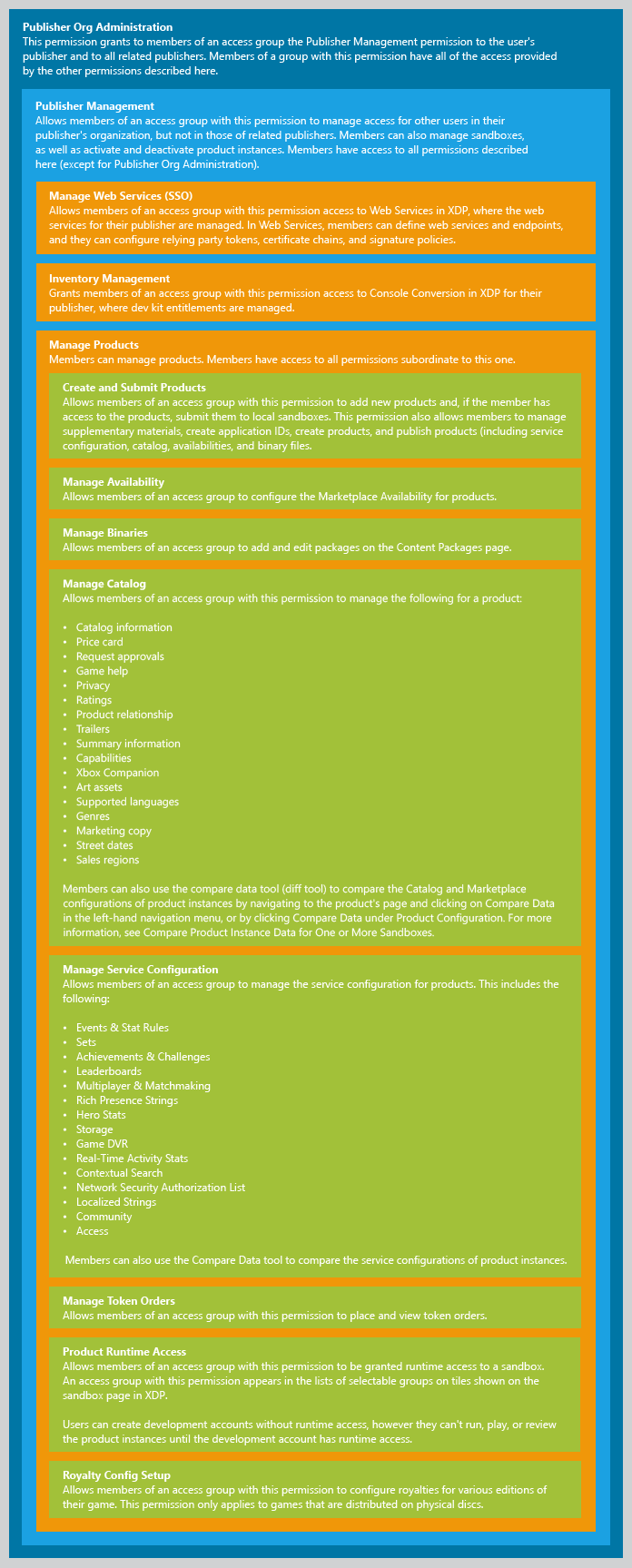
Permissions in XDP have a hierarchical relationship. That is, higher level permissions also include access to groups with lower level permissions. In the diagram below, the outermost container, the Publisher Org Administration group, contains all permissions within that container. Each each subsequent container contains the permissions within that container, and so on.
This diagram describes each permission in detail.
For more information, see About Product Builds, Sandboxes, and Run-time Access.