Home Page (Xbox Device Portal)
The home page shows installed games and apps and allows you to create and add Xbox Live test accounts. Additional tools can be added to the Home section using the menu button and selecting Add tools to workspace.
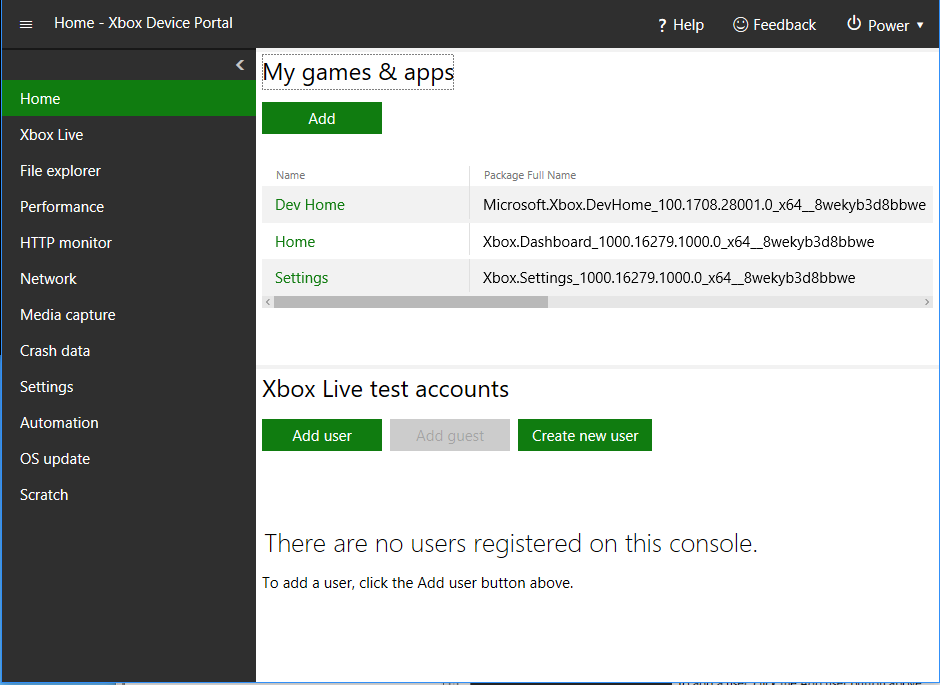
My games & apps
The My games & apps pane can be used to perform the following actions:
- View the list of games and apps installed on the development console.
- Quickly launch games and apps.
- View the PLM (Process Lifetime Management) state of games and apps. For more information on PLM, see Process Lifetime Management (PLM) for Xbox One.
- Change PLM states.
- Register and run a title from a remote network share. For more information, see Run from PC Deployment.
- Configure an Overlay Folder for a game. For more information, see Managing Overlay Folders (Xbox Device Portal).
Test accounts
The Test accounts pane can be used to perform the following actions:
- View the list of users registered on the console.
- Sign a user in or out with a single click.
- Add users and guest accounts. See Creating a new test account in Dev Home or Xbox Device Portal for more information on creating new accounts.
- View details of users and guest accounts.
In this section
Creating a new test account in Dev Home or Xbox Device Portal
The test accounts sections in Dev Home and Xbox Device Portal allow you to create new test accounts for use on the console.
Debugging with Overlay Folders
By viewing details of a game in the My Games and Apps section of Xbox Device Portal you can view and manage the Overlay Folder configured for the game.