Xbox Device Portal (Windows Device Portal on Xbox)
Xbox Device Portal is the Xbox version of Windows Device Portal. It includes all the standard functionality in Windows Device Portal as well as Xbox extensions such as Settings for PIX and for Xbox One X Devkits.
You can use Xbox Device Portal from any web browser on any device to remotely manage your console — simply navigate to https://yourconsoleipaddress:11443 in a web browser of your choice.
Important Starting with the June 2017 Dev Preview 1 XDK, Xbox Device Portal is enabled by default and does not require authentication by default. You can change these defaults to disable Xbox Device Portal or to require a username/password in Dev Home.
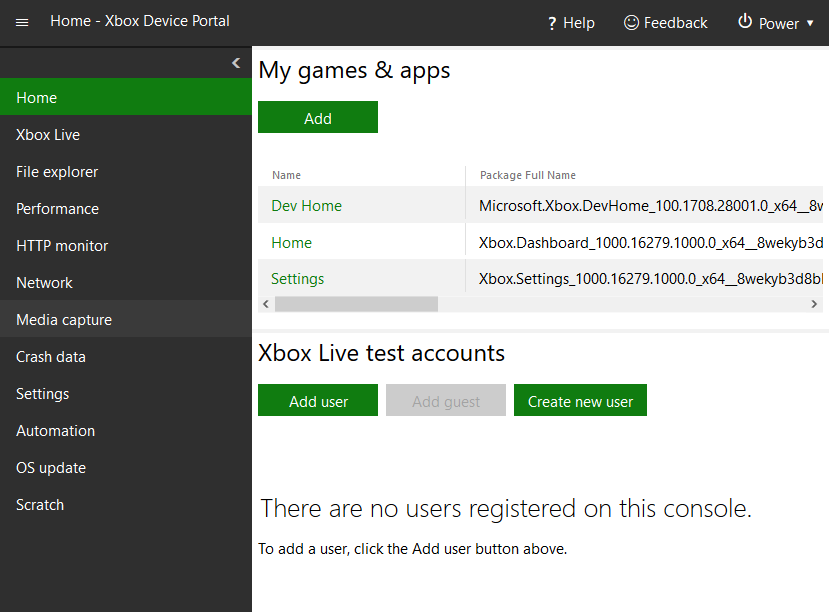
Xbox Device Portal Sections
Home
Shows installed games and apps and allows you to create and add Xbox Live test accounts. Additional tools can be added to the Home section using the menu button and selecting Add tools to workspace.
See Creating a new test account in Dev Home or Xbox Device Portal for more information on creating new accounts.
Xbox Live
Lets you view and configure Xbox Live settings.
File Explorer
Lets you browse folders on the console.
Performance
Shows realtime performance data for the console.
HTTP monitor
The HTTP Monitor allows you to view decrypted HTTP and HTTPS traffic from your app or game when it is running on your Xbox One. You can enable this tool in the Networking tab in Dev Home on your Xbox One.
Network
Lets you switch between available network interfaces and profiles, configure Fiddler, and retrieve network configuration information.
Media capture
Lets you capture and view screen images from the console.
Crash data
Lets you set the type of crash dump that should be collected for the console and lists any collected crash dumps.
Settings
Lets you change general seetings for your console.
Automation
Lets you create and import scripts, set unattended script settings, and set system mappings for front panel buttons. See Script Authoring Tool for more information.
OS Update
Lets you set the OS recovery update policy for the console and manually install an OS recovery.
Scratch
A scratch space showing any tools you’ve selected using Add tools to workspace in menu button drop-down.
Game event data
The Game Event Data page allows you to view Event Tracing on Windows (ETW) game event data through an event count graph and a table detailing each event.
For more information on Windows Device Portal see:
Windows Device Portal overview
Windows Device Portal REST API Reference
The New Xbox Developer Experience-Automating Controlling and Managing Your Devkits XFest talk
Script Authoring Tool in Xbox Device Portal
In this section
Enabling Xbox Device Portal (Windows Device Portal on Xbox)
Xbox Device Portal is the Xbox version of Windows Device Portal.
Adding Tools to Xbox Device Portal Workspaces
Additional tools can be added to any page in Xbox Device Portal allowing you customize the Xbox Device Portal interface.
Home Page (Xbox Device Portal)
The home page shows installed games and apps and allows you to create and add Xbox Live test accounts. Additional tools can be added to the Home section using the menu button and selecting Add tools to workspace.
Xbox Live Page (Xbox Device Portal)
The Xbox Live page lets you view and configure Xbox Live settings.
File Explorer Page (Xbox Device Portal)
The file explorer page lets you browse the file system on the console.
Performance Page (Xbox Device Portal)
The Performance page shows realtime performance data for the console.
HTTP Monitor Page (Xbox Device Portal)
The HTTP Monitor allows you to view decrypted HTTP and HTTPS traffic from your app or game when it is running on your Xbox One.
Network Page (Xbox Device Portal)
The Network page lets you switch between available network interfaces and profiles, configure Fiddler, and retrieve network configuration information.
Media Capture Page (Xbox Device Portal)
The Media Capture page lets you capture and view screen images from the console.
Crash Data Page (Xbox Device Portal)
The Crash data page lets you set the type of crash dump that should be collected for the console and lists any collected crash dumps.
Settings Page (Xbox Device Portal)
The Settings page lets you change general settings for your console.
Script Authoring Tool
Helps you quickly create new unattended setup scripts for Xbox One dev kits by choosing from a wide selection of predefined actions.
OS Update Page (Xbox Device Portal)
The OS update page lets you set the OS recovery update policy for the console and manually install an OS recovery.
Scratch Page (Xbox Device Portal)
The Scratch page is a scratch space showing any tools you’ve selected using Add tools to workspace in menu button drop-down.
Game Event Data Page (Xbox Device Portal)
The Game event data page allows you to view Event Tracing on Windows (ETW) game event data through an event count graph and a table detailing each event.