Capturing a PIX Frame
PIX provides options for capturing a frame, including capture next frame, timing capture, function summary capture, and continuous timing capture. Each frame capture can take a minute or so to complete. Most of the data resides on the Xbox One console, some of it (around 200 MB) on the development PC. Due to the size of the data, only one PIX engine (the data capture component of the PIX tool that resides on the console) can be active at any one time. Although multiple instances of the PIX app can be running on the development PC, only one instance of PIX should be linked to any one console.
- Capture Next Frame (camera icon)
- Create Timing Capture (stopwatch icon)
- Create Function Summary Capture (bar graph icon)
- Create Continuous Timing Capture (looping icon)
- “Include API calls in capture” option
Capture Next Frame (camera icon)
- From Visual Studio, run the test application on the console.
- Run PIX for Xbox One from the Start menu on the development PC, under Microsoft Xbox One XDK .
- In the Settings window ensure Include API calls in capture is checked. For more details on this option, see the Include API Calls section below.
- With the app running on the console, select the GPU Capture (Ctrl+N) (Camera) icon from the list shown below.
Figure 1. Capturing a frame: 1. When the frame capture is complete, a capture file is created. Then use the analysis options to provide some feedback about performance.
Capture files can be viewed offline, without the Xbox One console running. However, starting an analysis requires an active connection with a console, so only a subset of the features of PIX are available offline.
Create Timing Capture (stopwatch icon)
For details on CPU timing captures, see PIX Timing Captures .
Create Function Summary Capture (bar graph icon)
For details on CPU function summary captures, see PIX Function Summary Captures.
Create Continuous Timing Capture (looping icon)
For details on continuous timing captures, see the Continuous Timing Capturesection of PIX Timing Captures .
“Include API calls in capture” option
With this option checked:
- The API calls made by the application will appear in the PIX analysis.
- The HLSL source code will be viewable in the PIX Resource Browser.
- The PIX Edit and Continue functionality will be available.
- The Event Details option will be available to view details of the parameters passed to the API call being displayed.
Figure 2. Capturing API calls shows the names of the APIs in the Events:

If capturing with API information fails, you can uncheck the Include API calls in capture option. If the Include API calls in capture option is unchecked, these features will not be available, and lower-level command buffer information is displayed (such as IT_DRAW_INDEX_OFFSET_2), which can be more challenging to interpret.
Figure 3. Capturing without API information:
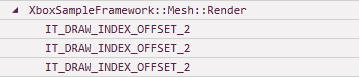
There are some complex coding situations where capturing API calls might fail. If this is the case the Include API calls in capture option can be turned off.
One example of where a capture might fail is if the application uses deferred contexts to generate command lists, and these command lists are used for several frames after their creation, then the deferred context used to create them should be created with the D3D11_CREATE_DEFERRED_CONTEXT_LONG_LIFE_COMMAND_LISTS flag. (Alternatively, set the command-list latency value by using the PIX UI, using PIX Settings page.) In this scenario, without the flag set or the latency value appropriately increased, the API capture will fail.